

Upgrading your console setup brings clear visual gains, but pairing enhanced hardware with an outdated display wastes that extra horsepower. Finding the best monitors for PS5 Pro requires balancing crisp 4K resolution, HDMI 2.1 bandwidth, and variable refresh rate support so your games stay sharp and fluid during intense gameplay.
Recommended by Us

MSI Pro MP165 E6 15.6" Portable Monitor
- Exceptionally lightweight at 0.78kg for effortless mobile productivity
- Comprehensive connectivity via USB-C DisplayPort Alt Mode and standard HDMI
- Uncommon mounting versatility with both a 1/4-inch tripod socket and VESA support
- Wide 178-degree viewing angles courtesy of the IPS display panel
- Standard 60Hz refresh rate is geared toward office tasks rather than high-frame gaming
- Specific response times and peak brightness levels are not specified in the listing
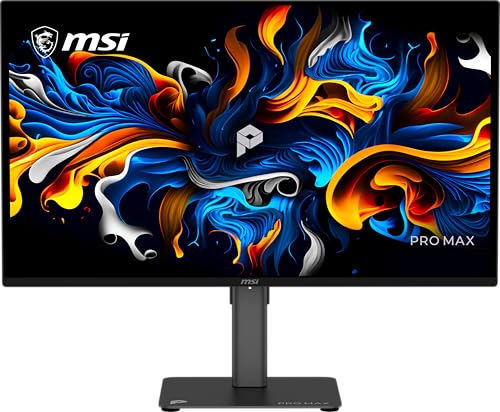
MSI PRO MAX 271UPX12G
- Crisp 4K QD-OLED panel offering deep black levels and rich contrast
- Smooth 120Hz refresh rate with Adaptive-Sync support
- High color accuracy rated at Delta E under 2
- Ergonomic height-adjustable stand with built-in speakers
- Dedicated USB-C video input and Mac optimization features
- USB-C port supplies only 15W of power, insufficient for laptop charging
- Requires conscious static-content management typical of OLED panels

ASUS ROG PG27UCDM 4K 240Hz OLED
- Exceptional 4K pixel density on a competitive 26.5-inch screen size
- Ultra-fast 240Hz refresh rate with near-instantaneous 0.03ms response time
- Future-ready DisplayPort 2.1a UHBR20 and 90W USB-C power delivery
- Smart proximity sensor dims the display automatically to preserve the panel
- Reaching 240 frames per second at 4K demands top-tier PC hardware
- Compact 26.5-inch format may feel small to users accustomed to 32-inch 4K screens
- QD-OLED panel characteristics require managed ambient room lighting for optimal black levels

ASUS ROG XG27AQDMGR 27" 1440p 240Hz OLED
- Glossy WOLED panel produces exceptional contrast and color saturation straight out of the box
- 240Hz refresh rate and 0.03ms response time make it highly competitive for fast-paced gaming
- OLED Care Pro with proximity sensing is a proactive, practical burn-in protection system
- 99% DCI-P3 coverage makes it genuinely useful for color-sensitive creative tasks as well as gaming
- Dual-platform compatibility with PS5 and Xbox broadens its appeal beyond PC-only users
- Glossy panel coatings can produce noticeable reflections in brightly lit rooms, which may bother some users
- OLED technology generally carries a higher burn-in risk than LCD panels over very long static-content sessions, even with protective features in place
- Connectivity and port options are not detailed in the listing, so buyers should verify these before purchasing

MSI PRO MP243L E14 24-inch FHD Monitor
- 144Hz refresh rate at this price point is excellent value for entry-level gaming and productivity
- IPS panel provides wide 178-degree viewing angles and a strong 1500:1 contrast ratio
- TUV-certified eye care features make it a solid choice for students and professionals with long screen hours
- Includes both HDMI and VGA ports, making it compatible with a wide range of devices
- VESA mount support adds long-term flexibility for monitor arms and multi-display setups
- Full HD 1080p resolution may feel limiting for users who want sharper text or more screen real estate on a 24-inch display
- No height or swivel adjustment listed, limiting ergonomic flexibility beyond tilt
- Color coverage figures such as sRGB or DCI-P3 percentage are not specified in the listing

G-STORY 14-Inch 4K Portable Gaming Monitor
- Incredible pixel density with 4K resolution on a compact 14-inch panel
- Seamless aesthetic and functional integration with the PS5 Pro chassis
- FreeSync and VRR compatibility reduces visual tearing during fast action
- Dual HDMI ports provide flexibility without swapping cables
- Refresh rate is capped at 60Hz
- Clamshell design is primarily customized for console mounting rather than standard desktop use
- 4K resolution on a 14-inch screen requires interface scaling for comfortable reading

Samsung Odyssey G7 37-Inch 4K Monitor
- Spacious 37-inch curved format delivers an engaging visual experience
- Sharp 4K UHD resolution ensures high detail density
- Rapid 165Hz refresh rate and 1ms GtG response time
- Certified VESA DisplayHDR 600 for improved contrast
- Underlying panel type is not specified in the product data
- Substantial weight and dimensions require a deep and sturdy desk
- Aggressive 1000R curve might not appeal to users doing precision geometry or drafting
Display Matches for Different Console Setups
If you want the cleanest balance of visual fidelity and speed at a desk, I would go with the ASUS ROG PG27UCDM. Its 27-inch 4K QD-OLED panel pairs an ultra-crisp image with an incredible 0.03ms response time, making high frame rate titles look remarkably clear. When exploring display brands, our comparison of dell vs ASUS monitor options highlights how well ROG screens handle competitive play, and you can learn more directly at ASUS.
For players who prefer a dedicated workspace that also handles evening gaming sessions, I would point toward the MSI PRO MAX 271UPX12G. It combines a 4K UHD QD-OLED screen with a 120Hz refresh rate and factory color calibration, so games render with rich contrast without needing manual tuning. Alternatively, if you want an expansive view from a couch or deep desk, the Samsung 37” Odyssey G7 delivers an immersive 1000R curve and bright VESA DisplayHDR 600 highlights.
FAQs
1. Does the PS5 Pro require an HDMI 2.1 monitor?
An HDMI 2.1 monitor is ideal because it allows uncompressed 4K output at up to 120Hz alongside variable refresh rate support. While HDMI 2.0 displays still work, they limit your resolution or refresh rate during gameplay. Checking hardware guides on RTINGS helps confirm specific port bandwidth across different panels.
2. Is 4K resolution necessary or is 1440p good enough?
While the console handles 1440p cleanly, 4K resolution lets you see the full benefit of enhanced rendering modes. Dense 4K pixel layouts ensure fine textures and distant objects remain sharp. Understanding color modes like what is sRGB mode on a monitor can also help you maintain accurate colors across any resolution.
3. Are curved gaming screens good for console play?
Curved screens work very well if you sit centered at a desk. An aggressive curve brings the edges of larger screens into your peripheral field, which reduces neck movement. In our AOC vs ASUS monitor breakdown, display curvature often comes down to seating distance and personal preference.
4. Why should I consider an OLED screen for console gaming?
OLED panels provide per-pixel dimming, which means absolute blacks and infinite contrast without light bleed around bright HUD elements. This visual depth makes dark game scenes far more striking than standard IPS or VA panels can manage.
Editor’s Verdict
For anyone searching for the best monitors for PS5 Pro, the ASUS ROG PG27UCDM stands out as the ultimate desk option with its 4K QD-OLED clarity. If you prefer a larger curved display for broader immersion, the Samsung 37” Odyssey G7 is a fantastic alternative.




