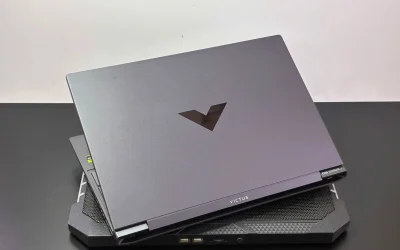
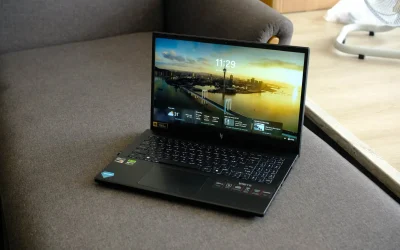
Budget gaming laptops usually mean picking a spec sheet compromise somewhere, and the HP Victus 15 with an RTX 4050 makes its trade-offs clear upfront: strong performance-per-dollar and a genuinely smooth 144Hz display, in exchange for looks and battery life that reviewers found unremarkable.
Full Specifications
| Spec | Details |
|---|---|
| CPU options | AMD Ryzen 7 7445HS (6-core, up to 4.7GHz) or Intel Core i5-13500H (12-core, 16 threads) |
| GPU | Nvidia GeForce RTX 4050, 2,560 CUDA cores, 8GB GDDR6 |
| RAM | 8GB or 16GB DDR5, depending on configuration |
| Storage | 512GB SSD |
| Display | 15.6″ FHD IPS, 144Hz, 300 nits |
| Battery | 70Whr, rated up to 12 hours video playback |
| Starting price | Around $600-$800 on sale, $800-$900 regular |
Two Very Different CPU Platforms in One Laptop Name
This is worth checking closely before buying, since the Victus 15 name covers configurations built around genuinely different chip platforms:
- AMD Ryzen 7 7445HS variants, a 6-core chip boosting to 4.7GHz
- Intel Core i5-13500H variants, offering 12 cores and 16 threads for stronger multitasking
- Neither is objectively better across the board, so matching the CPU to actual workload priorities matters more than defaulting to whichever is cheaper
144Hz at 1080p: A Real Strength for the Price
A 144Hz refresh rate at this price point is a genuine value highlight, giving competitive and fast-paced games noticeably smoother motion than the 60Hz panels still common on budget gaming laptops. At 300 nits brightness, it’s not the brightest panel available, but it’s adequate for indoor gaming use.
RTX 4050: Entry-Level, But Matched to the Price
With 2,560 CUDA cores and 8GB of GDDR6, the RTX 4050 is Nvidia’s entry-level discrete mobile GPU from the previous generation. It’s realistic to expect solid 1080p performance in most current titles at medium to high settings, rather than maxed-out graphics in the most demanding AAA releases. That positioning matches the laptop’s overall budget-focused pricing.
RAM Configuration Varies Significantly
Buyers need to check this carefully, since listings range from 8GB to 16GB DDR5 depending on retailer and configuration:
- 8GB is genuinely limiting for gaming alongside background apps and browser tabs
- 16GB is the more comfortable baseline for a dedicated gaming laptop at this tier
- Some configurations allow RAM upgrades after purchase, worth confirming before buying if starting at 8GB
Battery Life and Build: Where the Budget Shows
A 70Whr battery rated for up to 12 hours of video playback sounds reasonable on paper, but reviewers specifically flagged that gaming laptops in general, including this one, rarely hit anywhere near that figure under actual gaming loads. Reviewers were also candid that buyers prioritizing a more premium look and feel, or genuinely strong all-day battery life, would be better served by a different laptop entirely.
Where the Deep Discounts Make This a Strong Pick
At its regular $800-$900 price, this laptop competes in a crowded budget gaming segment. At sale pricing closer to $600-$800 which retailers have offered repeatedly, it becomes a genuinely compelling value, especially in 16GB RAM configurations. Checking current sale pricing before buying is worth the extra few minutes.
Pros and Cons
What stands out
- 144Hz display is a real value highlight at this price tier
- Frequently available at significant discounts below its $800-$900 regular price
- Choice between AMD Ryzen and Intel Core CPU platforms
What gives pause
- Battery life falls well short of its rated capacity under actual gaming use
- Build quality and design are unremarkable compared to pricier gaming laptops
- Base RAM configurations at 8GB are limiting; buyers should prioritize 16GB variants
FAQ
1. Should I get the AMD or Intel version?
The Intel i5-13500H offers more cores for multitasking, while the AMD Ryzen 7 7445HS is a capable 6-core alternative. Neither is a clear across-the-board winner, so match it to your actual workload.
2. Is 8GB of RAM enough for gaming on this laptop?
Not comfortably. 16GB is the more sensible baseline for a dedicated gaming laptop, especially with background apps running alongside games.
3. How long does the battery actually last while gaming?
Well below the rated 12-hour video playback figure. Gaming laptops in general, including this one, should be expected to run closer to 2-4 hours under actual gaming loads.
4. Is the RTX 4050 good enough for 1080p gaming?
Yes, for most current titles at medium to high settings, though it’s not built for maxed-out settings in the most demanding AAA releases.
The HP Victus 15 with an RTX 4050 earns its place through straightforward value: a fast 144Hz display and capable entry-level gaming performance, especially when caught on sale. Buyers should go in expecting budget-tier battery life and build quality in exchange for that price.
This review is based on manufacturer-published specifications and independent reporting as of publish date.