

Competitive multiplayer games demand quick eye travel across the entire display, which is why finding the best 24-inch gaming monitors remains a top priority for fast-paced titles. A compact 1080p screen keeps pixel density sharp without demanding an ultra-expensive graphics card to sustain triple-digit frame rates on your desk.
Recommended by Us
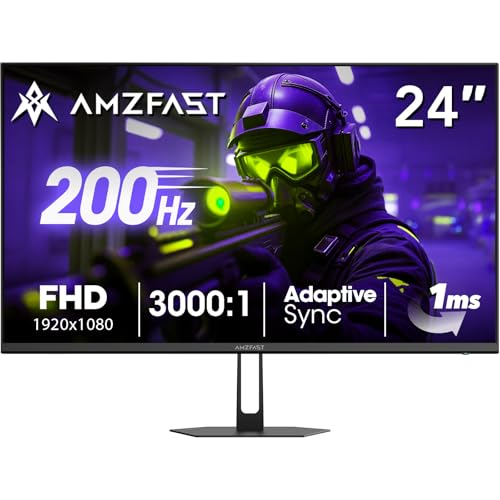
Amzfast AMZG24X1 24-Inch Gaming Monitor
- Impressive 200Hz refresh rate brings substantial motion smoothness to fast action
- High 3000:1 static contrast ratio creates noticeably deep black levels
- Vibrant 129% sRGB color gamut coverage elevates in-game visuals
- Includes a solid metal desktop stand and 75x75mm VESA mount compatibility
- Ergonomics are restricted to basic tilt adjustment with no height or swivel settings
- Standard 300 nits brightness may struggle in rooms with heavy ambient glare
- Fast VA technology can still exhibit slight trailing in extremely high-contrast scenes

Sceptre C248W 24-inch Curved Gaming Monitor
- Curved 1500R panel adds genuine immersion at an accessible price
- Two HDMI ports plus VGA offer versatile multi-device connectivity
- 75Hz refresh rate is a meaningful upgrade over standard 60Hz for gaming
- Built-in speakers reduce desk clutter and cable management needs
- VESA mounting support adds placement flexibility
- Panel type is not disclosed in the listing, making it hard to assess viewing angles or color accuracy upfront
- 75Hz is adequate but falls short of the higher refresh rates preferred by competitive gamers
- VGA is included but is a legacy connection that may not suit modern, high-resolution source devices

MSI PRO MP243L E14 24-inch FHD Monitor
- 144Hz refresh rate at this price point is excellent value for entry-level gaming and productivity
- IPS panel provides wide 178-degree viewing angles and a strong 1500:1 contrast ratio
- TUV-certified eye care features make it a solid choice for students and professionals with long screen hours
- Includes both HDMI and VGA ports, making it compatible with a wide range of devices
- VESA mount support adds long-term flexibility for monitor arms and multi-display setups
- Full HD 1080p resolution may feel limiting for users who want sharper text or more screen real estate on a 24-inch display
- No height or swivel adjustment listed, limiting ergonomic flexibility beyond tilt
- Color coverage figures such as sRGB or DCI-P3 percentage are not specified in the listing

Dell SE2426HG 24-inch 240Hz Gaming Monitor
- 240Hz refresh rate is exceptional for this price point, ideal for competitive gaming
- IPS panel provides wide, consistent viewing angles unlike typical TN gaming displays
- FreeSync Premium with HDMI VRR covers both PC and console gaming setups
- 99% sRGB coverage delivers accurate, vibrant colors for gaming and everyday use
- TUV Rheinland eye comfort certification is a practical bonus for long sessions
- 1080p resolution may feel limiting on a 24-inch screen for productivity or content creation use
- Stand offers only tilt adjustment; height, swivel and pivot are not listed as available
- No USB hub or built-in speakers mentioned in the product listing

Sceptre 24-inch 165Hz Gaming Monitor
- Four video inputs (2x HDMI, 2x DisplayPort) all at 165Hz is exceptional at this price point
- 94% sRGB coverage produces noticeably rich colors for a budget-tier display
- Adaptive Sync and 1ms BR make fast-paced gaming feel responsive and tear-free
- Minimal bezel design pairs well in a dual-monitor configuration
- Built-in speakers reduce the need for external audio equipment
- Resolution is not specified in the listing, so buyers should confirm it meets their needs before purchasing
- Panel type is not disclosed in the product data, making it difficult to assess viewing angle performance
- Built-in speakers on budget monitors typically offer limited audio depth and volume

ASUS TUF Gaming VG249QML5A Monitor
- Blazing 240Hz refresh rate ideal for competitive esports
- ELMB Sync works alongside variable refresh rates to eliminate blur without tearing
- Ergonomic stand offers height adjustment for optimal viewing comfort
- Broad 99% sRGB coverage provides vibrant color output
- 1080p resolution provides lower pixel density compared to 1440p displays
- Compact 23.8-inch screen size may feel small for multitasking or productivity

Sceptre E248W-19203R 24-Inch Monitor
- 100Hz refresh rate provides smoother scrolling and gameplay than standard 60Hz panels
- Dual HDMI plus VGA inputs accommodate both modern computers and older equipment
- Integrated stereo speakers save valuable desktop space
- VESA 100x100mm mounting support allows flexible arm or wall installation
- Specific panel technology such as IPS or VA is not stated in the official specs
- Response time is listed as fast without an exact millisecond measurement
- Basic integrated audio is practical for alerts but lacks depth for immersive media
Choosing the Right Display for Your Desk
For dedicated esports players chasing maximum fluid motion, I would point directly to the ASUS TUF VG249QML5A. It features a Fast IPS panel running at 240Hz with an ergonomic height-adjustable stand, alongside ELMB Sync to cut down motion blur. Hardware enthusiasts comparing brands often follow the dell vs ASUS monitor rivalry, and ASUS delivers impressive gaming tuning here.
If you prefer an equally fast 240Hz refresh rate with TÜV eye comfort certification, the Dell SE2426HG Gaming Monitor is another stellar option that handles rapid frame rates smoothly through its 0.5ms Fast IPS screen. Meanwhile, budget-conscious setups that double for work tasks might prefer the MSI PRO MP243L E14. Its 144Hz IPS panel balances everyday viewing comfort with responsive gaming performance.
FAQs
1. Why do competitive gamers still prefer 24-inch screens?
A 24-inch screen fits entirely within a player’s field of view without requiring head movement. That allows you to track minimaps, health bars, and approaching opponents instantly. Running 1080p at this screen dimension also maintains crisp visuals without overtaxing your graphics card during high-stakes matches.
2. Is 240Hz noticeable compared to 144Hz on a 24-inch display?
While the jump from 60Hz to 144Hz is massive, moving up to 240Hz produces a noticeably cleaner image during flick shots and rapid camera pans. Competitive shooter players appreciate the reduced motion smear and lower input latency that high-refresh panels offer during intense tournament matches.
3. Does color accuracy matter on a competitive gaming screen?
Good color reproduction helps you distinguish enemies from backgrounds in dimly lit game environments. Many modern gaming displays achieve full coverage of standard color profiles. If you want to understand how display profiles manage visual fidelity, our guide on what is sRGB mode on a monitor explains why color balance matters.
4. How do panel types affect gaming performance at 24 inches?
Fast IPS panels provide wide viewing angles and vivid color reproduction while reaching sub-millisecond response ratings. VA panels deliver deeper contrast ratios, though they can exhibit slight smearing in dark scenes. Brands like Dell often deploy Fast IPS in competitive models to ensure motion clarity stays sharp across all viewing angles, which you can see in our LG vs dell monitor comparison.
Editor’s Verdict
When searching for the best 24-inch gaming monitors, the standout choice for speed and build quality is the ASUS TUF VG249QML5A, thanks to its 240Hz refresh rate and flexible stand. For a streamlined setup, the Dell SE2426HG Gaming Monitor matches that 240Hz speed on a responsive Fast IPS panel.


