

Modern laptops and desktops rely heavily on reversible ports for quick connectivity and file transfers. Finding the best USB-C hard drives helps you offload bulky projects, archive family photos, and back up system data without hunting for annoying adapters. Understanding what is the difference between HDD and SSD storage makes choosing the right portable setup straightforward.
Recommended by Us

Kosbees 500GB Portable External HDD
- Lightweight design weighing just 0.35 pounds makes it easy to take anywhere
- Instant plug-and-play functionality on Windows systems
- Respectable USB 3.0 transfer rates up to 133MB/s read speed
- Convenient storage expansion for PS4 and Xbox One consoles
- Requires reformatting to ExFAT before it works with Mac computers
- Cannot run current-gen PS5 or Xbox Series X|S games directly from external storage
- Modest 500GB capacity limits how many modern games can be archived at once

Seagate One Touch 4TB Portable HDD
- Spacious 4TB storage capacity in a compact form factor
- Hardware-based encryption with password protection
- Native USB-C connector for modern device compatibility
- Rescue Data Recovery Services bundled directly with the drive
- Exact transfer speeds are not specified in the manufacturer documentation
- Traditional mechanical drive mechanism will not match portable SSD transfer speeds

SSK 1TB Portable External SSD
- Rapid transfer speeds up to 1050MB/s over USB 3.2 Gen2
- Low power draw makes it ideal for mobile phone recording
- Robust 2mm thick aluminum casing helps manage heat
- Includes both USB-A and USB-C connection cables
- Formatted capacity shows as roughly 931GB on Windows systems
- No official water or dust resistance rating listed
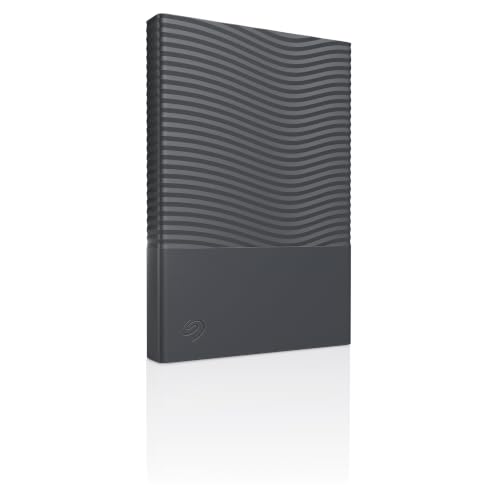
- Hardware-level encryption provides robust on-drive security
- Modern USB-C interface connects directly without legacy dongles
- Compact and lightweight footprint ideal for daily travel
- Includes data recovery services for peace of mind
- Manufacturer does not list explicit transfer speeds in specifications
- Mechanical hard drive speeds are naturally slower than portable SSD alternatives

SanDisk 2TB Extreme Portable SSD
- Impressive read speeds up to 1050MB/s via modern USB-C USB 3.2 Gen 2 interface
- Ruggedized design with IP65 weather rating and 3-meter drop protection
- Extremely lightweight at just 0.11 pounds for effortless everyday carry
- Includes 256-bit AES hardware encryption for robust personal data security
- Sustained transfer performance can vary depending on the host hardware used
- Integrated carabiner clip is not included in the box, only the built-in loop
SanDisk 4TB Extreme Portable SSD
- Blazing read speeds up to 1050MB/s and write speeds up to 1000MB/s
- Exceptional IP65 dust and water resistance with 3-meter drop durability
- Ultra-lightweight design weighing only 0.11 pounds
- Hardware-based 256-bit AES encryption keeps sensitive files secure
- High-capacity fast NVMe storage carries a premium investment
- Sustained speeds may vary depending on host device capabilities

SSK 250GB Portable SSD
- Fast transfer rates up to 1050MB/s read and 1000MB/s write
- Certified for direct 4K60Hz ProRes video capture on compatible phones
- Includes both USB-A and USB-C cables in the box
- Durable 2mm aluminum casing manages operating temperatures effectively
- Base 250GB capacity fills rapidly when recording high-bitrate ProRes video
- Windows systems will display available capacity as roughly 232GB due to binary calculation
Matching Portable Drives to Your Daily Workflow
Choosing between raw storage volume and high transfer rates depends entirely on your daily tasks. If you need massive room for archiving video libraries or system image backups, I would go with the Seagate One Touch 4TB. It provides ample capacity, includes password protection with hardware encryption, and bundles Rescue Data Recovery Services for extra peace of mind.
On the other hand, anyone who constantly moves large creative files between workstations needs solid state speed. For outdoor creators and travelers, I would pick the SanDisk 2TB Extreme, which features IP65 dust and water resistance alongside three-meter drop protection. Official drive updates from SanDisk highlight read speeds reaching up to 1050MB/s. If you want a pocket-friendly option for phone recording, the SSK Portable SSD 1TB is another model I suggest because its aluminum shell assists heat dissipation during direct captures. When managing external drives, knowing whether you should compress an SSD drive can help maintain maximum transfer efficiency.
FAQs
1. Can you run modern console games directly from a portable external drive?
For current generation consoles like the PlayStation 5 and Xbox Series X|S, you can only store native titles on external drives. To play them, you must move the files to internal storage, although older generation games can run straight from the external unit. Knowing where is the SSD located in a computer or console clarifies why internal drives handle fast asset loading.
2. Why does a 1TB external drive display less capacity on Windows?
Hard drive manufacturers report drive sizes using the decimal system, where one gigabyte equals one billion bytes. Windows calculates storage space using binary math, so a 1TB drive translates to roughly 931GB of usable room. Operating systems like macOS read drives differently, but the physical storage capacity remains unchanged.
3. What makes solid state external drives different from traditional portable hard drives?
External solid state drives use flash memory with no moving components, offering higher resistance to drops and faster speeds than mechanical platters. Looking back at when did SSDs come out shows how rapidly solid state technology displaced magnetic platters for portable daily use.
4. Do portable USB-C drives require an external power brick?
Most compact portable drives draw all necessary operating current directly through the host connection cable. Because the interface delivers adequate bus power for both solid state and portable spinning drives, you can connect them to laptops, tablets, or phones without packing extra AC adapters. Both Western Digital and Seagate design their mobile drives specifically around bus-powered operation.
Editor’s Verdict
Finding the best USB-C hard drives comes down to balancing raw storage room against file transfer speed. If you need extensive room for file backups and archival data, the Seagate One Touch 4TB provides dependable space with built-in encryption. For faster workflow demands and on-the-go durability, the SanDisk 2TB Extreme stands out as a dependable solid state solution.



