Building an AI workstation involves more than choosing a fast processor or graphics card. The best AI motherboards for AI and machine learning must suit the intended accelerators, operating system, cooling setup, and available expansion resources. Specialized hardware can be useful, but compatibility deserves careful attention before anything is installed.
Recommended by Us
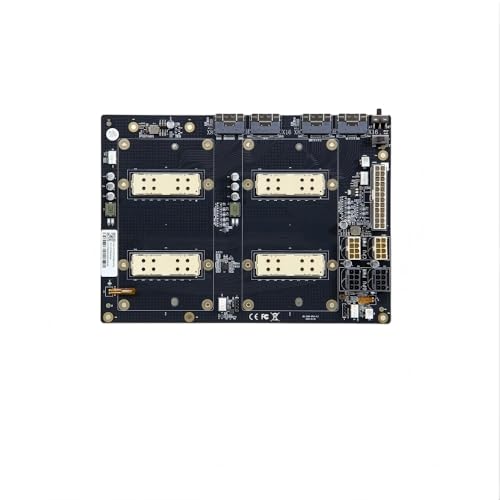
Generic V100 SXM2 Dual-Card Adapter
- Designed specifically for two V100 SXM2 graphics cards
- PLX8749 and NVLink Lite functionality are identified in the listing
- Intended for demanding AI computing configurations
- Listing clearly highlights the mandatory cooling precaution
- A radiator must be installed before the adapter is powered on
- Dual-card operation may not work properly on some newer Windows 10 or Windows 11 platforms
- Socket, chipset, form factor, memory support, and power requirements are not specified
Who This Specialized Board Suits
I would point experienced AI hardware enthusiasts toward the V100 SXM2 Graphics Card Adapter only when the build specifically calls for a dual-card SXM2 adapter with integrated NVLink Lite. This is specialized accelerator hardware rather than a conventional consumer motherboard, and the supplied information does not identify a CPU socket, chipset, memory standard, or traditional form factor.
Before choosing it, I would confirm the host platform, driver environment, power arrangement, and physical installation requirements. The listing warns that some newer Windows 10 and Windows 11 platforms may not recognize both cards or may report insufficient device resources. It also requires the radiator to be installed before power is applied, since powering it without cooling may prevent recognition or damage the card. Our explanation of GPU and motherboard compatibility covers the broader checks that matter when adding accelerator hardware. For further technical reading about graphics processors and platform support, TechPowerUp is a useful independent resource.
FAQs
1. Is this adapter a complete motherboard?
No. The available product information describes it as a single adapter board for V100 SXM2 graphics hardware with integrated NVLink Lite. It does not list a CPU socket, chipset, RAM slots, or other specifications expected from a complete desktop motherboard, so a compatible host platform and supporting components are still necessary.
2. How should I check CPU socket compatibility for an AI build?
Start by matching the processor to the exact socket and chipset listed by the motherboard manufacturer. Then check BIOS support, memory requirements, PCIe resources, and accelerator needs. Our article on choosing a motherboard for your CPU explains the core compatibility steps for a conventional system.
3. Does motherboard chipset choice matter for machine learning?
Yes. A chipset helps determine available expansion connectivity, storage options, USB features, and whether processor or memory tuning is supported. For a multi-accelerator machine, also examine how the motherboard distributes PCIe lanes and resources, since physical slot count alone does not confirm that every installed device will operate as intended.
4. What RAM support should an AI motherboard provide?
Choose a motherboard that supports the memory generation, capacity, module type, and speed required by your processor and workload. Large datasets and multitasking can increase system-memory demand, but the right amount depends on the software. The product data for this adapter does not specify RAM support because it is not presented as a standard CPU motherboard.
5. What should I verify before powering this adapter?
Install the required radiator before applying power, as the product information gives an explicit warning about recognition failure or possible damage without it. Also confirm host-platform support, available device resources, drivers, and operating-system compatibility. Keeping platform software current can help, although motherboard driver updates should be approached carefully rather than installed without a reason.
Editor’s Verdict
For shoppers researching the best AI motherboards for AI and machine learning, the V100 SXM2 Graphics Card Adapter is a narrowly focused option for experienced builders working with compatible V100 SXM2 hardware. I would choose it only after confirming host-platform resources, driver support, and cooling requirements, since it is not a conventional desktop motherboard.