

Jumping from a dual-screen setup to a single ultrawide panel eliminates the awkward center bezel while freeing up substantial desk space. Tracking down the best 34-inch curved monitors requires balancing panel curvature, vertical refresh rates, and port options. Understanding what is sRGB mode on a monitor also helps when selecting displays for color-sensitive office tasks.
Recommended by Us

Samsung ViewFinity S5 34" Curved Monitor
- Spacious 21:9 ultrawide canvas replaces multi-monitor clutter.
- Fluid 120Hz refresh rate with AMD FreeSync Premium support.
- HDR10 capability displaying over one billion rich colors.
- TÜV-certified eye comfort features protect against visual fatigue.
- Panel technology type is not listed in the manufacturer specifications.
- Lacks USB-C connectivity for streamlined single-cable laptop docking.
- Stand ergonomics and height adjustment range are not detailed in the listing.
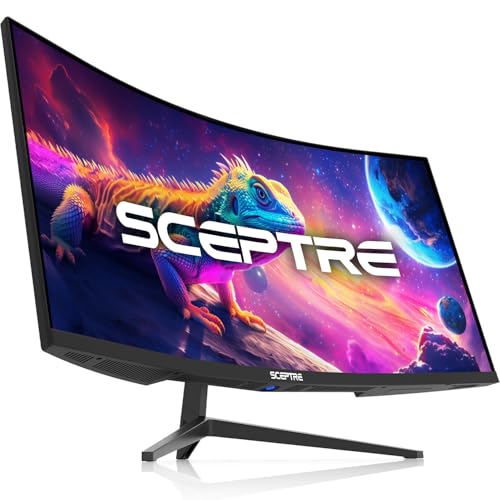
Sceptre 34-Inch Ultrawide C345B-QUT168
- Spacious 3440 x 1440 ultrawide screen ideal for side-by-side windows
- High refresh rate up to 180Hz ensures smooth desktop scrolling and gaming
- Hardware PIP and PBP support streamlined dual-source workflows
- Built-in speakers provide direct audio without extra desk clutter
- Panel technology type is not specified in the product documentation
- Weight of over 20 pounds requires a sturdy desk or heavy-duty mount

ZZA 34-Inch Ultrawide Curved Monitor
- Generous 21:9 WQHD workspace eliminates the need for multi-monitor desktop setups
- Smoother 100Hz motion benefits both general system navigation and casual gaming
- Integrated speakers save valuable workspace on compact desks
- VESA mount pattern enables straightforward installation on ergonomic monitor arms
- Panel technology (such as IPS or VA) is not clearly specified in manufacturer details
- Mild 3800R curve is relatively gentle compared to more immersive 1500R curved gaming displays
- Color finish information contains conflicting references to both white and black styling

LG 34WR55QK-B 34-Inch UltraWide Monitor
- Generous 3440 x 1440 ultrawide desktop space boosts productivity
- Convenient 65W USB-C charging reduces workstation cable clutter
- Height and tilt adjustable stand allows tailored ergonomic positioning
- Versatile connectivity with DisplayPort, dual HDMI, and built-in USB hub
- Panel technology type is not specified in the official listing
- 100Hz refresh rate and 5ms response time are modest for competitive gaming
- HDR10 provides basic high dynamic range without advanced local dimming

Sceptre C345B-QU240T 34-Inch Curved Monitor
- Enormous 3440 x 1440 ultrawide screen real estate replaces dual-monitor setups
- Rapid 240Hz maximum refresh rate provides exceptional fluidity
- Four dedicated digital video inputs allow multiple PCs or consoles to stay connected
- Blue-Light Shift mode helps reduce eye strain during extended work or gaming sessions
- Panel technology type is not specified in the official product specifications
- Wide 34-inch curved footprint requires significant dedicated desk depth and width

- Generous 3440 x 1440 ultrawide resolution allows effortless side-by-side multitasking
- High refresh rate up to 180Hz keeps motion extremely fluid for games and fast scrolling
- 1500R curve provides an engaging, comfortable viewing experience across a wide surface
- Dual DisplayPort connections provide flexibility for multi-system setups
- Panel technology type is not explicitly specified in the product documentation
- Large 34-inch footprint demands considerable desktop depth and width

SANSUI 34-Inch Curved 200Hz UWQHD Monitor
- Huge 21:9 ultrawide aspect ratio provides superior screen real estate for multitasking
- High 200Hz refresh rate with VRR support over HDMI 2.1 and DisplayPort
- Broad color spectrum covering 130% sRGB and 97% DCI-P3
- PBP capability streamlines workflow for dual-machine workstations
- Stand functionality is limited to tilt only, with no built-in height or swivel adjustment
- Does not include built-in speakers, necessitating external audio gear
Matching Ultrawide Panels to Your Workflow
Choosing an ultrawide display comes down to how you split your day between high-speed games and multi-window work. For pure motion clarity during fast-paced play, I would go with the Sceptre Prime 34-Inch Monitor. It hits a rapid 240Hz refresh rate at 3440 x 1440 resolution with a tight 1500R curve and a 1ms response time, which keeps motion crisp without demanding a multi-thousand-dollar budget.
If your day revolves around remote work and productivity, the LG 34WR55QK-B Monitor is the screen I would point you toward. Its integrated USB Type-C port supports 65W power delivery for single-cable laptop docking, alongside Picture-by-Picture support and an ergonomic height-adjustable stand. For desk setups balancing both work and play, display maker Samsung also offers the Samsung ViewFinity S5 Monitor, featuring an 1800R curve, 120Hz refresh rate, AMD FreeSync Premium, and HDR10 support. In comparison reviews like our breakdown of LG vs dell monitor options, ergonomic adjustment and versatile port layouts often prove just as valuable as raw refresh speed.
FAQs
1. Is a 34-inch curved monitor good for office work?
Yes, an ultrawide screen with a 21:9 aspect ratio provides ample horizontal room to place two or three full application windows side by side. Displays with built-in Picture-by-Picture modes or USB-C connectivity simplify switching between different computers during work hours.
2. What resolution should I look for in a 34-inch monitor?
A resolution of 3440 x 1440 (WQHD) is standard for this screen size. It delivers sharp text and fine detail without putting excessive strain on your graphics card during everyday desktop navigation or casual gaming.
3. What does the R rating mean for monitor curvature?
The R rating indicates the radius of the circle the curve forms in millimeters. A 1500R panel has a tighter curve than an 1800R or 3800R screen, pulling the outer edges closer to your peripheral vision to reduce neck turning.
4. How does refresh rate affect ultrawide gaming?
Higher refresh rates, such as 120Hz or 240Hz, render fast movement with less visible judder. When examining brands like dell vs ASUS monitor lines, gamers typically prioritize panels offering 100Hz or higher paired with adaptive sync.
Editor’s Verdict
For shoppers seeking the best 34-inch curved monitors, the Sceptre Prime 34-Inch Monitor stands out for pure gaming performance thanks to its 240Hz refresh rate and 1500R curvature, while the LG 34WR55QK-B Monitor remains the smartest choice for desk productivity due to its 65W USB-C docking and adjustable stand.



