

Sony consoles have pushed display requirements far beyond traditional living room televisions. Between variable refresh rate support and higher frame target modes, sorting through the best monitors for PS5 and PS5 Pro means balancing resolution, panel response, and physical desk space to get the most out of your hardware.
Recommended by Us

ASUS ROG XG27AQDMGR 27" 1440p 240Hz OLED
- Glossy WOLED panel produces exceptional contrast and color saturation straight out of the box
- 240Hz refresh rate and 0.03ms response time make it highly competitive for fast-paced gaming
- OLED Care Pro with proximity sensing is a proactive, practical burn-in protection system
- 99% DCI-P3 coverage makes it genuinely useful for color-sensitive creative tasks as well as gaming
- Dual-platform compatibility with PS5 and Xbox broadens its appeal beyond PC-only users
- Glossy panel coatings can produce noticeable reflections in brightly lit rooms, which may bother some users
- OLED technology generally carries a higher burn-in risk than LCD panels over very long static-content sessions, even with protective features in place
- Connectivity and port options are not detailed in the listing, so buyers should verify these before purchasing
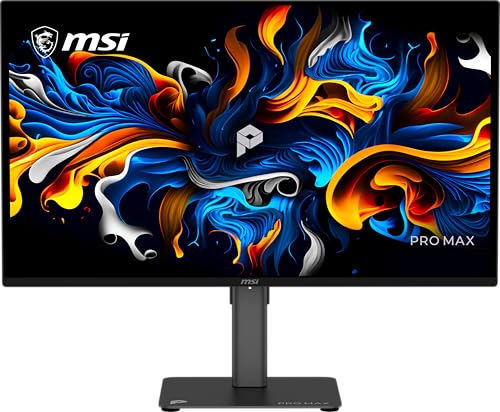
MSI PRO MAX 271UPX12G
- Crisp 4K QD-OLED panel offering deep black levels and rich contrast
- Smooth 120Hz refresh rate with Adaptive-Sync support
- High color accuracy rated at Delta E under 2
- Ergonomic height-adjustable stand with built-in speakers
- Dedicated USB-C video input and Mac optimization features
- USB-C port supplies only 15W of power, insufficient for laptop charging
- Requires conscious static-content management typical of OLED panels

Samsung Odyssey G7 37-Inch 4K Monitor
- Spacious 37-inch curved format delivers an engaging visual experience
- Sharp 4K UHD resolution ensures high detail density
- Rapid 165Hz refresh rate and 1ms GtG response time
- Certified VESA DisplayHDR 600 for improved contrast
- Underlying panel type is not specified in the product data
- Substantial weight and dimensions require a deep and sturdy desk
- Aggressive 1000R curve might not appeal to users doing precision geometry or drafting

ASUS TUF Gaming VG34WQML5A
- Rapid 250Hz overclocked refresh rate with 0.5ms minimum response time
- Immense 34-inch curved ultrawide workspace replaces multi-monitor setups cleanly
- ELMB Sync allows blur reduction and variable refresh rate to run together
- Vibrant 95% DCI-P3 color coverage provides vivid color reproduction
- Specific panel technology is not stated in the official product specifications
- DisplayHDR 400 provides entry-level dynamic range rather than high-end HDR brightness
- Substantial 34-inch footprint demands plenty of dedicated desk space

MSI Pro MP165 E6 15.6" Portable Monitor
- Exceptionally lightweight at 0.78kg for effortless mobile productivity
- Comprehensive connectivity via USB-C DisplayPort Alt Mode and standard HDMI
- Uncommon mounting versatility with both a 1/4-inch tripod socket and VESA support
- Wide 178-degree viewing angles courtesy of the IPS display panel
- Standard 60Hz refresh rate is geared toward office tasks rather than high-frame gaming
- Specific response times and peak brightness levels are not specified in the listing

MSI PRO MP243L E14 24-inch FHD Monitor
- 144Hz refresh rate at this price point is excellent value for entry-level gaming and productivity
- IPS panel provides wide 178-degree viewing angles and a strong 1500:1 contrast ratio
- TUV-certified eye care features make it a solid choice for students and professionals with long screen hours
- Includes both HDMI and VGA ports, making it compatible with a wide range of devices
- VESA mount support adds long-term flexibility for monitor arms and multi-display setups
- Full HD 1080p resolution may feel limiting for users who want sharper text or more screen real estate on a 24-inch display
- No height or swivel adjustment listed, limiting ergonomic flexibility beyond tilt
- Color coverage figures such as sRGB or DCI-P3 percentage are not specified in the listing

G-STORY 14-Inch 4K Portable Gaming Monitor
- Incredible pixel density with 4K resolution on a compact 14-inch panel
- Seamless aesthetic and functional integration with the PS5 Pro chassis
- FreeSync and VRR compatibility reduces visual tearing during fast action
- Dual HDMI ports provide flexibility without swapping cables
- Refresh rate is capped at 60Hz
- Clamshell design is primarily customized for console mounting rather than standard desktop use
- 4K resolution on a 14-inch screen requires interface scaling for comfortable reading
Matching Displays to Your Console Setup
Picking the ideal display comes down to whether you prioritize ultra-sharp resolution or blistering motion clarity for competitive multiplayer. If you spend most of your time in cinematic single-player adventures, I would go with the MSI PRO MAX 271UPX12G 27-inch 3840×2160(UHD). Its 27-inch 4K UHD QD-OLED panel delivers deep black levels and crisp detail, paired with a 120Hz refresh rate that aligns with console output caps. Makers like msi have tuned these panels to keep HDR content punchy without washing out shadow details.
For dedicated competitive shooters where instant target acquisition matters most, I would point toward the ASUS ROG XG27AQDMGR 27 Inch 1440p 240Hz Glossy. This 26.5-inch 1440p WOLED screen features a 0.03ms response time and wide color coverage, making fast movement look remarkably clean. Console players weighing display brands often look at comparisons like dell vs ASUS monitor builds to understand panel tuning differences. If you instead prefer a massive wrap-around view at your desk, the Samsung 37” Odyssey G7 (G75F) brings a 37-inch 4K curved display with DisplayHDR 600 brightness.
FAQs
1. Does the PS5 support 1440p resolution natively?
Yes, Sony updated system software to output a native 2560×1440 signal alongside 4K and 1080p. This allows gamers using standard QHD desktop displays to enjoy crisp rendering without downscaling blur or stretched aspect ratios.
2. Why does color profile calibration matter for console gaming?
Consoles rely on precise color reproduction to render game worlds accurately. Understanding settings like what is sRGB mode on a monitor helps players maintain natural skin tones and balanced environmental lighting across different genres.
3. Can I use an ultrawide monitor with a PS5?
PlayStation consoles output in a standard 16:9 aspect ratio. If you connect an ultrawide screen, you will typically see black pillarboxes on the left and right sides unless the monitor stretches the image, which distorts the geometry.
4. Is OLED worth the investment over IPS for consoles?
OLED displays offer per-pixel lighting that yields true black levels and near-instant pixel response times. While premium IPS panels found in comparisons like LG vs dell monitor lineups provide dependable brightness, OLED remains unmatched for dark room contrast and shadow clarity.
Editor’s Verdict
Finding the best monitors for PS5 and PS5 Pro depends on whether you value pure 4K density or blisteringly fast pixel transitions. For the sharpest visual balance, I recommend the MSI PRO MAX 271UPX12G 27-inch 3840×2160(UHD), while competitive players will gain an edge from the ASUS ROG XG27AQDMGR 27 Inch 1440p 240Hz Glossy.


