

Hooking a console up to an everyday television often introduces sluggish input latency and muddy motion that ruin competitive matches. Finding the best monitors for xbox one comes down to prioritizing low latency, reliable 1080p clarity, and smooth refresh handling, which you can understand further by reading our guide on what is sRGB mode on a monitor.
Recommended by Us

G-STORY 12.5-Inch Xbox Series S Monitor
- Tailor-made design docks flush with the Xbox Series S for travel
- FreeSync support prevents screen tearing during motion-heavy games
- Two HDMI inputs allow cross-compatibility with laptops and the Nintendo Switch
- Compact footprint makes setting up in hotel rooms or small desks effortless
- Refresh rate is capped at 60Hz rather than higher console-supported speeds
- Panel technology type is omitted from the product specifications
- Using cable-free USB power requires reducing display brightness and speaker volume

G-STORY 15.6" 4K Portable Gaming Monitor
- Directly integrates with the Xbox Series S for a compact all-in-one footprint
- Sharp 4K resolution provides incredible detail on a 15.6-inch screen
- Dual HDMI inputs expand functionality beyond console gaming to laptops and streaming devices
- FreeSync support prevents visual tearing during motion-heavy games
- Refresh rate is limited to 60Hz rather than 120Hz
- Form-fitting enclosure makes standalone use outside of the Xbox Series S less practical
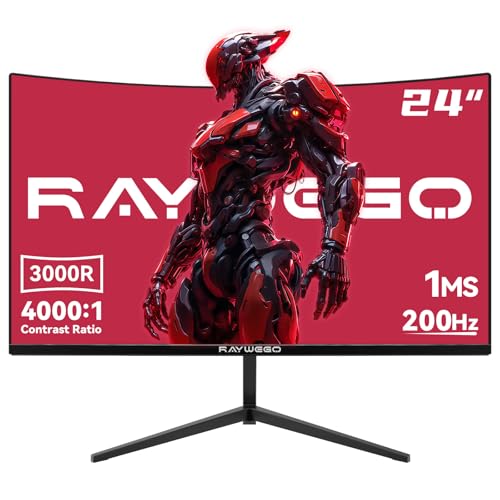
Raywego 24 Inch Curved Gaming Monitor
- High 200Hz refresh rate provides noticeably smooth motion
- Impressive 4000:1 contrast ratio offers deeper blacks than standard IPS screens
- 1500R curve enhances immersion during gaming and media streaming
- Comes packaged with an included DisplayPort cable
- Lacks built-in speakers, requiring external audio gear
- Stand only offers tilt adjustment without height or swivel options

Sceptre 27-inch 100Hz FreeSync Monitor
- 100% sRGB coverage is strong for a monitor at this price, benefiting both gamers and casual content creators
- Dual HDMI plus DisplayPort offers versatile multi-device connectivity
- Built-in speakers and headphone jack add audio convenience without extra cost
- AMD FreeSync helps eliminate screen tearing for a smoother gaming experience
- VESA compatibility gives flexible mounting options
- Resolution is not specified in the product listing, so buyers cannot confirm whether it is Full HD or higher before purchasing
- Panel type is not disclosed, making it difficult to assess viewing angles and color consistency compared to IPS alternatives
- Built-in speakers on budget monitors typically lack depth and bass, likely best suited for background audio rather than immersive listening

ArcticPro 22-Inch 144Hz FHD Monitor
- High 144Hz refresh rate delivers fluid motion output
- Substantial 4000:1 contrast ratio from the VA display
- Compact footprint fits neatly on small workstations
- Wide 178-degree horizontal and vertical viewing angles
- VESA wall mount ready for customizable setups
- Lacks built-in speakers
- Limited video inputs with only HDMI 1.4 and legacy VGA
- Compact 22-inch size may feel small for heavy window multitasking

Anyuse 15.6" FHD Portable Monitor
- Extremely lightweight and travel-friendly form factor
- Dual USB-C ports simplify single-cable connection setups
- Wide 178-degree viewing angles preserve image quality from the side
- Integrated stereo speakers eliminate the immediate need for external audio
- Single-cable USB-C operation requires host devices to support DP Alt Mode or Thunderbolt
- Uses mini HDMI rather than a standard full-size HDMI port
- Refresh rate is standard 60Hz, which is not tailored for competitive high-frame-rate gaming

SANSUI 34-Inch Curved 200Hz UWQHD Monitor
- Huge 21:9 ultrawide aspect ratio provides superior screen real estate for multitasking
- High 200Hz refresh rate with VRR support over HDMI 2.1 and DisplayPort
- Broad color spectrum covering 130% sRGB and 97% DCI-P3
- PBP capability streamlines workflow for dual-machine workstations
- Stand functionality is limited to tilt only, with no built-in height or swivel adjustment
- Does not include built-in speakers, necessitating external audio gear
Matching Displays to Console Playstyles
Since the base console outputs standard Full HD signals at sixty frames per second, paying for ultra-dense panels is rarely necessary. If you want a dedicated desktop screen with great contrast and comfortable viewing, the Raywego 24 Inch Curved is an option I would pick. Its 1500R curved VA panel provides a deep 4000:1 contrast ratio alongside HDMI input, giving darker game environments richer black levels without breaking the bank.
For players who prefer a traditional flat screen that doubles as an everyday workspace display, I would point toward the Sceptre 27-inch Prime. It provides a spacious 27-inch 1080p view with 100% sRGB color gamut coverage, dual HDMI ports, and built-in speakers that eliminate the need for external desktop audio. Gamers seeking an ultra-compact setup should consider the Anyuse 15.6″ Portable Monitor, which features an IPS screen with wide 178-degree viewing angles and Mini HDMI connectivity, as detailed on hardware coverage sites like PC Gamer.
FAQs
1. Does the Xbox One support monitor refresh rates above 60Hz?
While the original Xbox One and Xbox One S support up to 60Hz over HDMI, the Xbox One X can output at 120Hz at 1080p or 1440p. High-refresh monitors run smoothly with the console by locking to 60Hz or using adaptive sync. You can compare how different brands balance refresh speeds in our dell vs ASUS monitor.
2. Should I choose a 4K display or a 1080p display for Xbox One?
Standard Xbox One games render at 900p or 1080p, so a 1080p monitor matches native output cleanly. If you play on an Xbox One X, a 4K screen will show sharper textures. Major display manufacturers like ASUS offer monitors with built-in scaling hardware that keeps lower resolutions looking crisp on modern panels.
3. Can I get game audio from a monitor without built-in speakers?
Yes, you can plug standard headphones straight into the 3.5mm jack on your wireless Xbox controller. Alternatively, monitors with an audio-out jack can route HDMI sound directly to powered external speakers. Examining build choices like audio jacks is covered in our LG vs HP monitor.
4. Is an IPS panel better than a VA panel for console gaming?
IPS panels offer wider viewing angles and consistent color rendering from edge to edge, making them great for shared rooms. VA panels deliver much higher native contrast ratios and deeper blacks, which makes them ideal for playing in dim bedrooms or dark spaces. Both panel types perform well for console action.
Editor’s Verdict
For players searching for the best monitors for xbox one, the Raywego 24 Inch Curved delivers an immersive curved display with deep contrast, while the Sceptre 27-inch Prime offers great flat-panel colors and integrated audio for easy desk gaming.






