

Programmers, writers, and streamers often find that horizontal workspace gets cluttered by endless lines of text or feed chats. Adding one of the best vertical monitors alongside your primary screen gives you immediate breathing room. A portrait orientation keeps documentation in view without constant scrolling or messy desktop window arrangements.
Recommended by Us
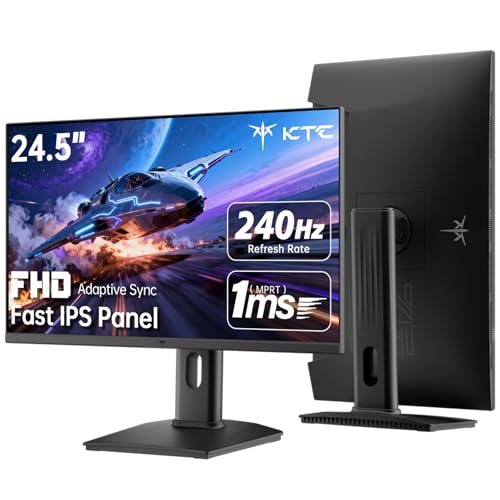
KTC H25T7-3 24.5-Inch Gaming Monitor
- Fluid 240Hz refresh rate tailored for competitive gamers
- Fast IPS panel combines speed with wide viewing angles
- Fully adjustable stand supporting height, tilt, and pivot
- Generous port selection with multiple HDMI and DisplayPort inputs
- 1080p resolution provides lower pixel density than 1440p displays
- HDR400 offers entry-level high dynamic range performance
- Built-in USB connection is limited to standard USB 2.0
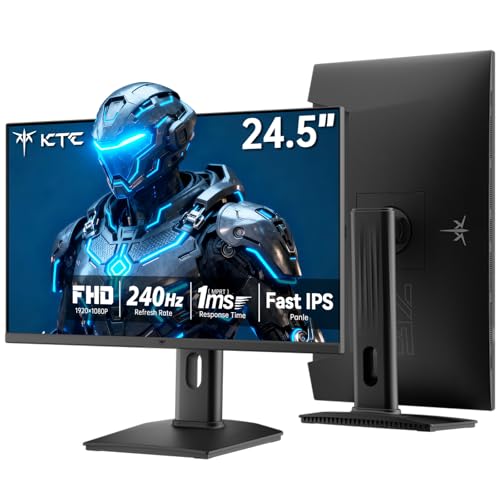
KTC H25T7-3 24.5-Inch 240Hz Monitor
- Fast 240Hz refresh rate ideal for competitive esports
- Comprehensive ergonomic stand with full vertical pivot
- Wide color space with 94% DCI-P3 and 114% sRGB coverage
- Multiple modern display connections with DisplayPort 1.4 and HDMI 2.0
- 1080p resolution offers standard pixel density compared to higher-tier 1440p screens
- Integrated speakers are not specified in the listing

Thinlerain 23.8-Inch FHD Vertical Monitor
- Highly versatile stand allows effortless switching between landscape and portrait orientations
- Exceptional video input variety spanning modern HDMI to legacy BNC and AV connections
- Includes a dedicated remote control for quick setting tweaks and media control
- Sleek borderless design maximizes viewable screen area
- Refresh rate is capped at standard 60Hz
- Lacks an automatic orientation sensor, requiring manual display rotation within your operating system
- Panel technology type is not explicitly specified in the manufacturer specifications

Dell S2425HSM 24 Plus Monitor
- Fast 144Hz refresh rate and AMD FreeSync provide exceptionally smooth motion
- Extensive ergonomic stand adjustments including height, tilt, swivel, and pivot
- Built-in dual 3W speakers save valuable desktop space
- Strong 1500:1 contrast ratio enhances image depth
- Specific panel type is not specified in the listing details
- Connectivity is primarily centered around standard HDMI
- 1080p resolution provides standard detail compared to higher-density QHD displays

KTC H27F7 27-Inch Gaming Monitor
- Ultra-smooth 240Hz refresh rate ideal for competitive gaming
- Full ergonomic adjustment options including height, tilt, and pivot
- Wide color gamut with 97% DCI-P3 and factory Delta E under 2
- Fast IPS display maintains accurate colors from wide viewing angles
- 1080p resolution results in lower pixel density across a 27-inch display compared to 1440p
- Integrated speakers are not included in the design
- Lacks USB-C connectivity for single-cable display and charging

Samsung S40GD 24-Inch IPS Monitor
- Smooth 100Hz refresh rate upgrades standard office workflows
- Ergonomic stand includes height adjustment and 90-degree portrait pivot
- IPS panel provides stable viewing angles without color degradation
- Minimal border design ideal for dual-screen arrangements
- Native display resolution is not listed in manufacturer specifications
- Detailed port selection and audio specifications are not stated

Samsung S40GD 27-Inch Business Monitor
- Higher 100Hz refresh rate delivers fluid motion for work and casual play
- Comprehensive ergonomic stand with height adjustment and vertical pivot
- IPS panel prevents color washing when viewed from wide angles
- Ultra-thin borders maximize usable screen space on busy desks
- Native resolution is not stated in the official product specifications
- Specific input port types and counts are omitted from the product details
Matching Portrait Displays to Your Desk Workflow
Setting up a secondary display in portrait mode requires a stand that can physically rotate ninety degrees smoothly while maintaining good viewing angles. For daily office work and coding, I would point you toward the Dell 24 Plus Monitor – S2425HSM. It features a 23.8-inch Full HD panel, a smooth 144Hz refresh rate, and an adjustable stand that supports height, tilt, pivot, and swivel adjustments right out of the box. As we noted when comparing dell vs ASUS monitor designs, hardware from Dell tends to offer reliable ergonomic stands for desktop productivity.
If you want high refresh rates for fast scrolling or side-screen gaming, the KTC 24.5 Inch 240Hz Gaming Monitor is the screen I would go with. Its Fast IPS panel pushes up to 240Hz at 1080p, while the included stand pivots directly into portrait orientation. For budget-conscious users who want clean desk aesthetics, the Samsung 24” (S40GD) Borderless Business Monitor delivers an IPS panel with a 100Hz refresh rate and a slim border design that fits neatly next to a main screen.
FAQs
1. Why should I use an IPS panel for a vertical screen?
Viewing angles are essential when turning a display ninety degrees. Standard TN or budget VA panels often shift contrast and distort colors when viewed vertically off-center. An IPS panel keeps colors accurate and clear from both left and right angles, which prevents the top and bottom of your portrait screen from dimming.
2. Does color accuracy matter on a secondary vertical display?
Color reproduction matters if you inspect web graphics or edit documents on your side display. Understanding what is sRGB mode on a monitor can help you align color spaces so images look identical across both displays. Panels offering near full sRGB coverage ensure that reference material does not look washed out.
3. Can any computer monitor be rotated into portrait mode?
Any screen can display vertical content if your operating system supports orientation changes in display settings. However, the physical monitor requires either an ergonomic stand with a ninety-degree pivot mechanism or VESA mount compatibility. If the factory stand only tilts, you must attach the panel to an aftermarket monitor arm.
4. Is a 24-inch or 27-inch screen better for vertical setups?
Most desktop users prefer a 24-inch screen for vertical mounting. A 27-inch 16:9 screen turned vertically stands quite tall, requiring you to crane your neck upward to read top windows. When evaluating brands in our LG vs HP monitor breakdown, compact 24-inch screens consistently proved easier to glance across naturally.
Editor’s Verdict
For a clean dual-display configuration, the Dell 24 Plus Monitor – S2425HSM and KTC 24.5 Inch 240Hz Gaming Monitor stand out among the best vertical monitors. Both models include built-in pivot stands and wide-angle IPS panels, ensuring text remains sharp and legible whether you are compiling code, managing Discord chats, or reading documentation throughout the day.


