Competitive esports shooters push modern graphics hardware to extreme frame rates where standard refresh rates simply create visual bottlenecks. Upgrading your desk setup to handle twitch reactions requires hunting for the best 300Hz monitors available right now, giving your GPU room to render frames with minimal latency and crystal-clear motion clarity.
Recommended by Us

LXZ 24.5-Inch 300Hz FHD Gaming Monitor
- Blistering 300Hz refresh rate gives an edge in fast-paced competitive titles
- Strong 3500:1 contrast ratio produces deep black levels and rich contrast
- Abundant connectivity with two DisplayPort and two HDMI connections
- VESA 75x75mm mounting support and 15-degree tilt adjustment
- Full 300Hz performance is only accessible through the DisplayPort inputs
- Ergonomics are limited to tilt adjustment with no height or swivel movement
- Color reproduction sits at a standard 73% NTSC coverage

SANSUI ES-G25X1 PRO 24.5" 300Hz Monitor
- High 300Hz refresh rate via DisplayPort at an approachable level
- Fast IPS panel offers great viewing angles and rich 120% sRGB coverage
- Generous port selection with two DP 1.4 and two HDMI 2.0 inputs
- Includes standard 75x75mm VESA mount compatibility
- Lacks built-in speakers, necessitating external audio or headphones
- Stand ergonomics are limited to basic tilt adjustments
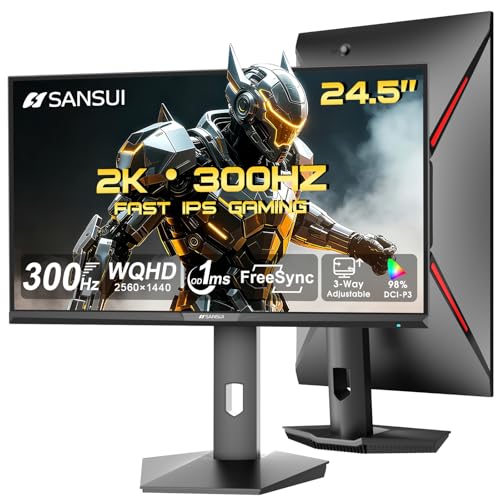
SANSUI ES-G25F6Q Pro Gaming Monitor
- High 300Hz refresh rate supported across both HDMI 2.1 and DP 1.4 inputs
- Sharp pixel density from combining 1440p resolution with a 24.5-inch panel
- Complete ergonomic stand offering height, pivot, swivel, and tilt flexibility
- Vibrant color presentation with 130% sRGB coverage
- Does not include built-in speakers (headphone jack only)
- 350 nits peak brightness offers entry-level HDR capability
- Higher pixel density on a smaller screen may require desktop interface scaling

ASUS TUF Gaming VG259QMR5A Monitor
- Ultra-high 310Hz refresh rate provides a tangible competitive edge in fast titles
- Fast IPS panel offers wide viewing angles with minimal motion blur
- ELMB Sync functions alongside variable refresh rate technologies
- On-screen display adjustments can be handled easily through Windows software
- 1080p resolution provides standard pixel density on a 24.5-inch panel
- Integrated audio capabilities and exact video port configurations are omitted from listing

Amzfast AMZG25F6F 25-Inch 320Hz Gaming Monitor
- Incredible 320Hz refresh rate provides elite motion clarity for competitive shooters.
- Fast IPS technology pairs rapid responsiveness with wide viewing angles.
- Distinctive clean white aesthetic with an upgraded, compact metal stand.
- Dual DisplayPort 1.4 and dual HDMI 2.0 inputs offer excellent setup flexibility.
- Lacks integrated speakers, requiring dedicated desktop audio or a headset.
- Full 320Hz refresh rate requires DisplayPort, as HDMI ports top out at 240Hz.
- 1080p resolution offers standard pixel density across a 25-inch screen.

Z-Edge UG27S 27-Inch Curved Monitor
- Ultra-high 300Hz refresh rate provides exceptionally smooth gaming performance
- Strong 4000:1 contrast ratio yields deep shadows and punchy contrast
- Generous port selection with two DisplayPort and two HDMI inputs
- 1500R curvature creates an engaging field of view for gaming and media
- 1080P resolution on a 27 inch display yields modest pixel density for fine text
- Maximum 300Hz refresh rate requires DisplayPort, with HDMI capped at 240Hz

ASUS TUF Gaming VG27AQM5A 27" 1440p
- Exceptional 300Hz refresh rate at QHD resolution is ideal for competitive and fast-paced gaming
- Wide 95% DCI-P3 color gamut is unusually strong for a gaming-focused display
- ELMB Sync simultaneously addresses ghosting and screen tearing, a feature many monitors cannot offer together
- Shadow Boost provides a practical in-game advantage in dark environments
- G-SYNC support adds broad compatibility with Nvidia GPUs for tear-free gameplay
- Brightness specification is not listed in the product data, making it harder to assess HDR or bright-room performance
- Built-in speakers are convenient but rarely match the audio quality of even a basic external speaker or headset
- Connectivity options and port selection are not detailed in the listing, which may require additional research before purchase
Choosing the Right Display for Your Competitive Rig
For players who want an ideal balance between razor-sharp resolution and rapid motion, I would point toward the ASUS VG27AQM5A. Its 27-inch 1440p Fast IPS panel delivers crisp detail without sacrificing speed, while ELMB Sync prevents visual tearing during chaotic firefights. Hardware engineers at ASUS designed it to handle competitive play smoothly, backed by broad 95 percent DCI-P3 color coverage that also serves well when editing footage.
If your priorities lean strictly toward maximum speed and smaller physical dimensions, the ASUS VG259QMR5A is the display I would go with instead. Its 24.5-inch 1080p profile lets your eyes scan the entire panel instantly without turning your head. Alternatively, if you want high resolution on a compact footprint, the SANSUI ES-G25F6Q Pro pairs a 24.5-inch Fast IPS panel with 1440p resolution and ergonomic tilt, swivel, and height adjustments. Those curious about color calibration can explore what is sRGB mode on a monitor to ensure their panel presents clean, balanced visuals.
FAQs
1. Does a 300Hz refresh rate provide a noticeable advantage over 240Hz?
The step from 240Hz to 300Hz offers a subtle yet measurable reduction in input lag and frame persistence. While the jump is less dramatic than moving from 60Hz to 144Hz, competitive players notice smoother tracking on fast-moving targets. Comparing high-end panels from major vendors in our dell vs ASUS monitor guide shows how response times impact clarity at elevated speeds.
2. Which video cable connection is required to output 300Hz?
DisplayPort 1.4 is usually required to push 300Hz at either 1080p or 1440p resolutions. Some displays feature HDMI 2.1 ports that also support the full refresh rate, whereas older HDMI 2.0 connections frequently cap throughput at 240Hz. Always verify port specifications on your graphics card and monitor before configuring your display settings in Windows.
3. What graphics card is needed to run games at 300 frames per second?
Reaching 300 frames per second depends heavily on the title and graphical settings. Modern esports titles like Counter-Strike 2 or Valorant can hit these numbers on mid-range GPUs, while demanding narrative titles require flagship hardware. Evaluating panel response characteristics against brand engineering, as noted in our AOC vs ASUS monitor comparison, ensures smooth motion even during occasional frame drops.
4. Is a 24.5-inch or 27-inch screen size better for esports?
Esports professionals widely favor 24.5-inch screens because the entire display fits comfortably within central vision. This size minimizes eye fatigue during intense matches. However, 27-inch displays with 1440p resolution offer greater immersion and extra screen real estate for general computing and single-player games.
Editor’s Verdict
When searching for the best 300Hz monitors, the ASUS VG27AQM5A stands out as the most balanced pick thanks to its sharp 1440p Fast IPS panel and ELMB Sync clarity, while the ASUS VG259QMR5A remains my top suggestion for pure 1080p tournament-style responsiveness.