

Tangled power bricks and display cables quickly clutter any modern desk setup. Running a single cord that transmits high-resolution video while charging your laptop transforms your workspace into an efficient workstation. Finding the best USB-C monitors with power delivery means balancing panel clarity, refresh rate, and enough wattage to keep your machine charged under heavy creative or productivity workloads.
Recommended by Us

ASUS ProArt PA278CGRV 27-Inch Monitor
- Factory-calibrated color accuracy with Calman verification and 97% DCI-P3 gamut coverage
- Generous 96W USB-C Power Delivery charges demanding modern laptops while carrying video
- 144Hz refresh rate provides significantly smoother motion than standard 60Hz creative displays
- Built-in Auto KVM and DisplayPort daisy-chaining simplify complex multi-device desks
- VESA DisplayHDR 400 offers only entry-level dynamic range performance
- Pixel response times are not explicitly listed in the manufacturer specifications

MSI PRO MP242 E14C 24-Inch FHD Monitor
- 144Hz refresh rate offers far smoother motion than standard 60Hz or 75Hz office monitors
- USB Type-C port supports video input and 15W device charging
- IPS display provides strong color consistency with a 1500:1 static contrast ratio
- Certified eye-care features and Eye-Q Check assist with viewing comfort
- Compact footprint with built-in speakers and VESA mount capability
- 15W USB-C power delivery is too low to recharge most laptops under heavy load
- Ergonomics are restricted to tilt adjustment, omitting height and swivel options

Dell S2725DC 27-inch QHD USB-C Monitor
- Convenient 65W USB-C hub simplifies single-cable laptop connections
- Fast 144Hz refresh rate provides noticeably smoother scrolling than standard 60Hz displays
- Fully adjustable ergonomic stand supports portrait pivot and height changes
- Innovative pop-out port cluster makes fast device charging easily accessible
- Integrated stereo speakers free up desktop work surface
- Panel technology type is not explicitly stated in the manufacturer listing
- 65W power delivery might charge high-performance creator laptops slower than dedicated bricks
- Ash White exterior aesthetic may not match all dark workstation setups

ViewSonic VP2766-2K 27-Inch QHD Monitor
- High 90W power delivery easily charges demanding creator laptops
- Smooth 120Hz refresh rate upgrades standard 60Hz productivity workflows
- Factory hardware calibration saves time for photo and design work
- Fully adjustable ergonomic stand with portrait pivot support
- A 5ms response time is suited for editing rather than fast-paced esports
- Wider color gamuts like Adobe RGB or DCI-P3 are not detailed in the specifications
- Dual 3W integrated speakers are only suitable for basic desktop audio

ASUS ProArt PA247CV 24-Inch Monitor
- Factory Calman Verified calibration provides reliable Delta E < 2 color accuracy
- Single-cable USB-C connection supplies 65W power to connected laptops
- DisplayPort daisy-chaining streamlines multi-display desktop arrangements
- Full 100% sRGB and Rec. 709 support caters well to digital content creation
- 1080p resolution provides limited screen real estate compared to 1440p or 4K
- Official technical listing does not specify the monitor refresh rate
- Compact 24-inch screen size may feel restrictive for extensive multitasking

Philips 346E2CUAE 34" Ultrawide Monitor
- Convenient USB-C docking with device power delivery
- Spacious 21:9 UWQHD screen replaces awkward dual-monitor setups
- Fluid 100Hz refresh rate with Adaptive-Sync support
- Height-adjustable ergonomic stand included
- VA panel viewing angles are narrower than IPS displays
- 100Hz ceiling is lower than dedicated competitive gaming screens
- Substantial 34-inch footprint requires a deep desk
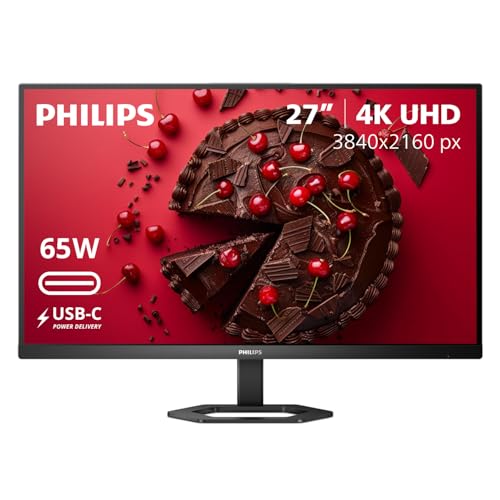
- Convenient single-cable USB-C connectivity with 65W laptop charging
- Full ergonomic stand with height, tilt, and pivot adjustments
- Ultra-sharp 4K IPS panel ideal for text, spreadsheets, and detailed media
- MultiView dual-source capability for multi-device setups
- Exact refresh rate is not specified in the manufacturer listing
- 65W USB-C power delivery may be slow for high-draw performance workstations
Matching Displays to Your Daily Workflow
Choosing the right screen comes down to resolution and charging capacity. If you spend your work hours editing photos or video, I would point you toward the ASUS ProArt PA278CGRV. Its 27-inch 1440p IPS panel runs at 144Hz and supplies 96W of juice over USB-C, which easily handles power-hungry laptops. Creative professionals often evaluate panel accuracy, and our comparison of dell vs ASUS monitor lineups shows how focused the ProArt series remains on factory calibration.
For office workers and casual users who want extra resolution without spending a fortune, the Philips 27E1N5900R 4K UHD is a strong candidate. It packs a 3840×2160 IPS screen with 65W charging and a built-in USB hub. Meanwhile, if you want a wider workspace for spreadsheets or multitasking, the Philips 346E2CUAE Curved UWQHD gives you an expansive 34-inch ultrawide VA panel with a 100Hz refresh rate. Hardware manufacturers like ASUS have prioritized single-cable docking solutions across recent display generations to make swapping devices straightforward.
FAQs
1. How many watts of power delivery do I need for my laptop?
Most ultraportable notebooks and office machines charge comfortably with 65W of power delivery. If you run a larger laptop with dedicated graphics, you will want a display offering 90W or higher to prevent battery drain while working under heavy loads.
2. Does USB-C carry audio and video along with charging power?
Yes, a standard DisplayPort over USB-C connection carries high-bandwidth video, multi-channel audio, and bidirectional data alongside electrical power. This setup allows your display to function as a full hub for connected peripherals while charging your system.
3. Why is color profile accuracy important on productivity screens?
Proper color reproduction ensures that digital artwork and video renders look consistent across different hardware. Understanding what is sRGB mode on a monitor helps you lock down standard web colors so your projects translate accurately to other screens and print media.
4. Can I play fast-paced games on a USB-C monitor?
Many modern productivity displays now support high refresh rates like 100Hz or 144Hz alongside variable refresh rate technologies like AMD FreeSync. While dedicated gaming panels focus purely on low latency, hybrid displays handle casual gaming smoothly after work hours.
Editor’s Verdict
For the best USB-C monitors with power delivery, I recommend the ASUS ProArt PA278CGRV for heavy laptop users who need 96W charging, or the Philips 27E1N5900R 4K UHD if you prefer sharp 4K text clarity on your desk.





