

Competitive first-person shooter lobbies leave zero margin for display latency or frame tearing when split-second reactions decide entire rounds. Chasing maximum clarity at competitive refresh thresholds leads serious players toward the best 600Hz monitors on the current display market. Reaching this tier requires pairing rapid response hardware with reliable connectivity so every frame renders cleanly during intense tournament action.
Recommended by Us

CRUA 27-inch FHD 540Hz IPS Gaming Monitor
- Extreme 540Hz refresh rate ideal for twitch-reflex gaming and esports titles
- Ergonomic stand supports complete height, swivel, tilt, and vertical pivot rotation
- Vibrant IPS panel with high 400 cd/m² brightness and wide sRGB coverage
- Modern connectivity with HDMI 2.1 and DisplayPort 1.4 ports
- 1080p resolution across a 27-inch screen results in moderate pixel density
- Reaching 540Hz requires exceptionally powerful PC hardware and compatible games
- Built-in speakers provide basic utility rather than rich multimedia sound

BenQ Zowie XL2566X+ Gaming Monitor
- Incredible 400Hz refresh rate built for tournament-level FPS gameplay
- DyAc 2 technology provides top-tier motion clarity during fast crosshair movements
- Fast TN panel design mitigates inverse ghosting and liquid crystal overshoot
- Comes packaged with practical esports accessories including the Shielding Hood and S Switch
- FHD resolution provides modest screen real estate for general productivity tasks
- TN panel technology exhibits narrower viewing angles than typical IPS displays
- Requires top-tier computer hardware to consistently output 400 frames per second

- Extreme 600Hz maximum refresh rate via DisplayPort
- Fast response time rated down to 0.1ms (G to G)
- AMD FreeSync Premium prevents frame tearing
- Includes integrated speakers and multiple HDMI/DisplayPort connections
- HDMI connection caps refresh rate at 240Hz
- Specific panel technology is not stated in official specifications
- 1080p resolution offers modest desktop real estate compared to 1440p or 4K

Alienware AW2524HF 24-Inch Gaming Monitor
- Extremely high 500Hz overclocked refresh rate for elite motion clarity
- Fast IPS panel combines rapid 0.5ms response with wide viewing angles
- AMD FreeSync Premium and VESA AdaptiveSync support
- Versatile ergonomic stand with full tilt, swivel, pivot, and height adjustment
- FHD resolution offers less screen real estate than 1440p or 4K panels
- Requires DisplayPort connection to achieve full refresh rates above 255Hz
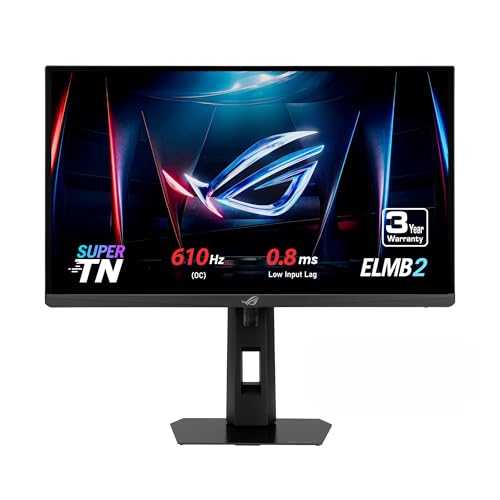
ASUS ROG XG248QSG Gaming Monitor
- Blistering 610Hz refresh rate and 0.1ms response time offer elite motion clarity
- ELMB 2 reduces motion blur without drastically dimming overall screen luminance
- HDMI 2.1 integration ensures high-bandwidth compatibility with top-tier hardware
- Space-saving stand provides ample room for aggressive mouse maneuvering
- TN panel technology offers narrower viewing angles compared to IPS or OLED displays
- 1080p resolution provides lower visual density for detailed desktop productivity

ASUS TUF Gaming VG27AQM5A 27" 1440p
- Exceptional 300Hz refresh rate at QHD resolution is ideal for competitive and fast-paced gaming
- Wide 95% DCI-P3 color gamut is unusually strong for a gaming-focused display
- ELMB Sync simultaneously addresses ghosting and screen tearing, a feature many monitors cannot offer together
- Shadow Boost provides a practical in-game advantage in dark environments
- G-SYNC support adds broad compatibility with Nvidia GPUs for tear-free gameplay
- Brightness specification is not listed in the product data, making it harder to assess HDR or bright-room performance
- Built-in speakers are convenient but rarely match the audio quality of even a basic external speaker or headset
- Connectivity options and port selection are not detailed in the listing, which may require additional research before purchase

- Unprecedented 600Hz refresh rate offers state-of-the-art motion tracking
- DyAc 2 technology delivers class-leading blur reduction with comfortable light output
- Enhanced Fast TN engineering substantially mitigates distracting overshoot
- Esports accessories like the S Switch and shielding hood are included in the box
- FHD resolution is tailored for esports rather than crisp everyday productivity
- TN panel viewing angles are inherently narrower than IPS or OLED displays
- Niche feature set prioritizes competitive gaming over cinematic media playback
Matching High Refresh Displays to Your Competitive Style
If your primary goal is pure motion clarity in tactical shooters, the BenQ Zowie XL2586X+ is the display I would point you toward. Its 24.1-inch Full HD Fast TN panel delivers native 600Hz performance, utilizing DyAc 2 dual backlight technology to keep moving targets remarkably sharp during quick mouse flicks. Designers at BenQ refined the liquid crystal conductivity to eliminate distracting overshoot artifacts.
For esports competitors who value extreme input response alongside an overclocked refresh rate, I would pick the ASUS ROG XG248QSG. This 24.1-inch Super TN display achieves a 610Hz overclock, DisplayHDR 400 brightness, and ELMB 2 motion blur reduction while preserving desk room with a slim base footprint. Gamers who still prioritize wider viewing angles can explore the Alienware AW2524HF with its 500Hz Fast IPS screen, an approach often weighed when reading our dell vs ASUS monitor comparison.
FAQs
1. Can you run 600Hz over an HDMI connection?
Most displays reaching these extreme frequencies require a DisplayPort connection to achieve their advertised refresh rates. For instance, high-speed monitors often limit HDMI inputs to 240Hz or 255Hz due to interface bandwidth constraints. Always consult hardware specifications from manufacturers like ASUS to ensure your graphics card outputs through DisplayPort.
2. Why do competitive 600Hz monitors still use TN panels?
Fast TN panels maintain the fastest pixel transition response with minimal overshoot, which prevents visual smearing behind rapid crosshair motion. While IPS panels offer wider viewing angles and punchier color profiles, dedicated esports displays favor TN technology for maximum clarity. Understanding what is sRGB mode on a monitor can also help you calibrate color presentation properly.
3. What computer hardware is required to drive 600Hz gaming?
Driving several hundred frames every second requires a powerful modern processor and a high-tier graphics card. You must configure competitive graphics settings in titles like Counter-Strike 2 or Valorant to push frame rates matching the display. Without consistent frame delivery, extreme refresh monitors cannot showcase their full fluidity advantage.
4. Does a 600Hz display make a noticeable difference over 240Hz or 360Hz?
Upgrading from 240Hz to 600Hz reduces motion blur and cuts input latency noticeably for high-level esports competitors. While diminishing returns exist compared to moving from 60Hz to 144Hz, tracking fast-moving targets feels distinctly smoother. You can discover more brand balance considerations in our AOC vs ASUS monitor analysis.
Editor’s Verdict
When searching for the best 600Hz monitors, the BenQ Zowie XL2586X+ remains my standout choice for pure tournament motion clarity with its 600Hz Fast TN panel. For players wanting lower input lag and a 610Hz ceiling, the ASUS ROG XG248QSG is an equally formidable competitive alternative.


