

Jumping from standard 1080p to a sharper resolution transforms everyday desktop computing, but pushing high frame rates requires a sensible middle ground. Modern graphics cards handle 2560×1440 comfortably across most titles, making the best 144hz qhd monitors the ideal target for players who want fluid movement without overtaxing their hardware.
Recommended by Us

Dell S2725DSM 27-inch QHD 144Hz Monitor
- QHD resolution at 27 inches offers a meaningful sharpness upgrade over 1080p without the GPU demand of 4K
- 144Hz refresh rate is well above the standard 60Hz, making the display versatile for both work and gaming
- Comprehensive ergonomic stand with height, tilt, pivot, and swivel adjustments supports comfortable long-term use
- Integrated speakers and AMD FreeSync add practical value without requiring extra accessories or hardware
- TUV-certified eye comfort features make it a considerate choice for users who spend many hours at a screen
- Panel type is not specified in the product listing, making it difficult to assess color accuracy or viewing angle performance before purchase
- Built-in 3W speakers are adequate for basic audio but will not satisfy users who prioritize rich or high-volume sound
- At this price tier, contrast ratio and HDR capabilities are modest, which may disappoint users seeking cinematic image depth
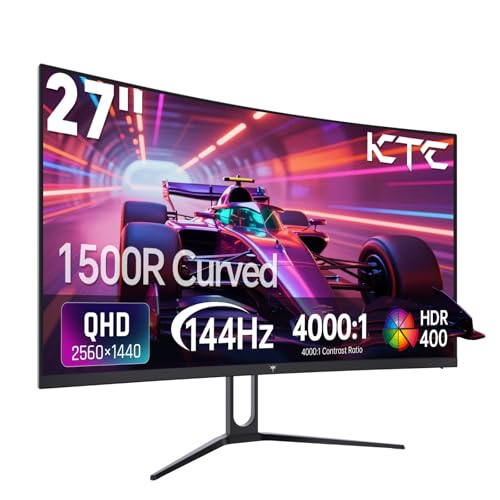
KTC H27S5C 27-Inch 144Hz Curved Monitor
- High 2560x1440 QHD resolution delivers great pixel density on a 27-inch screen
- Deep 4000:1 static contrast produces far better black levels than standard IPS panels
- Fluid 144Hz refresh rate with Adaptive-Sync support
- 1500R curvature creates an engaging and comfortable viewing field
- Included stand only offers tilt adjustment, lacking height or swivel flexibility
- No integrated speakers are listed in the product specifications
- HDR performance is entry-level HDR400 rather than full-array local dimming

MSI PRO MP273Q E14 27-inch Monitor
- Sharp QHD resolution paired with a responsive 144Hz refresh rate
- Higher 1500:1 contrast ratio compared to typical standard IPS panels
- Integrated eye-care certifications and vision check utility
- Standard VESA 100x100mm compatibility for monitor arms
- Stand is limited to tilt adjustment without height or swivel capability
- Integrated speakers provide basic audio suitable primarily for system alerts
- Display brightness rating is not listed in the manufacturer specifications

Samsung 27" Odyssey G5 G51F QHD Gaming Monitor
- High 180Hz refresh rate is excellent for competitive and fast-action gaming
- QHD resolution provides a meaningful sharpness upgrade over 1080p at 27 inches
- Fully adjustable ergonomic stand supports comfortable, personalized setups
- AMD FreeSync and 1ms response time make for a responsive, tear-free gaming experience
- Black Equalizer and Virtual Aim Point are practical gaming-focused additions
- Panel type is not specified in the listing, making it harder to assess color accuracy and viewing angles upfront
- HDR10 is an entry-level HDR standard and may not deliver the dramatic HDR effect seen on higher-end displays
- Connectivity options are not detailed in the listing, so port availability is unclear before purchase

AOC Q27G41ZE 27" QHD 260Hz IPS Monitor
- Exceptional 260Hz overclocked refresh rate is rare at this price point
- IPS panel provides accurate colors and wide viewing angles compared to TN alternatives
- Dual Adaptive-Sync support works seamlessly with both major GPU brands
- Frameless three-sided design creates an immersive, multi-monitor-friendly look
- Versatile connectivity with DisplayPort 1.4 and two HDMI 2.0 ports plus audio out
- Tilt-only stand with a limited -3 to +21 degree range offers no height or swivel adjustment
- 300-nit brightness may fall short in very bright or sunlit room environments
- No USB hub functionality is mentioned in the listing, limiting desk connectivity options

Dell S2725DC 27-inch QHD USB-C Monitor
- Convenient 65W USB-C hub simplifies single-cable laptop connections
- Fast 144Hz refresh rate provides noticeably smoother scrolling than standard 60Hz displays
- Fully adjustable ergonomic stand supports portrait pivot and height changes
- Innovative pop-out port cluster makes fast device charging easily accessible
- Integrated stereo speakers free up desktop work surface
- Panel technology type is not explicitly stated in the manufacturer listing
- 65W power delivery might charge high-performance creator laptops slower than dedicated bricks
- Ash White exterior aesthetic may not match all dark workstation setups

KTC H27T27S 27-Inch QHD 144Hz Monitor
- Sharp 1440p resolution provides excellent clarity on a 27-inch canvas
- High 4000:1 static contrast ratio outclasses typical office monitors in dark rooms
- Smooth 144Hz refresh rate handles fast motion with adaptive sync support
- Rich color coverage with 129% sRGB for vivid multimedia playback
- Ergonomics are limited to tilt only, with no height, swivel, or pivot adjustment
- Peak brightness of 300 nits may struggle against direct glare in sunlit rooms
- Specific pixel response time figures are not provided in the listing details
Matching the Right 1440p Display to Your Setup
Finding the right monitor comes down to your primary use case and desk space. If your priority is immersive single-player games and movie watching, the KTC H27S5C Curved Monitor is a strong candidate. Its 1500R curved HVA panel offers a deep 4000:1 contrast ratio and HDR400 support, pulling you into scenes far better than flat office panels. For general color work, understanding what is sRGB mode on a monitor helps you tame wide gamuts like this panel’s 129% sRGB coverage.
On the other hand, if you juggle hybrid office tasks alongside evening gaming, I would point toward the Dell S2725DC USB-C Monitor. Having a single USB-C connection that provides 65W power delivery keeps desk clutter to a minimum. Enthusiasts debating brands often review the LG vs dell monitor design philosophy, and Dell excels here with practical ergonomics, dual integrated speakers, and smooth FreeSync support.
FAQs
1. Is 144Hz fast enough for modern competitive gaming?
Yes, 144Hz provides a noticeable leap in motion clarity over standard 60Hz displays. It offers rapid frame transitions and responsive input tracking. While esports specialists sometimes consider options from our AOC vs ASUS monitor guide, 144Hz remains a reliable target for everyday gaming.
2. Why is 27 inches considered the sweet spot for QHD resolution?
A 27-inch screen with a 2560×1440 resolution yields roughly 109 pixels per inch. This density produces sharp text and detailed graphics without requiring aggressive desktop scaling in Windows, striking a balance between screen real estate and legibility.
3. What hardware is needed to run games at 1440p and 144Hz?
Running games smoothly at 1440p requires a capable mid-range graphics card with modern DisplayPort or HDMI outputs. Less demanding multiplayer titles achieve high frame rates easily, while heavy titles might require tweaking visual settings to maintain smooth performance.
4. How do VA and IPS panels differ at 144Hz?
IPS panels offer wider viewing angles and dependable color consistency across the entire screen. VA panels, by comparison, produce significantly higher static contrast ratios, yielding deep blacks that excel in dimly lit gaming rooms.
Editor’s Verdict
For shoppers tracking down the best 144hz qhd monitors, the versatile Dell S2725DC USB-C Monitor delivers an outstanding balance of clean ergonomics, built-in sound, and high refresh clarity. If you prefer high contrast and immersion, the curved KTC H27S5C Curved Monitor provides deep blacks and punchy visuals for any desk.





