

The Best 16 inch gaming laptops balance a spacious display with enough portability for work, travel, and gaming. The GIGABYTE AERO X16 is the strongest all-around choice, while the msi Vector 16 HX AI suits buyers who prioritize more powerful graphics.
Recommended by Us

MSI Vector 16 HX AI RTX 5070 Ti Laptop
- High-end RTX 5070Ti graphics with 12GB GDDR7
- Sharp QHD+ display with a fast 240Hz refresh rate
- Ryzen 9 processor and 32GB DDR5 RAM support heavy workloads
- Thunderbolt 4, Wi-Fi 7, and customizable 24-zone RGB lighting
- Includes an additional 1TB portable hard drive
- At 5.95 pounds, it is relatively substantial for frequent travel
- Battery capacity and expected runtime are not specified
- The listing does not identify the display's brightness or color-gamut coverage

MSI Vector 16 HX AI RTX 5080 Gaming Laptop
- High-end RTX 5080 GPU with 16GB GDDR7
- Sharp 16-inch QHD+ display with a 240Hz refresh rate
- Powerful Intel Core Ultra 9 275HX processor
- Versatile port selection including Thunderbolt 5 and HDMI 2.1
- Customizable 24-zone RGB backlit keyboard
- 16GB of system RAM may feel modest next to the high-end CPU and GPU
- At 5.95 pounds, it is less convenient for frequent travel than a lighter laptop
- The listing does not specify battery capacity, expected runtime, or cooling details

GIGABYTE AERO X16 RTX 5070 Laptop
- Upper-tier RTX 5070 Laptop GPU with DLSS 4 support
- Strong 32GB DDR5 and 1TB SSD configuration
- Ryzen AI 7 350 processor built for gaming and creative workloads
- Relatively light 4.18-pound weight for a 16-inch gaming laptop
- Windows 11 Home with Copilot+ PC features
- Display resolution and refresh rate are not specified in the listing
- Port selection, wireless standard, and keyboard lighting are not listed
- GPU power limit and SSD interface are not provided

Lenovo Legion 5 16-inch RTX 5060 Laptop
- High-refresh 16-inch WQXGA IPS display with 500-nit brightness
- Performance-focused Core Ultra 9 processor and RTX 5060 graphics
- Generous 32GB DDR5-5600 memory configuration
- Current Wi-Fi 7 and Bluetooth 5.4 connectivity
- Gigabit LAN supports stable wired networking
- The 1TB SSD can fill quickly when storing several large games and media projects.
- At 5.4 pounds, it is less convenient to carry than many general-purpose laptops.
- The RTX 5060 has 8GB of VRAM, which may require reduced settings in especially memory-intensive workloads at the display's native resolution.
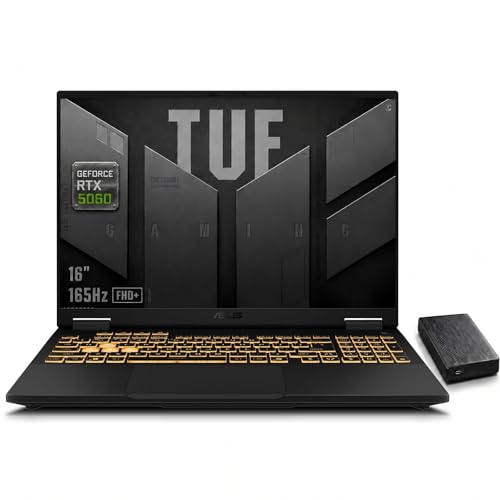
ASUS TUF F16 RTX 5060 Gaming Laptop
- Up to 115W RTX 5060 graphics with DLSS 4 support
- Fast 165Hz display with a spacious 16:10 aspect ratio
- Strong Core i7-14650HX processor for gaming and creative workloads
- Generous 32GB DDR5 memory and 1TB SSD configuration
- Additional 1TB external HDD included
- FHD+ resolution may be less appealing to buyers looking for a QHD-class display.
- At 5 pounds, it is not among the lightest options for frequent travel.
- The listing does not state the SSD interface or memory speed.
Understanding the 16-Inch Balance
Buyers comparing the best 16 inch gaming laptops should first decide whether they value a larger workspace or easy portability. A 16-inch chassis gives games, creative applications, and multitasking more visual room than a smaller laptop, especially with a taller 16:10 display. However, the machine and its power adapter can take up more bag space. The best option is not automatically the fastest model. It is the laptop whose display, graphics hardware, cooling, and weight fit where and how you expect to use it.
- A high-resolution screen rewards a stronger GPU, but it can also make an entry-level graphics processor work harder than necessary.
- A thicker chassis may provide more room for cooling, while a slimmer model is generally easier to carry between home, work, and school.
- Battery life should be treated separately from plugged-in gaming performance because demanding hardware usually performs best when connected to power.
Our overview of plugged-in gaming explains why power settings matter.
Worth knowing: Match the laptop to the advantages of a 16-inch format rather than chasing the highest specification on the page. A balanced display, GPU, cooling system, and carrying weight will often be more useful than one standout component.
Practical Size Selection Rules
A 16-inch laptop sits between compact gaming machines and oversized desktop replacements. That middle ground is useful, but only if the complete system fits your routine. Consider the desk space available at home, the bag you use, and whether the laptop will regularly travel with its charger. These short rules help narrow the field before comparing individual processors or graphics chips. They also prevent an impressive specification sheet from distracting you from everyday usability.
- Choose a taller display when you want more vertical room for productivity, browsing, and creative application timelines.
- Favor a lighter chassis if the laptop regularly moves between rooms, offices, classrooms, or shared gaming spaces.
- Match display resolution to GPU class so visual sharpness does not come at the expense of consistently usable performance.
- Check cooling details when sustained gaming matters, because short bursts of speed reveal little about longer sessions.
These rules are starting points rather than rigid requirements. A heavier machine can be sensible when it stays on a desk, while a thin design may be worth accepting lower sustained power if mobility matters every day. Think about the complete setup, including the charger, mouse, headset, and any external storage you expect to carry.
Choosing for Your Routine
Mostly Gaming at a Desk
If the laptop will spend most of its time on a desk, prioritize the GPU, display, and cooling arrangement. A QHD+ panel can show more detail than an FHD+ or WUXGA screen, but its additional pixels create a heavier graphics workload. A high refresh rate is useful for smooth motion, although the GPU still needs enough capability to take advantage of it.
Weight is less important in this situation, so a larger cooling system and a broader port selection may have more practical value. You should still verify dimensions if the machine needs to fit a compact desk, stand, or shelf.
Work and Gaming in One Machine
A mixed-use buyer should seek balance instead of concentrating only on graphics. A capable multicore CPU, sufficient RAM, and a roomy SSD help when several applications are open or when creative work accompanies gaming. A 16:10 panel is especially useful here because the extra vertical area can make documents, editing interfaces, and browser windows feel less cramped.
Display color coverage may matter more for creative tasks than an extreme refresh rate. Our discussion of gaming laptop editing covers the broader trade-offs.
Frequent Travel and Shared Spaces
Travel changes the calculation because chassis weight is only part of what you carry. The power adapter, protective sleeve, mouse, and other accessories add bulk. A thinner 16-inch system can preserve the useful screen area while remaining easier to move, but slim construction may leave less physical room for cooling than a substantial desktop-replacement design.
Look carefully at wireless connectivity and the ports needed for displays, storage, and wired networking. Battery capacity can help away from an outlet, but gaming performance and runtime depend on workload and power settings. Treat manufacturer claims as context rather than a guarantee for your exact use.
Hardware Differences That Matter
The msi RTX 5070 TI combines an AMD Ryzen 9 8940HX, NVIDIA Geforce RTX 5070Ti 12GB GDDR7, 32GB DDR5 RAM, and a 1TB SSD. Its 2560×1600 display runs at 240Hz, while Cooler Boost 5 uses dual fans and up to seven heat pipes. The msi RTX 5080 moves to an Intel Core Ultra 9 275HX and NVIDIA GeForce RTX 5080 16GB GDDR7, making it the strongest GPU specification in the table. It has 16GB DDR5 RAM, a 1TB PCIe SSD, and a QHD+ 240Hz display, but buyers should notice that it is renewed.
The GIGABYTE RTX 5070 takes a different route. It pairs an AMD Ryzen AI 7 350 Processor with an NVIDIA GeForce RTX 5070 Laptop GPU in a chassis measuring 16.75 millimeters thick and weighing 1.9 kilograms. Those dimensions distinguish it from the 5.95-pound msi RTX 5080. The Lenovo RTX 5060 provides an Intel Core Ultra 9 275HX, NVIDIA GeForce RTX 5060 8GB GDDR7, 32GB DDR5-5600 RAM, and a 1TB SSD. Its 2560×1600 IPS panel reaches 240Hz and is rated at 500 nits.
The ASUS RTX 5060 uses an Intel Core i7-14650HX and an RTX 5060 Laptop GPU rated at up to 115W TGP. It includes 32GB DDR5 and a 1TB SSD, but its 16-inch display is FHD+ at 165Hz rather than QHD+ at 240Hz. ASUS lists dual Arc Flow Fans, multiple heat pipes, and large exhaust vents for cooling. For this category, the most important difference is the relationship between GPU class and display resolution, followed closely by cooling and portability.
Six Checks Before Ordering
- Start with the display resolution and then choose the GPU tier. A higher-resolution 16-inch panel places more demand on the graphics processor, while an FHD+ or WUXGA panel can be a sensible match for a more modest GPU.
- Check the GPU name and any listed power information rather than assuming identical GPU labels perform identically. Cooling, power limits, and laptop design can affect how a mobile graphics processor behaves under sustained loads.
- Balance the CPU with memory capacity. A premium processor paired with limited RAM may be less useful for heavy multitasking than a more balanced configuration with enough memory for games and background applications.
- Compare resolution and refresh rate together. A fast panel helps motion look smoother, but resolution, brightness, color coverage, and GPU capability determine whether that screen suits gaming, work, or both.
- Read the cooling description for fan count, heat pipes, vents, or vapor-chamber details. Long-term upkeep matters too, and our guide to performance over time explains the wider issue.
- Verify condition, ports, storage capacity, and upgrade access in the exact listing. Renewed status, Thunderbolt support, Ethernet, card readers, open SSD slots, and tool-free access can differ substantially between these laptops.
A listing should also be checked again before checkout because bundled accessories and configurations may change. Pay particular attention to RAM and storage when similar model names appear in several versions. If you plan to connect an external monitor or fast storage device, confirm the relevant port standard rather than relying on the presence of a familiar connector shape.
The Strongest All-Around Choices
The GIGABYTE AERO X16 is the best overall fit for buyers wanting capable RTX 5070 graphics in a relatively thin and light 16-inch design. Choose the msi Vector 16 HX AI instead when the RTX 5070Ti, QHD+ 240Hz panel, 32GB of memory, and substantial cooling specification matter more than minimizing carrying weight.
Cost and Hardware Questions
1. Is a 16-inch gaming laptop worth paying more for?
It can be worthwhile when you want more screen space without moving to an especially large desktop-replacement laptop. The format is particularly useful for a 16:10 panel, multitasking, and creative work. It is less compelling if you usually connect an external monitor or need the smallest possible travel setup.
2. Do I need the most powerful GPU available?
No. The right tier depends on the display resolution, the visual settings you prefer, and how long you intend to keep demanding software in your routine. An RTX 5060 or RTX 5070 configuration can offer a better balance for many buyers, while higher tiers suit those who prioritize graphics capability over cost and portability.
3. Is 16GB of RAM still enough for gaming?
It is a reasonable starting capacity for gaming and normal daily tasks, but 32GB provides more breathing room for heavy multitasking, content creation, and applications running alongside a game. Check whether the memory is upgradeable. Soldered memory and accessible memory slots offer very different ownership experiences.
4. Should I choose FHD+, WUXGA, or QHD+?
FHD+ and WUXGA are easier for a midrange GPU to drive, while QHD+ produces a sharper image and provides more working space. The best choice depends on GPU strength and whether detail or lighter graphics demand matters more. Refresh rate should be considered alongside resolution rather than as a separate deciding factor.
5. Are thin 16-inch gaming laptops a bad compromise?
Not automatically. A thin design can make a 16-inch laptop much easier to carry, as shown by the dimensions and weight listed for the GIGABYTE AERO X16. However, buyers should compare cooling information and GPU power details because a compact chassis has different thermal constraints from a thicker performance-oriented machine.
6. How much battery life should I expect?
Runtime varies with screen brightness, refresh rate, GPU activity, battery capacity, and power mode, so chassis size alone provides no reliable answer. Gaming is normally more demanding than browsing or document work. Our overview of gaming laptop battery life provides useful context.
Other 16-Inch Models Worth Considering
- GIGABYTE Gaming A16 – Intel i7-13620H GeForce RTX pairs an Intel Core i7-13620H Processor with an NVIDIA GeForce RTX 5050 Laptop GPU. Its 180-degree hinge and 19.45-millimeter chassis suit buyers who want a slimmer alternative with a flexible screen position.
- ASUS ROG Strix G16 Gaming Laptop combines an Intel Core i5 Processor 14450HX, NVIDIA GeForce RTX 5050 Laptop GPU, 16GB DDR5-5600, and a 512GB PCIe Gen 4 SSD. Tool-free access, a vapor chamber, tri-fan cooling, and a MUX Switch make it appealing to buyers who value upgrade access and detailed thermal features.
- Acer Nitro V 16S AI Gaming Laptop offers an AMD Ryzen 7 260 Processor, NVIDIA GeForce RTX 5060 Laptop GPU, 32GB DDR5, and a 1TB Gen 4 SSD. Its 1920 x 1200 IPS display has a 180Hz refresh rate and 100% sRGB coverage, making it a balanced alternative for gaming and color-sensitive work.


