

The best gaming laptops under $800 combine dedicated graphics with sensible compromises elsewhere. The HP RTX 3050 is our best overall choice, while the renewed istcomputers RTX 4050 is the stronger option when graphics performance matters most.
Recommended by Us

HP Victus 15 RTX 4050 Gaming Laptop
- RTX 4050 graphics include modern features such as ray tracing and DLSS 3 frame generation.
- 144Hz FHD screen is better suited to fluid gaming than a conventional 60Hz panel.
- 16GB of DDR5 memory is a practical capacity for gaming and everyday multitasking.
- Strong port selection includes HDMI 2.1, USB Type-C, two USB Type-A ports, and Ethernet.
- Wi-Fi 6 and Bluetooth 5.4 provide current wireless connectivity.
- The 512GB SSD may fill quickly after installing several large games or media projects.
- The built-in webcam is limited to 720p resolution.
- This is a renewed product rather than a new retail unit.
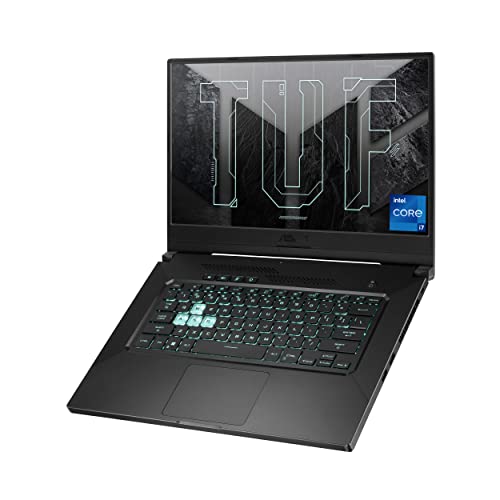
ASUS TUF Dash 15 RTX 3050 Ti Gaming Laptop
- Thin 0.8-inch chassis and manageable 4.41-pound weight
- 144Hz Full HD display includes adaptive sync
- Dedicated RTX 3050 Ti graphics with 4GB GDDR6
- Fast PCIe NVMe storage and Wi-Fi 6 connectivity
- 8GB of DDR4 RAM is modest for demanding multitasking and newer games
- The RTX 3050 Ti has 4GB of VRAM, which can limit demanding graphics settings
- 512GB of storage may fill quickly with a large game library

HP Victus 15 Gaming Laptop with RTX 3050
- Dedicated RTX 3050 GPU includes 6GB of GDDR6 memory
- 144Hz IPS display is smoother than a standard 60Hz panel
- Eight-core Intel processor supports both gaming and general productivity
- Broad port selection includes USB-C, HDMI 2.1, USB-A, Ethernet, and an audio jack
- Fast 512GB NVMe storage and current Wi-Fi 6 connectivity
- 8GB of RAM may constrain demanding multitasking and memory-heavy workloads
- The listed 250-nit brightness and 45% NTSC color coverage are modest
- At 5.06 pounds, it is less convenient to carry than many general-purpose laptops

HP Victus 15 RX 6550M Gaming Laptop
- Dedicated Radeon RX 6550M graphics
- 144Hz IPS display with AMD FreeSync Premium
- Strong selection of ports, including HDMI 2.1 and Ethernet
- Wi-Fi 6 and backlit keyboard included
- Fast charging support
- 8GB of RAM is modest for current gaming and heavier multitasking
- 512GB of storage may fill quickly with large applications and media libraries
- The listed 720p webcam is lower resolution than many newer 1080p laptop cameras

Acer Nitro 5 GTX 1650 Gaming Laptop
- Dedicated NVIDIA graphics with 4GB of VRAM
- Full HD IPS display
- Two M.2 slots with one left open for expansion
- Wi-Fi 6 and Gigabit Ethernet connectivity
- Backlit keyboard and dual-fan cooling
- 8GB of RAM is a modest capacity for demanding multitasking
- The 256GB SSD may fill quickly with large applications
- Display refresh rate is not specified in the listing
What a Gaming Laptop Around $800 Can Do
A gaming laptop in this bracket can provide a modern multi-core processor, dedicated graphics, a Full HD display and enough storage for a practical game library. These laptops include graphics options such as the NVIDIA GeForce RTX 4050, NVIDIA GeForce RTX 3050 Ti and NVIDIA GeForce RTX 3050. These GPUs are primarily suited to gaming at 1920 x 1080, with settings adjusted according to the title and the graphics chip. High-refresh displays also make everyday motion and competitive play look smoother when performance is sufficient.
This tier is not intended to deliver uncompromised performance at maximum settings, high-resolution gaming or heavy ray tracing in demanding releases. You may need to reduce image quality, use an upscaling feature when supported or prioritize smoother play over visual detail. Battery-powered gaming also involves performance compromises, so serious sessions are generally better near an outlet. Our guide to plugged-in gaming explains why. Expectations should remain practical even when the specification includes a newer graphics card.
Worth knowing: A stronger graphics card pays off most when the laptop’s screen resolution and refresh rate can make use of it. You cannot swap the built-in panel later, so consider the GPU and display as a pair.
What to Expect at This Price
Specifications vary, but these are the hardware combinations commonly represented by these laptops.
| Component | What You Get |
|---|---|
| CPU | Mobile processors ranging from older Intel Core i5 hardware to newer chips such as the Intel Core i5-13420H and AMD Ryzen 7 7445HS, with multiple cores for gaming, multitasking and general productivity. |
| GPU | Dedicated graphics may include the NVIDIA GeForce RTX 4050, NVIDIA GeForce RTX 3050 Ti or NVIDIA GeForce RTX 3050. Older alternatives such as the NVIDIA GeForce GTX 1650 also appear. |
| Display | A 15.6-inch Full HD panel is typical. Several listings include IPS or IPS-type technology, a 144Hz refresh rate, anti-glare treatment or adaptive-sync support. |
| RAM | Many configurations begin with 8GB of DDR4 or DDR5 memory. Better-equipped listings provide 16GB, which is a more comfortable capacity for current games and background applications. |
| Storage | A 512GB SSD is common among these listings, providing responsive startup and loading behavior. Some older configurations include a smaller 256GB NVMe SSD but offer open storage expansion space. |
The same GPU can appear alongside different processors, memory capacities and displays, so compare the full specification rather than choosing by graphics-chip name alone. A machine with balanced components may feel more consistent than one with a standout GPU and limited memory. Availability and discounts also change frequently. Our overview of gaming laptop sales covers useful times to shop.
How to Choose a Gaming Laptop at This Budget
Start with your games and priorities, then compare every major component instead of focusing on one headline specification.
Start With the Graphics Card
The graphics card has the greatest influence on how comfortably a laptop handles visually demanding games. An NVIDIA GeForce RTX 4050 is the strongest GPU represented here, while the NVIDIA GeForce RTX 3050 Ti and NVIDIA GeForce RTX 3050 occupy lower performance classes. The NVIDIA GeForce GTX 1650 is older and better suited to reduced settings. Consider the types of games you play, the image quality you expect and whether newer graphics features matter to you.
Match the graphics card to the display included with the laptop. A Full HD screen is a sensible partner for this hardware tier because it places less demand on the GPU than a higher-resolution panel. A 144Hz refresh rate can provide visibly smoother motion, but only when the system renders quickly enough to take advantage of it. Check the listed screen resolution, refresh rate, panel type and adaptive-sync support instead of assuming every configuration of a familiar model uses the same display.
Balance the CPU and RAM
A capable graphics card can still be held back by limited memory or an unsuitable processor. Compare the CPU generation, core configuration and listed boost speed, but do not assume that a familiar Intel Core or AMD Ryzen family name tells the entire story. Newer mobile chips can differ considerably within the same broad product family. A balanced laptop should have enough processor performance for game logic, background tasks, voice chat and routine work without making the GPU the only impressive component.
For a new gaming purchase, 16GB of RAM is a sensible floor when the budget and configuration allow it. A laptop with 8GB can still run games, but background programs and memory-heavy workloads may make that capacity feel restrictive. Moving to 32GB provides extra headroom for demanding multitasking, creative applications and larger projects, although it is not essential for every player. If a listing has 8GB, verify whether the memory can be expanded and what type of RAM it uses.
Display, Battery and Cooling
Resolution and refresh rate determine how the laptop presents the GPU’s output. Full HD is a practical target for this class, while 144Hz panels can make compatible content feel more responsive. Panel brightness, color coverage and adaptive sync also affect the experience, but those details are not consistently provided in every listing. Avoid assuming that two laptops with the same screen size deliver identical image quality. Read the exact display specification attached to the configuration you plan to order.
Battery endurance and fan noise can vary substantially among gaming laptops because power limits, cooling designs and workloads differ. Check what the listing actually states rather than relying on the model family’s general reputation. Dedicated graphics consume significant power under load, and cooling fans may become more noticeable during gaming. The HP RTX 4050 listing mentions fast charging and an updated thermal design, while the Acer listing specifies twin fans and dual exhaust ports. Our gaming laptop battery article adds useful context.
Condition and Ports
Check whether a laptop is sold new or renewed before comparing it with another listing. The RTX 4050 HP Victus shown here is specifically described as renewed, which may affect how some buyers judge its value. Review the seller’s stated condition, included accessories and return window on the store page. Those policies can change and are not provided consistently in specification summaries, so confirm them immediately before ordering rather than assuming every listing follows the same terms.
Ports matter if you use an external monitor, wired network, headset, controller or storage drive. Confirm that the listed USB, HDMI and Ethernet connections cover your setup without requiring several adapters. Many gaming laptops allow RAM or storage upgrades, but the processor and graphics card usually are not practical upgrade targets. Display panels are not routine upgrades either. Choose the core CPU, GPU, screen and port combination carefully, then treat accessible memory and storage expansion as useful flexibility rather than a complete upgrade path.
Who Should Buy Which Laptop
- Best overall: HP RTX 3050 pairs an Intel Core i5-13420H and NVIDIA GeForce RTX 3050 with a 144Hz Full HD display.
- Best for the strongest GPU: istcomputers RTX 4050 offers an NVIDIA GeForce RTX 4050, 16GB DDR5 and a 144Hz display in renewed condition.
- Best value: Acer GTX 1650 suits lighter requirements with NVIDIA GeForce GTX 1650 graphics, Wi-Fi 6 and expandable storage options.
- Best alternative brand: ASUS RTX 3050 TI combines NVIDIA GeForce RTX 3050 Ti graphics with a thin, 4.4-pound body.
- Best runner-up: HP RX 6550 provides AMD Radeon RX 6550M graphics and AMD FreeSync Premium.
Final Thoughts
The HP RTX 3050 is the most balanced overall choice, combining NVIDIA GeForce RTX 3050 graphics with a Full HD 144Hz display and useful connectivity. Buyers prioritizing the strongest available GPU should consider the renewed istcomputers RTX 4050, which also includes 16GB DDR5. Compare condition, memory and the complete display specification before making the final decision.
More Options to Consider
- HP i5-12500H RTX 3050 uses a 12th Gen Intel Core i5-12500H, NVIDIA GeForce RTX 3050, 8GB RAM and a 512GB SSD. It suits buyers who prefer this processor configuration and an IPS Full HD display.
- HP i5-13420H RTX 3050 increases memory to 16GB while retaining the Intel Core i5-13420H and NVIDIA GeForce RTX 3050 combination. It is a practical alternative for multitasking without an immediate RAM upgrade.
- HP i5-13420H RTX 3050 includes an Intel Core i5-13420H, NVIDIA GeForce RTX 3050 6GB, 8GB DDR4 and a 512GB SSD. Consider it if the Performance Blue finish and anti-glare IPS display appeal to you.
FAQs
1. Can you get a good gaming laptop for under $800?
Yes, particularly if Full HD gaming is your goal and you are willing to adjust graphics settings when necessary. Dedicated GPUs such as the NVIDIA GeForce RTX 3050 commonly appear in this bracket, while stronger options may surface through discounts or renewed listings. Expect compromises in memory, storage capacity, display quality or construction compared with more expensive machines. Compare the complete configuration because a familiar model name may cover several substantially different versions.
2. Is a gaming laptop around $800 worth it?
It can be worthwhile for someone who needs one computer for gaming, school, work and general use. This class offers dedicated graphics and higher-refresh displays without moving into premium hardware. It is less suitable for buyers expecting maximum settings, high-resolution gaming or desktop-like upgrade freedom. Value also depends on the exact CPU, GPU, RAM, display and condition, so evaluate those specifications together rather than treating the graphics card as the only deciding factor.
3. Which graphics card is best around $800?
Among the hardware listed here, the NVIDIA GeForce RTX 4050 is the strongest graphics option, followed by lower classes such as the NVIDIA GeForce RTX 3050 Ti and NVIDIA GeForce RTX 3050. An RTX 4050 configuration may be renewed or involve compromises elsewhere, so the GPU label does not settle the decision by itself. Check memory capacity, processor, screen and seller-stated condition. A balanced RTX 3050 laptop may be the simpler choice for a buyer prioritizing a new configuration.
4. How much RAM does a gaming laptop at this budget need?
Aim for at least 16GB when possible. An 8GB laptop can handle lighter gaming and everyday tasks, but it leaves less room for background applications and demanding workloads. A 32GB configuration offers more headroom for heavy multitasking and creative work, although many gamers do not need that capacity immediately. If the laptop includes 8GB, check whether its memory is upgradeable, how many slots are available and whether replacing existing modules will be necessary.
5. Can I upgrade a gaming laptop later?
Many gaming laptops allow some memory and storage expansion, but upgrade options vary by configuration. The processor and dedicated GPU are generally not practical upgrade targets, and replacing the internal display is not a normal improvement path. Check the manufacturer’s documentation or the exact listing before ordering, especially if the machine begins with 8GB RAM or a small SSD. Our article on laptop performance explains how maintenance and aging can affect the system over time.


