

The best gaming laptops under $2000 combine capable graphics, modern processors, and fast displays without moving into luxury pricing. The msi RTX 5070 is our balanced overall choice, while the Acer RTX 5070 TI offers a stronger GPU and premium OLED display.
Recommended by Us

Acer Predator Helios Neo 16S RTX 5070 Ti
- High-end RTX 5070 Ti GPU with 12GB GDDR7, DLSS 4 and ray-tracing support
- Fast 240Hz OLED display with 2.5K resolution
- Powerful 24-core Intel Core Ultra 9 275HX processor
- Generous 32GB DDR5 configuration
- Broad connectivity including Thunderbolt 4, HDMI, Ethernet and Wi-Fi 6E
- The 5.07-pound weight may be cumbersome for frequent travel
- A 1TB SSD can fill quickly with large modern games and creator projects
- Battery runtime is not specified in the listing

ASUS ROG Strix G16 RTX 5070 Ti Gaming Laptop
- High-tier RTX 5070 Ti GPU with 12GB of GDDR7 video memory
- Strong 16-core Ryzen 9 processor and 32GB DDR5 configuration
- Fast 165Hz display for fluid gaming visuals
- Large 2TB PCIe SSD and a versatile port selection
- Renewed condition may not appeal to buyers who want a factory-sealed laptop
- Listed weight of 5.51 pounds makes it less convenient for frequent travel
- Battery capacity and expected runtime are not provided in the listing

MSI Cyborg 15 RTX 5070 Gaming Laptop
- High-tier RTX 5070 Laptop GPU with 8GB GDDR7
- Generous 32GB DDR5 memory configuration
- Fast 144Hz IPS display for smoother motion
- Broad connectivity with Wi-Fi 6E, Ethernet, HDMI, USB-C, and Bluetooth 5.3
- Bundled Res Cooler and four-zone RGB keyboard
- FHD resolution is less detailed than QHD or higher-resolution panels.
- Only one USB Type-C port is listed.
- Battery capacity, runtime, display brightness, and color coverage are not specified.
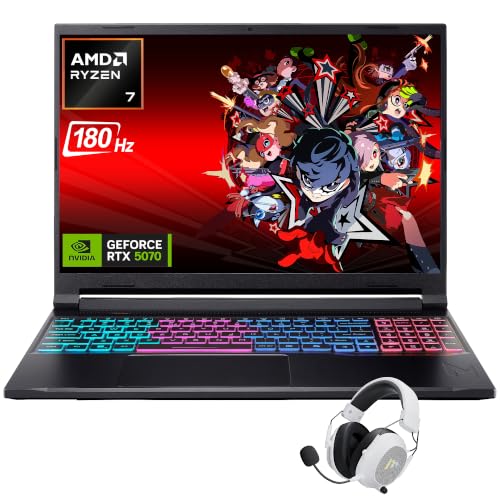
Acer Nitro V16 RTX 5070 Gaming Laptop
- High-performance RTX 5070 graphics with DLSS 4 support
- Sharp 16-inch WQXGA display with a fast 180Hz refresh rate
- Generous 32GB DDR5 configuration for multitasking
- Broad wired and wireless connectivity
- G-Sync, MUX switch, and Advanced Optimus are included
- A 1TB SSD can become restrictive for a large modern game library
- At 5 pounds, it is less convenient for frequent travel than smaller laptops
- Battery capacity and expected runtime are not provided in the listing

Lenovo Legion Pro 7i RTX 4080 Gaming Laptop
- High-end RTX 4080 graphics with 12GB of GDDR6 VRAM
- Fast 240Hz WQXGA display with G-Sync and FreeSync Premium
- Large 64GB DDR5 memory and 4TB NVMe SSD configuration
- Thunderbolt 4 provides versatile display and peripheral connectivity
- Pantone factory calibration and 100% sRGB coverage support accurate color
- The listing does not provide battery capacity, expected runtime, or product weight.
- At 14.3 x 10.32 x 1 inches, the chassis requires more desk and bag space than a smaller gaming laptop.
- The included operating system is Windows 11 Home rather than a professional edition.
What a Gaming Laptop Around $2000 Can Do
A gaming laptop in this bracket can provide an RTX 5070 Ti, RTX 5070, or RTX 4080 alongside a modern multi-core processor. These parts are suited to visually demanding games at 1080p or 1440p-class resolutions, depending on the laptop display and chosen quality settings. High settings are realistic in many situations, while ray tracing and maximum settings can require upscaling or other compromises. You can also expect enough CPU performance for streaming, recording, everyday productivity, and demanding creative applications. Our guide to laptop video editing explains that second use case.
Higher-refresh displays are common at this level, with these laptops offering panels from 144Hz through 240Hz. Memory and storage configurations also tend to be practical, including 32GB RAM and 1TB SSD options. However, this bracket does not guarantee uncompromised performance at every resolution or graphics setting. Native 4K gaming with maximum ray tracing remains demanding, particularly in a mobile chassis. Buyers should also expect meaningful differences in screen quality, cooling design, port selection, weight, and component balance, even when two listings use similar graphics hardware.
Worth knowing: A stronger graphics card pays off most when the laptop’s display resolution and refresh rate can use its output. Choose carefully because the built-in panel cannot be replaced like desktop hardware.
What to Expect at This Price
Specifications vary, but the strongest listings generally share several core characteristics.
| Component | What You Get |
|---|---|
| CPU | A recent multi-core Intel Core, Intel Core Ultra, or AMD Ryzen processor designed for demanding gaming and multitasking. |
| GPU | Dedicated graphics such as an RTX 5070 Ti, RTX 5070, or RTX 4080, with ray tracing and supported upscaling features. |
| Display | A 15.6-inch or 16-inch high-refresh panel, commonly using Full HD, WUXGA, WQXGA, or similar resolutions. |
| RAM | Usually 32GB DDR5 in the featured configurations, though some alternatives start with 16GB DDR5. |
| Storage | A fast 1TB SSD is common, while selected configurations provide substantially more space for a larger library. |
The same GPU can appear with very different processors, displays, memory capacities, and storage sizes, so compare the entire specification rather than one headline component. Retail timing can affect which configuration offers the better overall package. Our overview of gaming laptop sales covers common opportunities to shop.
How to Choose a Gaming Laptop at This Budget
Start with the workload that matters most, then compare each machine as a complete system rather than a collection of isolated specifications.
Start With the Graphics Card
The graphics card usually has the greatest effect on gaming performance. An RTX 5070 is a sensible starting point for a capable modern system, while an RTX 5070 Ti or RTX 4080 provides additional graphics power for demanding settings and higher-resolution displays. GPU names alone do not tell the entire story, however. A laptop also needs a suitable screen, processor, memory configuration, and cooling approach to form a balanced package that fits how you plan to play.
Match the graphics hardware to the panel included with the laptop. A fast GPU is more useful when paired with a high-refresh screen that can display smoother motion, while a higher native resolution places more demand on that GPU. The Acer Predator combines an RTX 5070 Ti Laptop GPU with a 2.5K 240Hz OLED panel. The MSI Cyborg instead pairs an RTX 5070 Laptop GPU with a 144Hz FHD IPS display, creating a different balance between graphics demand and screen specification.
Balance the CPU and RAM
A powerful GPU should not be paired with inadequate memory or a processor poorly suited to your broader workload. The listings here use modern multi-core processors, including Intel Core Ultra, Intel Core, and AMD Ryzen options. CPU capacity matters beyond gaming when you stream, record, edit media, or keep several applications running. Rather than choosing solely by core count or maximum clock speed, consider whether the overall combination gives sufficient CPU and graphics performance for your regular mix of tasks.
Consider 16GB of RAM the practical floor for a new gaming laptop in this class. It can support gaming and normal background applications, but 32GB offers more headroom for heavy multitasking, content creation, and keeping the system useful as software demands increase. Several featured configurations include 32GB DDR5, while the renewed MSI Vector lists 16GB DDR5. Check whether memory is upgradeable before assuming you can add capacity, because the supplied data does not confirm upgrade access for every model.
Display, Battery and Cooling
Refresh rate and resolution determine how you experience the GPU’s output. A 144Hz FHD display places different demands on graphics hardware than a WQXGA 240Hz or 2.5K 240Hz panel. Color coverage can also matter for creative work. The Acer Nitro V16 specifies 100% sRGB, while the Lenovo Legion Pro 7i lists 100% sRGB coverage, factory calibration, and 500 nits. The Acer Predator uses OLED, providing a distinct panel option among the featured machines.
Battery behavior and cooling noise can vary substantially among gaming laptops, so avoid assuming similar components produce an identical ownership experience. Check what each listing explicitly states about its thermal system, dimensions, and power features. The Acer Predator listing describes AeroBlade 3D metal fans, liquid metal, and separate CPU and GPU heat zones. Other listings provide less cooling detail. Our overview of gaming laptop batteries explains why mobility expectations should remain realistic.
Condition and Ports
Confirm whether the machine is new, renewed, or modified by a reseller before ordering. The ASUS ROG Strix G16 and MSI Vector 16 HX AI shown here are renewed listings, while the ASUS listing also says its seal was opened for an upgrade. Review the seller’s return window and included coverage on the purchase page, since those details are not supplied here and may change. Condition can be a worthwhile trade-off, but only when its terms suit your comfort level.
Port selection matters if you connect an external monitor, wired network, storage, headset, or several accessories. Look for the exact number and type of USB connections, along with HDMI, Ethernet, and any card reader you need. Thunderbolt appears on selected models, but it should not be assumed across the category. Most gaming laptops offer fewer meaningful upgrade paths than desktops beyond memory and storage, and upgrade access is model-specific, so choose the display, GPU, CPU, and ports carefully at purchase.
Who Should Buy Which Laptop
- Best overall: msi RTX 5070 combines an RTX 5070, 32GB DDR5, 1TB SSD, and 144Hz FHD IPS display.
- Strongest featured GPU: Acer RTX 5070 TI pairs an RTX 5070 Ti with a 240Hz OLED display.
- Best value: Acer RTX 5070 includes an RTX 5070, 32GB DDR5, and a 180Hz WQXGA display.
- Alternative brand: ASUS RTX 5070 TI offers renewed condition, an RTX 5070 Ti, 32GB DDR5, and 2TB SSD.
- Runner-up: Lenovo RTX 4080 combines an RTX 4080, 240Hz display, 64GB RAM, and 4TB SSD.
Final Thoughts
The msi RTX 5070 is the most balanced overall choice for shoppers who want RTX 5070 graphics, 32GB memory, and a straightforward FHD gaming display. It covers the essentials without putting every part of the budget into one specification.
Choose the Acer RTX 5070 TI instead if the RTX 5070 Ti and 240Hz OLED panel matter more. Either way, compare condition, ports, display, and the full configuration before ordering.
More Options to Consider
- msi RTX 5080 is a renewed alternative with an NVIDIA GeForce RTX 5080 16GB GDDR7 and Intel Core Ultra 9 275HX. It suits buyers prioritizing graphics power who are comfortable with 16GB DDR5 and renewed condition.
- HP RTX 5060 uses an NVIDIA GeForce RTX 5060 Laptop GPU with 32GB DDR5 and a 16-inch 2K 144Hz display. Consider it if you prefer HP and want a capable CPU-centered configuration.
- Lenovo RTX 4060 combines an Intel Core i9-14900HX with an NVIDIA GeForce RTX 4060 and 32GB DDR5. It fits CPU-heavy users who value its 165Hz WQXGA display over having a newer GPU tier.
FAQs
1. Can you get a good gaming laptop for under $2000?
Yes. This budget can provide modern dedicated graphics, a multi-core processor, a high-refresh display, and enough memory and storage for a practical gaming setup. RTX 5070 configurations are available in the featured selection, along with older high-tier options and renewed machines using faster GPUs. Focus on the complete configuration because a powerful graphics card does not compensate for a display, memory capacity, or port selection that fails to meet your needs.
2. Is a gaming laptop around $2000 worth it?
It can be worthwhile for someone who wants substantial gaming performance in a portable, integrated system. This bracket gives you access to higher-refresh displays and capable graphics without automatically entering the most expensive flagship category. Value depends on whether you will use the hardware and whether portability matters. Desktop systems may provide different upgrade options, but a laptop includes its display and can move between locations without a separate tower and monitor.
3. Which graphics card is best around $2000?
Among the graphics options highlighted here, an RTX 5070 Ti or RTX 4080 is appealing when graphics performance is the main priority. An RTX 5070 can offer a more balanced match for FHD or WQXGA-class displays while leaving room in the configuration for memory and storage. The best choice depends on resolution, refresh rate, condition, and the rest of the hardware. Do not compare GPU names without also checking the laptop’s screen and full specification.
4. How much RAM does a gaming laptop at this budget need?
Sixteen gigabytes is a sensible minimum, while 32GB provides more breathing room for multitasking, streaming, creative software, and demanding background applications. Several laptops featured here already include 32GB DDR5, which reduces the immediate need for an upgrade. More memory does not replace a capable GPU or CPU, so keep the system balanced. Confirm whether the RAM is upgradeable if you are considering a 16GB configuration and may need more later.
5. Can I upgrade a gaming laptop later?
Some gaming laptops allow memory and storage upgrades, but access and supported capacities vary by model. The processor, graphics chip, and built-in display generally are not practical upgrade targets, so select those components correctly from the start. Check the manufacturer’s documentation and seller terms before opening the chassis. Our article on long-term laptop performance also explains maintenance considerations that can affect the system over time.


