

The Best 240Hz gaming laptops pair a genuinely fast screen with hardware capable of using it. The HP RTX 5070 offers the strongest overall balance, while the msi RTX 5070 TI stands out for buyers who want the more powerful graphics option.
Recommended by Us

MSI Vector 16 HX AI RTX 5070 Ti Gaming Laptop
- High-end RTX 5070 Ti graphics with 12GB GDDR7
- Fast 240Hz QHD+ IPS-level display
- Powerful 16-core, 32-thread Ryzen 9 processor
- Generous 32GB RAM configuration
- At 5.95 pounds, it may be cumbersome for frequent travel
- A 1TB SSD can fill quickly with a large collection of modern software and media
- Battery capacity and estimated runtime are not listed

Acer Predator Helios Neo 16 RTX 5070 Ti
- High-end RTX 5070 Ti graphics with DLSS 4 and full ray-tracing support
- Fast 240Hz WQXGA display with G-SYNC and a 3ms overdrive response time
- Powerful Intel Core Ultra 9 275HX processor with dedicated NPU capabilities
- Wide color coverage of up to 100% DCI-P3 and 500-nit brightness
- Fast Gen 4 SSD storage and Killer Wi-Fi 6E connectivity
- 16GB of RAM may be modest for buyers planning heavy creative workloads alongside gaming
- At 5.95 pounds, it is relatively substantial for frequent travel
- Battery runtime and port selection are not detailed in the provided listing
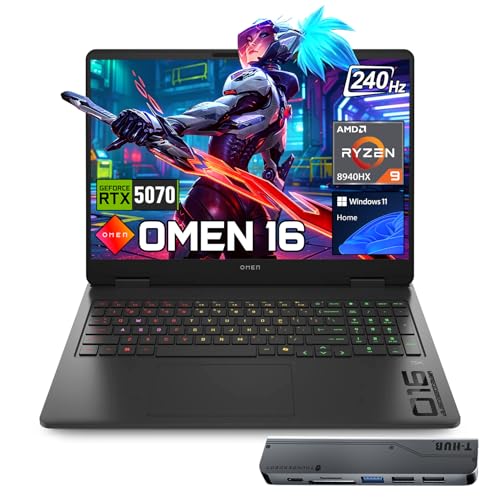
HP OMEN 16 RTX 5070 Gaming Laptop
- High-performance RTX 5070 and Ryzen 9 configuration
- Sharp 16-inch WQXGA display with a 240Hz refresh rate
- Generous 32GB DDR5 memory
- Broad selection of wired and wireless connections
- Bundled 7-in-1 USB-C hub adds expansion options
- At 5.4 pounds, it is heavier than many portability-focused laptops
- The 1TB SSD may fill quickly with a large collection of modern games
- Battery capacity and expected runtime are not specified in the listing

MSI Crosshair 18 HX AI RTX 5070
- High-resolution 240Hz display with wide 100% DCI-P3 color coverage
- Strong CPU and GPU configuration for high-refresh gaming and creative applications
- Generous 32GB DDR5-5600 memory configuration
- Extensive port selection, including Thunderbolt 4 and HDMI 2.1
- At 6.83 pounds, it is heavier than smaller gaming laptops
- The 720p webcam is modest for an otherwise premium hardware configuration
- The RTX 5070 has 8GB of VRAM, which may limit some memory-intensive workloads at maximum settings

Lenovo Legion Pro 7i RTX 4080 Gaming Laptop
- High-end RTX 4080 graphics with 12GB GDDR6
- Fast 240Hz WQHD IPS display
- Powerful 24-core Intel Core i9 processor
- Generous 32GB DDR5 memory and 2TB NVMe storage
- Extensive wired and wireless connectivity
- At 6.17 pounds, it is relatively heavy for frequent travel.
- Battery capacity and expected runtime are not specified in the listing.
- The 16-inch chassis may require more desk and bag space than a smaller gaming laptop.
What 240Hz Really Requires
A 240Hz display can make pointer movement, scrolling, and fast action look unusually fluid, but the panel does not create performance by itself. The graphics processor still has to render frames quickly. Buyers should therefore treat refresh rate and GPU tier as a package rather than shopping for the largest number printed beside the display.
High-end and upper-midrange laptop GPUs make the most sense at this refresh rate, especially when paired with a 2560×1600 panel. Less demanding software can take fuller advantage of the panel, while visually intensive games may require reduced settings or upscaling. That is normal and does not make the high-refresh display pointless.
Cooling, processor performance, and power limits can also affect how consistently a laptop uses its hardware. A thin specification list rarely tells the whole story, particularly during long sessions. Our overview of gaming laptop heat explains why thermal behavior deserves attention before settling on a model.
Worth knowing: Match the laptop to the way you play instead of chasing the highest specification-sheet number. A balanced GPU, CPU, display, and cooling system is more useful than a 240Hz badge attached to mismatched hardware.
Five Persistent 240Hz Myths
Any GPU Can Fully Use 240Hz
A laptop can output to a 240Hz panel without delivering equally high frame rates in every workload. Resolution, image settings, power limits, and game complexity all influence rendering speed. For a QHD+ screen, an upper-midrange or high-end GPU is the sensible starting point, but buyers should still expect to adjust settings when visual quality is demanding.
The Strongest GPU Solves Everything
A powerful GPU helps, but a weak processor can limit performance in CPU-heavy situations, while insufficient memory can make multitasking less comfortable. Balanced systems are safer choices. These laptops combine enthusiast-class processors with dedicated RTX graphics, though memory capacity varies and should be checked rather than assumed from the GPU name alone.
More RAM Always Raises Refresh Performance
RAM capacity matters when applications, background tasks, and games compete for memory, but adding capacity does not automatically make a display refresh faster. A sensible amount prevents avoidable constraints. Most table models provide 32GB, while the Acer Predator Helios Neo 16 AI has 16GB, which may still suit gaming but offers less room for heavy multitasking.
A 240Hz Label Guarantees a Great Screen
Refresh rate describes only one part of a panel. Resolution, brightness, color coverage, response behavior, and synchronization support also matter. Several models here specify 2560×1600 displays, while the Acer lists 500-nit brightness, up to 100% DCI-P3, G-SYNC, and a 3ms overdrive response time. Cooling matters too because sustained component performance creates heat and fan noise. Our guide to gaming laptop noise covers that trade-off.
Ports And Upgrades Are Minor Details
Ports determine whether a laptop fits an existing desk setup, while storage and memory affect long-term practicality. Buyers should verify the exact listing because similarly named configurations may differ. Check the stated USB standards, display outputs, networking, operating system, RAM, and SSD capacity. Upgrade access is valuable when documented, but it should never be assumed from a model family name.
Listing Red Flags To Catch
- A listing that advertises 240Hz prominently but gives no native resolution leaves out essential context, because driving a QHD+ panel is more demanding than driving a lower-resolution screen.
- A vague GPU description without the complete laptop GPU model makes meaningful comparison difficult, since the graphics tier is central to deciding whether the display and hardware are sensibly matched.
- Missing RAM and storage details can hide an unbalanced configuration, especially if the seller focuses entirely on the processor while avoiding capacity and memory-generation information.
- An unclear condition, seller configuration, or bundled-upgrade description deserves caution because memory, storage, operating system, and included accessories can differ from the base manufacturer specification.
Weight and chassis size also deserve scrutiny when a listing presents a machine as portable without dimensions. High-performance cooling and large displays add bulk. Our explanation of gaming laptop weight outlines why powerful models are rarely as convenient to carry as ordinary notebooks.
Benefits And Practical Compromises
Upsides
- Motion can look clearer and more immediate when the GPU supplies frames quickly enough to make meaningful use of the high-refresh panel.
- A 240Hz screen gives competitive and fast-paced players more display headroom than an ordinary productivity panel, even when demanding software cannot always reach the panel ceiling.
- High-refresh QHD+ panels combine fluid motion with sharper detail, making them useful for buyers who do not want to choose between speed and a spacious desktop.
- The premium hardware commonly paired with these displays is also suitable for demanding creative work, multitasking, and other GPU-accelerated applications.
Trade-offs
- Powerful CPUs and GPUs produce considerable heat, so fan noise and sustained thermal management remain part of the ownership experience.
- Running a high-resolution panel at demanding settings can prevent the GPU from approaching the display ceiling, particularly in visually complex software.
- Large screens, substantial cooling systems, and high-capacity power adapters can reduce portability compared with mainstream laptops.
For buyers comparing the best 240hz gaming laptops, the panel is worth having when the GPU tier and intended settings make sense together. RTX 5070-class options provide a capable starting point, while RTX 5070 Ti and RTX 4080 configurations offer more graphics headroom. Paying for 240Hz makes less sense if quiet operation, battery runtime, or light weight matters more than motion clarity.
How The Main Models Differ
The msi Vector 16 HX AI combines an AMD Ryzen 9 8940HX, NVIDIA GeForce RTX 5070 Ti Laptop GPU 12GB GDDR7, 32GB RAM, and a 1TB SSD. Its listed GPU can use up to 140W Maximum Graphics Power with Dynamic Boost. The Acer Predator Helios Neo 16 AI also uses an NVIDIA GeForce RTX 5070 Ti, but pairs it with an Intel Core Ultra 9 275HX, 16GB DDR5, and a 1TB Gen 4 SSD. Acer additionally specifies G-SYNC, Advanced Optimus, and a 3ms overdrive response time for its 500-nit display.
The HP OMEN 16 uses the same AMD Ryzen 9 8940HX processor listed for the AMD-based Vector, but steps down to NVIDIA GeForce RTX 5070 Graphics with 8GB GDDR7. It provides 32GB DDR5 and a 1TB PCIe NVMe M.2 SSD. The msi Crosshair 18 HX AI also has an RTX 5070 and 32GB RAM, although it uses the Intel Core Ultra 9 275HX and expands the screen to 18 inches. Its listed cooling details are limited, but MSI specifies a 240W adapter, 90Whr battery, and a 6.83-pound chassis.
The Lenovo Legion Pro 7i takes a different route with a 13th Gen Intel Core i9-13900HX and NVIDIA GeForce RTX 4080 with 12GB GDDR6. Its 32GB DDR5 matches several rivals, while its 2TB PCIe NVMe M.2 SSD doubles the listed storage of the other table models. No detailed cooling specification is provided for the Lenovo or HP. For this topic, the GPU difference matters most because graphics capability determines how effectively a laptop can feed a 2560×1600 240Hz display.
Practical 240Hz Ownership Questions
1. Is a 240Hz gaming laptop worthwhile long term?
It can be worthwhile if you value smooth motion and plan to keep using fast-paced software. The panel will not become slower as newer hardware appears, but future games may require reduced settings or upscaling to maintain high frame rates. A balanced processor, GPU, memory capacity, and cooling design will age more gracefully than refresh rate alone.
2. Which GPU tier makes sense for QHD+ 240Hz?
An upper-midrange or high-end laptop GPU is the practical target for a QHD+ 240Hz display. An RTX 5070-class GPU offers a reasonable balance, while RTX 5070 Ti and RTX 4080 options provide more graphics headroom. Exact performance still depends on power limits, cooling, software, and selected image settings.
3. Is 16GB RAM enough for this class?
16GB can be enough for gaming and everyday use, but 32GB gives heavier multitaskers more breathing room. RAM capacity does not directly determine screen refresh rate, so it should not distract from the GPU. Confirm whether the listed capacity is the factory configuration or a seller upgrade, and verify upgrade options rather than assuming they exist.
4. Does a 240Hz panel hurt battery life?
A high-refresh display can consume more power than a lower-refresh mode, while the powerful components commonly paired with it also place heavy demands on the battery. Runtime varies by workload, settings, battery capacity, and power management. Our guide to gaming laptop battery life covers the broader factors that shape unplugged use.
5. What listing details should I verify before ordering?
Confirm the native resolution, refresh rate, full GPU name, processor, RAM, SSD capacity, operating system, ports, wireless standard, and condition. Also check whether the configuration was modified by a third-party seller. If cooling specifications or upgrade access are absent, treat them as unknown rather than filling in the gaps from another version of the same model.
Other 240Hz Configurations Worth Considering
Lenovo RTX 5060 pairs an Intel Core Ultra 9 275HX with an NVIDIA GeForce RTX 5060, 32GB DDR5-5600, and a 1TB SSD. It suits buyers willing to accept a lower GPU tier in exchange for Wi-Fi 7 and a 500-nit 2560×1600 display.
msi Core Ultra 9 RTX 5070 TI is an Intel-based Vector configuration with an NVIDIA GeForce RTX 5070Ti, 16GB DDR5, and a 1TB NVMe SSD. Thunderbolt 5, Wi-Fi 7, dual fans, and up to seven heat pipes distinguish it from the AMD-based table configuration.
Dell RTX 5070 combines an Intel Core Ultra 9 275HX, NVIDIA GeForce RTX 5070 8GB GDDR7, 32GB RAM, and a 2TB SSD. Its 2560×1600 display lists 100% DCI-P3 coverage and G-SYNC, making it relevant for buyers who want more storage and specified color coverage.
The Clearest Choices
The HP RTX 5070 is the most balanced choice, combining a QHD+ 240Hz screen, 32GB RAM, and RTX 5070 graphics without leaning on one headline specification. Choose the msi RTX 5070 TI instead if stronger graphics hardware is the priority. Its RTX 5070 Ti, 12GB GDDR7, and stated 140W maximum graphics power make it the more compelling option for pushing a high-refresh QHD+ panel.


