

The Best 165Hz gaming laptops combine a responsive display with hardware powerful enough to use it. The Lenovo RTX 5060 is the strongest all-around choice, while the Thunderobot RTX 5070 offers the most capable GPU among these laptops.
Recommended by Us

Thunderobot Storm 17 RTX 5070 Gaming Laptop
- High-tier GeForce RTX 5070 graphics
- Large 17.3-inch QHD 165Hz display
- Generous 32GB DDR5 memory configuration
- Fast 1TB PCIe M.2 SSD
- Broad port selection with Wi-Fi 6 and Ethernet
- The listing does not specify the RTX 5070 power limit or graphics memory capacity.
- At 5.84 pounds, it is less travel-friendly than smaller gaming laptops.
- The 53Wh battery is relatively compact for a 17.3-inch gaming system, and estimated runtime is not listed.
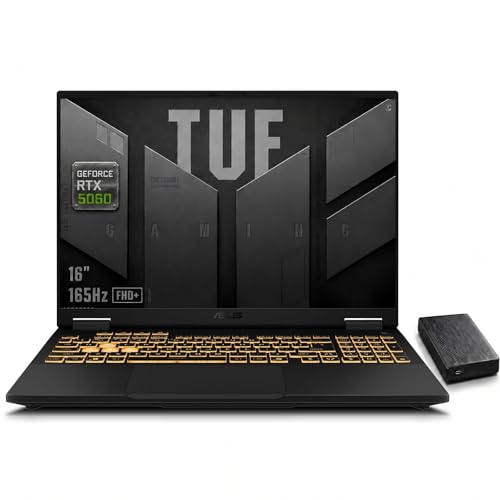
ASUS TUF F16 RTX 5060 Gaming Laptop
- RTX 5060 GPU has a listed maximum TGP of 115W.
- Fast 165Hz display is well matched to competitive gaming.
- Core i7-14650HX supports demanding multitasking and creative workloads.
- Includes a 1TB SSD and a listed 1TB external HDD.
- Cooling system uses dual fans, multiple heat pipes, and large exhaust vents.
- FHD+ resolution is less detailed than QHD+ options available on some 16-inch gaming laptops.
- 16GB of RAM may be limiting for especially heavy multitasking or large creative projects.
- The listing does not provide battery runtime or detailed port information.

Lenovo LOQ RTX 5060 165Hz Gaming Laptop
- RTX 5060 graphics provide a strong basis for serious gaming
- Fast 165Hz IPS display is well matched to high-refresh gameplay
- Ryzen 7 processor and 16GB memory form a capable overall configuration
- 1TB capacity offers useful space for a growing game library
- Listed weight of 4.62 pounds is reasonable for a performance-focused gaming laptop
- The listing does not specify the RAM type or speed
- Storage capacity is stated, but the drive type is not identified
- Port selection, wireless standards, battery details, and keyboard lighting are not listed

Acer Nitro 16 RTX 4060 Gaming Laptop
- Strong midrange gaming hardware with an RTX 4060 Laptop GPU and Ryzen 7 7840HS processor
- Fast 165Hz IPS display with a taller 16:10 WUXGA resolution
- Useful 16GB DDR5 and 1TB PCIe Gen 4 SSD configuration
- Extensive port selection includes USB4, HDMI 2.1, Ethernet, and microSD
- Advanced cooling design includes liquid metal thermal grease
- At 5.95 pounds, it is relatively substantial for frequent travel
- The listing does not provide battery capacity or expected runtime
- The WUXGA panel prioritizes refresh rate over a higher native resolution

ASUS ROG Strix G16 RTX 4060 Gaming Laptop
- RTX 4060 Laptop GPU runs at up to 140W Max TGP.
- Fast 165Hz display includes Adaptive-Sync and 100% sRGB coverage.
- Core i7-13650HX and 16GB DDR5 memory support gaming and multitasking.
- MUX Switch with Advanced Optimus automatically switches between integrated and dedicated graphics.
- Cooling system includes CPU liquid metal and a third intake fan.
- The 512GB SSD may fill quickly when storing a large game library.
- FHD resolution prioritizes frame rate rather than the sharper detail of a higher-resolution panel.
- At 5.51 pounds, it is heavier than many general-purpose laptops.
Understanding 165Hz Hardware
A 165Hz panel refreshes more frequently than a standard laptop screen, which can make motion look smoother and controls feel more immediate. Its value still depends on the graphics hardware. An entry-level GPU may struggle to make full use of that refresh rate in demanding titles, especially at QHD resolution. Mid-range and upper-mid-range GPUs are generally a more natural match, while settings adjustments can help less powerful hardware deliver a responsive experience. Our guide to laptop desktop performance adds useful context.
Resolution changes the workload substantially. A Full HD or FHD+ display gives the GPU less work than a QHD panel, making high-refresh gaming easier to sustain. QHD looks sharper, particularly on a larger screen, but it asks more from the graphics processor. Buyers should therefore judge the panel and GPU as a pair rather than choosing the highest resolution or newest GPU label independently. CPU capability, memory capacity, cooling, and graphics power limits also affect how consistently a laptop can perform during longer sessions.
Worth knowing: A well-balanced laptop that can consistently feed its 165Hz panel is usually a smarter purchase than a model with one headline specification and obvious compromises elsewhere.
165Hz Myths That Cost You
Every Modern GPU Fully Uses 165Hz
A 165Hz screen does not guarantee that every game or workload will run at a similarly high frame rate. GPU class, display resolution, graphics settings, and the laptop GPU’s available power all matter. An RTX 4050-class option can make sense for lighter workloads or reduced settings, while RTX 4060, RTX 5060, RTX 4070, and RTX 5070 configurations offer progressively stronger foundations. The correct choice depends on whether you prioritize visual quality, resolution, responsiveness, or a balance among all three.
A Strong GPU Makes Everything Else Irrelevant
A powerful graphics processor can still be held back by limited memory, an unsuitable CPU, or poor thermal management. Sixteen gigabytes of RAM is a sensible starting point for a modern gaming laptop, while thirty-two gigabytes provides more room for demanding multitasking and creation work. CPU selection also matters when the laptop must handle gaming, background applications, streaming, or editing at the same time. Balanced components are more useful than an expensive GPU paired with avoidable bottlenecks.
All 165Hz Displays Are Equivalent
Refresh rate is only one display characteristic. Resolution, aspect ratio, adaptive synchronization, color coverage, and panel size can change the experience. A QHD screen offers more detail but increases GPU demand, while a 16:10 panel provides extra vertical space compared with a conventional 16:9 display. Cooling deserves equal attention because sustained heat can affect long-session performance. Build quality may also influence how well a machine holds up. Our laptop build quality overview explains what matters.
Every Listing Describes a Standard Configuration
Some listings are customized by third-party sellers, so the memory, storage, warranty, or included accessories may differ from the manufacturer’s standard retail configuration. Read the configuration note and warranty terms before ordering. Confirm the exact display resolution, GPU, RAM, storage, operating system, and port selection rather than relying on the model family name. Upgrade access also varies, and a listing should clearly identify whether memory or storage has already been changed.
Listing Red Flags
- A listing that highlights 165Hz but omits the native resolution makes it difficult to estimate how demanding the screen will be for the included GPU.
- An unspecified GPU power level can hide meaningful performance differences between laptops that use graphics processors with the same model name.
- Memory capacity without information about slots or upgrade limits may leave buyers uncertain about whether an affordable future RAM expansion is possible.
- A customized configuration with unclear warranty coverage can split support responsibilities between the original manufacturer and the third-party seller.
- A high-refresh display paired with no meaningful cooling information deserves closer scrutiny because sustained gaming places prolonged demand on the CPU and GPU.
- A sparse port description may conceal the absence of the display output, Ethernet connection, or USB standard needed for a particular desk setup.
Specifications should be checked against how the laptop will actually be used. A machine that stays on a desk may need Ethernet, external-display support, and several peripheral ports. A portable system puts more emphasis on chassis size and charging arrangements. Upgrade details are equally important if the included memory or storage will not meet long-term needs. Our overview of gaming laptop upgrades covers the usual limitations.
Benefits and Compromises
Upsides
- A 165Hz panel produces smoother motion than an ordinary low-refresh laptop display when the hardware supplies frames consistently.
- The higher refresh rate is useful for quick camera movement, precise cursor tracking, and other visually fast interactions.
- Many 165Hz laptops pair the display with dedicated NVIDIA graphics suitable for both gaming and GPU-accelerated creative work.
- Available FHD, FHD+, WUXGA, and QHD configurations let buyers choose between easier performance targets and sharper image quality.
Trade-offs
- Reaching high frame rates at QHD is more demanding than doing so at Full HD, even when both displays refresh at 165Hz.
- Powerful CPUs and GPUs create heat, making cooling design important for maintaining consistent behavior during extended sessions.
- Paying for the strongest GPU may offer limited value if the buyer mainly runs lighter software or prefers modest visual settings.
A 165Hz laptop is most worthwhile when its GPU tier matches the screen resolution and the user’s expectations. Full HD models can make sense with mainstream graphics, while QHD configurations benefit from stronger GPUs. The best choice is not automatically the fastest model. It is the machine that balances display sharpness, graphics capability, cooling, memory, storage, and connectivity without overspending on unused performance.
Four-Step Selection Checklist
- Start with the GPU and resolution together. Choose stronger graphics for QHD or demanding visual settings, while a Full HD-class panel can be a more forgiving match for a mainstream GPU.
- Check the CPU and RAM balance. A capable Core i7 or Ryzen 7 processor with at least sixteen gigabytes of memory provides a practical foundation for gaming and normal background tasks.
- Review cooling and display details beyond refresh rate. Look for clearly described fans, heat pipes, exhausts, adaptive synchronization, color coverage, and the panel’s native aspect ratio.
- Verify the exact condition, configuration, ports, warranty, and upgrade terms. Customized listings may have different support arrangements, while soldered or limited components can affect later expansion.
After narrowing the specifications, consider whether portability is genuinely important. Gaming laptops provide an integrated screen and keyboard, but desktop systems can offer different upgrade and cooling advantages. The right format depends on where the system will be used and how often it must move. Our laptop versus PC comparison explores those practical differences.
Match Models to Priorities
- Best overall: Lenovo RTX 5060 combines RTX 5060 graphics, a WUXGA 165Hz display, 16GB memory, and 1TB storage.
- Strongest GPU: Thunderobot RTX 5070 pairs GeForce RTX 5070 graphics with a large 17.3-inch QHD panel.
- Best value: ASUS RTX 5060 provides 115W RTX 5060 graphics, FHD+, 16GB DDR5, and a 1TB SSD.
- Alternative brand: Acer RTX 4060 features Ryzen 7 7840HS, RTX 4060 graphics, WUXGA, and Wi-Fi 6E.
- Runner-up: ASUS RTX 4060 offers RTX 4060 graphics, Adaptive-Sync, Advanced Optimus, and 100% sRGB coverage.
Practical 165Hz Laptop Questions
1. Is paying extra for a 165Hz laptop worthwhile?
It can be worthwhile for players who value smoother motion and responsive controls, provided the GPU is capable enough for the display resolution. The premium is less useful when the laptop will mostly handle basic productivity or video playback. Buyers uncertain about the broader value proposition can read our gaming laptop value overview.
2. Which GPU class makes sense for a 165Hz screen?
Mainstream dedicated graphics can suit a Full HD 165Hz display when settings are adjusted sensibly. Stronger GPUs become more valuable at QHD, with demanding visual settings, or when the laptop will also handle GPU-accelerated creative work. Do not judge by the GPU name alone, since laptop power limits and cooling influence sustained performance.
3. How much memory should a 165Hz laptop have?
Sixteen gigabytes is a practical starting point for modern gaming and ordinary multitasking. Thirty-two gigabytes is more appropriate for buyers who keep many applications open, work with demanding creative projects, or want extra capacity from the outset. Refresh rate itself does not consume system memory, but the games and background software used with the laptop do.
4. What details should be verified before ordering?
Confirm the exact GPU, processor, native resolution, RAM, storage, ports, wireless standard, and warranty terms shown in the listing. Check whether the machine is a standard manufacturer configuration or has been upgraded by another seller. Cooling information and memory expansion limits are also useful because they affect sustained use and future flexibility.
Other 165Hz Configurations
| Product | What Is Different | Suits Whom |
|---|---|---|
| iCarp RTX 4050 | This customized configuration uses GeForce RTX 4050 graphics and a 15.3-inch WUXGA display. Upgraded memory and storage have separate warranty coverage. | It suits buyers comfortable with a third-party customized configuration and clearly divided warranty responsibilities. |
| Acer RTX 4050 | It combines an Intel Core i7-13620H, GeForce RTX 4050, a 15.6-inch Full HD panel, and Thunderbolt 4. | It suits mainstream Full HD gaming and users who value versatile high-speed connectivity. |
| msi RTX 4070 | This model pairs a QHD display with GeForce RTX 4070 graphics, 16GB DDR5, a 1TB NVMe SSD, and Cooler Boost 5. | It suits buyers who want sharper QHD visuals and stronger graphics without moving to the largest screen size. |
Choosing Your 165Hz Laptop
The Lenovo RTX 5060 is the best overall choice for its balanced RTX 5060 configuration, WUXGA display, memory, and storage. Buyers who prioritize the strongest available graphics should consider the Thunderobot RTX 5070, which combines GeForce RTX 5070 graphics with a large QHD 165Hz screen. Choose between them according to whether overall balance or maximum GPU capability matters more.


