

The Best 1TB SSD gaming laptops combine practical storage with enough graphics and processing power for modern games. The msi RTX 5060 is the strongest all-around choice, while the Thunderobot RTX 5070 offers a higher GPU tier and a larger QHD display.
Recommended by Us

Thunderobot Storm 17 RTX 5070 Gaming Laptop
- RTX 5070 GPU includes 8GB of newer GDDR7 graphics memory.
- QHD IPS display offers both a spacious 17.3-inch viewing area and a 165Hz refresh rate.
- 32GB DDR5 RAM is generous for gaming, content creation and multitasking.
- Strong port selection includes USB-C, HDMI and wired Ethernet.
- Wi-Fi 6, Bluetooth and an adjustable RGB keyboard are included.
- At 5.84 pounds, it is less convenient to carry than many smaller gaming laptops.
- The 53Wh battery is relatively modest for powerful hardware and a 17.3-inch QHD display.
- The listing does not specify the GPU power limit, SSD interface or RAM speed.

MSI Cyborg 17.3-inch RTX 5060 Laptop
- Current-generation RTX 5060 graphics with 8GB GDDR7 memory
- Generous 32GB DDR5 memory and 2TB of combined storage
- Fast 144Hz refresh rate on a spacious 17.3-inch display
- Comprehensive cooling system with dual fans and six heat pipes
- Useful wired and wireless connectivity, including Gigabit Ethernet and Wi-Fi 6E
- The large 17.3-inch display is limited to Full HD resolution
- At 5 pounds, it is less convenient to carry than a smaller laptop
- The listing does not specify the operating system or battery runtime
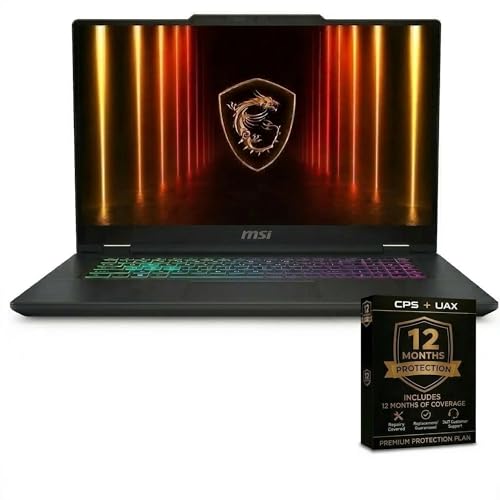
MSI Cyborg 15 RTX 5060 Gaming Laptop
- Modern NVIDIA GeForce RTX 5060 graphics
- Large 32GB DDR5 memory configuration
- Fast 144Hz Full HD display
- Spacious 1TB NVMe SSD
- WiFi 6 and Windows 11 included
- Full HD resolution may not satisfy buyers seeking a higher-resolution gaming display.
- The listed 8-pound weight is relatively cumbersome for frequent travel.
- The listing does not specify the port selection, battery runtime, or display color coverage.
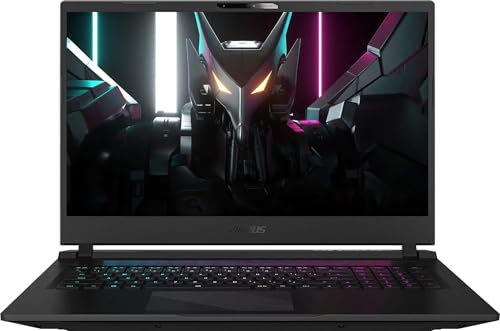
GIGABYTE Aorus 17 RTX 4070 Gaming Laptop
- Sharp 2560 x 1440 display with a fast 240Hz refresh rate
- RTX 4070 GPU and 14-core Core i7 processor form a capable gaming configuration
- 100% sRGB coverage is useful for gaming and color-sensitive creative work
- Wide port selection includes Thunderbolt 4, HDMI 2.1, and RJ-45 Ethernet
- 1080p IR camera supports clearer video calls and compatible facial sign-in
- At 6.22 pounds, it is heavier than many smaller gaming laptops
- The 300-nit display may be less comfortable in very bright environments
- The listing provides battery capacity but does not state expected runtime

ASUS TUF Gaming A15 RTX 4060 Laptop
- RTX 4060 Laptop GPU operates at up to 140W Max TGP
- Fast 144Hz display with adaptive sync and 100% sRGB coverage
- Generous 1TB PCIe SSD storage
- MUX Switch and Advanced Optimus are included
- Dual 84-blade Arc Flow Fans support cooling
- FHD resolution is less detailed than QHD or QHD+ alternatives
- The 144Hz refresh rate trails faster 165Hz and 240Hz gaming panels
- Battery capacity and estimated runtime are not listed
Understanding the 1TB Sweet Spot
A 1TB SSD provides comfortable starting capacity for Windows, essential applications, and a varied game library, but it is not unlimited. Large releases, downloadable content, recordings, and creative files can consume the available space quickly. You should expect to manage older games eventually, especially if you prefer keeping everything downloaded. That still makes 1TB much easier to live with than a smaller primary drive, because it leaves meaningful headroom after the operating system and everyday software are accounted for.
Storage capacity should narrow the field rather than decide the purchase by itself. Once every candidate includes a 1TB SSD, compare the GPU, CPU, memory, display, cooling, and expansion options. A well-balanced laptop usually provides a better experience than a storage-heavy configuration with weak graphics. If you are deciding whether the entire category fits your needs, our overview of gaming laptop value covers the broader trade-offs between portability, cost, and performance.
Four Practical Selection Rules
Choose an SSD as the primary drive, not merely as secondary capacity. Games and applications stored on an NVMe or PCIe SSD benefit from responsive loading and file access. A laptop that combines a 1TB SSD with a separate hard drive offers more total space, but the slower drive is better treated as bulk storage.
Check whether the storage can be expanded. A second M.2 slot can be more convenient than replacing the original drive when your library grows. Listings do not always explain internal access or supported capacities, so verify the model documentation and seller details rather than assuming every gaming laptop has the same upgrade layout.
Match the graphics hardware to the display. A high-resolution panel asks more of the GPU than a Full HD screen, while a high refresh rate is most useful when the rest of the hardware can provide smooth output. Storage capacity does not compensate for a mismatched display and graphics combination.
Leave room in the overall specification for adequate memory and cooling. A large SSD cannot prevent slowdowns caused by limited RAM or sustained heat. For gaming and multitasking, 16GB is a sensible baseline, while 32GB provides additional breathing room for streaming, content creation, and running several demanding applications together.
Worth knowing: Match the laptop to what you plan to store and play instead of chasing the highest number on the specification sheet. A balanced 1TB model can be a better purchase than a larger or faster-looking configuration with compromises elsewhere.
Hardware Tiers at a Glance
| Tier | What You Get | Best For |
|---|---|---|
| Value | A 1TB SSD paired with entry-level dedicated graphics, a Full HD display, and enough memory for ordinary gaming and daily use. | Casual players who prioritize storage capacity and are comfortable adjusting visual settings. |
| Balanced | A 1TB SSD, mid-range graphics, at least 16GB of memory, and a high-refresh display with a practical resolution. | Most gamers who want a capable library machine without paying primarily for the highest graphics tier. |
| Performance | A 1TB SSD combined with stronger graphics, a higher-resolution or faster display, and more memory for demanding workloads. | Enthusiasts, creators, and players who want more visual headroom and stronger multitasking capability. |
These tiers describe priorities rather than guaranteed performance. Cooling and GPU power limits can affect how two laptops with similar component names behave. Our discussion of laptop versus desktop performance explains why mobile hardware should not be judged by naming alone.
Storage and Hardware Myths
A Stronger GPU Always Makes Sense
The GPU tier should reflect your preferred resolution, visual settings, and types of games, not the size of the SSD. Entry-level dedicated graphics can suit lighter gaming and reduced settings, while mid-range hardware provides a more flexible balance for modern titles. Higher GPU tiers become more relevant with QHD displays, demanding visual effects, or creative applications. Paying for stronger graphics may be worthwhile, but a 1TB drive does not create that requirement by itself.
Storage Capacity Matters More Than Balance
A 1TB SSD is useful, but it cannot rescue an uneven system. A strong processor paired with limited memory may struggle during heavy multitasking, while abundant RAM cannot replace suitable graphics hardware. Look at the complete configuration and consider whether the CPU, GPU, and memory occupy broadly compatible tiers. For most buyers, 16GB is a practical starting point. Moving to 32GB makes more sense for demanding creation work, streaming, or frequent multitasking.
A Fast Display Guarantees Smooth Gaming
Refresh rate describes how often a display can update, not the performance the laptop will automatically deliver. Resolution also matters because QHD panels place a greater load on graphics hardware than Full HD screens. Panel color coverage, adaptive-sync support, and response characteristics may influence the experience as well. Compare the complete display specification with the GPU tier instead of selecting the largest refresh-rate number without context.
Cooling Is Just a Marketing Detail
Thermal design affects comfort, noise, and sustained performance during long sessions. Product listings may mention fan layouts, heat pipes, exhaust vents, or dedicated performance controls, but these details still need to be considered alongside chassis size and hardware power. Keep vents unobstructed and expect gaming laptops to become audible under load. Our article on long-term laptop performance discusses maintenance and heat-related considerations.
Every Listing Includes the Same Essentials
Condition, ports, wireless standards, warranty coverage, and upgrade access can vary even when two listings use similar model names. Confirm whether the product is new, identify the exact GPU and memory capacity, and inspect the available USB, display, Ethernet, and audio connections. Check whether charging over USB-C is supported rather than assuming it is. Seller-added accessories or warranties should also be distinguished from the laptop manufacturer’s standard package.
Matching Laptops to Real Buyers
The Growing Library Gamer
If you regularly rotate between several large games, 1TB is a sensible starting point because it reduces immediate storage pressure without making capacity the entire reason for buying. You may still need to remove older titles later, but routine management should be less restrictive than it would be with a smaller drive. Prioritize a balanced GPU, at least 16GB of RAM, and an SSD with practical expansion options.
Look for a second M.2 slot if you expect your collection to keep growing. An external SSD can also hold less frequently used files, though internal storage is cleaner for a portable setup. Avoid sacrificing a suitable display or GPU solely to obtain extra secondary storage that you may not need immediately.
The Gamer and Content Creator
A mixed gaming and creative workload can fill 1TB quickly because project files, recorded footage, caches, and exported media compete with installed games. In this situation, 32GB of memory can be useful, and a second storage slot deserves extra attention. Display resolution and color coverage also matter when the laptop will handle visual work as well as entertainment.
Processor capability becomes more important when editing, encoding, or running several applications together. Keep the system balanced rather than placing every available dollar into the GPU. Our overview of gaming laptop editing explains the hardware considerations for combined gaming and production use.
The Portable Everyday Player
For a laptop that moves between home, school, or work, 1TB offers enough flexibility to combine games with documents and everyday applications. Focus on a manageable screen size, useful ports, wireless connectivity, and charging requirements. Larger displays are immersive but usually create a heavier footprint, while compact models can be easier to carry and position.
Battery capacity alone does not tell the whole story because workload, display settings, and power modes influence runtime. Gaming performance is generally intended for plugged-in use. Check the supplied adapter and port layout, then decide whether the added screen space of a larger model is worth the reduced portability for your routine.
The Clearest Overall Choices
The msi RTX 5060 is the strongest all-around choice because it combines a 1TB NVMe SSD with 32GB of DDR5 memory, NVIDIA GeForce RTX 5060 graphics, and a 144Hz Full HD display. Choose the Thunderobot RTX 5070 instead if the GeForce RTX 5070 and 17.3-inch QHD 165Hz display better match your performance and screen priorities.
Other 1TB Models Worth Comparing
| Product | What Is Different | Suits Whom |
|---|---|---|
| Acer RTX 4060 | It pairs a 1TB PCIe Gen 4 SSD with an NVIDIA GeForce RTX 4060 Laptop GPU and a 16-inch 2560 x 1600 165Hz G-SYNC display. Two PCIe M.2 slots provide a documented storage expansion path. | It suits buyers who value a taller 16:10 display, Thunderbolt 4 connectivity, and clearly stated internal expansion options. |
| HP RTX 3050 | This model uses an NVIDIA GeForce RTX 3050 6GB GPU, 16GB of DDR4 memory, and a 15.6-inch Full HD 144Hz display. Its graphics tier is lower than the other alternatives listed here. | It fits casual players who want 1TB of storage and dedicated graphics but do not require a higher-tier GPU or QHD panel. |
| Thunderobot i7-13620H RTX 5070 | It combines an Intel Core i7-13620H, GeForce RTX 5070, 32GB of DDR5 memory, and a 17.3-inch QHD 165Hz display. The listing also specifies Wi-Fi 6, Ethernet, HDMI, and 100W PD fast-charging support. | It suits buyers seeking RTX 5070 graphics in a large-screen configuration but who prefer an Intel processor over the Ryzen-equipped Storm model. |
Practical 1TB Laptop Questions
1. Is 1TB enough for a gaming laptop?
For many buyers, 1TB is a comfortable starting capacity that leaves room for Windows, applications, and a useful selection of games. It can still fill quickly if you keep many large releases, recordings, or creative projects. Expansion support and sensible file management make the capacity easier to live with over time.
2. Does a 1TB SSD improve gaming performance?
An SSD improves loading, startup, installation, and file-transfer responsiveness compared with a mechanical hard drive. Capacity itself does not make the GPU render games faster. Once you have enough storage, graphics performance, processor capability, memory, cooling, and display quality become the more important differences between laptops.
3. What GPU tier should accompany a 1TB SSD?
There is no required GPU tier because storage capacity and graphics performance solve different problems. Entry-level dedicated graphics can serve casual gaming, while mid-range and higher tiers offer more flexibility for demanding settings and QHD displays. Choose according to the games, resolution, and visual settings you expect to use.
4. Is 16GB or 32GB of RAM better?
16GB is a practical baseline for gaming and ordinary multitasking. A 32GB configuration provides more headroom for streaming, creation work, heavy browser use, and running several demanding applications together. Check whether the memory is upgradeable if you would rather start with 16GB and expand later.
5. Should I choose Full HD or QHD?
Full HD places a lighter load on the GPU and can be a sensible match for mid-range hardware. QHD produces a sharper image but asks more from the graphics processor, particularly in demanding games. Screen size, refresh rate, adaptive-sync features, and panel quality should be evaluated alongside resolution.
6. What should I verify before ordering?
Confirm the exact CPU, GPU, RAM, SSD capacity, screen resolution, refresh rate, ports, wireless support, condition, and warranty source. Also check for a second storage slot and whether memory can be upgraded. Our article on laptop build quality covers additional chassis and durability considerations.


