

The Best 4TB SSD gaming laptops combine substantial storage with hardware powerful enough to justify the investment. The msi RTX 5070 stands out for its large, fast display and RTX 5070 graphics, while the Thunderobot RTX 5070 offers a compelling alternative with similarly spacious memory and storage.
Recommended by Us
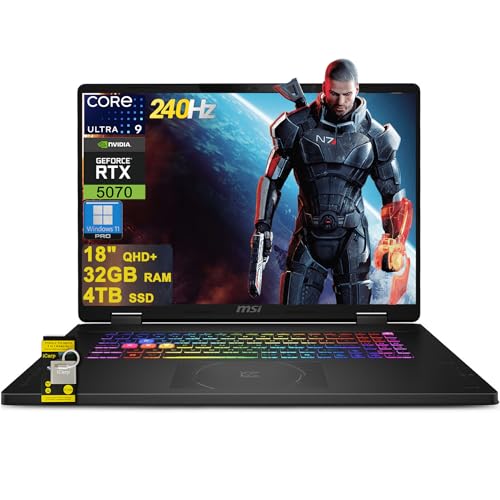
MSI Crosshair 18 HX AI RTX 5070 Laptop
- Large 32GB DDR5 and 4TB SSD configuration
- High-refresh 18-inch QHD+ IPS display
- GeForce RTX 5070 graphics with 8GB GDDR7
- Strong port selection with Thunderbolt 4 and HDMI 2.1
- Windows 11 Professional included
- The 18-inch chassis and 15.9-inch width may be less convenient for frequent travel.
- The RTX 5070 is listed with 8GB of graphics memory, which may constrain especially memory-intensive workloads.
- Battery capacity and expected runtime are not provided in the listing.

HP Omen 16 Slim RTX 5070 Gaming Laptop
- High-capacity 64GB RAM and 4TB SSD configuration
- GeForce RTX 5070 graphics with 8GB GDDR7
- Responsive 144Hz IPS anti-glare display
- Broad port selection including HDMI 2.1 and Ethernet
- Windows 11 Professional and Wi-Fi 6E included
- The WUXGA display is lower resolution than QHD or 4K panels found on some premium gaming laptops.
- Only one USB-C port is listed.
- Battery capacity, runtime, panel brightness, and color coverage are not specified.

MSI Crosshair 18 HX AI RTX 5070 Laptop
- Generous 64GB DDR5 memory and 4TB SSD configuration
- Large, color-rich QHD+ display with a fast 240Hz refresh rate
- High-end 24-core Intel processor for intensive multitasking
- RTX 5070 graphics with newer GDDR7 video memory
- Strong port selection including Thunderbolt 4 and HDMI 2.1
- The RTX 5070 has 8GB of VRAM, which may become restrictive in especially memory-heavy graphics workloads
- Battery capacity and expected runtime are not specified in the listing
- Chassis materials and detailed cooling information are not provided

Thunderobot Storm 17.3-inch RTX 5070
- High-capacity 64GB DDR5 memory and 4TB SSD configuration
- RTX 5070 GPU with 8GB of GDDR7 graphics memory
- Large 17.3-inch QHD IPS display with a 165Hz refresh rate
- Strong port selection with USB-C, HDMI, Ethernet, and three USB-A ports
- Wi-Fi 6, Bluetooth, RGB keyboard lighting, and a built-in webcam
- At 5.84 pounds, it may be less convenient for frequent travel than a smaller gaming laptop.
- The 53Wh battery is relatively modest for hardware built around a 17.3-inch QHD display and dedicated graphics.
- The listing does not provide details about GPU power limits or SSD expansion options.
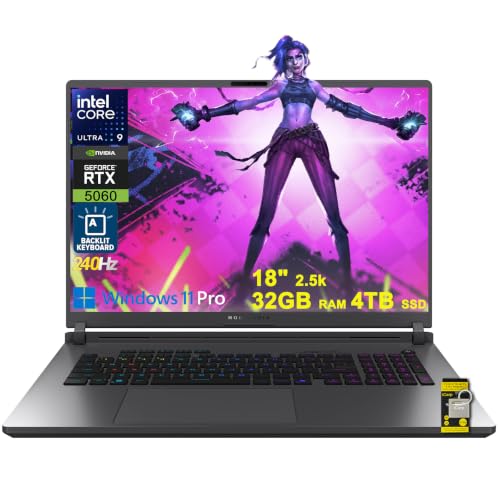
ASUS ROG Strix G18 RTX 5060 Gaming Laptop
- Generous 32GB DDR5 and 4TB SSD configuration
- Fast 240Hz IPS display with 100% DCI-P3 coverage
- High-end Intel Ultra 9 275HX processor
- Broad port selection including Thunderbolt 4 and HDMI 2.1 FRL
- Modern Wi-Fi 7 connectivity
- The 18-inch chassis and 7.05-pound weight limit portability
- GeForce RTX 5060 has 8GB of listed graphics memory
- Battery capacity and expected runtime are not specified
Understanding Four-Terabyte Storage
A 4TB SSD provides considerably more breathing room than the smaller drives commonly supplied with gaming laptops. It can hold a broad game library alongside launchers, saved videos, creative applications, and everyday files. That reduces the need to uninstall large titles whenever you want to try something different.
Storage capacity does not determine gaming performance by itself. The processor, graphics card, memory, display, and cooling design still shape how a laptop feels in demanding workloads. A well-balanced system is usually more useful than one that allocates most of its value to storage while compromising on the GPU or screen.
These laptops make the most sense for buyers who expect to use that capacity rather than leave most of it empty. Consider your game library, media files, and editing projects before paying for additional space. Our laptop selection guide explains the wider hardware choices.
Matching Storage to Your Routine
Keeping a Large Game Library
Players who regularly switch between many large games can benefit immediately from 4TB. The extra headroom reduces storage management and leaves room for updates, downloadable content, launchers, screenshots, and recordings. Prioritize a capable GPU and a high-refresh display alongside the drive, since storage space cannot compensate for weak graphics performance.
Think about how often you actually revisit older installations. If you normally keep only a few games available, a smaller internal drive plus external storage may be more economical. If slow internet or data limits make repeated downloads inconvenient, keeping more titles locally becomes a stronger reason to choose 4TB.
Gaming and Creating Content
A combined gaming and creative workflow can consume storage quickly. Raw video, project caches, exported files, and game captures all compete with installed titles for space. In this situation, favor a laptop with ample RAM, a strong multicore processor, and a color-capable display rather than viewing the SSD as the only important specification.
Port selection matters as well because external displays, card readers, audio equipment, and backup drives may become part of the setup. Thunderbolt or a capable USB-C connection can make desk use more convenient. Our gaming laptop cooling overview covers another consideration for sustained workloads.
Replacing a Desktop System
An 18-inch or 17.3-inch laptop with 4TB of storage can work well for someone who wants a desktop-like setup that remains movable. In that role, display resolution, refresh rate, keyboard layout, Ethernet, and monitor outputs deserve close attention. Weight and battery life may matter less if the computer spends most of its time connected to power.
Smaller 16-inch models are easier to carry while still offering substantial storage, but screen workspace will differ. Decide whether mobility or a larger built-in display matters more. Large gaming laptops can also be physically demanding to transport, as our guide to gaming laptop weight explains.
Hardware That Supports 4TB
GPU Tier and Display Resolution
The GPU should match the laptop’s native resolution and your preferred visual settings. RTX 5060 and RTX 5070 configurations can suit mainstream high-resolution gaming with sensible adjustments, while the RTX 5080 targets buyers seeking a higher graphics tier. Storage capacity has no direct effect on rendering speed, so avoid treating a 4TB label as proof that the rest of the computer is equally powerful.
Memory for Games and Multitasking
Large storage often appeals to people who keep many applications, browser tabs, launchers, and creative tools available. For gaming alone, moderate memory capacity can be sufficient, but heavier multitasking and content creation make additional RAM useful. Check whether a listing includes 32GB or 64GB and decide based on actual workload. More memory does not make an unused portion of the SSD faster.
Drive Configuration and Upgrades
Confirm whether the advertised 4TB is a factory configuration or a retailer upgrade, especially when the listing mentions an opened original seal. Also review any stated warranty coverage for upgraded parts. A large internal SSD is convenient, but accessible expansion slots can be valuable later. Brand support is another consideration, and our laptop reliability guide provides useful context.
Worth knowing: Match the laptop to what you will store and run instead of chasing the highest number on every specification. A balanced GPU, display, processor, memory configuration, and 4TB SSD will usually serve a large game library better than storage capacity alone.
Six Practical Selection Rules
First, choose the graphics tier before comparing storage configurations. A 4TB SSD gives games room to live, but it does not improve visual quality or rendering performance. Start with the GPU needed for your display resolution and settings, then look for that hardware with the desired capacity.
Second, avoid paying for memory you are unlikely to use. A 64GB configuration can suit demanding creation and extensive multitasking, while 32GB is already substantial for many gaming setups. Consider whether the additional memory supports a real workload or merely makes the specification sheet look more impressive.
Third, treat the display as a core part of the purchase. Resolution, refresh rate, color coverage, brightness, and screen size affect every session. A fast QHD+ panel is appealing for gaming and creation, while a WUXGA screen may place a lighter demand on the graphics processor.
Fourth, inspect the port list before ordering. HDMI, Ethernet, USB-A, USB-C, Thunderbolt, and card-reader availability vary between models. The right connections can reduce the need for adapters when adding external storage, monitors, controllers, networking, or creative equipment to a permanent desk setup.
Fifth, expect powerful gaming hardware to produce heat and fan noise under load. Larger chassis may have more physical room, but cooling behavior cannot be assumed from size alone. Our explanation of gaming laptop noise covers why performance and acoustics are connected.
Finally, read the exact seller listing rather than relying only on the model family. Gaming laptops often appear in many processor, GPU, memory, storage, and display configurations. Verify that the selected listing actually includes the 4TB SSD and every other feature that influenced your decision.
Key 4TB Laptop Questions
1. Is a 4TB gaming laptop worth the added cost?
It can be worthwhile if you maintain a large installed library, record gameplay, edit media, or have limited access to fast downloads. Buyers who keep only a small selection of games may get better value from a smaller internal drive. Spending more on the GPU or display could have a greater effect on everyday gaming.
2. Does a 4TB SSD make games run faster?
Capacity alone does not increase graphics performance. An SSD can provide responsive loading and file access, but the CPU and GPU remain central to gaming performance. A 4TB model mainly gives you more room before you need to remove games, move files, or connect external storage.
3. Is an RTX 5060 or RTX 5070 better with 4TB?
The appropriate GPU depends on display resolution, settings, and the types of workloads you run, not the SSD size. An RTX 5060 configuration may be enough for buyers who accept adjusted settings, while an RTX 5070 offers a higher graphics tier. Compare the entire laptop rather than pairing storage capacity with a GPU automatically.
4. How much RAM should a 4TB model have?
Storage and memory solve different problems. A 4TB SSD holds games and files, while RAM supports active programs and multitasking. The 32GB configurations listed here are generous for many users, and 64GB is more relevant to demanding creative work, large projects, or unusually heavy multitasking.
5. What should beginners verify before ordering?
Check the exact GPU, processor, RAM, display resolution, refresh rate, ports, operating system, and SSD capacity shown for the selected configuration. Look for any wording about seller upgrades or separate warranty terms. Battery expectations also deserve attention if mobility matters. Our gaming laptop battery guide explains the broader tradeoffs.
The Clearest 4TB Choices
The msi RTX 5070 is the strongest overall match for buyers wanting a spacious SSD, 64GB of memory, RTX 5070 graphics, and a large QHD+ display. The Thunderobot RTX 5070 is the value-oriented alternative, combining the same storage and memory capacities with RTX 5070 graphics and a 17.3-inch QHD screen. Choose based on display preferences, connectivity, and comfort with the brand.
Other 4TB Models Worth Seeing
ASUS RTX 5060This 18-inch option combines a 144Hz WUXGA display with NVIDIA GeForce RTX 5060 graphics, 64GB of RAM, and a 4TB PCIe SSD. It suits buyers who prioritize memory capacity and a large screen over moving to a higher GPU tier.
Lenovo RTX 4080The Legion pairs NVIDIA GeForce RTX 4080 graphics with a 240Hz display, 64GB of DDR5 RAM, and a 4TB NVMe SSD. Its factory-calibrated display and Thunderbolt 4 connection make it particularly relevant to gaming and creative workflows.
msi RTX 5080This is the highest GPU tier among the listed alternatives, using an NVIDIA GeForce RTX 5080 Laptop GPU with 16GB GDDR7. It also provides a 240Hz QHD+ display, 32GB DDR5 memory, a 4TB SSD, and two Thunderbolt 5 ports.


