

The Best gaming laptops for 60 FPS balance graphics power, processor performance, memory, and display quality without chasing unnecessary specifications. The ASUS GTX 1650 TI is the sensible overall choice, while the MECHREVO RTX 4050 offers the strongest graphics hardware among these laptops.
Recommended by Us

MECHREVO Dragon 15K RTX 4050 Gaming Laptop
- RTX 4050 supports DLSS 3 and accelerated ray tracing.
- High-refresh 165Hz FHD display with 100% sRGB coverage.
- DDR5 5600MHz dual-channel memory technology.
- RAM and SSD expansion options are listed up to 64GB and 4TB.
- Control Center provides fan, performance-profile, and RGB customization.
- Installed RAM and SSD capacities are not specified in the provided listing.
- The display is FHD rather than a higher-resolution QHD panel.
- Battery capacity, runtime, ports, and wireless specifications are not listed.

HP Victus 15.6-inch RTX 4050 Gaming Laptop
- RTX 4050 GPU includes 6GB of dedicated graphics memory.
- 144Hz FHD IPS anti-glare display is well matched to high-refresh gaming.
- Useful selection of wired ports, including HDMI 2.1 and Ethernet.
- 16GB of RAM is a practical capacity for gaming and multitasking.
- Backlit keyboard and included USB-C hub add value.
- The 512GB SSD may fill quickly after installing several large applications or games.
- The listed webcam resolution is limited to 720p.
- Battery capacity, runtime, RAM type, and SSD interface are not specified in the listing.

ASUS TUF FX506LI GTX 1650 Ti Gaming Laptop
- Dedicated NVIDIA GeForce GTX 1650 Ti graphics
- Full HD 15.6-inch display
- Quad-core Intel Core i5 processor
- Fast PCIe SSD storage
- The 256GB SSD may fill quickly with a large game library.
- 8GB of RAM is a basic capacity for modern gaming and heavy multitasking.
- At 6 pounds and 1.1 inches thick, it is less portable than slimmer laptops.

HP Victus 15.6 Gaming Laptop GTX 1650
- Dedicated NVIDIA GeForce GTX 1650 graphics
- Capable Intel Core i5-12450H processor
- Useful 512GB SSD capacity
- Full-size 15.6-inch laptop format
- 8GB of memory may limit demanding games and heavier multitasking
- Display resolution and refresh rate are not specified
- Cooling, connectivity, ports, and keyboard lighting details are not listed
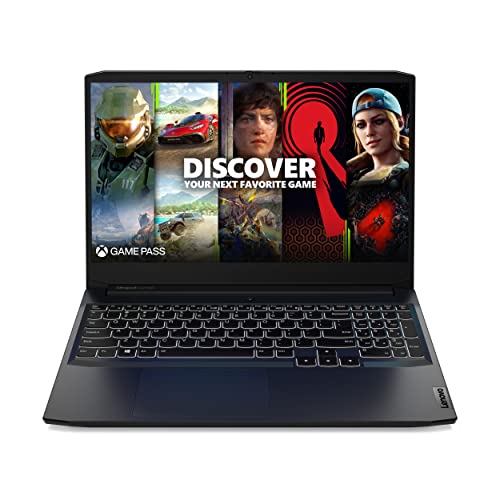
Lenovo IdeaPad Gaming 3 GTX 1650
- 120Hz FHD IPS display offers smoother motion than a standard 60Hz panel
- Six-core Ryzen 5 5600H processor supports gaming and general productivity
- Dedicated GTX 1650 graphics are appropriate for entry-level gaming
- Includes Wi-Fi 6, Ethernet, USB-C, and HDMI connectivity
- Backlit keyboard and webcam privacy shutter are useful practical extras
- 8GB of RAM may feel restrictive during heavier multitasking
- 256GB of storage can fill quickly with large applications and game libraries
- At 6.9 pounds, it is relatively heavy for frequent travel
Understanding the Performance Target
A steady frame-rate target at Full HD does not automatically require the newest or most expensive mobile GPU. Older GTX hardware can remain suitable when settings are adjusted, while RTX models provide more graphics headroom for demanding visual options. The useful question is whether the complete laptop can sustain consistent play, not whether one component carries the largest model number.
Display refresh rate also matters, but a high-refresh panel cannot create performance the GPU does not supply. A balanced CPU, adequate memory, sensible resolution, and effective thermal design all affect consistency. Thin machines may also prioritize portability over cooling capacity. Our guide to laptop weight explains why powerful models often carry extra bulk.
Listing Terms Worth Understanding
- Full HD resolution: This usually means a 1920 x 1080 display, a practical resolution for balancing image clarity with the workload placed on a mobile GPU.
- Refresh rate: A faster panel can display motion more smoothly when the hardware produces enough frames, but it does not guarantee stable gaming performance by itself.
- Dedicated graphics: A separate NVIDIA GPU has its own graphics memory and is generally better suited to modern gaming than graphics built into the processor.
- Dynamic Boost: This NVIDIA technology can shift available power toward the GPU under suitable conditions, although actual behavior still depends on the laptop’s power and thermal limits.
- G-SYNC or adaptive sync: These technologies coordinate display behavior with rendered frames to reduce visible tearing and make variable performance feel smoother.
Cooling descriptions deserve attention because sustained gaming loads generate much more heat than browsing or video playback. Marketing language is less useful than concrete details about fans, vents, heat pipes, and selectable performance modes. Our explanation of gaming laptop noise covers why fan volume rises during demanding workloads.
A Practical Hardware Checklist
- Match the GPU to your settings: GTX 1650-class graphics can suit a cost-conscious Full HD setup with adjusted settings, while RTX 3050 and RTX 4050 models offer progressively more room for demanding graphics features. Do not assume every laptop using the same GPU performs identically.
- Balance the CPU and RAM: A capable graphics processor can still be held back by limited memory or an uneven processor pairing. Eight gigabytes is a workable starting point, but heavier multitasking and newer software can make additional memory worthwhile.
- Check the display and cooling: Full HD is the sensible resolution for this performance goal, while a faster refresh panel provides room for lighter workloads. Thermal design determines whether the hardware can maintain its intended performance during longer sessions.
- Verify condition, ports, and upgrades: Confirm whether the machine is factory configured or reseller upgraded, then check storage capacity, external display connections, Ethernet, USB ports, memory options, and the warranty covering modified components.
Heat does not automatically indicate a defective laptop, but blocked vents, aggressive boost behavior, and poor placement can make temperatures harder to manage. Our overview of laptop overheating explains the distinction between normal warmth and a real thermal problem.
Worth knowing: Match the laptop to a steady Full HD experience instead of chasing the highest specification on the page. Money spent on unused display speed or oversized storage may be better directed toward balanced memory and graphics hardware.
Benefits and Practical Compromises
Upsides
- Full HD gaming places a more manageable load on a mobile GPU than higher display resolutions, making balanced mid-tier hardware genuinely useful.
- A high-refresh display can still improve pointer movement, scrolling, and lighter competitive workloads even when demanding software cannot use its full refresh range.
- RTX-class graphics provide access to newer NVIDIA rendering features and generally offer more flexibility when visual settings become demanding.
- Gaming laptops combine the display, keyboard, processor, graphics hardware, and storage in one portable system, reducing the need for separate desktop parts.
Trade-offs
- Sustained gaming creates heat and fan noise, particularly when performance modes allow the processor and GPU to draw more power.
- Entry configurations with limited memory or storage may need upgrades sooner, adding inconvenience and possible warranty considerations.
- A fast panel can look impressive in a listing while doing little to compensate for an underpowered GPU or poorly balanced system.
Buyers should expect the graphics tier, selected settings, and software demands to determine how reliably a laptop reaches its intended target. GTX models make the most sense when cost matters and settings are flexible. RTX 4050 systems offer greater breathing room, but they should still be judged as complete machines rather than purchased solely for the GPU badge.
Matching Hardware to Your Priorities
Budget-Conscious Full HD Players
Start with the GPU, but accept that sensible settings are part of the bargain. A GTX 1650 or GTX 1650 Ti configuration can suit this situation when the goal is stable Full HD play rather than maximum visual quality. Check whether the included memory and storage will cover your normal workload before assuming the lowest initial cost is the best value.
Older hardware can still be practical, although smaller solid-state drives fill quickly and limited memory reduces multitasking flexibility. Buyers should also consider whether an older processor and graphics platform remain worthwhile compared with a newer discounted model.
Players Wanting More Graphics Headroom
An RTX 4050 laptop is the stronger direction when you want more room for demanding settings, ray tracing, or NVIDIA’s newer rendering features. The MECHREVO and HP RTX 4050 configurations in the table pair that GPU with Full HD high-refresh displays, while their listed processors and memory configurations differ.
Extra graphics capability does not remove the need to check cooling, ports, and upgrade access. If timing matters more than a particular model, our overview of laptop sales explains common opportunities to shop more carefully.
Students and Everyday Multitaskers
A gaming laptop used for classes, work, media, and games needs a balanced specification. Prioritize enough memory for simultaneous applications, a solid-state drive large enough for everyday files, and a processor that is not badly mismatched with the GPU. Port selection matters when you regularly connect storage, displays, Ethernet, or classroom accessories.
Weight and fan behavior deserve equal consideration because performance-oriented laptops are not automatically ideal travel companions. A thinner chassis may be easier to carry, while a larger thermal system may handle sustained loads more comfortably. Decide which compromise affects your routine most.
Picks for Different Players
| Reader | Pick | Why |
|---|---|---|
| Best overall | ASUS GTX 1650 TI | Its NVIDIA GeForce GTX 1650 Ti, Full HD display, and Intel Core i5-10300H form a sensible basic gaming combination. |
| Strongest GPU | MECHREVO RTX 4050 | The RTX 4050, DDR5 memory, 165Hz Full HD display, and configurable cooling controls suit buyers prioritizing graphics capability. |
| Best value | Lenovo GTX 1650 | It combines a Ryzen 5 5600H, GTX 1650, Full HD IPS display, and 120Hz refresh rate. |
| Alternative brand | HP RTX 4050 | This HP configuration includes an RTX 4050, 16GB RAM, 512GB SSD, and Intel Core i5-13420H. |
| Runner-up | HP GTX 1650 | The Intel Core i5-12450H, GTX 1650, and 512GB SSD provide a straightforward entry-level combination. |
The Shortlist Verdict
The ASUS GTX 1650 TI is the balanced overall choice for buyers comfortable with adjusting settings and working with an older graphics tier. Choose the MECHREVO RTX 4050 when stronger graphics hardware, DDR5 memory, and a faster Full HD display matter more. Either way, check the exact configuration before ordering because memory, storage, condition, and warranty coverage can matter as much as the model name.
Other Configurations Worth Comparing
| Product | What Is Different | Suits Whom |
|---|---|---|
| ASUS RTX 3050 TI | It uses an NVIDIA GeForce RTX 3050 Ti with a 144Hz Full HD adaptive-sync display in a 0.8-inch, 4.4-pound chassis. | It suits buyers who want a thinner RTX laptop and can work with the included 8GB DDR4 memory. |
| Delca RTX 3050 | This reseller-upgraded HP Victus pairs an Intel Core i5-13420H with an RTX 3050 6GB. Delca covers upgraded memory and storage separately. | It suits buyers wanting configurable memory or storage who are comfortable with a resealed, third-party-upgraded machine. |
| Lenovo RTX 4050 | It combines an RTX 4050 with a Ryzen 5 7235HS and a 144Hz Full HD IPS G-SYNC display rated at 300 nits. | It suits buyers prioritizing RTX graphics, G-SYNC, and broad RAM or storage configuration options. |
Questions Before You Commit
1. Is a gaming laptop sensible for steady Full HD play?
Yes, provided portability or an all-in-one setup matters to you. A desktop may offer easier upgrades, but a laptop includes the screen, keyboard, battery, and gaming hardware in one machine. Our discussion of laptop value can help clarify that trade-off.
2. Which mobile GPU tier should a beginner choose?
A GTX 1650-class GPU can be adequate when you accept reduced settings, while RTX 3050 and RTX 4050 options provide more graphics headroom. Beginners should avoid choosing from the GPU name alone. Compare memory, processor balance, display resolution, storage, cooling details, and warranty terms as well.
3. How much memory makes sense for long-term ownership?
Eight gigabytes can serve as a starting point, but it leaves less room for background applications and demanding software. Sixteen gigabytes is a more comfortable target for multitasking and longer ownership. If a listing starts lower, verify whether memory is upgradeable and whether opening or modifying the laptop affects warranty coverage.
4. What listing details prevent costly mistakes?
Confirm the exact processor, GPU, dedicated graphics memory, system RAM, storage capacity, display resolution, refresh rate, ports, operating system, and warranty provider. Also check whether the computer is factory configured, refurbished, or resealed by a reseller for upgrades. Similar model names can hide materially different configurations.


