

The Best gaming laptops for gaming and streaming combine powerful graphics with enough processor headroom for broadcasting, recording, and background apps. The msi RTX 5080 is the strongest all-around choice here, while the Acer RTX 5070 TI pairs high-end hardware with a larger display.
Recommended by Us

Acer Predator Helios Neo 18 RTX 5070 Ti
- High-end RTX 5070 Ti graphics with DLSS 4 and ray-tracing support
- Fast, color-rich 18-inch WQXGA 240Hz G-SYNC display
- Generous 32GB DDR5-6400 memory and 2TB PCIe Gen 4 storage
- Extensive ports including Thunderbolt 4 and HDMI 2.1
- Dual-fan cooling with an AeroBlade metal fan and liquid metal thermal compound
- The 7.28-pound chassis is cumbersome for frequent travel
- Both PCIe M.2 slots are occupied, so adding another internal SSD requires replacing an existing drive
- Battery capacity and expected runtime are not specified in the listing
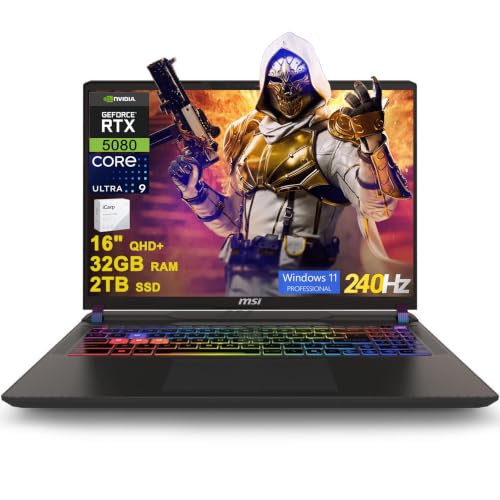
MSI Vector 16 HX AI RTX 5080 Gaming Laptop
- High-end RTX 5080 graphics with 16GB of dedicated graphics memory
- Sharp 16-inch QHD+ IPS display with a fast 240Hz refresh rate
- Generous 32GB DDR5 memory and 2TB SSD configuration
- Extensive port selection includes two Thunderbolt 5 connections
- Includes Windows 11 Professional and Wi-Fi 7
- The listed 49.82-pound weight appears unusually high for a laptop and should be verified before purchase.
- Battery capacity and expected runtime are not provided in the listing.
- The listing does not specify display brightness or color-gamut coverage.

MSI Vector 16 HX RTX 5080 Gaming Laptop
- RTX 5080 Laptop GPU includes 16GB of GDDR7 graphics memory
- Fast 240Hz QHD+ display with 100% DCI-P3 coverage
- High-capacity 64GB RAM and 4TB SSD configuration is listed
- Extensive port selection includes dual Thunderbolt 5, HDMI 2.1, Ethernet, and an SD card reader
- Thunderobot 7-in-1 USB-C hub is included
- The listing conflicts on capacity: the selected size says 64GB RAM and 4TB SSD, while the feature bullets state 32GB and 2TB
- The built-in camera is limited to 720p HD
- Wi-Fi 6 is listed rather than a newer Wi-Fi standard

Lenovo Legion 5 15IRX10 RTX 5070 OLED
- High-end Core i9-14900HX processor
- RTX 5070 graphics with 8GB GDDR7
- Sharp 15.1-inch WQXGA OLED display
- Generous 32GB DDR5-5600 memory
- Modern Wi-Fi 7 and Gigabit Ethernet connectivity
- Glossy display may show reflections in bright environments
- Display refresh rate is not specified in the listing
- Battery capacity and expected runtime are not provided

GIGABYTE AERO X16 RTX 5070 Laptop
- Upper-tier RTX 5070 Laptop GPU with DLSS 4 support
- Strong 32GB DDR5 and 1TB SSD configuration
- Ryzen AI 7 350 processor built for gaming and creative workloads
- Relatively light 4.18-pound weight for a 16-inch gaming laptop
- Windows 11 Home with Copilot+ PC features
- Display resolution and refresh rate are not specified in the listing
- Port selection, wireless standard, and keyboard lighting are not listed
- GPU power limit and SSD interface are not provided
Streaming Performance Priorities
Buyers comparing laptops for simultaneous gaming and streaming should focus on sustained performance rather than one headline specification. The GPU handles game rendering and can assist with video encoding, while a capable multicore CPU leaves room for streaming software, voice chat, browser tabs, and background tools. Memory capacity matters because these applications run together, and fast storage helps with large game libraries and locally recorded video. Display resolution and refresh rate affect the built-in gaming experience, but they do not replace balanced internal hardware. Cooling also matters because laptop components share limited thermal space during long sessions. Portability should be weighed against screen size and performance class, especially if the computer will travel regularly. Our laptop selection guide adds context.
Hardware Tiers That Fit
| Tier | What You Get | Best For |
|---|---|---|
| Value tier | A modern dedicated GPU, a capable multicore processor, adequate memory, and fast SSD storage without prioritizing every premium specification. | Casual streaming, mainstream gaming settings, and buyers willing to adjust visual options to keep background tasks responsive. |
| Balanced tier | Stronger graphics, more processor headroom, generous memory, and a high-refresh display that suits both gaming and content work. | Regular gaming and streaming from one laptop, including recording clips and running several supporting applications together. |
| Performance tier | A high-end GPU and processor, substantial memory, fast storage, premium connectivity, and displays designed for demanding visual workloads. | Frequent streaming, higher-resolution gaming, heavier creation tasks, and buyers who prioritize performance over compact size or lower cost. |
A balanced tier is enough for many users, while the performance tier makes more sense when streaming is frequent or creative workloads extend beyond broadcasting. Our laptop versus desktop overview explains the broader performance trade-offs.
Five Models Compared
The Acer Predator Helios Neo 18 AI Gaming Laptop combines an Intel Core Ultra 9 275HX with an NVIDIA GeForce RTX 5070 Ti Laptop GPU, 32GB DDR5 memory, and a 2TB PCIe Gen 4 SSD. Its 18-inch WQXGA display supports a 240Hz refresh rate and NVIDIA G-SYNC. Acer also specifies dual fans, a custom 5th Gen AeroBlade 3D Metal Fan, and liquid metal thermal compound, making it the only table model with this level of stated cooling detail.
Both MSI Vector configurations pair the Intel Core Ultra 9 275HX with the NVIDIA GeForce RTX 5080 Laptop GPU, 32GB DDR5, and a 2TB SSD. Each has a 16-inch QHD+ 240Hz display and two Thunderbolt 5 ports. The B0G1XY2MYS configuration lists Wi-Fi 7, an FHD IR camera, and a 24-zone RGB keyboard, while B0FCG52DBR lists Wi-Fi 6, a 720p camera, and an included USB-C hub. Those listing differences are worth checking before ordering.
Worth knowing: Match the laptop to gaming and streaming together rather than chasing the highest specification on the page. Balanced CPU, GPU, memory, storage, and cooling characteristics are more useful than one standout number.
The Lenovo Legion 5 uses an Intel Core i9 14th Gen 14900HX, NVIDIA GeForce RTX 5070 8GB GDDR7, 32GB DDR5-5600, and a 1TB SSD. Its 15.1-inch WQXGA OLED display and 4.19-pound listed weight distinguish it from the larger options. The GIGABYTE AERO X16 pairs an AMD Ryzen AI 7 350 with an NVIDIA GeForce RTX 5070 Laptop GPU in a 4.18-pound, 0.65-inch chassis. For this workload, the most important difference is GPU and CPU balance, followed closely by memory capacity and the cooling information supplied by the manufacturer.
Shared Benefits and Compromises
Upsides
- Dedicated NVIDIA graphics can handle game rendering while providing hardware features that support video production and streaming workflows.
- Every table model includes 32GB of memory, giving games, broadcast software, browser sources, voice chat, and utility programs room to operate together.
- High-refresh displays make fast movement look smoother during play, while QHD-class or WQXGA-class resolutions provide useful workspace for gaming and content tasks.
- Modern SSD storage reduces startup and loading delays, while 2TB configurations provide more immediate room for games and local recordings than 1TB models.
Trade-offs
- Large displays and performance-focused components can make a laptop less convenient to carry, particularly when compared with thinner 15-inch and 16-inch designs.
- Powerful components generate substantial heat under combined workloads, yet detailed cooling information is not supplied for every model in the table.
- Premium GPU tiers can cost considerably more, even when a balanced model would already meet a buyer’s streaming quality and gaming needs.
The best choice is not automatically the laptop with the largest screen or highest GPU designation. Buyers should consider how often they stream, whether they record locally, and which applications remain open while playing. A balanced configuration usually provides a smoother ownership experience than overspending on graphics while overlooking storage, portability, connectivity, or cooling information.
Upgrade Order Over Time
- Start by expanding storage if the laptop supports another SSD and your game library or recordings are filling the existing drive. Extra capacity improves convenience without changing the core performance profile.
- Increase memory next when monitoring tools show that games, streaming software, browser sources, and background applications are approaching the installed capacity. Confirm supported capacity and module requirements before purchasing parts.
- Improve the external setup with a suitable microphone, camera, lighting, or capture hardware based on what the stream actually lacks. These additions often affect presentation more directly than replacing a capable laptop.
- Replace the laptop only when the fixed CPU or GPU no longer meets your preferred settings or workload. Our laptop upgrade guide explains typical limitations.
Laptop upgrades are more restricted than desktop upgrades, so the initial CPU and GPU choice deserves the most attention. Storage and memory may be serviceable on some machines, but support varies by configuration. Plan around the components that cannot normally be replaced, then treat accessible storage, memory, and external equipment as later improvements rather than reasons to postpone a suitable purchase.
Match Models to Buyers
Best overall: msi RTX 5080 suits buyers wanting RTX 5080 graphics, 32GB RAM, and 2TB storage.
Strongest-GPU brief: Acer RTX 5070 TI suits buyers wanting RTX 5070 Ti graphics and documented cooling features.
Best value: GIGABYTE RTX 5070 suits mobile creators wanting RTX 5070 graphics.
Alternative configuration: msi core Ultra 9 RTX 5080 adds listed Wi-Fi 7 and an FHD IR camera.
Runner-up: Lenovo RTX 5070 suits buyers prioritizing an OLED display and lower listed weight.
Streaming Laptop Questions
1. Is one gaming laptop enough for playing and streaming?
Yes, a suitably configured gaming laptop can run a game and streaming software together. Prioritize a capable dedicated GPU, a multicore processor, sufficient memory, and cooling designed for sustained workloads. Using one computer is convenient, although performance settings may need adjustment when the game and broadcast tools compete for the same system resources.
2. Which GPU class makes sense for regular streaming?
A modern mid-range dedicated GPU is a practical starting point for mainstream gaming and streaming, while higher tiers provide more room for demanding visual settings and creative tasks. The right tier depends on display resolution, preferred quality settings, and stream complexity. Avoid choosing by the GPU name alone because laptop power and thermal designs also influence sustained behavior.
3. Is 32GB of memory worthwhile for this workload?
For gaming and streaming together, 32GB provides comfortable space for broadcast software, browser sources, chat tools, and background utilities. Lower capacities can still work for lighter setups, but they leave less room for multitasking. Every laptop in the main table includes 32GB, so memory capacity is not a major differentiator among these particular models.
4. Should I prioritize the processor or graphics card?
Neither should be considered in isolation. The GPU handles game rendering and can help with video encoding, while the processor manages game logic, streaming software, and other active applications. A balanced combination is generally preferable to pairing a very powerful component with a much weaker partner, especially for long sessions involving several simultaneous tasks.
5. How important is cooling for longer streams?
Cooling is important because the CPU and GPU may remain under substantial load throughout a gaming and streaming session. Look for clearly stated thermal features and avoid assuming that every large chassis uses the same cooling design. Our gaming laptop cooling article covers what to examine.
6. What should I verify before choosing a configuration?
Confirm the exact CPU, GPU, memory, storage, display, wireless standard, ports, camera, and operating system shown for the specific listing. Closely related configurations can differ in meaningful ways. Also check whether storage slots are available, whether memory is expandable, and whether the ports support any external displays, capture devices, or accessories you plan to use.
Other Capable Alternatives
| Product | What Is Different | Suits Whom |
|---|---|---|
| Acer RTX 5060 | It combines an AMD Ryzen 7 260, NVIDIA GeForce RTX 5060 Laptop GPU, 32GB DDR5, and a 1TB SSD. The 16-inch WUXGA display has a 180Hz refresh rate and 100% sRGB coverage. | It suits buyers seeking a less extravagant hardware tier with ample memory, accurate listed color coverage, and an available second M.2 slot. |
| HP RTX 4090 | This larger model uses an i9-13900HX and GeForce RTX 4090 with 32GB DDR5 and a 2TB SSD. Its 17.3-inch QHD display supports a 240Hz refresh rate. | It suits buyers who prefer RTX 4090 graphics, a large display, Windows 11 Pro, and a broad selection of stated ports. |
| Alienware RTX 4080 | It pairs an Intel Core i9-14900HX with NVIDIA GeForce RTX 4080 12 GB GDDR6 graphics. It also provides an 18-inch QHD+ 165Hz display and four M.2 slots on applicable configurations. | It suits buyers who prioritize a large 18-inch screen, substantial storage expansion potential, and a full keyboard with a number pad. |
The Bottom Line
The msi RTX 5080 is the leading all-around option for gaming and streaming because it combines high-end graphics, substantial memory and storage, and a fast QHD+ display. Choose the Acer RTX 5070 TI instead if an 18-inch display and clearly documented cooling hardware are higher priorities. Both are performance-focused choices, so portability and the exact listing details should be considered before ordering.


