

The Best MSI raider gaming laptops combine desktop-class hardware with large, fast displays. The EXCaliberPC MSI Raider A18 HX is the strongest all-around choice, while the MSI Raider 18 HX AI offers a balanced QHD+ configuration for high-refresh gaming.
Recommended by Us

MSI Raider 18 HX AI RTX 5070 Ti
- High-end RTX 5070 Ti GPU with 12GB GDDR7
- Fast 240Hz QHD+ IPS display
- Powerful 24-core Intel Core Ultra 9 processor
- Generous 32GB RAM and 2TB NVMe SSD configuration
- Modern Wi-Fi 7 and Bluetooth 5.4 connectivity
- At 7.94 pounds, it is considerably heavier than many portable laptops
- The 18-inch chassis requires substantial desk and travel space
- Battery capacity is listed, but estimated real-world runtime is not provided

MSI Raider 16 Max HX RTX 5090 Laptop
- Top-tier RTX 5090 GPU with 24GB GDDR7 VRAM
- Fast 240Hz QHD+ OLED display
- High-end 24-core Intel Core Ultra 9 processor
- Modern Wi-Fi 7 and 2.5Gb Ethernet connectivity
- Generous 32GB DDR5 memory
- The 1TB SSD may feel limited for a large collection of modern games and media projects.
- At 5.73 pounds, it is less convenient to carry than many thinner gaming laptops.
- Battery capacity and expected runtime are not specified in the listing.
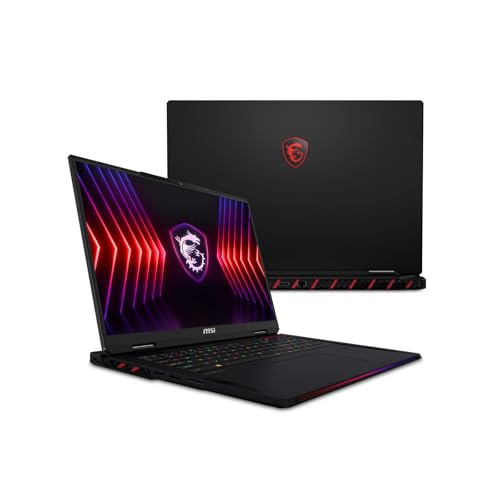
EXCaliberPC MSI Raider A18 HX RTX 5080
- High-end RTX 5080 GPU with 16GB GDDR7
- Powerful 16-core Ryzen 9 9955HX3D processor
- Sharp Mini LED display with HDR 1000 and full DCI-P3 coverage
- Generous 32GB DDR5 memory and 2TB NVMe storage
- Large 18-inch screen for an immersive desktop-replacement setup
- At 7.94 pounds, it is relatively cumbersome for frequent travel
- The 15.91 by 12.09-inch footprint requires considerable desk and bag space
- The 120Hz refresh rate is less competition-focused than higher-refresh displays available on some gaming laptops

EXCaliberPC MSI Raider 18 RTX 5080
- High-end NVIDIA GeForce RTX 5080 graphics with 16GB GDDR7
- Sharp and spacious 18-inch UHD+ Mini LED display
- Generous 64GB DDR5-6400 memory configuration
- Large 4TB total NVMe storage across two SSDs
- Wide 100% DCI-P3 color coverage with HDR 1000
- At 7.94 pounds, it is cumbersome for frequent travel
- The 120Hz refresh rate prioritizes resolution and image quality over ultra-high-refresh competitive play
- The large 15.91 by 12.09-inch footprint requires ample desk and bag space

MSI Raider A16 HX RTX 5080 Gaming Laptop
- High-end Ryzen 9 and RTX 5080 hardware
- Fast 240Hz QHD+ display with wide color coverage
- Generous 32GB DDR5 memory and 2TB NVMe storage
- Quick-access panel supports convenient upgrades
- The 5.4-pound weight may be cumbersome for frequent travel
- The feature list describes the 240Hz display as optional, so buyers should confirm the exact configuration
- Battery capacity and expected runtime are not listed
Understanding the Raider Range
Buyers comparing MSI Raider gaming laptops should expect powerful processors, dedicated high-tier graphics, fast displays, and relatively large chassis. The main choice is not simply between good and bad models. It is between different balances of resolution, refresh rate, GPU level, memory, storage, and portability. An 18-inch UHD+ configuration favors visual detail and workspace, while a QHD+ 240Hz model places more emphasis on fast motion. Your preferred games, creative workloads, desk space, and travel habits should determine which balance is worthwhile.
Our guide to choosing gaming laptops covers the broader decision.
- Display resolution changes the workload placed on the GPU, so a UHD+ panel and a QHD+ panel can produce different experiences even when paired with similar graphics hardware.
- High-end HX processors suit gaming alongside streaming, content creation, and heavy multitasking, but GPU selection usually has the more direct effect on visually demanding play.
- Large Raider models are better viewed as transportable desktop replacements than lightweight everyday notebooks, particularly when an 18-inch screen is a priority.
Worth knowing: Match the laptop to how you will use an MSI Raider rather than chasing the highest specification-sheet number. Extra resolution, memory, or storage is useful only when your games and workloads benefit from it.
Five Raider Configurations Compared
The MSI Raider 18 HX AI 18″ QHD(2560 x 1600) pairs an Intel Core Ultra 9 Processor 285HX with an NVIDIA GeForce RTX 5070 Ti 12GB GDDR7. Its 32GB DDR5 memory and 2TB PCI-E NVMe storage are sensible for a premium gaming system, while the 18-inch QHD+ 240Hz IPS display emphasizes refresh rate. It also includes a 99.9Whr battery, Wi-Fi 7, and Bluetooth 5.4.
The msi Raider 16 Max HX Gaming Laptop moves to an Intel Core Ultra 9 290HX Plus and NVIDIA GeForce RTX 5090 24GB GDDR7. It has 32GB DDR5 RAM, a 1TB PCIe Gen4 NVMe M.2 SSD, and a 16-inch QHD+ 240Hz OLED display. Its cooling system is designed to support up to 300W of total system power. The msi Raider A16 HX 16” 240Hz QHD+ Gaming Laptop instead uses an AMD Ryzen 9-8940HX, NVIDIA GeForce RTX 5080, 32GB DDR5, and 2TB NVMe storage. Its Quick Access Panel is specifically intended to make memory and storage upgrades easier.
The two EXCaliberPC configurations combine RTX 5080 graphics with higher-resolution displays. The EXCaliberPC [2025] MSI Raider A18 HX A9WIG-082US has an AMD Ryzen 9 9955HX3D, 32GB DDR5-5600 memory, a 2TB PCIe NVMe SSD, and an 18-inch UHD+ 120Hz Mini LED display. The EXCaliberPC [2025] MSI Raider 18 HX AI uses an Intel Core Ultra 9 285HX, 64GB DDR5-6400, and 4TB split across PCIe 5.0 and PCIe 4.0 drives. For most buyers, the most meaningful difference is the GPU and display pairing, followed by whether the included memory and storage avoid an early upgrade.
A Sensible Upgrade Order
Raider configurations already start with capable hardware, so upgrades should address an actual limitation rather than a desire to fill every available slot. GPU and CPU choices are largely fixed at purchase, making the original configuration especially important. Memory and storage are more practical areas to revisit later, although access and supported specifications should always be confirmed for the exact model.
- Choose the GPU tier and display first because they define the gaming target and cannot normally be replaced like desktop graphics cards or monitors.
- Start with enough memory for present workloads, then increase it only if heavy multitasking or content applications regularly exhaust the installed capacity.
- Add storage when the game library and project files begin crowding the existing drive, checking the model documentation for compatible slots and drive formats before ordering parts.
- Review networking and external connectivity last, since Wi-Fi 7 and wired networking are already listed on several of these configurations, while adapters can solve some peripheral needs.
Our overview of gaming laptop costs explains why premium components add up quickly.
Listing Red Flags to Avoid
Marketplace listings can combine a base model name with seller-installed memory or storage, so the complete configuration matters more than the Raider badge alone. Read the processor, GPU, display, operating system, and warranty details as separate line items. Product images may represent the wider family rather than every exact configuration, making the written specification the safer reference.
- A listing that omits the complete GPU name and video-memory capacity makes it difficult to judge the actual graphics tier.
- A display described only as high resolution is incomplete because refresh rate, panel type, and exact resolution can materially change the intended use.
- Memory or storage marked as upgraded without explaining capacity or drive arrangement deserves closer inspection because seller configurations can differ from MSI base models.
- A model number that does not match the surrounding specification may indicate that details from multiple Raider versions have been mixed together.
- Missing warranty information is a concern for a premium laptop because manufacturer coverage and seller support may not be identical.
Our article on laptop brand reliability provides useful ownership context.
Checks Before You Order
A short pre-purchase checklist can prevent paying for hardware that does not suit your routine. Think beyond headline performance and consider where the laptop will sit, how often it will travel, which peripherals it must support, and whether the included storage is sufficient. Large displays improve immersion and workspace, but they also change how practical the computer feels away from a desk.
- Does the display favor your priorities, with QHD+ 240Hz options aimed at faster motion and UHD+ 120Hz Mini LED options emphasizing resolution and image detail?
- Is the exact GPU appropriate for the panel, settings, and workloads you intend to use, rather than selected only because it has a higher model number?
- Will the included 32GB or 64GB memory capacity cover your gaming, streaming, editing, and multitasking needs without an immediate upgrade?
- Is the listed SSD capacity enough for your active library, and does the configuration explain whether that capacity comes from one drive or multiple drives?
- Are the laptop size, network options, ports, operating system, warranty, and seller support suitable for how and where you expect to use it?
Our discussion of gaming laptop weight helps set expectations for larger machines.
Matching Raiders to Buyers
Each table model targets a slightly different buyer. The comparison below prioritizes the clearest hardware distinctions from the listings rather than treating every Raider as interchangeable.
| Reader | Pick | Why |
|---|---|---|
| Best overall | EXCaliberPC [2025] MSI Raider A18 HX A9WIG-082US | Ryzen 9 9955HX3D, RTX 5080, and an 18-inch UHD+ Mini LED display create a balanced premium configuration. |
| Strong-GPU shopper | MSI Raider 18 HX AI 18″ QHD(2560 x 1600) | Its RTX 5070 Ti and 240Hz QHD+ screen suit high-refresh gaming with 32GB memory and 2TB storage. |
| Best value balance | EXCaliberPC [2025] MSI Raider 18 HX AI | RTX 5080 graphics, 64GB memory, 4TB storage, and a UHD+ Mini LED panel reduce near-term upgrade needs. |
| Flagship alternative | msi Raider 16 Max HX Gaming Laptop | RTX 5090 graphics, a 240Hz OLED screen, and a 16-inch format distinguish this high-end option. |
| Runner-up | msi Raider A16 HX 16” 240Hz QHD+ Gaming Laptop | Ryzen 9-8940HX, RTX 5080 graphics, and a Quick Access Panel make it a practical 16-inch choice. |
Other Raider Configurations
MSI Raider 18 HX AI 18″ QHD+ IPS 240Hz Display combines an Intel Core Ultra 9 285HX and NVIDIA GeForce RTX 5080 16GB GDDR7 with 64GB DDR5-5600 RAM. Its 18-inch QHD+ 240Hz screen suits buyers who prefer high refresh over the finer detail of a UHD+ panel.
msi Raider GE78HX 17” 240Hz QHD+ Gaming Laptop uses an Intel Core i9-14900HX and NVIDIA Geforce RTX 4080 alongside 64GB DDR5 and 2TB NVMe storage. The 17-inch QHD+ 240Hz display provides a middle ground between the 16-inch and 18-inch formats.
msi Raider GE68HX 16” 120Hz MiniLED UHD pairs an Intel Core i9-14900HX with NVIDIA Geforce RTX 4080 graphics. Its 16-inch 4K UHD Mini LED display makes it the more resolution-focused option among these older RTX 4080 configurations.
MSI Raider Buyer Questions
1. Which MSI Raider GPU tier makes the most sense?
The right tier depends on screen resolution, preferred settings, and the applications used outside gaming. RTX 5070 Ti graphics provide a capable foundation for QHD+ gaming, while the listed RTX 5080 and RTX 5090 configurations offer more graphics memory and a higher hardware tier. Choose the complete GPU and display pairing instead of comparing model numbers in isolation.
2. Is 32GB of RAM enough for an MSI Raider?
For gaming and ordinary multitasking, 32GB is a strong starting capacity. Buyers running large creative projects, virtual machines, or unusually heavy multitasking may benefit from 64GB, especially if they want that capacity included from the beginning. Confirm whether memory was configured by MSI or upgraded by the seller.
3. Should I choose QHD+ 240Hz or UHD+ 120Hz?
QHD+ at 240Hz is the more natural fit for buyers who prioritize responsive motion and a high refresh rate. UHD+ at 120Hz provides greater pixel density and more detailed workspace, with the listed Mini LED panels also specifying HDR 1000 and full DCI-P3 coverage. The better choice depends on whether speed or visual detail matters more.
4. Are 18-inch Raider laptops practical for travel?
An 18-inch laptop offers a large screen for gaming, multitasking, and creative work, but it requires more bag and desk space than a 16-inch model. Buyers who travel frequently should consider the complete carrying setup, including the power adapter and accessories. A 16-inch Raider may be easier to move without giving up high-end hardware.
5. How important is cooling in a high-end Raider?
Cooling matters because powerful HX processors and high-tier laptop GPUs produce substantial heat under sustained loads. Among these listings, the Raider 16 Max HX specifically describes a thermal system designed for up to 300W total system power, while the GE models list Cooler Boost 5. Our guide to gaming laptop cooling explains what to compare.
6. What should I verify about seller-upgraded models?
Check the exact memory speed, total storage, drive arrangement, operating system, and warranty language. The EXCaliberPC models list their memory modules, SSD capacities, MSI warranty coverage, and lifetime seller technical support. Keep the product page and order details so the delivered configuration can be checked against what was advertised.
The Bottom Line
The EXCaliberPC MSI Raider A18 HX is the best overall match for buyers wanting RTX 5080 graphics, an AMD Ryzen 9 9955HX3D, and a detailed 18-inch Mini LED display. Choose the MSI Raider 18 HX AI instead if a QHD+ 240Hz screen, 32GB memory, and RTX 5070 Ti graphics better match your gaming priorities.


