

The Best RTX 3070 gaming laptops balance graphics power with a suitable display, processor, memory, and cooling system. The Razer RTX 3070 TI is the strongest overall option here, while the ASUS RTX 3070 offers a more value-focused combination of hardware.
Recommended by Us

Razer Blade 17 RTX 3070 Ti Gaming Laptop
- High-refresh QHD display with NVIDIA G-SYNC
- Capable RTX 3070 Ti graphics and 14-core Intel processor
- Fast DDR5 memory and spacious 1TB PCIe SSD
- Extensive wired connectivity and built-in SD card reader
- Chroma RGB lighting adds keyboard customization
- 16GB of RAM may be limiting for especially heavy creative workloads or extensive multitasking
- The listing does not provide battery capacity or estimated runtime
- A 17.3-inch design may be less convenient for frequent travel than a smaller gaming laptop

ASUS TUF Dash F15 RTX 3070 Gaming Laptop
- Capable NVIDIA GeForce RTX 3070 graphics
- Fast 144Hz IPS display with Full HD resolution
- DDR5 memory with expansion support up to 32GB
- Broad port selection includes Thunderbolt 4 and Ethernet
- Includes Wi-Fi 6 and a backlit keyboard
- The 512GB SSD may fill quickly with large applications and media libraries
- Display resolution is limited to Full HD rather than QHD
- The listing does not specify battery runtime or chassis materials

ASUS TUF Dash F15 RTX 3070 Gaming Laptop
- RTX 3070 with 8GB GDDR6
- Fast 144Hz IPS-level Full HD display
- 10-core Intel Core i7-12650H processor
- 16GB of DDR5-4800 RAM
- PCIe NVMe storage and Windows 11 Home included
- 512GB storage may feel limited for a large game library
- Display resolution is limited to 1920 x 1080
- The listing does not provide battery runtime, port details, or weight
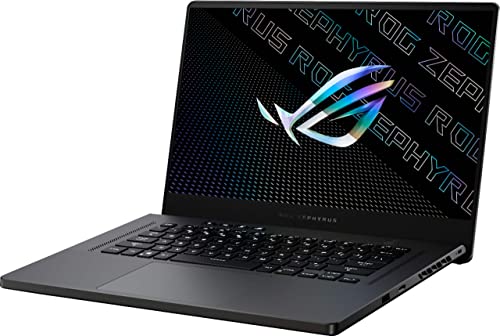
ASUS ROG Zephyrus 15.6-inch QHD RTX 3070
- Capable NVIDIA GeForce RTX 3070 graphics
- High-end AMD Ryzen 9 processor family
- Sharp 15.6-inch QHD display
- Useful 16GB RAM and 1TB SSD configuration
- Approximately 4.19-pound listed weight
- Display refresh rate is not provided in the listing
- Ports, wireless standards, and operating system are not specified
- Cooling and keyboard-lighting details are not listed
Understanding RTX 3070 Performance
Buyers researching the best RTX 3070 gaming laptops should begin with realistic expectations. This GPU tier is well suited to high-refresh Full HD gaming and can handle QHD gaming with sensible graphics settings. Ray tracing is available, although demanding effects may require reduced settings or upscaling. Laptop performance also varies because cooling and permitted GPU power differ between models, so the graphics chip name never tells the whole story. Our overview of laptops versus PCs explains the broader portability and performance trade-offs.
- Choose Full HD if consistently high refresh rates matter more to you than extra image detail, particularly for fast and competitive play.
- Consider QHD when you want a sharper picture and are comfortable adjusting demanding settings rather than automatically selecting the highest preset.
- Look beyond the GPU badge because processor performance, memory capacity, display quality, cooling, and GPU power limits can materially affect the experience.
How These Laptops Compare
The Razer RTX 3070 TI has the strongest graphics specification in the table: NVIDIA GeForce RTX 3070 Ti rather than RTX 3070. It pairs that GPU with an Intel Core i7-12800H processor, 16GB of DDR5 4800MHz memory, and a 1TB PCIe SSD. Its 17.3-inch QHD 240Hz display is also the largest and fastest listed screen. Razer specifically describes an upgraded vapor chamber system with more exhaust fins, quieter fans, and increased liquid capacity.
The ASUS RTX 3070 uses an Intel Core i7-12650H 10-core processor, NVIDIA GeForce RTX 3070, 16GB of DDR5 4800MHz memory, and a 512GB PCIe SSD. Its 15.6-inch Full HD display has a 144Hz refresh rate. The EXCaliberPC RTX 3070 lists a very similar foundation, including the same processor, memory capacity, storage capacity, display resolution, and refresh rate. Its listing adds useful GPU detail, specifying 8GB of GDDR6 memory and up to 105W with Dynamic Boost.
The ASUS RTX 3070 2 takes a different route with an AMD Ryzen 9 processor, NVIDIA GeForce RTX 3070, 16GB of memory, and a 1TB SSD. Its QHD screen favors sharper detail over the Full HD presentation of the TUF Dash models. For this topic, the most important difference is the combination of display resolution and GPU capability, followed closely by cooling and disclosed GPU power, because these factors determine how fully the graphics hardware can be used.
Worth knowing: Match the entire laptop to the RTX 3070 rather than chasing the highest number on one specification line. A suitable display, balanced processor, adequate memory, and clearly described cooling can matter more than a small paper advantage elsewhere.
Strengths and Practical Compromises
Upsides
- The RTX 3070 tier has enough graphics capability for visually rich Full HD gaming without forcing buyers into the highest current laptop category.
- QHD is a realistic target when settings are chosen carefully, making this tier suitable for players who value image clarity as well as responsiveness.
- Hardware-accelerated ray tracing and upscaling support provide useful flexibility when a demanding visual effect would otherwise reduce smoothness.
- The GPU can also support creative workloads that benefit from graphics acceleration, making a well-balanced model useful beyond games.
Trade-offs
- Laptop versions can perform differently because manufacturers configure power limits and cooling systems differently, even when listings show the same GPU name.
- Native QHD places a heavier load on the GPU than Full HD, so the sharpest display option will not always produce the smoothest experience at maximum settings.
- A powerful gaming laptop generally favors plugged-in performance over long unplugged sessions, and battery behavior varies with workload and power settings.
In practical terms, RTX 3070 laptops suit buyers who want strong Full HD performance or a credible route into QHD without entering the most expensive graphics tier. They are less convincing when the listing hides power and thermal details. Our discussion of plugged-in gaming covers why maximum performance and portable use are different priorities.
Listing Red Flags to Avoid
- Be cautious when a listing says RTX 3070 without identifying whether the GPU is the standard version or RTX 3070 Ti, because those are distinct graphics configurations.
- Treat missing GPU power information as a reason to research further, since two laptops carrying the same GPU label can operate under different power limits and deliver different results.
- Watch for incomplete display descriptions that omit resolution, refresh rate, or panel type, because the screen determines whether the graphics hardware is paired with an appropriate visual target.
- Avoid assuming that a large processor name compensates for limited memory, storage, or cooling information, since sustained gaming depends on the whole system rather than one headline component.
Condition also deserves attention, particularly when an older graphics generation appears through third-party sellers. Confirm whether the machine is new, renewed, open-box, or used, then check who provides warranty service and technical support. Questions about aging hardware are covered in our guide to performance over time.
Your RTX 3070 Checklist
- Start by deciding whether RTX 3070 performance is enough for your intended resolution and settings. It is a strong match for high-refresh Full HD and a capable QHD option, but QHD may require more selective graphics settings.
- Check the precise GPU name and any disclosed power limit. Do not treat NVIDIA GeForce RTX 3070 and NVIDIA GeForce RTX 3070 Ti as interchangeable, and remember that laptop power configurations can differ.
- Balance the GPU with the CPU and memory. A modern Intel Core i7 or AMD Ryzen 9 configuration with 16GB of memory is represented among these laptops, while unusually weak supporting hardware would deserve closer scrutiny.
- Match the display to your priorities. Full HD reduces the rendering load and suits high-refresh play, while QHD offers finer detail but asks more from the GPU at native resolution.
- Review cooling information before deciding. A detailed cooling description is helpful because sustained gaming creates heat, but missing information should not be replaced with assumptions based on the chassis name or appearance.
- Verify condition, ports, storage, memory upgrades, warranty coverage, and the actual seller. If portability matters, read our explanation of gaming laptop battery life before treating battery specifications as a gaming performance measure.
Ports and upgrades are easy to overlook when comparing graphics specifications. Consider whether you need wired Ethernet, Thunderbolt, external display outputs, an SD card reader, or accessible memory expansion. Storage deserves similar attention because a 512GB SSD leaves less room than a 1TB drive once large applications and personal files are added. A balanced machine should fit your everyday setup without requiring an immediate collection of adapters and upgrades.
Matching Each Laptop to Buyers
Razer RTX 3070 TI suits buyers wanting the strongest overall configuration, with RTX 3070 Ti graphics, QHD 240Hz display, and vapor chamber cooling.
ASUS RTX 3070 is the value choice for Full HD 144Hz gaming, expandable DDR5 memory, Wi-Fi 6, and varied ports.
EXCaliberPC RTX 3070 fits value-focused shoppers wanting disclosed GPU power, 16GB DDR5 memory, and ASUS warranty coverage.
ASUS RTX 3070 2 is the alternative for buyers preferring an AMD Ryzen 9 processor, QHD display, and 1TB SSD.
RTX 3070 Laptop Questions
1. Is an RTX 3070 laptop still worth considering?
Yes, if its overall configuration and condition make sense for your needs. This graphics tier remains capable for high-refresh Full HD and can handle QHD with suitable settings. Compare the screen, CPU, RAM, storage, GPU power information, and cooling rather than choosing solely because RTX 3070 appears in the title.
2. Do I need RTX 3070 Ti instead?
Not necessarily. NVIDIA GeForce RTX 3070 is already appropriate for strong Full HD gaming and flexible QHD use, while NVIDIA GeForce RTX 3070 Ti provides a higher graphics tier. The better choice depends on the full laptop, including its display and cooling, rather than the GPU suffix alone.
3. Is 16GB of RAM enough for this GPU?
For mainstream gaming and everyday multitasking, 16GB is a sensible starting point and is included across the listed configurations. Upgrade support can still be valuable if you run memory-heavy creative software or keep many demanding applications open. The ASUS TUF Dash FX517ZR listing specifically says its RAM can expand to 32GB through two slots.
4. Should I choose Full HD or QHD?
Choose Full HD when high refresh rates and lower GPU load matter most. Pick QHD if you value sharper detail and accept that demanding settings may need adjustment. Screen size matters too, since the extra detail of QHD can be especially useful on a larger panel, while Full HD remains practical on a 15.6-inch display.
5. What should I verify before paying?
Confirm the exact GPU, CPU, RAM, storage, display resolution, refresh rate, ports, condition, seller, and warranty terms. Look for disclosed GPU power and cooling details where available, but never invent missing information from the model name. Our article on laptop build quality explains other physical considerations worth checking.
The Strongest Choices Here
The Razer RTX 3070 TI is the strongest overall choice for shoppers prioritizing RTX 3070 Ti graphics, a QHD 240Hz display, larger storage, and clearly described vapor chamber cooling. For a more value-conscious Full HD configuration, the ASUS RTX 3070 combines RTX 3070 graphics with an Intel Core i7-12650H, 16GB of DDR5 memory, and a 144Hz display.


