

The Best gaming laptops with intel core i9 combine strong multicore performance with capable dedicated graphics, but balance matters more than the processor badge alone. The HP RTX 5070 is our balanced choice, while the msi RTX 5080 offers the strongest GPU among these laptops.
Recommended by Us

MSI Vector 16 HX AI RTX 5080 Gaming Laptop
- High-end RTX 5080 GPU with 16GB of graphics memory
- Fast QHD+ 240Hz IPS display
- 24-core Intel Ultra 9 275HX processor
- Extensive port selection with dual Thunderbolt 5
- Wi-Fi 7, spatial audio, and an FHD IR camera
- 16GB of system RAM may be modest for a laptop in this performance class
- At 5.95 pounds and 1.12 inches thick, it is less travel-friendly than slimmer gaming laptops
- The listing does not state the RAM type, SSD interface, or battery runtime
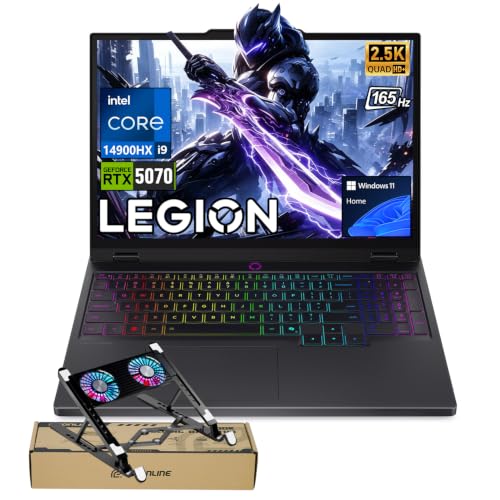
Lenovo Legion 5 RTX 5070 OLED
- High-performance RTX 5070 graphics with 8GB GDDR7
- Powerful 24-core Intel Core i9-14900HX processor
- Sharp 2560 × 1600 OLED display with a 165Hz refresh rate
- Broad port selection with USB-C, USB-A, HDMI and Ethernet
- Customizable 24-zone RGB keyboard
- The RTX 5070 is listed with 8GB of graphics memory, which may require texture-setting adjustments in especially memory-intensive workloads.
- The listing conflicts on system memory and storage: the title states 32GB RAM and a 2TB SSD, while the size field states 8GB RAM and a 128GB SSD.
- Battery capacity and expected runtime are not provided.

HP OMEN 16 RTX 5070 Gaming Laptop
- High-performance RTX 5070 graphics with 8GB GDDR7 VRAM
- Fast 16-core Intel Core Ultra 9 processor
- Generous 32GB DDR5 memory and 1TB SSD configuration
- Smooth 144Hz IPS display with a taller 16:10 format
- Anti-glare screen and backlit keyboard improve everyday usability
- The 300-nit display may be less comfortable in very bright environments
- At 5.35 pounds, it is not among the lightest laptops for frequent travel
- Battery capacity, battery runtime, and port selection are not specified in the listing

HP OMEN 17.3-inch RTX 4090 Gaming Laptop
- High-end GeForce RTX 4090 graphics
- Fast 17.3-inch QHD 240Hz IPS display
- Powerful 24-core Intel i9-13900HX processor
- Generous 32GB DDR5 RAM and 2TB NVMe SSD
- Extensive wired and wireless connectivity
- At 6.1 pounds, it is less convenient for frequent travel
- The listed 300-nit brightness is modest for a premium gaming display
- Battery capacity and expected runtime are not specified

GIGABYTE AORUS 17X RTX 4080 Gaming Laptop
- High-end RTX 4080 Laptop GPU with 12GB GDDR6
- Fast Core i9-13980HX processor
- Sharp 17.3-inch QHD display with a 240Hz refresh rate
- Wide 100% DCI-P3 color coverage
- Fast Gen4 M.2 SSD and Wi-Fi 6E connectivity
- The listed 16GB of RAM uses a single module, which is modest beside the high-end CPU and GPU
- At 6.17 pounds, it is less convenient for frequent travel
- The listing does not specify battery capacity, battery runtime, port selection, or cooling details
Understanding Intel Gaming Performance
A Core i9 or comparable Core Ultra 9 processor gives a gaming laptop plenty of headroom for demanding games, streaming, creative software, and heavy multitasking. However, the CPU does not determine gaming performance by itself. The graphics processor usually has a greater effect when resolution and visual settings rise. Buyers should therefore treat the processor as one part of the system rather than choosing solely by its name, generation, core count, or advertised boost speed.
The worthwhile configurations pair that processor with a suitable GPU, enough memory, useful storage, and a display the graphics hardware can serve effectively. An RTX 4060 configuration can make sense for less demanding settings, while RTX 5070, RTX 4080, RTX 4090, and RTX 5080 options target progressively more ambitious gaming or creative workloads. These components also affect size, cooling demands, noise, and cost. Our explanation of gaming laptop costs provides more context.
Worth knowing: Match the laptop to what you plan to play and create instead of chasing the highest specification-sheet number. A balanced CPU, GPU, display, and memory configuration is usually the smarter purchase.
Your Practical Selection Checklist
A specification list becomes much easier to judge when you read it as a complete system. Work through these checks before comparing smaller details such as lighting or bundled accessories.
- Match the GPU to your intended resolution, quality settings, and workload. An Intel Core i9 paired with a lower GPU tier can still suit mainstream gaming, but buyers seeking demanding QHD visuals should prioritize graphics power.
- Balance the CPU with RAM rather than paying for one exceptional component beside a weak one. Memory capacity matters when you keep games, browsers, communication tools, and creative applications open together.
- Compare display resolution and refresh rate with the GPU, then examine any cooling information supplied by the manufacturer. Higher-performance parts produce more heat, and sustained performance depends on the laptop moving that heat effectively.
- Confirm whether the listing is new, refurbished, or sold as a modified configuration, and check its ports, storage, memory, operating system, and upgrade access. Do not assume two similarly named models have identical hardware.
Thermal behavior can also affect comfort and sustained performance during long sessions. Our overview of gaming laptop cooling explains what heat means in everyday use.
How These Models Compare
The msi Vector 16 HX AI combines an Intel 24-core Ultra 9 275HX with an NVIDIA GeForce RTX 5080 16GB, 16GB of RAM, and a 1TB SSD. Its 16-inch QHD+ IPS display has a 240Hz refresh rate, and its connectivity includes two Thunderbolt 5 ports. The Lenovo Legion 5 5070 instead uses an Intel Core i9-14900HX, an NVIDIA GeForce RTX 5070 with 8GB GDDR7, 32GB of RAM, and a 2TB SSD. Its 15.1-inch QHD+ OLED display runs at 165Hz.
The HP OMEN 16 pairs an Intel Core Ultra 9 285H with an NVIDIA GeForce RTX 5070, 32GB of DDR5 RAM, and a 1TB SSD. Its 16-inch 1920×1200 IPS panel runs at 144Hz. It is also the only table model whose supplied details quantify a cooling revision, with more fan blades and greater heat-pipe coverage claimed to make the machine quieter and cooler than before. That makes it a particularly balanced option for buyers who do not need the highest available graphics tier.
The HP OMEN 17.3-inch model steps up to a GeForce RTX 4090 alongside an i9-13900HX, 32GB of DDR5 RAM, and a 2TB SSD. It has a 17.3-inch QHD IPS display with a 240Hz refresh rate. The GIGABYTE AORUS 17X uses an Intel Core i9-13980HX and NVIDIA GeForce RTX 4080 Laptop GPU, but starts with 16GB of DDR5 RAM and a 1TB SSD. Its 17.3-inch QHD display also reaches 240Hz and covers 100% DCI-P3. For this search, the GPU difference matters most because every option already offers a high-end Intel processor.
Useful Core i9 Rules
These quick rules help separate meaningful specifications from impressive-looking labels. Apply them to the whole configuration, not just the processor line.
- A Core i9 cannot compensate for a GPU that falls short of your preferred resolution and visual settings.
- HX processors emphasize performance, while laptop size and cooling still influence how that performance behaves during long workloads.
- More RAM helps demanding multitasking, but it does not replace the need for a suitably powerful graphics processor.
- A high-refresh QHD display makes most sense when the selected GPU can handle the intended graphics workload comfortably.
- Larger SSDs reduce storage juggling, especially when your game library and creative project files share one machine.
- Check the exact processor suffix because similarly marketed Core i9 laptops can use substantially different processor classes and generations.
Also consider where the laptop will spend most of its time. High-performance models can be bulky because their cooling systems, displays, and internal hardware require space. Our article on laptop weight explains why powerful portable systems are not always especially light.
Choosing the Right Hardware Tier
| Tier | What You Get | Best For |
|---|---|---|
| Value tier | A capable Core i9 paired with RTX 4060-class graphics, practical memory, and a high-refresh Full HD or QHD display. | Buyers prioritizing CPU-heavy work, mainstream gaming, and sensible settings over maximum graphics quality. |
| Balanced tier | A high-end Intel processor with RTX 5070-class graphics, stronger memory capacity, and a sharp high-refresh display. | Mixed gaming, streaming, multitasking, and creative work without moving immediately to the largest graphics configuration. |
| Performance tier | Core i9 or Core Ultra 9 processing with RTX 4080, RTX 4090, or RTX 5080 graphics and premium QHD displays. | Demanding QHD gaming, GPU-intensive creation, and buyers who prioritize graphics capability over portability or cost. |
The best tier is the one that fits your actual workload and replacement schedule. Seasonal discounts can shift the relative value between configurations. Our guide to laptop sales covers useful shopping periods.
Matches for Different Buyers
- Best overall: HP RTX 5070 pairs an Intel Core Ultra 9 285H with RTX 5070 graphics and 32GB RAM.
- Strongest GPU: msi RTX 5080 includes an NVIDIA GeForce RTX 5080 16GB and 240Hz QHD+ display.
- Best value: GIGABYTE RTX 4080 combines RTX 4080 graphics with an i9-13980HX and 240Hz panel.
- Alternative brand: Lenovo RTX 5070 offers an i9-14900HX, RTX 5070, 32GB RAM, and QHD+ OLED display.
- Runner-up: HP RTX 4090 provides RTX 4090 graphics, 32GB RAM, and a 2TB SSD.
Our Closing Intel Verdict
The HP RTX 5070 is the most balanced choice for buyers who want strong Intel processing, RTX 5070 graphics, ample memory, and a practical 16-inch display. It suits gaming and demanding everyday workloads without making the GPU the only priority.
Choose the msi RTX 5080 instead when graphics capability comes first. Its RTX 5080 and 240Hz QHD+ panel place it at the performance-focused end of this comparison.
Intel Gaming Laptop Questions
1. Is a Core i9 gaming laptop worth the extra cost?
It can be worthwhile if you combine gaming with streaming, content creation, software development, or heavy multitasking. For gaming alone, spending more on the GPU may produce a more noticeable improvement than moving between two already capable processors. Compare the complete configuration and avoid paying for CPU power that your everyday workload will rarely use.
2. Which GPU should accompany an Intel Core i9?
An RTX 4060 can suit mainstream gaming and buyers who value CPU performance for other tasks. RTX 5070 configurations provide a more balanced step up, while RTX 4080, RTX 4090, and RTX 5080 options better suit demanding QHD graphics and GPU-heavy creative work. Your display resolution and preferred quality settings should guide the decision.
3. How much RAM makes sense for long-term ownership?
Sixteen gigabytes can handle gaming and ordinary multitasking, but 32GB gives heavier users more breathing room for streaming, creative tools, large browser sessions, and background applications. Also check whether the memory is upgradeable because listings can differ even within one model family. Capacity matters more than buying a Core i9 badge beside an unnecessarily limited memory configuration.
4. What ownership details should buyers compare?
Check the exact CPU and GPU, memory capacity, SSD size, display resolution, refresh rate, ports, wireless standard, operating system, and listing condition. Battery expectations also deserve attention because high-performance components and high-refresh displays demand substantial power. Our battery life overview explains the broader trade-offs.
Other Intel-Powered Alternatives
| Product | What Is Different | Suits Whom |
|---|---|---|
| Acer RTX 4060 | It pairs an Intel Core i9-13900H with RTX 4060 graphics, 16GB DDR5, a 512GB SSD, and a 15.6-inch Full HD 144Hz display. | It suits buyers who want Core i9 processing but can accept a lower graphics tier and less included storage. |
| Lenovo RTX 4060 | This model combines an Intel Core i9-14900HX with RTX 4060 graphics, 32GB DDR5, and a 16-inch WQXGA 165Hz IPS display. | It fits multitaskers who value 32GB of memory and a bright, high-resolution display more than top-tier graphics. |
| msi core Ultra 9 RTX 5080 | Its core hardware matches the other Vector configuration, including the Ultra 9 275HX and RTX 5080, but this listing specifies Windows 11 Professional. | It suits performance-focused buyers who specifically need the professional Windows edition supplied with the laptop. |


