

The Best gaming laptops with intel core ultra i7 pair strong multicore performance with a dedicated NVIDIA GPU. The Acer RTX 5060 is the most balanced choice, while the msi RTX 5070 TI is better suited to buyers prioritizing graphics power.
Recommended by Us

MSI Vector 16 HX AI RTX 5070 Ti
- High-tier RTX 5070 Ti GPU with 12GB of graphics memory
- Powerful Intel Core Ultra 7 255HX processor
- Fast 144Hz display refresh rate
- Useful 1TB PCIe SSD capacity
- Modern DDR5 system memory
- The listed 7-pound weight limits everyday portability
- Display resolution and panel technology are not specified
- Port selection, wireless standard and keyboard lighting are not detailed in the listing

MSI Vector 16 RTX 5070 Ti Gaming Laptop
- High-tier RTX 5070 Ti GPU with 12GB GDDR7, DLSS 4, and ray tracing support
- Powerful 20-core Core Ultra 7 255HX processor with built-in NPU
- Smooth 144Hz IPS display with a productive 16:10 aspect ratio
- Extensive port selection, including dual Thunderbolt 5 and HDMI 2.1
- Fast wired and wireless networking through 2.5G Ethernet and Wi-Fi 6E
- The 1920×1200 resolution is less detailed than QHD+ panels found on some high-performance gaming laptops.
- At 5 pounds and 1.12 inches thick, it is not among the most portable 16-inch options.
- Battery capacity and expected runtime are not specified in the listing.

Acer Predator Helios Neo 14 RTX 5060
- RTX 5060 graphics with DLSS 4 and advanced ray-tracing support
- Sharp 165Hz WQXGA display with G-SYNC and 100% sRGB coverage
- Strong connectivity including Thunderbolt 4, HDMI 2.1, and Wi-Fi 6E
- Second M.2 slot is available for additional storage
- Metal-built chassis with customizable three-zone RGB keyboard lighting
- The 16GB LPDDR5X memory is onboard, so buyers should verify whether the capacity meets their long-term needs.
- Battery capacity and expected runtime are not specified in the listing.
- At 4.19 pounds, it is portable but not exceptionally light for a 14.5-inch laptop.
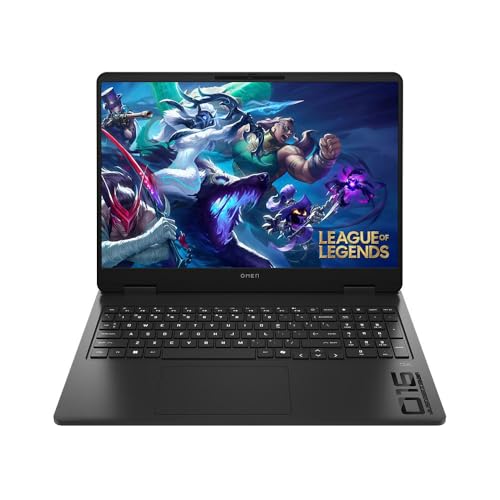
HP Omen 16 Slim RTX 5060 Gaming Laptop
- Current-generation Intel Core Ultra 7 processor and RTX 5060 graphics
- Fast 165Hz IPS panel with 100% sRGB coverage
- Quick DDR5-5600 memory and PCIe Gen4 NVMe storage
- Both Gigabit Ethernet and Wi-Fi 6 are included
- Roomy 16-inch 16:10 display
- Listed weight of 8.6 pounds may be cumbersome for frequent travel
- Display is non-touch
- The listing does not state the GPU VRAM capacity or battery runtime

HP HyperX OMEN 15 RTX 5050 Gaming Laptop
- RTX 5050 GPU includes 8GB of dedicated GDDR7 memory.
- Fast 165Hz IPS display with anti-glare coating and wide viewing angles.
- Useful combination of 16GB DDR5 RAM and a 1TB PCIe Gen4 NVMe SSD.
- Modern Wi-Fi 7 and Bluetooth 6.0 connectivity.
- FHD infrared camera supports HDR auto-switch and Windows Hello facial recognition.
- The processor model is inconsistent: the title says Core Ultra 7 365H, while the feature section says Core Ultra 7 356H.
- The listing calls the 1920 x 1200 panel 2K, which may confuse buyers expecting a higher conventional 2K resolution.
- Battery capacity and estimated runtime are not specified.
Understanding Core Ultra Gaming
Core Ultra 7 processors are well suited to gaming, streaming, creative work, and heavy multitasking, but the processor alone does not determine gaming performance. The dedicated GPU usually has a larger effect on visual settings and resolution. Cooling, display quality, memory, and power limits also influence the overall experience. Buyers should compare complete configurations rather than assuming every Core Ultra 7 laptop performs alike. Battery expectations matter too because powerful components consume considerable energy under load. Our guide to gaming laptop battery life adds useful context.
- Choose the Core Ultra 7 255HX when demanding multicore work, frequent content creation, or heavy multitasking matters alongside gaming, as this processor is positioned above the lower-power H-series options in these laptops.
- Prioritize the GPU when gaming is the main purpose because an RTX 5070 Ti configuration offers a higher graphics tier than an RTX 5060 or RTX 5050 configuration, even when all three use Core Ultra 7 processors.
- Consider the entire chassis because display resolution, refresh rate, cooling design, memory capacity, storage, ports, and portability determine whether the laptop fits your desk and travel habits.
Worth knowing: Match the laptop to how you plan to use Core Ultra 7 instead of chasing the largest specification number. A balanced GPU, display, and cooling system can be more useful than extra processor headroom you rarely use.
Checks Before You Order
- Which exact Core Ultra 7 processor is included, and is it an HX chip intended for higher sustained performance or an H-series chip suited to a slimmer configuration?
- Which NVIDIA Laptop GPU does the configuration use, since RTX 5050, RTX 5060, RTX 5070, and RTX 5070 Ti options target different graphics workloads?
- Does the display resolution suit the GPU tier, and does the panel provide the refresh rate, color coverage, brightness, and adaptive-sync support you actually want?
- Are the listed RAM and SSD capacities enough for your current software and game library, and does the seller explain whether those components were upgraded after leaving the manufacturer?
- Does the port selection support your monitor, wired network, external storage, headset, and other peripherals without requiring a large collection of adapters?
- Who provides warranty coverage, and do upgraded memory or storage components receive different coverage from the rest of the laptop?
Retailer reputation and return terms also deserve attention when a configuration has been opened for upgrades. Our retailer guide explains the main purchasing options.
Choosing the Right Hardware Tier
| Tier | What You Get | Best For |
|---|---|---|
| Value tier | Core Ultra 7 with RTX 5050 graphics, a high-refresh display, and mainstream memory and storage | Everyday gaming, schoolwork, general productivity, and buyers who do not need the highest graphics tier |
| Balanced tier | Core Ultra 7 with RTX 5060 graphics and a sharper or color-focused high-refresh display | Players seeking a practical mix of visual quality, portability, creative capability, and graphics performance |
| Performance tier | Core Ultra 7 255HX with RTX 5070 or RTX 5070 Ti graphics and stronger connectivity options | Demanding graphics workloads, higher settings, streaming, content creation, and heavier desktop-style use |
The balanced tier makes sense for most buyers because it avoids pairing a capable processor with entry-level graphics while remaining easier to carry than some performance-focused systems. High-powered laptops generally deliver their best gaming performance on external power. Our plugged-in gaming guide explains why.
Where Your Budget Should Go
These four areas have the greatest effect on how a Core Ultra 7 gaming laptop feels in regular use.
| Part | Priority | Why |
|---|---|---|
| CPU tier | Medium to high | Core Ultra 7 H and HX chips provide different balances of mobility and sustained processing power |
| GPU tier | Highest for gaming | The dedicated GPU largely determines suitable visual settings and rendering capability |
| Display | High | Resolution, refresh rate, color coverage, and adaptive sync shape every visible task |
| RAM and Storage | High | A practical capacity prevents unnecessary limits when multitasking or maintaining a larger library |
A high-refresh IPS panel is common among these laptops, but resolution and color specifications vary. None of these listings advertises an OLED panel, so buyers prioritizing contrast should understand the tradeoffs first. Our OLED display overview covers why the technology is less common.
Match Each Laptop to Buyer
Best overall: Acer RTX 5060 combines RTX 5060 graphics, a WQXGA 165Hz G-SYNC display, and advanced cooling.
Best for the strongest GPU: msi RTX 5070 TI pairs Core Ultra 7 255HX processing with RTX 5070 Ti graphics.
Best value: HP RTX 5050 offers RTX 5050 graphics, 16GB DDR5 RAM, and a 1920 x 1200 165Hz display.
Best alternative: msi Core Ultra 7 RTX 5070 TI includes RTX 5070 Ti graphics, Thunderbolt 5, and a 144Hz IPS display.
Best runner-up: HP RTX 5060 balances RTX 5060 graphics with a 165Hz 100% sRGB display.
Other Configurations Worth Considering
- PCONLINE RTX 5070 combines RTX 5070 graphics with 32GB DDR5 RAM, a 1TB SSD, and a 2560 x 1600 165Hz display. Its upgraded RAM and SSD receive coverage from PCOnline US, while the remaining components retain the stated manufacturer coverage.
- msi Core Ultra 7 RTX 5070 TI is another RTX 5070 Ti configuration with two Thunderbolt 5 ports, 2.5G Ethernet, Wi-Fi 6E, and a bundled wireless gaming headset. It suits buyers who need extensive wired connectivity and support for fast external storage.
- Delca RTX 5070 TI provides configurable memory and storage capacities around the Core Ultra 7 255HX and RTX 5070 Ti platform. The computer is resealed for upgrades, with Delca covering the upgraded memory and drive separately from the remaining manufacturer-covered components.
Core Ultra Laptop Questions
1. Is Core Ultra 7 actually good for gaming?
Yes, Core Ultra 7 processors offer ample capability for modern gaming and background tasks. However, the processor label should not be the only deciding factor. A laptop with a stronger dedicated GPU will generally be the better gaming choice when the other specifications and cooling are suitable.
2. Is an RTX 5050 enough with Core Ultra 7?
An RTX 5050 can make sense for buyers who prioritize mainstream gaming, daily productivity, and a lower graphics tier. It is less suitable for someone specifically seeking the strongest visual settings or demanding rendering performance. Compare the complete laptop rather than assuming the Core Ultra 7 processor compensates for every GPU limitation.
3. Should I choose an RTX 5060 or RTX 5070 Ti?
The RTX 5060 is the balanced choice for buyers who want capable graphics without moving to the highest tier represented here. The RTX 5070 Ti is better for demanding graphics workloads and buyers who intend to keep visual settings high. The stronger GPU may also come in a larger or more performance-focused chassis.
4. Is 16GB of RAM enough for these laptops?
For gaming and ordinary multitasking, 16GB is a reasonable starting capacity. More memory becomes useful when running heavy creative software, large projects, virtual machines, or many demanding applications together. Check whether the memory is upgradeable and whether a third-party seller modified the original configuration before shipping.
5. Can a Core Ultra 7 gaming laptop handle video editing?
Yes, these processors and dedicated NVIDIA GPUs can support video editing, but the ideal configuration depends on project resolution, effects, memory demands, and storage needs. Display color coverage also matters when accurate output is a priority. Our video editing overview explains the broader advantages and limitations.
6. What listing details are easiest to overlook?
Check the exact CPU and GPU, display resolution, refresh rate, color coverage, RAM, SSD capacity, ports, wireless standard, and warranty provider. Also look for language stating that the laptop was opened or resealed for memory and storage upgrades. That detail can change which company handles warranty claims for individual components.
The Best Fit Overall
The Acer RTX 5060 is the strongest all-around option for its balanced RTX 5060 configuration, WQXGA 165Hz G-SYNC display, and portable screen size. Choose the msi RTX 5070 TI instead when RTX 5070 Ti graphics and the Core Ultra 7 255HX are higher priorities than compact dimensions.


