

Upgrading to an ultrawide setup changes daily workflow and gaming immersion by replacing messy dual-screen bezels with a continuous panoramic view. Tracking down the best 34-inch monitors means balancing pixel density against refresh rates to keep text crisp and motion clear across such a wide horizontal workspace.
Recommended by Us

SANSUI 34-Inch Curved 200Hz UWQHD Monitor
- Huge 21:9 ultrawide aspect ratio provides superior screen real estate for multitasking
- High 200Hz refresh rate with VRR support over HDMI 2.1 and DisplayPort
- Broad color spectrum covering 130% sRGB and 97% DCI-P3
- PBP capability streamlines workflow for dual-machine workstations
- Stand functionality is limited to tilt only, with no built-in height or swivel adjustment
- Does not include built-in speakers, necessitating external audio gear

Samsung ViewFinity S5 34" Curved Monitor
- Spacious 21:9 ultrawide canvas replaces multi-monitor clutter.
- Fluid 120Hz refresh rate with AMD FreeSync Premium support.
- HDR10 capability displaying over one billion rich colors.
- TÜV-certified eye comfort features protect against visual fatigue.
- Panel technology type is not listed in the manufacturer specifications.
- Lacks USB-C connectivity for streamlined single-cable laptop docking.
- Stand ergonomics and height adjustment range are not detailed in the listing.

- Generous 3440 x 1440 ultrawide resolution allows effortless side-by-side multitasking
- High refresh rate up to 180Hz keeps motion extremely fluid for games and fast scrolling
- 1500R curve provides an engaging, comfortable viewing experience across a wide surface
- Dual DisplayPort connections provide flexibility for multi-system setups
- Panel technology type is not explicitly specified in the product documentation
- Large 34-inch footprint demands considerable desktop depth and width

- Generous 21:9 aspect ratio eliminates the need for dual monitor setups
- Smooth 100Hz refresh rate outperforms standard 60Hz office screens
- Full ergonomic stand supports height, tilt, and swivel adjustments
- Versatile connectivity featuring USB Type-C, DisplayPort, and HDMI
- 2560 x 1080 resolution provides lower pixel density across 34 inches than 1440p
- USB Type-C port does not list high-wattage power delivery specifications

Samsung ViewFinity S50GC 34" Monitor
- Expansive 21:9 Ultra-WQHD canvas replaces cumbersome dual-monitor setups
- Upgraded 100Hz refresh rate provides noticeable fluidity over typical 60Hz panels
- Integrated ambient light sensor automatically balances room lighting for less eye strain
- Robust PBP and PIP capabilities simplify managing two separate computers simultaneously
- Flat 34-inch panel profile lacks curvature, requiring wider eye movement across edges
- Standard 300 cd/m² brightness may require shading in bright, sunlit rooms
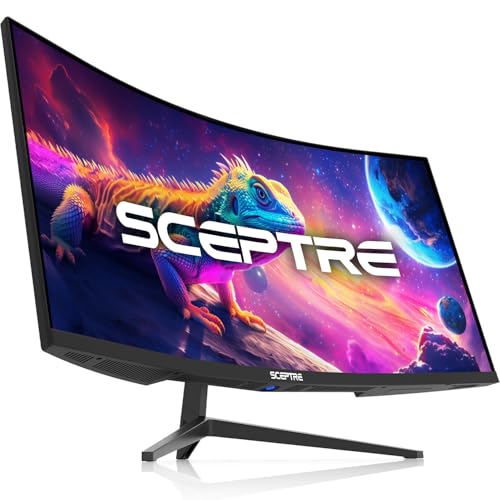
Sceptre 34-Inch Ultrawide C345B-QUT168
- Spacious 3440 x 1440 ultrawide screen ideal for side-by-side windows
- High refresh rate up to 180Hz ensures smooth desktop scrolling and gaming
- Hardware PIP and PBP support streamlined dual-source workflows
- Built-in speakers provide direct audio without extra desk clutter
- Panel technology type is not specified in the product documentation
- Weight of over 20 pounds requires a sturdy desk or heavy-duty mount

Sceptre C345B-QU240T 34-Inch Curved Monitor
- Enormous 3440 x 1440 ultrawide screen real estate replaces dual-monitor setups
- Rapid 240Hz maximum refresh rate provides exceptional fluidity
- Four dedicated digital video inputs allow multiple PCs or consoles to stay connected
- Blue-Light Shift mode helps reduce eye strain during extended work or gaming sessions
- Panel technology type is not specified in the official product specifications
- Wide 34-inch curved footprint requires significant dedicated desk depth and width
Matching Ultrawide Panels to Your Daily Workflow
Ultrawide displays demand different compromises depending on whether your priority is competitive gameplay or spreadsheet management. For high-speed gaming where frame rates matter most, I would point toward the Sceptre Curved 34-inch Gaming Monitor. Its rapid 240Hz refresh rate, 1ms response time, and tight 1500R curve deliver smooth motion and wraparound visuals at a sharp 3440 x 1440 resolution.
If your daily routine leans toward general office multitasking and media consumption, the Samsung 34″ ViewFinity S5 is the model I would pick. It offers an 1800R curve with HDR10 support and a 120Hz refresh rate, backed by picture-by-picture modes for managing multiple video inputs. For laptop users who prioritize simple cabling, the LG 34U530A-W UltraWide stands out with its USB Type-C connectivity and flat IPS panel, though its 2560 x 1080 resolution is lower than standard UWQHD. When checking panel capabilities, learning what is sRGB mode on a monitor helps ensure accurate colors across desktop software, while rtings provides helpful analysis on general display characteristics.
FAQs
1. Is 1440p resolution necessary on a 34-inch ultrawide monitor?
A resolution of 3440 x 1440 is strongly recommended for this screen size. Because a 34-inch 21:9 screen has roughly the same physical height as a 27-inch monitor, running it at 2560 x 1080 results in a lower pixel density. Fine text can look slightly pixelated, making the higher resolution much better for reading documents and editing.
2. Do curved panels make a noticeable difference on a 34-inch display?
A subtle curve helps bring the outer edges of a wide display into your natural field of view. Without a curve, viewing angles near the borders can shift colors slightly, especially on VA panels. When evaluating brand options, comparing dell vs ASUS monitor designs shows how curvature improves immersion and decreases neck movement during long work sessions.
3. What graphics card power is required to drive a 3440 x 1440 monitor?
Pushing 3440 x 1440 pixels requires driving roughly thirty percent more pixels than a standard 1440p panel. For basic productivity, modern integrated graphics handle the display easily over HDMI or DisplayPort. Gaming at high refresh rates, however, requires a capable modern dedicated graphics card to maintain smooth frame rates in demanding modern titles.
4. How does an IPS panel compare to VA on these ultrawide screens?
IPS panels offer wider viewing angles and consistent color across the wide surface, which benefits photo editing and design work. VA panels generally offer deeper black levels and higher contrast ratios, making them popular for gaming in dimly lit rooms. Our comparison of LG vs dell monitor options highlights how panel choices impact daily productivity.
Editor’s Verdict
For players wanting maximum speed, the Sceptre Curved 34-inch Gaming Monitor is hard to overlook with its 240Hz refresh rate and crisp resolution. If you split your hours between work spreadsheets and media, the Samsung 34″ ViewFinity S5 provides the ideal balance among the best 34-inch monitors thanks to its comfortable curve and solid multitasking features.





