

Stepping up to a desktop display with ample screen real estate can transform how you handle multiple windows or dive into virtual worlds. Finding the best 32-inch monitors means balancing pixel density against your primary workload. A large screen pushes visual clarity to the forefront, whether you work across spreadsheets or jump into fast multiplayer lobbies.
Recommended by Us

- Fluid 100Hz refresh rate noticeably improves daily scrolling and motion clarity
- Curved screen design enhances viewing comfort across the wide 32-inch surface
- OnScreen Control allows quick window splitting without clumsy physical buttons
- Reader Mode helps minimize blue light exposure during long working hours
- Full HD resolution yields lower pixel density on a large 32-inch canvas
- Ergonomic stand offers tilt adjustment only, lacking height adjustment or swivel

Samsung Odyssey G50F 32" QHD Monitor
- Fluid 180Hz refresh rate paired with low 1ms GtG response time
- Flexible ergonomic stand with pivot, tilt, swivel, and height adjustments
- Dual adaptive sync capability with G-Sync compatibility and AMD FreeSync
- Expansive 32-inch IPS panel with 178-degree wide viewing angles
- 32-inch footprint requires considerable desk depth and surface space
- HDR10 implementation is standard without advanced local dimming specifications listed

Samsung 32" LS32B304NWN Monitor
- Expansive 32-inch view provides comfortable screen space for work and entertainment
- Smooth 75Hz refresh rate paired with AMD FreeSync for tear-free video and gaming
- Sleek three-sided borderless aesthetic fits modern minimalist desk setups
- Dedicated Eye Saver Mode and Flicker Free technology reduce visual fatigue
- Specific screen resolution is not explicitly stated in product specifications
- Panel type is omitted from manufacturer listing

Samsung 32" S3 S39GD Curved Monitor
- 100Hz refresh rate delivers visibly smoother motion than standard 60Hz displays
- Curved 32-inch format delivers an engaging, wraparound viewing experience
- Built-in speakers help keep your workspace clean and wire-free
- Certified eye comfort technology helps prevent strain during extended shifts
- Full HD resolution on a 32-inch screen results in modest pixel density
- Exact panel technology is not specified in the manufacturer listing
- Curved screen geometry may not appeal to users doing precision straight-line design work
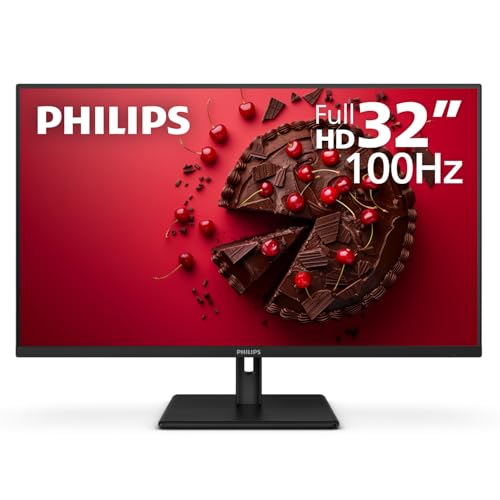
Philips 32E1N1100L 32-Inch Monitor
- Smooth 100Hz refresh rate with Adaptive-Sync
- Expansive 32-inch screen size for clear visibility
- High-contrast VA panel offers deep black levels
- Includes both modern HDMI and legacy VGA ports
- VESA wall mount ready for custom desk setups
- 1080p resolution results in lower pixel density on a 32-inch display
- Lacks an integrated USB hub for extra accessories

Sceptre E325B-QW200D 32" QHD 210Hz Monitor
- High 210Hz refresh rate delivers fluid motion for gaming and daily tasks
- Versatile port selection including USB Type-C, DisplayPort, and dual HDMI
- Vibrant 115% sRGB color coverage on an expansive 32-inch canvas
- AMD FreeSync Premium support ensures tear-free visuals
- Integrated speakers and audio-out jack keep desktop setups tidy
- HDMI connections are capped at 144Hz rather than the full 210Hz
- Large 32-inch flat panel footprint requires ample desk depth
- Integrated speakers provide basic audio suitable mainly for notifications
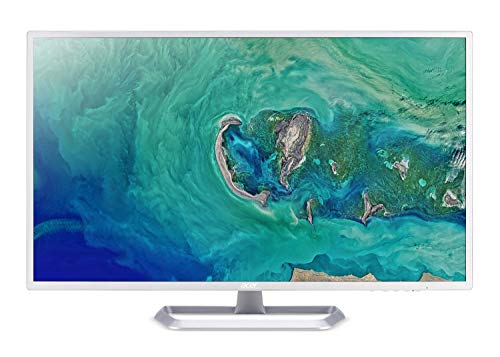
- Expansive 31.5-inch IPS screen provides wide viewing angles and large, easy-to-read text
- Equipped with flickerless technology and a blue light filter for enhanced eye comfort
- Features both HDMI and legacy VGA video inputs
- VESA mount compatibility allows flexible ergonomic mounting options
- 1080p resolution across a 31.5-inch panel results in lower pixel density
- Lacks DisplayPort and USB-C connectivity
- Listing details show conflicting refresh rate specifications
Matching Display Specs to Your Daily Setup
If you want sharp gaming clarity and flexible ergonomics, the Samsung Odyssey G5 is the one I would go for. Its 2560 by 1440 resolution provides plenty of sharpness at this panel dimension, and the 180Hz Fast IPS panel delivers crisp motion for rapid gameplay. The height-adjustable stand also makes dialling in posture straightforward.
For creators or gamers needing high refresh rates alongside versatile connectivity, I would point toward the Sceptre 32-inch QHD. It reaches up to 210Hz and includes a handy USB Type-C port alongside 115 percent sRGB coverage. Anyone curious about display gamut targets can review our guide explaining what is sRGB mode on a monitor before buying. Hardware publications like RTINGS frequently emphasize that panel type dictates your contrast and viewing angles, which is why matching the monitor to your lighting environment matters.
If your priority is general office tasks on an affordable budget, the Philips 32 Inch FHD provides a smooth 100Hz refresh rate and a four-year advance replacement warranty that brings serious peace of mind.
FAQs
1. Is 1080p resolution enough for a 32-inch display?
A 1080p resolution on a 32-inch screen yields lower pixel density, which can make fine text look slightly soft from standard viewing distances. For routine web browsing or casual streaming it functions fine, but users working heavily with code or spreadsheets will find 1440p significantly cleaner.
2. Do I need a curved panel on a 32-inch screen?
A curve is not strictly mandatory, but it helps bring the outer edges into your natural field of view. On wide screens, curvature reduces the need to turn your head constantly and minimizes perceived contrast shifts near the perimeter.
3. Which brands offer the most dependable desktop panels?
Display specialists like LG and Samsung remain major manufacturers of monitor technology worldwide. When comparing major nameplates, reading our head-to-head analysis of LG vs dell monitor lineups helps highlight how office and gaming lines differ.
4. How do refresh rates above 60Hz benefit daily use?
A 100Hz or 180Hz panel renders cursor motion and scrolling visibly smoother than a conventional 60Hz display. Beyond reducing stutter in games, higher refresh rates can make navigating documents and shifting browser tabs feel noticeably more responsive throughout the day.
5. Should I choose an IPS or a VA monitor for mixed tasks?
IPS panels offer wider viewing angles and dependable color consistency, while VA panels provide deeper contrast ratios in dim rooms. If you want to see how performance brands stack up across different panels, check our breakdown of dell vs ASUS monitor models for practical comparisons.
Editor’s Verdict
For shoppers seeking the best 32-inch monitors, panel resolution and refresh rate determine long-term satisfaction. The Samsung Odyssey G5 stands out as my primary pick for gaming thanks to sharp QHD visuals and a 180Hz refresh rate, while the Philips 32 Inch FHD remains a reliable value for straightforward office productivity.


