

Modern graphics cards and current consoles push intense resolutions with fluid motion, driving interest in the best 4k 120hz monitors. Pairing 3840×2160 clarity with high refresh rates prevents motion stutter during fast sequences while preserving crisp text rendering for daily desktop productivity and media playback.
Recommended by Us

Dell S3225QS 32-Inch 4K 120Hz Monitor
- 4K resolution at 31.5 inches provides excellent pixel density for text clarity and detailed visual work
- 120Hz refresh rate is unusually high for a large 4K productivity monitor, adding versatility for light gaming
- Broad color gamut coverage (99% sRGB, 95% DCI-P3) suits creative professionals and general users alike
- ComfortView Plus low blue light solution is hardware-based, meaning it works without sacrificing color accuracy
- Sleek ash white design with ultra-thin bezels stands out from the typical black monitor aesthetic
- At 300 cd/m2 peak brightness, the display may struggle in very bright or sunlit environments compared to higher-brightness alternatives
- VA panels, while offering strong contrast, can exhibit some color shift at extreme viewing angles compared to IPS panels
- No reviews are currently available to validate real-world performance claims from buyers
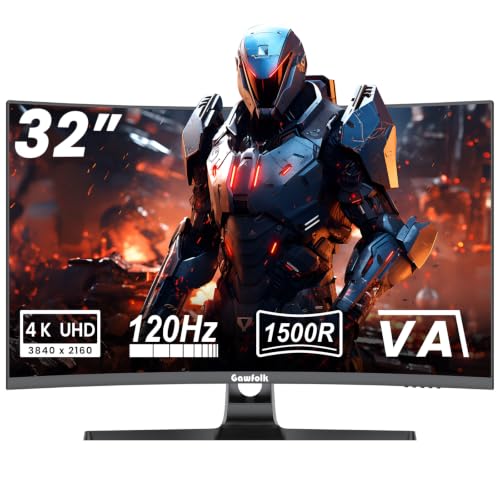
Gawfolk 32-Inch 4K 120Hz Curved Monitor
- Sharp 4K resolution paired with a fluid 120Hz refresh rate
- High 3000:1 contrast ratio produces rich black levels
- Immersive 1500R curvature reduces edge distortion
- Supports both G-Sync and FreeSync adaptive synchronization
- Specific input ports and connection versions are not detailed in the listing
- Curved VA panels typically have narrower optimal viewing angles compared to flat IPS screens

ASUS TUF Gaming VG27UQ1A
- Sharp 4K resolution paired with a fast 160Hz refresh rate
- HDMI 2.1 enables full 4K 120Hz console gaming without chroma subsampling
- Simultaneous motion blur reduction and variable refresh rate with ELMB Sync
- Rich color performance covering 95% of the DCI-P3 spectrum
- Achieving 160 frames per second at 4K resolution requires powerful PC hardware
- Specific stand ergonomic adjustments are not detailed in the specifications

Dell S2725QC 27-Inch 4K UHD Monitor
- 120Hz refresh rate provides noticeably smoother scrolling than standard 60Hz 4K monitors
- Convenient USB-C cable setup delivers video and 65W power charging simultaneously
- Higher 1500:1 contrast ratio brings improved depth compared to typical IPS displays
- Hardware-level blue light reduction keeps colors natural during long workdays
- 65W power delivery may not charge larger, high-performance laptops at full speed
- HDR capability is basic and lacks multi-zone local dimming

CRUA 32" 4K 160Hz Curved Gaming Monitor
- Crisp 4K resolution paired with a speedy 160Hz refresh rate
- Strong 3000:1 contrast ratio delivers deep black levels in dark games
- Equipped with HDMI 2.1 and DisplayPort 1.4 for next-gen setups
- 1500R curvature enhances peripheral immersion across the wide 32-inch screen
- Pixel response time is not specified in the official listing
- Uses a 75x75mm VESA mount rather than the more common 100x100mm size
- Stand ergonomics such as height adjustment and swivel are not detailed

Dell S2725QS 27-Inch 4K UHD Monitor
- Crisp 4K UHD resolution paired with a fluid 120Hz refresh rate
- Comprehensive ergonomic stand with tilt, swivel, pivot, and height adjust
- Higher 1,500:1 contrast ratio than standard IPS panels
- Multiple input choices with HDMI, DisplayPort, and USB-C connectivity
- Hardware-based low blue light solution maintains color accuracy
- Peak brightness of 350 cd/m2 may struggle against strong ambient glare
- Ash white finish might not match traditional black office peripherals
Matching Panels to Your Setup and Needs
When deciding between display technologies, your primary workload dictates whether you want an IPS screen for wide viewing angles or a VA panel for deeper contrast. If you read our comparison on dell vs ASUS monitor designs, you know both manufacturers prioritize different strengths across their lineups.
For fast multiplayer gaming on PC or modern consoles, I would point competitive players toward the ASUS TUF Gaming VG27UQ1A. It features a Fast IPS panel capable of running up to 160Hz with HDMI 2.1 support and 95% DCI-P3 color coverage. If your desk serves as a hybrid workstation, I would go with the Dell S2725QC 4K Monitor, which pairs a 120Hz IPS display with an integrated USB-C port delivering up to 65W power to keep cables tidy. Meanwhile, anyone seeking immersive open-world viewing on a curved screen should consider the CRUA 32-inch Curved Gaming Monitor, which features a 1500R curved VA panel and a 3000:1 contrast ratio. Gamers can inspect setup guides directly on ASUS for utility updates.
FAQs
1. Do you need HDMI 2.1 for 4K at 120Hz?
Yes, running native 4K resolution at 120Hz on PlayStation 5 or Xbox Series consoles requires an HDMI 2.1 port to deliver sufficient bandwidth without color subsampling. On a desktop PC, you can achieve smooth high refresh rates using either HDMI 2.1 or DisplayPort 1.4 connections.
2. Does wide color gamut coverage matter for everyday work?
Standard desktop operating systems and web pages target the standard sRGB color spectrum. Understanding what is sRGB mode on a monitor helps prevent unnatural oversaturation in SDR programs, which is especially useful when editing web graphics or reviewing documents.
3. Which panel type works better between IPS and VA?
IPS panels offer wider viewing angles and rapid pixel response, which benefits competitive action titles and office collaboration. VA panels produce higher static contrast ratios around 3000:1, generating deeper black levels in dim rooms, as detailed in our LG vs dell monitor comparison and on hardware pages from Dell.
4. Can mid-range graphics cards run 4K games at 120Hz?
Sustaining 120 frames per second at native 4K resolution requires substantial graphical processing power. For graphics-intensive titles, enabling upscaling algorithms or tweaking internal settings helps maintain high frame output so you can take full advantage of the monitors below.
Editor’s Verdict
Selecting the best 4k 120hz monitors comes down to balancing panel response against your daily workflow. For dedicated console and PC gaming, the ASUS TUF Gaming VG27UQ1A delivers swift IPS motion clarity. If clean desk setup and office multitasking take priority, the Dell S2725QC 4K Monitor remains my top all-around pick.





