

Upgrading to an ultrawide workspace eliminates the clutter of multi-screen setups while expanding peripheral vision for games and timeline work. Finding the best 40-inch monitors means balancing pixel density against refresh rates to avoid blurry text or sluggish frame rates. A wider canvas gives creative workflows the breathing room they desperately need.
Recommended by Us

MSI MAG 401QR 40-Inch Gaming Monitor
- Huge 40-inch screen size easily replaces dual-monitor office arrangements
- Smooth 155Hz refresh rate with AMD FreeSync Premium support
- Versatile connectivity includes modern USB-C alongside HDMI and DisplayPort
- Fast 1ms response time keeps motion clear
- Substantial weight and wide dimensions demand a deep, sturdy desk
- Ergonomic adjustment is limited to tilt only
- Flat ultrawide panel might require more head movement compared to curved alternatives
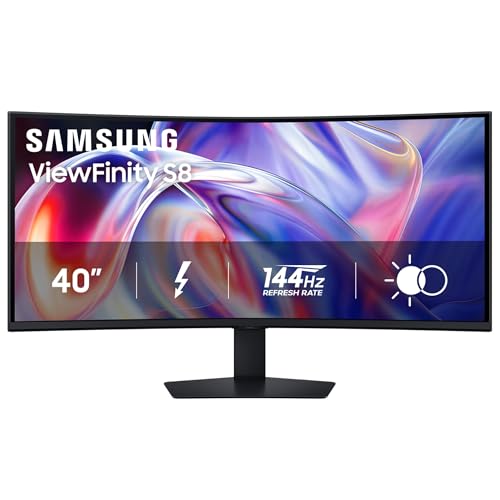
Samsung ViewFinity S8 40" Curved Monitor
- Massive 5K2K ultrawide canvas eliminates the need for dual-monitor bezels
- Next-gen Thunderbolt 5 integration with robust 140W power delivery
- Smooth 144Hz refresh rate gives creative work and general use superior fluidity
- Integrated KVM and LAN port enable a complete single-cable hub setup
- Substantial 39-pound weight requires a sturdy desk setup
- Specific panel technology (such as IPS or VA) is not listed in the product data
- Large physical footprint takes up significant desktop depth

INNOCN 40C1R Max 40" Ultrawide Monitor
- Massive 40-inch screen accommodates three side-by-side applications comfortably
- Unusually high 200Hz refresh rate for an office and productivity-focused ultrawide
- Clean single-cable USB-C docking with 65W power delivery for laptops
- Broad viewing angles and reliable color reproduction from the IPS panel
- Significant physical width requires a large desk and deep viewing distance
- HDR400 capability offers entry-level dynamic range performance
- 65W power delivery may charge power-hungry workstation laptops more slowly

Samsung 40" Odyssey G7 (G75F) Monitor
- Enormous 40-inch 21:9 ultrawide canvas replaces multi-monitor arrangements
- High-tier 180Hz refresh rate coupled with 1ms GtG response speed
- Certified VESA DisplayHDR 600 provides strong dynamic contrast
- Tight 1000R curve maximizes peripheral immersion across a wide display
- Substantial 36.56-inch width and 24.9-pound weight require a sturdy, deep desk
- Specific panel technology type (such as IPS or VA) is not listed in product specs
- Deep 1000R curve may take some getting used to for straight-line CAD or drafting work

Dell UltraSharp U4025QW 40" Curved Monitor
- Massive 5K2K WUHD resolution provides extensive screen real estate for complex workflows
- High 600-nit brightness easily combats glare in brightly lit rooms
- Integrated USB Type-C connection simplifies workstation data management
- Curved 21:9 ultrawide form factor minimizes neck strain during multi-window use
- Substantial 41.93-pound weight necessitates a dedicated, heavy-duty desk setup
- Refresh rate and specific panel type are not provided in official listing specifications
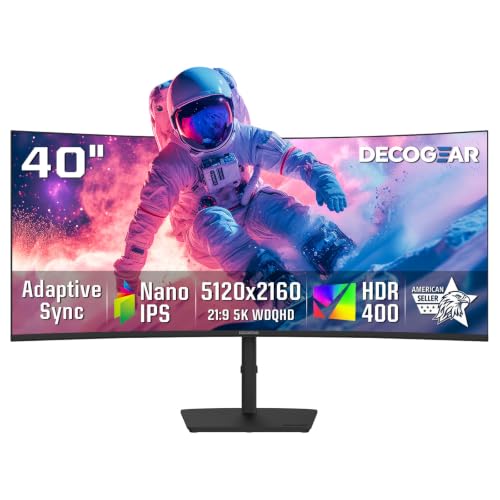
Deco Gear 40" 5K2K Curved Ultrawide Monitor
- Vast 5120x2160 resolution replaces complex multi-monitor setups with seamless screen space
- Generous 90W USB-C power delivery easily charges modern productivity laptops
- Integrated KVM switch and split-screen viewing simplify managing two PCs
- Flexible ergonomic stand offers generous height adjustment, tilt, and swivel
- 75Hz refresh rate is built for office and creative workflows rather than fast esports gaming
- Integrated USB hub downstream ports operate at USB 2.0 speeds
- HDMI connection is limited to the HDMI 2.0 specification

INNOCN 40C1R 40-Inch Ultrawide Monitor
- Generous 40-inch ultrawide screen replaces dual-monitor setups seamlessly
- Smooth 144Hz refresh rate via DisplayPort with FreeSync Premium support
- Versatile connectivity options including USB Type-C, DisplayPort, and dual HDMI ports
- Comes with factory color calibration report indicating Delta E under 2
- HDMI connections are capped at a 100Hz maximum refresh rate
- Flat ultrawide design across 40 inches requires ample viewing distance to minimize neck strain
- Large base and wide chassis demand substantial desk space
Matching 40-Inch Panels to Your Setup
If your daily workload revolves around video editing, coding, or managing financial spreadsheets, I would point you directly toward 5K2K resolution. The Dell UltraSharp U4025QW offers 5120×2160 pixels on an ultrawide canvas with 600 nits of brightness, making fine text razor-sharp across every corner. For professionals who switch between multiple office laptops, Dell integrates dependable connectivity that keeps clean desk arrangements simple.
Gamers wanting immersion will prefer a faster panel. For pure motion clarity, the Samsung Odyssey G7 G75F delivers an aggressive 1000R curve paired with a 180Hz refresh rate and a 1ms response time. If you want maximum refresh rates on a tighter budget without jumping to extreme resolutions, I would go with the INNOCN 40C1R Max. It hits a swift 200Hz across a 3440×1440 IPS screen with FreeSync and G-SYNC support, which keeps competitive titles running smoothly. You can also explore our comparison on dell vs ASUS monitor models to see how different brands balance productivity features against gaming performance.
FAQs
1. Is 3440×1440 sharp enough on a 40-inch screen?
A 3440×1440 resolution on a 40-inch panel offers the same pixel density as a 27-inch 1080p display. It works well for gaming and general browsing at normal viewing distances, but reading tiny text requires sitting slightly farther back. If you need crisp typography for daily office tasks, step up to a 5K2K display.
2. Do you need a curved screen for an ultrawide monitor this large?
A curved display significantly reduces neck strain on a 40-inch monitor because the outer edges angle inward toward your eyes. Flat panels this wide require turning your head more frequently to see edge windows. The aggressive 1000R curve seen on screens from Samsung provides noticeable comfort during marathon gaming or editing sessions.
3. What graphics card do you need to drive these displays?
Running high refresh rates at 3440×1440 requires at least a modern mid-range graphics card for gaming. Driving 5120×2160 resolution demands significantly more graphics power, close to regular 4K. For productivity alone, modern integrated laptop graphics with Thunderbolt or modern DisplayPort outputs handle these resolutions without trouble.
4. How do color modes impact creative work on these panels?
High-end ultrawide monitors cover wide gamuts like DCI-P3 to deliver vibrant tones. When preparing images or video for web publication, understanding what is sRGB mode on a monitor helps clamp color output properly, preventing unnatural saturation on standard consumer screens.
5. Which brand offers better office reliability between Dell and LG?
Both manufacturers produce top-tier productivity displays, though Dell often focuses on business connectivity while LG targets entertainment. Comparing LG vs dell monitor options reveals distinct differences in software management, port placement, and stand ergonomics across their flagship ultrawide lineups.
Editor’s Verdict
For buyers pursuing the best 40-inch monitors, the Dell UltraSharp U4025QW takes top honors for professional workflows with its stunning 5K2K clarity. If competitive motion and deep visual curve matter most for gaming, pick the Samsung Odyssey G7 G75F instead.




