Desktop builders balancing massive media libraries, project archives, and game installs quickly discover that solid-state space remains pricey per gigabyte. Finding the best 3.5 hard drives allows you to park bulk data safely without clearing out your wallet, especially when understanding what is the difference between HDD and SSD roles across modern system configurations.
Recommended by Us

Seagate BarraCuda 4TB Internal HDD
- Massive 4TB storage capacity for desktop archiving and gaming libraries
- Large 256MB cache helps facilitate smooth day-to-day computing tasks
- Up to 190 MB/s maximum sustained transfer speed
- Complimentary DiscWizard utility assists with drive cloning and system migration
- 5400 RPM rotational speed provides lower peak access rates than 7200 RPM alternatives
- Internal 3.5-inch form factor requires desktop PC bay mounting and SATA cabling
- Not portable or usable on laptops without a separate external enclosure

- Consistent 7200 RPM performance for everyday computing tasks
- IntelliSeek feature actively reduces acoustics and operational vibration
- NoTouch Ramp Load technology minimizes mechanical wear on the disk surface
- Standard 3.5-inch form factor fits easily into desktop drive bays
- Ships as a bare drive without SATA cables, mounting screws, or installation guides
- 500GB capacity is relatively modest for modern games and large video libraries
- Specific sustained read and write transfer rates are not specified in the listing

Seagate Enterprise 10TB HDD (Renewed)
- Massive 10TB storage capacity in a standard 3.5-inch form factor
- Enterprise-grade 24/7 design backed by a 2.5 million hour MTBF rating
- High-performance 7200 RPM rotation speed with 256MB buffer
- Versatile application across desktop PCs, NAS racks, and surveillance systems
- Ships as a bare drive without SATA data cables or mounting screws
- Requires manual drive initialization and formatting before the system detects it
- Supplied in basic brown box packaging rather than retail boxing

- 7200 RPM class performance provides dependable everyday mechanical responsiveness
- SATA 6Gb/s connection ensures easy integration with common desktop towers
- Useful as a dedicated secondary storage drive when paired with an SSD
- Standard 3.5-inch form factor fits common PC chassis brackets
- 500GB capacity is relatively modest for extensive game installations or large video archives
- Specific sustained transfer speed rates are not detailed in the manufacturer listing

Seagate Enterprise 6TB 3.5 HDD
- Sustained transfer speeds reaching up to 216MB/s
- Rated for nonstop 24x7 operation in multi-drive environments
- Integrated PowerChoice technology helps control power usage
- Generous 6 TB storage volume ideal for RAID setups and surveillance
- Requires a 3.5-inch internal bay and separate SATA power cabling
- 7200 RPM enterprise mechanism generates more heat and noise than consumer models
- Equipped with a fast 7200 RPM spindle speed and 256MB cache buffer
- Free DiscWizard utility makes copying data from an old drive simple
- Generous 2TB capacity is well suited for modern gaming libraries and media storage
- Standard 3.5-inch SATA design offers straightforward desktop installation
- 3.5-inch form factor is strictly for desktop towers, not laptops
- Maximum sustained transfer speeds are not specified in the listing
- Mechanical HDD speeds are inherently lower than solid-state storage
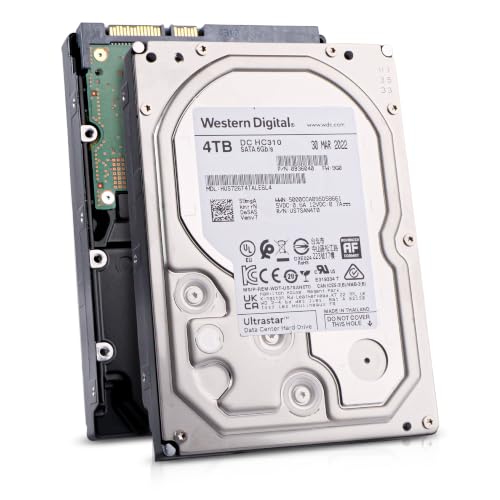
Hitachi Ultrastar 4TB Enterprise HDD
- CMR technology ensures consistent performance during intensive write cycles
- Substantial 550TB/year workload rating built for 24/7 multi-drive arrays
- High-speed 7200 RPM operation combined with a 256MB buffer
- Dual-stage micro actuator provides precision head alignment
- Offered as a renewed drive rather than brand-new retail packaging
- Internal 3.5-inch form factor requires mounting brackets and SATA cables
- Specific sustained megabyte-per-second transfer speeds are not stated in the listing
Selecting the Right Platter Drive for Your Setup
When piecing together secondary storage for a desktop workstation, I look closely at drive rotational speeds and endurance ratings rather than chasing raw capacity alone. For massive archives and round-the-clock operation, Seagate Enterprise 10TB is the one I would go with because its 7200 RPM spindle speed, 256MB cache, and 2.5 million hour MTBF handle continuous write loads with ease. Manufacturer documentation from Seagate highlights the hyperscale heritage of these platforms.
If you manage write-intensive tasks or need dependable local backup without extreme capacity needs, Hitachi Ultrastar 4TB is another drive I would point toward. It relies on CMR recording technology, spins at 7200 RPM with a 256MB buffer, and holds a 550TB per year workload rating. Meanwhile, builders who already know where is the SSD located in a computer for boot duties can pair it with Seagate BarraCuda 4TB, which runs quieter at 5400 RPM with up to 190 MB/s sustained transfer speeds for general media storage.
FAQs
1. Why should desktop builders still buy 3.5-inch hard drives instead of SSDs?
While solid-state drives dominate operating system drives, mechanical platters offer far higher storage capacity per dollar for bulk archiving. High-capacity drives excel at storing large media collections, video projects, and scheduled system backups. Exploring how many M.2 SSD slots does a motherboard have shows that physical board space often limits how many fast flash drives you can mount.
2. What makes 7200 RPM drives different from 5400 RPM models?
A drive spinning at 7200 RPM rotates faster, reducing latency and increasing sustained data throughput compared to a 5400 RPM unit. However, faster rotation generates slightly more operating noise and power draw. Quieter 5400 RPM drives remain popular choices for secondary home office desktop storage.
3. What does CMR mean for magnetic hard drives?
CMR stands for Conventional Magnetic Recording, where data tracks are written parallel to one another without overlapping. This approach ensures consistent write speeds during heavy file transfers compared to shingled recording methods. Media review sites like Tom’s Hardware frequently highlight CMR drives for stable performance in multi-drive enclosures and backup duties.
4. Should desktop hard drives be compressed to save space?
File compression can regain storage on crowded volumes, but it introduces extra CPU overhead whenever you read or write files. For high-speed solid-state drives, people often debate whether you should you compress an SSD drive, but with roomy multi-terabyte mechanical hard drives, native uncompressed storage is usually fast enough and much simpler to maintain.
Editor’s Verdict
For builders assembling high-capacity desktop storage, picking the best 3.5 hard drives comes down to matching endurance with workload. The Seagate Enterprise 10TB delivers incredible capacity alongside dependable 7200 RPM speeds, while the Seagate BarraCuda 4TB remains an approachable choice for everyday desktop archives and general file backup.