

The best gaming laptops under $850 balance dedicated graphics, a fast Full HD screen, and practical everyday hardware. The istcomputers RTX 4050 is our best overall choice, while the msi RTX 4060 is worth considering if graphics performance is your main priority.
Recommended by Us

MSI Cyborg 15 A12VF RTX 4060 Laptop
- RTX 4060 is a capable graphics option for mainstream Full HD gaming
- Core i7-12650H offers substantial processing capability
- IPS-level Full HD display provides a practical native resolution
- PCIe SSD storage is included
- Windows 11 Home comes preinstalled
- 8GB of RAM is modest for a modern gaming laptop and heavier multitasking
- 512GB of storage may fill quickly with large game installations
- The display refresh rate is not specified in the listing

Acer Nitro V 15 RTX 4050 Gaming Laptop
- RTX 4050 graphics with DLSS 3.5 and ray-tracing support
- Fast 165Hz Full HD IPS display
- Two DDR5 slots with support for up to 32GB
- Strong connectivity selection including Thunderbolt 4, Wi-Fi 6, and Gigabit Ethernet
- The included 8GB of RAM is modest for demanding gaming and heavy multitasking.
- A 512GB SSD can fill quickly after installing several large applications.
- Battery runtime is not specified in the listing.

HP Victus 15 RTX 4050 Gaming Laptop
- RTX 4050 graphics include modern features such as ray tracing and DLSS 3 frame generation.
- 144Hz FHD screen is better suited to fluid gaming than a conventional 60Hz panel.
- 16GB of DDR5 memory is a practical capacity for gaming and everyday multitasking.
- Strong port selection includes HDMI 2.1, USB Type-C, two USB Type-A ports, and Ethernet.
- Wi-Fi 6 and Bluetooth 5.4 provide current wireless connectivity.
- The 512GB SSD may fill quickly after installing several large games or media projects.
- The built-in webcam is limited to 720p resolution.
- This is a renewed product rather than a new retail unit.
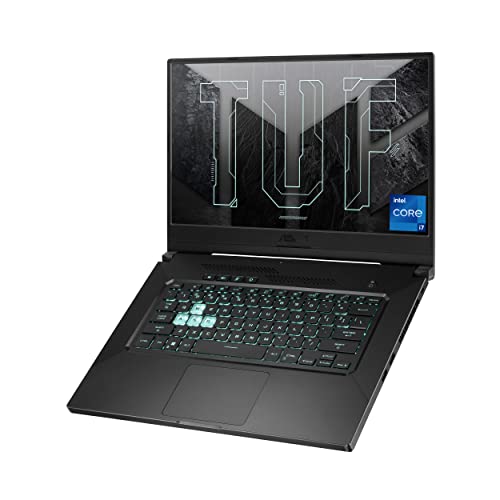
ASUS TUF Dash 15 RTX 3050 Ti Gaming Laptop
- Thin 0.8-inch chassis and manageable 4.41-pound weight
- 144Hz Full HD display includes adaptive sync
- Dedicated RTX 3050 Ti graphics with 4GB GDDR6
- Fast PCIe NVMe storage and Wi-Fi 6 connectivity
- 8GB of DDR4 RAM is modest for demanding multitasking and newer games
- The RTX 3050 Ti has 4GB of VRAM, which can limit demanding graphics settings
- 512GB of storage may fill quickly with a large game library
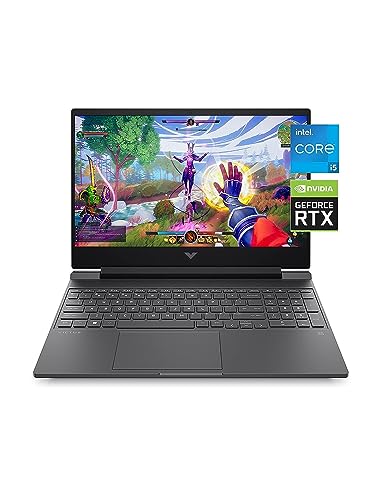
HP Victus 15 Gaming Laptop with RTX 3050
- Dedicated NVIDIA GeForce RTX 3050 graphics
- Capable 12th Gen Intel Core i5-12500H processor
- Full HD IPS panel with wide viewing angles
- Fast 512 GB SSD storage
- Backlit keyboard and Windows 11 Home included
- 8 GB of RAM may be restrictive for demanding multitasking and newer games
- RTX 3050 is an entry-level gaming GPU, so demanding graphics settings may need adjustment
- The listing does not specify the display refresh rate
What a Gaming Laptop Around $850 Can Do
A budget around this level can buy a capable Full HD gaming machine with dedicated graphics, a modern multi-core processor, and a higher refresh-rate display. Depending on the listing and availability, graphics options can include the NVIDIA GeForce RTX 4060, NVIDIA GeForce RTX 4050, and NVIDIA GeForce RTX 3050 Ti. These GPUs are primarily suited to playing at 1920 by 1080. Sensible quality settings help keep demanding games smooth, while competitive titles can make better use of a fast display.
You should also expect some compromises. Maximum ray tracing settings, uncompromised 4K gaming, premium OLED panels, and consistently quiet operation are generally outside this class. RAM and storage can vary substantially, with some configurations offering only 8GB of memory or a relatively small SSD. Battery runtime also depends on workload and power settings, and gaming usually favors wall power. Our guide to plugged-in gaming explains why portable performance changes when the charger is disconnected.
Worth knowing: A stronger graphics card pays off most when the laptop’s own display has the refresh rate to show the extra output. You cannot replace the built-in panel later as easily as RAM or storage.
What to Expect at This Price
The hardware varies by configuration, but the listings in this category share several common traits.
| Component | What You Get |
|---|---|
| CPU | Expect a mobile multi-core processor such as an Intel Core i5, Intel Core i7, or AMD Ryzen 5 or Ryzen 7. Processor generations differ, so compare the complete model number rather than relying only on the family name. These chips are intended to cover gaming, general productivity, streaming, and moderate creative workloads. |
| GPU | Common options include the NVIDIA GeForce RTX 4060, NVIDIA GeForce RTX 4050, and NVIDIA GeForce RTX 3050 Ti. The RTX 4060 is the strongest class represented here, while the RTX 4050 offers a useful middle ground. Older RTX 3050-class hardware can still suit Full HD gaming with adjusted settings. |
| Display | A 15.6-inch Full HD IPS or IPS-type screen is typical. Refresh rates of 144Hz or 165Hz appear in the listed configurations, providing smoother motion than an ordinary office display. Brightness, color coverage, adaptive sync support, and panel quality are not always identical, so check each listing carefully. |
| RAM | Listings commonly include 8GB or 16GB of DDR4 or DDR5 memory. A 16GB configuration is the more comfortable starting point for current games and multitasking. An 8GB laptop may still be usable, but it is worth checking whether the memory can be expanded and how many slots are available. |
| Storage | A 512GB PCIe or NVMe SSD is common among these choices, although smaller drives also appear in older models. An SSD gives the operating system and games responsive loading behavior. Large libraries can fill the drive quickly, making an open M.2 slot or another supported storage upgrade useful. |
The same graphics processor can appear beside different CPUs, displays, memory capacities, and storage configurations. Compare the whole specification list rather than choosing from the GPU name alone. Screen quality and chassis construction can matter just as much once you use the machine every day. Our overview of laptop build quality covers the physical details worth examining.
How to Choose a Gaming Laptop at This Budget
Start with the games and applications you use, then decide which compromises are acceptable.
Start With the Graphics Card
The graphics card has the biggest direct effect on gaming capability, so it is a sensible first comparison point. The NVIDIA GeForce RTX 4060 is the strongest GPU represented in the table, followed by RTX 4050 and RTX 3050 Ti class choices. A stronger tier generally provides more room for higher visual settings, ray tracing, or demanding future releases, but the complete laptop design still affects the experience. Avoid judging a configuration by the GPU badge alone.
Match that GPU to the display included with the laptop. A Full HD panel is a practical fit for this price class because it places less demand on the graphics processor than a higher-resolution screen. Refresh rate matters as well, particularly for quick competitive games. The listed models include 144Hz and 165Hz displays, but that does not mean every game will fully use the panel’s maximum refresh rate. Resolution, settings, drivers, power mode, and workload all influence performance.
Balance the CPU and RAM
A strong GPU paired with too little memory can produce an unbalanced system. The table includes Intel Core i5, Intel Core i7, and AMD Ryzen processors from different generations, so compare exact chip names and core configurations. For gaming, the processor must keep up with the graphics card while also handling Windows, launchers, voice chat, and background applications. Content creation and streaming can place additional demands on the CPU, making the overall platform more important than one headline component.
For a new gaming laptop, 16GB of RAM is the practical floor when the budget allows. It gives Windows and current games more breathing room than an 8GB configuration, especially when several applications remain open. A 32GB setup provides extra headroom for heavier multitasking, large creative projects, or memory-intensive workloads, but it is not essential for every player. If a laptop starts with 8GB, confirm the supported maximum and available memory slots before assuming an easy upgrade.
Display, Battery and Cooling
Refresh rate and resolution determine how you see the GPU’s output. A 144Hz or 165Hz Full HD screen is well matched to mainstream gaming hardware, but panel specifications can extend beyond those two numbers. Check the listing for IPS technology, anti-glare treatment, adaptive sync, brightness, and any stated color information. Do not assume two laptops with identical resolution and refresh rate have identical displays. Our article on gaming laptop OLEDs explains why premium panels remain less common.
Battery life and cooling noise vary considerably at this tier. Powerful CPUs and dedicated GPUs create heat, and compact cooling systems may become clearly audible during demanding work. Battery claims can also reflect light video playback or general use rather than gaming. Check what the manufacturer or seller actually states, and treat broad endurance claims cautiously. The HP renewed configuration mentions fast charging and video playback endurance, while the Acer Nitro 5 specifically lists twin fans, dual exhaust ports, and Acer Cool Boost technology.
Condition and Ports
Check whether the laptop is new, used, open-box, or renewed before ordering. One HP Victus configuration in the table is explicitly listed as renewed, which may affect the return arrangements and seller support. Read the condition notes, return window, and included accessories instead of assuming every listing follows the same terms. Product pages can also change over time, so review the current seller, configuration, and policy immediately before checkout, particularly when several similar model names are available.
Port selection should cover your monitor, mouse, headset, storage, network, and other accessories. Useful connections can include USB-C, USB-A, HDMI, Ethernet, and an audio jack, but availability differs by model. Many gaming laptops permit RAM or storage upgrades, yet the CPU, GPU, display, and most ports generally cannot be replaced. Choose those fixed components carefully. If you need a particular video output, charging feature, or memory-card slot, verify that exact feature in the current listing.
Who Should Buy Which Laptop
- Best overall: istcomputers RTX 4050 pairs an NVIDIA GeForce RTX 4050 with 16GB DDR5 and a 144Hz Full HD display.
- Best for the strongest GPU: msi RTX 4060 includes an NVIDIA GeForce RTX 4060 and Intel Core i7-12650H.
- Best value: HP RTX 3050 combines NVIDIA GeForce RTX 3050 graphics, an Intel Core i5-12500H, and a Full HD IPS display.
- Best alternative brand: Acer RTX 4050 offers NVIDIA GeForce RTX 4050 graphics, a 165Hz display, and a 512GB Gen 4 SSD.
- Best runner-up: ASUS RTX 3050 TI is a 4.4-pound RTX 3050 Ti model with a 144Hz display.
Final Thoughts
The istcomputers RTX 4050 offers the most balanced combination here, with RTX 4050 graphics, 16GB DDR5 memory, and a 144Hz Full HD display. Its renewed condition should be checked before purchase.
Choose the msi RTX 4060 if getting the strongest listed GPU matters more than receiving 16GB of memory from the start. Compare condition, RAM, screen specifications, and ports before deciding.
More Options to Consider
- HP RTX 4050 combines an Intel Core i5-13420H, NVIDIA GeForce RTX 4050, 16GB DDR4, and a 512GB SSD. It suits buyers who want a new RTX 4050 configuration with 16GB of memory.
- HP RX 6550 uses AMD Radeon RX 6550M graphics instead of an NVIDIA GPU. Its AMD Ryzen 5 7535HS, FreeSync Premium display, SD card reader, and fast charging make it a distinct alternative.
- Acer GTX 1650 is an older option with a GTX 1650, 8GB DDR4, and a 256GB SSD. It is better suited to lighter Full HD gaming and buyers who value its open M.2 slot and available hard-drive bay.
FAQs
1. Can you get a good gaming laptop for under $850?
Yes, especially if your target is Full HD gaming rather than uncompromised 4K output. This class can include dedicated graphics such as the NVIDIA GeForce RTX 4050 or RTX 3050, a multi-core mobile processor, and a high-refresh display. Configuration quality varies, so compare memory, storage, screen specifications, and condition carefully. Discounts and renewed listings may also change which GPU tier is available within the budget.
2. Is a gaming laptop around $850 worth it?
It can be worthwhile for someone who needs one portable computer for gaming, school, work, and general media use. You receive dedicated graphics and a faster display without moving into the premium laptop category. The tradeoffs can include fan noise, limited battery runtime during demanding tasks, modest storage, and less premium construction. Our overview of gaming laptop battery life provides more context about realistic portable use.
3. Which graphics card is best around $850?
Among the products listed here, the NVIDIA GeForce RTX 4060 is the strongest graphics tier, while the NVIDIA GeForce RTX 4050 provides a balanced alternative. Availability does not always follow a fixed price order, especially when older, discounted, or renewed systems are involved. Check RAM, processor, display, storage, and condition alongside the GPU. A slightly weaker graphics card in a better-balanced configuration may be more practical for some buyers.
4. How much RAM does a gaming laptop at this budget need?
A 16GB configuration is the preferred starting point for current gaming and ordinary multitasking. It leaves more memory available for Windows, launchers, browsers, communication software, and background utilities. An 8GB laptop can still operate, but memory pressure is more likely when several applications are open. If considering an 8GB model, check whether the RAM is upgradeable, how many slots the laptop provides, and the maximum capacity supported by that exact configuration.
5. Can I upgrade a gaming laptop later?
RAM and SSD storage are the most commonly upgradeable parts, although access and supported capacities vary by model. The Acer Nitro V listing states that it has two DDR5 slots and supports up to 32GB, while the older Acer Nitro 5 lists an open M.2 slot and an available hard-drive bay. The processor, graphics chip, built-in display, and port selection generally are not practical upgrades. Verify the service documentation and exact configuration before buying components.


