

The Best 17 inch gaming laptops provide more screen space without tying you permanently to a desk. The HP RTX 5070 offers the strongest overall balance here, while the lighter msi RTX 5060 is the more approachable option for buyers who value portability.
Recommended by Us
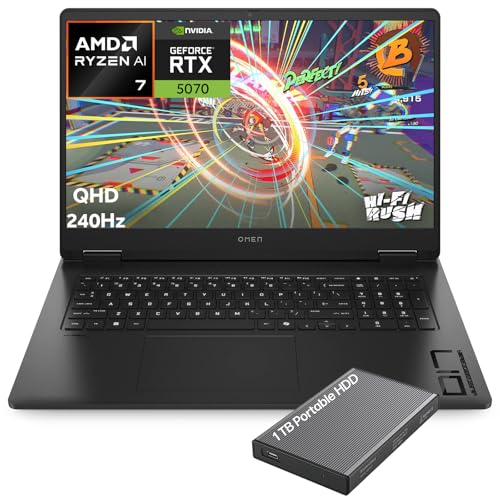
HP OMEN 17.3-inch QHD 240Hz Gaming Laptop
- QHD IPS display with a fast 240Hz maximum refresh rate
- RTX 5070 Laptop GPU includes 8GB of GDDR7 memory and DLSS 4 support
- Generous 32GB DDR5 memory for gaming, streaming, and productivity
- Includes both a 1TB internal SSD and a 1TB portable hard drive
- Strong connectivity selection with Wi-Fi 6E, USB-C, HDMI 2.1, and Ethernet
- At 6.51 pounds, it is less convenient for frequent travel than smaller gaming laptops
- Keyboard lighting is limited to one RGB zone rather than per-key customization
- Battery capacity and expected runtime are not specified in the listing

MSI Cyborg 17 RTX 5060 Gaming Laptop
- RTX 5060 graphics with DLSS 4 and ray-tracing support
- Large 17.3-inch 144Hz display
- Useful 16GB DDR5 and 1TB NVMe SSD configuration
- Broad port selection including USB-C, HDMI, and RJ45
- Relatively thin and light for a 17.3-inch gaming laptop
- FHD resolution may look less detailed on a 17.3-inch panel than higher-resolution alternatives.
- Battery capacity and expected runtime are not specified in the listing.
- The listing does not state the RTX 5060 VRAM capacity or graphics power limit.

HP OMEN 17.3-inch RTX 4090 Gaming Laptop
- High-end GeForce RTX 4090 graphics
- Fast 17.3-inch QHD 240Hz IPS display
- Powerful 24-core Intel i9-13900HX processor
- Generous 32GB DDR5 RAM and 2TB NVMe SSD
- Extensive wired and wireless connectivity
- At 6.1 pounds, it is less convenient for frequent travel
- The listed 300-nit brightness is modest for a premium gaming display
- Battery capacity and expected runtime are not specified

GIGABYTE AORUS 17X RTX 4080 Gaming Laptop
- High-end RTX 4080 Laptop GPU with 12GB GDDR6
- Fast Core i9-13980HX processor
- Sharp 17.3-inch QHD display with a 240Hz refresh rate
- Wide 100% DCI-P3 color coverage
- Fast Gen4 M.2 SSD and Wi-Fi 6E connectivity
- The listed 16GB of RAM uses a single module, which is modest beside the high-end CPU and GPU
- At 6.17 pounds, it is less convenient for frequent travel
- The listing does not specify battery capacity, battery runtime, port selection, or cooling details
Understanding the Larger Format
Buyers comparing large gaming laptops should first decide whether the extra screen space is worth carrying a wider and usually heavier machine. A 17-inch display can make games, editing timelines, and everyday multitasking easier to see, but it also reduces how comfortably the laptop fits into ordinary bags or cramped spaces. The larger chassis may give manufacturers more room for cooling and ports, although the specification sheet still needs to confirm what is actually included. Resolution matters too: QHD looks sharper than FHD at this size, but it places more demand on the GPU. The sensible choice balances graphics power, display resolution, weight, memory, and storage rather than maximizing one number. Our overview of laptop build quality covers another consideration for a machine likely to be moved between desks.
Hardware Choices That Matter
How do you match the GPU to a 17-inch display?
Aim for a graphics tier suited to the panel resolution and refresh rate. An FHD display is less demanding than QHD, while a high-refresh QHD panel benefits more from a stronger GPU and sensible graphics settings.
How should CPU and RAM be balanced?
A fast processor cannot fully compensate for limited memory during heavy multitasking. For gaming and ordinary productivity, look for a capable modern CPU alongside enough DDR5 RAM to avoid turning memory into the obvious bottleneck.
Does the highest refresh rate always matter?
No. A fast panel is useful for responsive play, but resolution, response time, color coverage, and GPU capability matter as well. A premium refresh specification alone does not guarantee balanced visual performance.
Why should cooling affect the decision?
Gaming components generate sustained heat, and a larger chassis does not automatically guarantee quiet or effective cooling. Read the listed cooling details instead of assuming that every 17-inch model handles demanding loads equally well.
What listing details should be verified before ordering?
Confirm whether the machine is new, upgraded, or bundled by a third-party seller, then verify ports, wireless connectivity, memory, storage, and operating system. Our laptop retailer guide explains where seller choice can matter.
Listing Red Flags to Notice
- A listing that emphasizes the GPU name but omits display resolution, refresh rate, or response time makes it difficult to judge whether the graphics hardware and panel are sensibly paired.
- Vague claims about large memory or storage deserve caution when the listing does not identify the memory generation, drive type, installed configuration, or whether a reseller performed the upgrade.
- A product page that shows only glamorous exterior photos while leaving out dimensions, weight, port placement, and cooling information may hide practical drawbacks that become obvious after delivery.
- Battery claims without clear conditions are not very useful because demanding gaming normally requires wall power; our guide to plugged-in gaming explains why performance expectations change away from an outlet.
Checks Before Placing an Order
- Is the listed GPU the laptop version you expect, and is its tier appropriate for the native display resolution rather than merely impressive in the product title?
- Does the display specify resolution, refresh rate, response time, panel technology, and color coverage, since screen size alone says little about actual image quality?
- Are the installed RAM and SSD capacities sufficient for your current library and workload, and does the manufacturer or seller clearly describe whether either component can be upgraded?
- Are the required ports present, including the display outputs, USB connections, wired networking, and card reader you may need, so that adapters do not become an immediate extra purchase?
- Will the listed dimensions and weight fit your bag, desk, and travel routine, given that a large-screen laptop can feel portable in theory but awkward in daily use?
- Does the seller clearly explain the condition, included accessories, operating system, return terms, and any bundled storage, so you know which parts actually arrive in the box?
Worth knowing: Match the whole laptop to the reason you want a 17-inch screen instead of chasing the highest GPU or refresh-rate number. A balanced display, cooling setup, memory configuration, and usable port selection will matter every day.
Battery expectations also deserve a reality check before ordering a larger model. Our overview of gaming laptop battery life explains the compromises behind portable use.
A Sensible Upgrade Order
- Start with storage if the internal SSD becomes crowded, because moving or removing games constantly is disruptive and free drive space is useful for updates. Confirm the available drive slots and supported format before buying hardware.
- Increase memory next when ordinary multitasking, creative applications, or large projects regularly push the installed capacity. Match compatible memory specifications and check whether the existing configuration uses one module or multiple modules.
- Add external peripherals only after learning which shortcomings actually bother you. A monitor, keyboard, mouse, headset, dock, or external drive can improve a desk setup, but unnecessary accessories quickly erase the convenience of a laptop.
- Plan eventual maintenance around dust, airflow, and software rather than treating every slowdown as an upgrade problem. Our article on performance over time discusses why long-term behavior can change.
Matching Models to Buyers
- Best overall: HP RTX 5070 combines an RTX 5070, 32GB DDR5, and a QHD display.
- Best value: msi RTX 5060 pairs RTX 5060 graphics with a 5.5-pound chassis.
- Premium value: HP RTX 4090 suits buyers wanting RTX 4090 graphics, 32GB DDR5, and 2TB storage.
- Alternative brand: GIGABYTE RTX 4080 offers RTX 4080 graphics and a 240Hz QHD panel.
Cost and Ownership Questions
1. Is paying more for QHD worthwhile on a 17-inch laptop?
QHD is easier to appreciate on a larger screen because its added pixel density produces a sharper desktop and more detailed image than FHD. It also asks more of the GPU, so the better purchase is a QHD laptop with appropriately strong graphics rather than a sharp display attached to underpowered hardware.
2. Does a premium GPU automatically make the laptop a better value?
No. A top-tier GPU may be justified for demanding QHD use, but it can be poor value if you mainly play lighter titles or plan to use conservative settings. Screen quality, memory, storage, ports, cooling information, and seller support all contribute to the overall value.
3. Is 16GB of RAM enough for long-term ownership?
It is a practical starting point for gaming and general use, particularly when the memory can be expanded later. Buyers who run creative applications, many browser tabs, or several demanding programs at once may prefer 32GB. For related workloads, our video editing overview covers the broader hardware demands.
4. Are large gaming laptops too inconvenient for regular travel?
They can be, depending on the model and your routine. Check the listed weight and dimensions rather than assuming every 17-inch machine is equally bulky. Remember that the power adapter and accessories add to the load, while the wider chassis may require a larger bag.
5. How long should a 17-inch gaming laptop remain useful?
Useful life depends on the GPU tier, display resolution, memory capacity, storage, cooling behavior, and your willingness to lower settings over time. Replaceable RAM and storage can help with capacity limitations, but they cannot turn an aging GPU into a newer graphics tier. Buy for realistic needs, not distant promises.
The Shortlist in Plain Terms
The HP RTX 5070 is the most balanced choice for buyers seeking QHD, a fast panel, substantial memory, and current graphics hardware. Choose the msi RTX 5060 instead if portability, FHD gaming, and a less extravagant specification make more sense. Either choice is easier to justify than paying for hardware your games and workload will rarely use.


