

The Best 300Hz gaming laptops combine a genuinely fast display with enough graphics power and cooling to use it well. The Eluktronics RTX 5090 is our strongest all-around choice, while the ASUS RTX 5070 TI offers a large Nebula display and a more familiar gaming design.
Recommended by Us

ASUS ROG Strix G18 RTX 5070 Ti
- Powerful RTX 5070 Ti and Core Ultra 9 configuration
- Fast 18-inch 2.5K 300Hz display
- Generous 32GB of DDR5-5600MHz memory
- Toolless access to RAM, SSD and fans
- Advanced vapor chamber and Tri-Fan cooling design
- At 7.05 pounds, it is less convenient for frequent travel than a smaller gaming laptop.
- A 1TB SSD may require expansion for users with very large game libraries.
- Battery capacity and expected runtime are not specified in the listing.
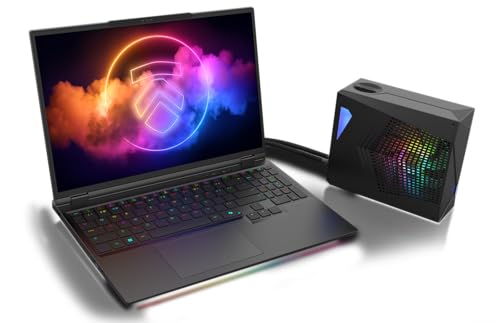
Eluktronics HYDROC 16 RTX 5090 Laptop
- High-wattage RTX 5090 GPU with 24GB of GDDR7
- Bright 16-inch QHD display with a 300Hz refresh rate
- Included external liquid cooler for use at a desk
- Non-soldered RAM and storage allow future component changes
- Strong connectivity selection including Thunderbolt 4 and Wi-Fi 7
- The external liquid cooler adds equipment and setup when using the complete cooling system.
- A 1TB SSD may feel limited for users maintaining a large collection of modern games and media projects.
- The high-end configuration requires a substantial budget.
Eluktronics HYDROC 16 RTX 5090 Laptop
- High-wattage RTX 5090 GPU with 24GB of GDDR7
- Fast 300Hz QHD display with a practical 16:10 aspect ratio
- Generous 64GB RAM and 2TB NVMe storage configuration
- Included external liquid-cooling hardware can be disconnected for mobile use
- CNC-machined aluminum chassis with extensive connectivity
- Using the external liquid cooler adds equipment and setup space at a desk
- The listing does not provide the laptop's weight
- Ships with Windows 11 Home rather than a professional edition

Alienware 18 Area-51 RTX 5080 Laptop
- High-end NVIDIA GeForce RTX 5080 graphics
- Fast 300Hz WQXGA display
- Generous 32GB DDR5 memory and 2TB SSD
- Performance-oriented Cryo-Chamber airflow design
- 2MP FHD IR camera included
- The 9.56-pound weight makes frequent travel less convenient
- Large 18-inch chassis requires substantial desk and bag space
- Battery capacity and expected runtime are not listed

Dell Alienware 18 RTX 5080 Gaming Laptop
- High-end RTX 5080 graphics with 16GB GDDR7
- Sharp 18-inch WQXGA display with a 300Hz refresh rate
- Flagship-class Core Ultra 9 275HX processor
- Generous 32GB DDR5 memory
- Extensive connectivity and an included 1TB docking station
- At 9.56 pounds, it is considerably less portable than a typical gaming laptop
- Only 1TB of the advertised storage is installed internally; the additional 1TB is housed in the included dock
- Battery capacity and expected runtime are not specified in the listing
Understanding the 300Hz Advantage
A 300Hz panel refreshes extremely quickly, but the number alone does not guarantee a better gaming experience. The GPU must render frames quickly enough for the display’s speed to matter, while the CPU must keep up in processor-sensitive competitive workloads. Resolution also changes the equation. Driving a QHD or WQXGA screen is more demanding than driving Full HD, so buyers should compare the panel, GPU tier, processor, and cooling system as a complete package rather than shopping by refresh rate alone.
- A high-end GPU makes more sense when you want to combine a 300Hz panel with a sharp QHD-class resolution. A midrange GPU can still suit competitive settings, but it may require reduced visual quality to prioritize responsiveness.
- Fast displays are most valuable to players who care about low input latency, clear motion, and competitive responsiveness. Slower cinematic games and everyday productivity rarely justify paying extra for such a high refresh rate.
- Cooling affects how consistently the CPU and GPU can sustain demanding workloads. Our overview of gaming laptop cooling explains why thermal design deserves as much attention as headline components.
Worth knowing: Match the laptop to how you actually play instead of chasing the largest specification number. A balanced GPU, CPU, display, and cooling system is usually more useful than a 300Hz label attached to underpowered hardware.
Hardware Differences That Matter
The Eluktronics HYDROC 16 configurations occupy the highest graphics tier in this group. Both use an NVIDIA GeForce RTX 5090 GPU with 24GB GDDR7 and a power rating of up to 175 watts, paired with an Intel Core Ultra 9 275HX. The higher-capacity version combines 64GB DDR5 5600MHz RAM with a 2TB PCIe Gen 4 NVMe SSD, while the other has 32GB RAM and a 1TB drive. Both include an external liquid cooler connected to an internal hydraulic chamber.
The ASUS ROG Strix G18 takes a different approach with an Intel Core Ultra 9 Processor 290HX Plus, an NVIDIA GeForce RTX 5070 Ti laptop GPU, 32GB DDR5-5600MHz memory, and a 1TB PCIe Gen 4 SSD. Its 18-inch 2.5K ROG Nebula display has a 300Hz refresh rate and 3ms response specification. Cooling comes from an end-to-end vapor chamber, a sandwiched heatsink design, and Tri-Fan technology. Toolless access also makes its RAM, SSD, and fans easier to reach.
The Alienware 18 Area-51 pairs an Intel Core Ultra 9 275HX with an NVIDIA GeForce RTX 5080, 32GB DDR5, and a 2TB SSD. Its Cryo-Chamber raises the system to create a larger air intake. The Dell Alienware 18 listing uses the same processor and an NVIDIA GeForce RTX 5080 16GB GDDR7, but it combines a 1TB internal SSD with a bundled 1TB dock and runs Windows 11 Pro. For 300Hz gaming, the most important difference is the relationship between GPU tier and display resolution, followed closely by cooling capacity.
When 300Hz Is Excessive
Skip this category if you mainly play slower-paced titles, use high visual settings regardless of latency, or need long unplugged use. A more moderately refreshed display can cost less while leaving budget for a stronger GPU, additional storage, or a lighter chassis. A 300Hz panel also offers diminishing practical value when the chosen graphics hardware cannot produce consistently high frame rates at the screen’s native resolution.
Instead, look for a balanced gaming laptop with a lower refresh rate, an appropriate GPU for its resolution, and enough memory for your usual workload. Buyers who travel frequently should also consider size, weight, and battery behavior before prioritizing display speed. Our explanation of gaming laptop weight covers why large screens and substantial cooling systems often reduce portability.
Your 300Hz Selection Checklist
- Start by matching the GPU tier to the screen resolution. A powerful GPU is particularly useful for QHD, 2.5K, or WQXGA panels because those resolutions require more graphics work than Full HD.
- Consider the games and settings you actually use. Competitive players who lower visual settings can benefit from a different hardware balance than buyers who prioritize maximum image quality.
- Check the CPU and RAM together rather than focusing on one impressive component. A high-end GPU should not be paired with inadequate memory or a processor that limits fast, CPU-sensitive gameplay.
- Read the display details carefully. Confirm the native resolution, maximum refresh rate, response specification when provided, brightness information, and whether a special graphics mode is needed to enable 300Hz.
- Compare cooling designs and operating expectations. Powerful components generate substantial heat, and fan noise may increase under demanding loads; our guide to gaming laptop noise explains the reasons behind that trade-off.
- Verify condition, seller upgrades, ports, warranty coverage, and internal upgrade access. A bundled dock or seller-installed storage is not the same as additional internal storage, so read the listing carefully before ordering.
Priorities for Different Players
Competitive Players Chasing Responsiveness
Prioritize the GPU and CPU combination first, then check whether the laptop provides a direct path from the dedicated GPU to the display. Fast-paced competitive play benefits most from 300Hz when the system can render rapidly and maintain stable performance. Lower visual settings may be a sensible compromise if responsiveness matters more than detailed effects.
Cooling should remain high on the list because sustained loads can expose the limits of a thin thermal system. A display specification describes its maximum capability, not the performance the laptop will maintain in every workload.
Players Wanting Sharp QHD Visuals
A QHD-class 300Hz panel places greater demand on the graphics processor than a Full HD screen. Buyers who want sharp detail and high settings should favor the stronger GPU tier rather than spending heavily on memory that will not directly improve graphics rendering. Brightness and color quality also matter when the laptop doubles as a creative or entertainment system.
Expect a premium system with a large, high-resolution panel to use more power under load. Our article on gaming laptop battery life provides useful context for shoppers balancing performance with unplugged use.
Desktop Replacements and Creators
Buyers replacing a desktop should look beyond refresh rate to memory capacity, storage, ports, networking, and cooling. Large project files and demanding multitasking can make 32GB or 64GB of RAM useful, while a larger SSD reduces the need for immediate expansion. An 18-inch display offers more workspace but creates a heavier and less travel-friendly machine.
External liquid cooling, high-capacity batteries, and substantial air-cooling systems can make sense for a laptop that spends most of its time at a desk. Frequent travelers should usually prioritize a more manageable chassis even if that means accepting less extreme sustained performance.
The Strongest 300Hz Choices
The Eluktronics RTX 5090 is the leading option for buyers who want the strongest GPU, abundant memory, generous storage, and liquid-assisted cooling. The ASUS RTX 5070 TI is the more approachable alternative for players who want an expansive 300Hz Nebula display, strong gaming hardware, and convenient access to upgradeable components.
300Hz Laptop Questions Answered
1. Is paying extra for 300Hz worthwhile?
It can be worthwhile for competitive players who value motion clarity and low perceived latency, but it is not automatically a good value for everyone. If you prefer demanding visual settings or slower-paced games, a lower-refresh display paired with a better-balanced GPU may be the smarter purchase. The screen should fit your workload rather than define the entire buying decision.
2. Does every 300Hz laptop need a flagship GPU?
No. A midrange or upper-midrange GPU can make sense when you play at reduced settings and prioritize responsiveness, particularly at Full HD. A flagship GPU becomes more compelling when the laptop combines 300Hz with QHD-class resolution and you want to preserve high visual quality. GPU power limits and cooling also affect the result.
3. Is 16GB of RAM enough for a fast gaming laptop?
For many gaming-focused systems, 16GB is a workable starting point, while 32GB gives more breathing room for multitasking and demanding applications. Larger capacities are more relevant to heavy creative work, professional workloads, or users who regularly run several memory-intensive programs. Confirm whether the memory is replaceable before assuming you can upgrade it later.
4. What listing details should I verify before ordering?
Confirm the exact GPU, CPU, native resolution, memory, storage, ports, operating system, warranty, and whether the seller modified the machine. Also check whether 300Hz requires a dedicated graphics mode and whether extra storage is internal or supplied through an accessory. Our laptop selection guide covers the wider trade-offs beginners should consider.
Other Fast-Display Alternatives
- Thunderobot RTX 5060 combines a 16-inch QHD+ display with an Intel Core i9-14900HX, GeForce RTX 5060, 16GB DDR5 RAM, and a 1TB SSD. It suits buyers who want 300Hz at a less extreme hardware tier and value additional internal storage.
- Thunderobot i9 5060 RTX 5060 uses the same listed processor, graphics tier, memory capacity, and display class but reduces the SSD to 512GB. It is better suited to someone with a modest game library or plans to manage storage carefully.
- ASUS RTX 3080 offers a 15.6-inch Full HD 300Hz display, NVIDIA GeForce RTX 3080 8GB GDDR6, AMD Ryzen 9 5900HX, 16GB DDR4, and a 1TB SSD. Its Full HD panel and smaller size make it a distinct alternative to the newer QHD-class machines.


