

The Best 64GB RAM gaming laptops combine substantial memory with a GPU and processor strong enough to justify it. The HP RTX 5070 offers the best overall balance, while the msi RTX 5080 is the stronger choice for buyers prioritizing graphics performance.
Recommended by Us
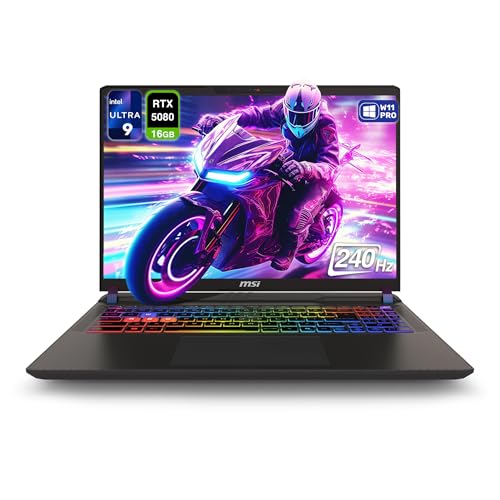
MSI Vector 16 HX AI RTX 5080 Gaming Laptop
- High-end RTX 5080 GPU with 16GB GDDR7
- Fast 240Hz WQXGA display
- Generous 64GB DDR5 memory configuration
- Advanced Thunderbolt 5 and Wi-Fi 7 connectivity
- Windows 11 Pro included
- The 1TB SSD may feel limited for users keeping a large local library of modern applications and media.
- At 5.95 pounds, it is less convenient for frequent travel than a typical thin-and-light laptop.
- Battery capacity and estimated runtime are not specified in the listing.

MSI Vector 16 HX RTX 5080 Gaming Laptop
- High-end RTX 5080 graphics with 16GB GDDR7
- Fast 240Hz QHD+ display with 100% DCI-P3 coverage
- Large 64GB DDR5 memory configuration
- Spacious 4TB PCIe NVMe SSD
- Strong port selection and bundled folding laptop cooler
- The 720p webcam is modest for a premium configuration
- At 5.95 pounds and 1.12 inches thick, portability is limited compared with slimmer laptops
- Wi-Fi 6 is included rather than a newer wireless standard

HP OMEN Slim 16 RTX 5070 Gaming Laptop
- High-refresh 240Hz WQXGA display with 500-nit brightness and 100% sRGB coverage
- Generous 64GB DDR5 memory and 2TB NVMe SSD configuration
- RTX 5070 GPU includes 8GB of newer GDDR7 graphics memory
- Strong port selection includes USB-C, HDMI, RJ-45 Ethernet, and three USB-A ports
- Windows 11 Pro and a bundled folding laptop cooler are included
- The RTX 5070 has 8GB of VRAM, which may require adjusted texture or graphics settings in especially demanding workloads at 2560 x 1600
- Battery capacity and expected runtime are not provided in the listing
- Wi-Fi 6 is included, but the listing does not specify Wi-Fi 6E or Wi-Fi 7
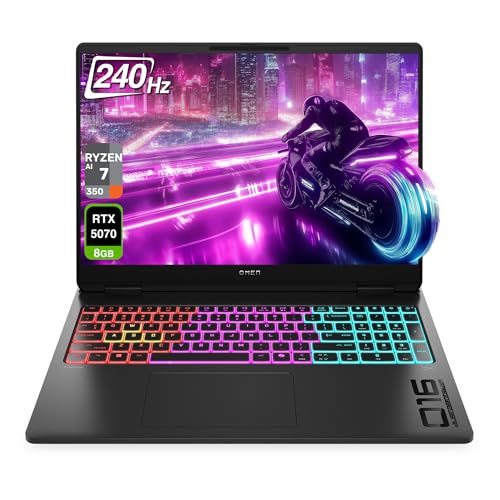
HP OMEN 16 MAX RTX 5070 Gaming Laptop
- High-end RTX 5070 graphics with dedicated GDDR7 memory
- Fast 240Hz WQXGA display with 500-nit brightness
- Generous 64GB DDR5 memory and 2TB PCIe storage configuration
- Strong port selection, including dual 40Gbps USB-C and HDMI 2.1
- Wi-Fi 7 and four-zone RGB keyboard lighting
- The 8GB VRAM capacity may become restrictive in some especially demanding high-resolution workloads.
- Battery capacity and expected runtime are not provided in the listing.
- The listed 49.82-pound weight appears unusually high for a 16-inch laptop and should be verified before purchase.

Lenovo Legion 5 RTX 5060 Gaming Laptop
- High-refresh 240Hz IPS display with 2560 x 1600 resolution
- Generous 64GB DDR5-5600 memory configuration
- RTX 5060 graphics with 8GB of GDDR7
- High-end 24-core Intel Core Ultra 9 275HX processor
- Includes Wi-Fi 7, Bluetooth 5.4, and Gigabit LAN
- At 8 pounds, it is relatively heavy for frequent travel
- The 1TB SSD may fill quickly with large game libraries and creative files
- The listing does not specify the operating system or battery runtime
Understanding the 64GB Advantage
For modern gaming alone, 64GB of RAM is usually more capacity than most players need. It becomes more useful when gaming shares the system with streaming tools, large browser sessions, virtual machines, editing software, or development environments. The extra memory provides room for demanding workflows, but it does not replace a capable GPU or fast processor.
Buyers researching the best 64GB RAM gaming laptops should therefore judge the complete hardware combination. A system with abundant memory but a lower-tier GPU may be less suitable for demanding graphics than a balanced configuration. Portability, heat, and fan noise also matter because powerful laptop components require substantial cooling. Our guide to gaming laptop noise explains why.
Hardware Differences That Matter
The MSI Vector 16 HX AI 400 and MSI Vector 16 HX RTX 5080 use the Intel Core Ultra 9 275HX and NVIDIA GeForce RTX 5080 Laptop GPU with 16GB GDDR7. Both have 64GB DDR5 RAM and 16-inch QHD+ 240Hz displays. Storage separates them: the AI 400 configuration lists a 1TB PCIe SSD, while the other Vector supplies a 4TB PCIe NVMe M.2 SSD and includes a folding laptop cooler.
The HP OMEN Slim pairs an Intel Core Ultra 9 285H with NVIDIA GeForce RTX 5070 Graphics, 64GB DDR5 RAM, and a 2TB SSD. The HP OMEN 16 MAX instead uses an AMD Ryzen AI 7 H 350 and NVIDIA GeForce RTX 5070 Laptop GPU with 8GB GDDR7. It also has 64GB DDR5 RAM and a 2TB PCIe SSD. Both provide 16-inch WQXGA 240Hz IPS displays, although only the OMEN Slim listing includes a bundled laptop cooler.
The Lenovo Legion 5 combines the Intel Core Ultra 9 275HX with an NVIDIA GeForce RTX 5060 8GB GDDR7, 64GB DDR5-5600 RAM, and a 1TB PCIe SSD. Its 16-inch WQXGA 240Hz IPS display reaches a listed 500-nit peak brightness. Cooling construction is not detailed for the Lenovo, OMEN 16 MAX, or MSI AI 400, so it should not be assumed. Our overview of gaming laptop cooling provides useful context. For this category, GPU tier is the difference that most directly affects gaming value once every option already has 64GB of memory.
Matching Memory to Your Workload
Gaming With Heavy Multitasking
If you play while keeping voice chat, recording tools, launchers, browser tabs, and other utilities open, 64GB gives the system generous working space. Prioritize a balanced CPU and GPU before paying for unusually large storage. The extra memory can reduce pressure during multitasking, but it cannot compensate for graphics hardware that falls short of your preferred resolution or visual settings.
A high-refresh QHD+ or WQXGA display is a sensible match for powerful hardware, but consider how often the laptop will leave your desk. Large displays and performance-focused components can make a machine less convenient to carry. Our article on gaming laptop value discusses that desktop-versus-laptop tradeoff.
Gaming and Creative Production
For gaming mixed with video editing, rendering, large image projects, or other content work, 64GB is easier to justify. Pay close attention to the GPU, its dedicated graphics memory, the processor, and SSD capacity. These parts affect different stages of a creative workflow, so choosing memory capacity without examining the rest of the system can produce an expensive but uneven configuration.
Worth knowing: Match the laptop to the reason you need 64GB instead of chasing the highest number on every specification line. A suitable GPU, display, storage setup, and processor will usually matter more than moving beyond already generous memory capacity.
Development and Virtual Machines
Developers running local services, large toolchains, containers, or several virtual machines can make practical use of 64GB. Processor core count and SSD space deserve close attention because these workloads can demand both compute resources and frequent storage access. Fast connectivity is also useful when attaching docks, external drives, displays, or wired networking.
In this situation, gaming capability may be only part of the purchase. Start by listing the applications that must run together, then estimate storage needs for projects and virtual disks. Once 64GB is confirmed as enough, compare processor class, GPU tier, ports, and display characteristics rather than treating RAM as the sole measure of performance.
Five Rules for Choosing Well
Choose the GPU before comparing minor memory details. Every laptop here already provides 64GB, but their graphics processors span different tiers. A stronger GPU is generally more valuable for demanding visual settings, higher display resolutions, GPU rendering, and other accelerated workloads than a small difference in RAM speed.
Match the processor to work outside gaming. High-end processors help with compilation, encoding, complex calculations, and running several demanding applications together. If your workload is mostly gaming, avoid assuming that the highest processor designation automatically produces the most balanced laptop for your needs.
Buy enough internal storage for the files you actually keep. A 1TB SSD can fill quickly when it holds large applications, media libraries, project files, and several games. A 2TB or 4TB configuration offers more breathing room, but external storage remains an option when portability is not the priority.
Check the display rather than focusing only on refresh rate. Resolution, brightness, color coverage, panel type, and glare treatment affect daily use as much as the headline refresh figure. OLED is not represented in the listed table configurations. Our explanation of gaming laptop OLED covers the wider tradeoffs.
Treat mobility as part of performance. Powerful components can consume substantial energy and create heat, while gaming laptops often deliver their best sustained performance when connected to power. Review your travel habits, available outlets, and tolerance for carrying a large charger before settling on a desktop-class configuration.
Listing Terms Made Simple
- 64GB DDR5 RAM: This means the laptop uses a newer generation of system memory and provides ample capacity for heavy multitasking, creation tools, and memory-intensive professional applications.
- Dual-channel memory: This describes memory operating across two channels, which provides more bandwidth than a comparable single-channel arrangement when the hardware and modules support it.
- PCIe NVMe M.2 SSD: This is a compact solid-state storage format designed for fast startup, application loading, file access, and transfers without the mechanical parts used by hard drives.
- GDDR7 dedicated graphics memory: This is memory reserved for the GPU rather than the laptop’s 64GB system RAM, and it supports graphics processing and GPU-accelerated workloads.
- WQXGA or QHD+: These labels commonly refer to the 2560×1600 resolution shown in these listings, providing more workspace and image detail than lower-resolution laptop panels.
Battery claims should be considered separately from memory and storage terminology because capacity depends heavily on workload, power mode, and hardware. Our overview of gaming laptop battery life explains the practical considerations.
Best Match by Buyer Type
- Best overall: HP RTX 5070 combines 64GB DDR5, a 2TB SSD, and a 240Hz WQXGA display.
- Strongest GPU: msi RTX 5080 includes an NVIDIA GeForce RTX 5080 16GB GDDR7.
- Best value: HP RTX 5070 2 pairs RTX 5070 graphics with 64GB DDR5 and 2TB storage.
- Alternative MSI configuration: msi i9-14900HX RTX 5080 adds a 4TB SSD and bundled cooler.
- Runner-up: Lenovo RTX 5060 offers DDR5-5600 memory, Wi-Fi 7, and RTX 5060 graphics.
The Practical Bottom Line
The HP RTX 5070 is the most balanced choice for buyers who want 64GB of memory, substantial storage, and RTX 5070 graphics. Choose the msi RTX 5080 instead when the NVIDIA GeForce RTX 5080 Laptop GPU is the priority. Both make better sense when your workload genuinely benefits from 64GB, rather than when memory capacity is simply being used as a shortcut for judging overall performance.
Other 64GB Configurations
| Product | What Is Different | Suits Whom |
|---|---|---|
| ASUS RTX 5060 | This model uses an 18-inch WUXGA 144Hz display, AMD Ryzen 7 260 processor, NVIDIA RTX 5060, 64GB RAM, and a 2TB SSD. | It suits buyers who prefer a larger screen and want a desktop-replacement format for gaming, creative work, and multitasking. |
| Dell RTX 4090 | This renewed configuration combines a Core i9-13900HX, RTX 4090 graphics, 64GB DDR4, and two separate 2TB PCIe NVMe M.2 SSDs. | It suits buyers seeking powerful previous-generation graphics and substantial storage who are comfortable considering a renewed laptop. |
| Mavark RTX 4090 | This 18-inch option lists a QHD+ 165Hz display, 64GB DDR5-4800, a 4TB PCIe SSD, and NVIDIA GeForce RTX 4090 graphics. | It suits buyers who prioritize a large QHD+ display, generous internal storage, and high-end graphics in a desktop-style laptop. |


