

The Best affordable gaming laptops combine capable graphics with sensible compromises rather than chasing premium specifications. The ASUS GTX 1650 TI is our balanced overall choice, while the MECHREVO RTX 4050 stands out when stronger graphics performance matters most.
Recommended by Us

MECHREVO Dragon 15K RTX 4050 Gaming Laptop
- RTX 4050 supports DLSS 3 and accelerated ray tracing.
- High-refresh 165Hz FHD display with 100% sRGB coverage.
- DDR5 5600MHz dual-channel memory technology.
- RAM and SSD expansion options are listed up to 64GB and 4TB.
- Control Center provides fan, performance-profile, and RGB customization.
- Installed RAM and SSD capacities are not specified in the provided listing.
- The display is FHD rather than a higher-resolution QHD panel.
- Battery capacity, runtime, ports, and wireless specifications are not listed.

HP Victus 15 RTX 3050 Gaming Laptop
- RTX 3050 includes 6GB of dedicated GDDR6 graphics memory.
- 144Hz IPS display offers smoother motion than a standard 60Hz panel.
- Eight-core Intel processor supports gaming, work, and general multitasking.
- Broad port selection includes USB-C, HDMI 2.1, RJ-45, and two USB-A ports.
- Fast 512GB NVMe storage and modern Wi-Fi 6 connectivity are included.
- 8GB of DDR4 RAM is modest for heavier multitasking and demanding modern software.
- The display is rated at only 250 nits and 45% NTSC, limiting brightness and color coverage.
- It is a renewed laptop, and the listing does not provide battery runtime information.

ASUS TUF FX506LI GTX 1650 Ti Gaming Laptop
- Dedicated NVIDIA GeForce GTX 1650 Ti graphics
- Full HD 15.6-inch display
- Quad-core Intel Core i5 processor
- Fast PCIe SSD storage
- The 256GB SSD may fill quickly with a large game library.
- 8GB of RAM is a basic capacity for modern gaming and heavy multitasking.
- At 6 pounds and 1.1 inches thick, it is less portable than slimmer laptops.

HP Victus 15.6 Gaming Laptop GTX 1650
- Dedicated NVIDIA GeForce GTX 1650 graphics
- Capable Intel Core i5-12450H processor
- Useful 512GB SSD capacity
- Full-size 15.6-inch laptop format
- 8GB of memory may limit demanding games and heavier multitasking
- Display resolution and refresh rate are not specified
- Cooling, connectivity, ports, and keyboard lighting details are not listed
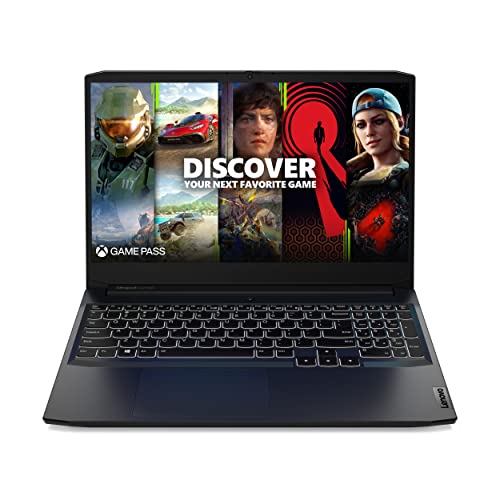
Lenovo IdeaPad Gaming 3 GTX 1650
- 120Hz FHD IPS display offers smoother motion than a standard 60Hz panel
- Six-core Ryzen 5 5600H processor supports gaming and general productivity
- Dedicated GTX 1650 graphics are appropriate for entry-level gaming
- Includes Wi-Fi 6, Ethernet, USB-C, and HDMI connectivity
- Backlit keyboard and webcam privacy shutter are useful practical extras
- 8GB of RAM may feel restrictive during heavier multitasking
- 256GB of storage can fill quickly with large applications and game libraries
- At 6.9 pounds, it is relatively heavy for frequent travel
What Affordable Really Means
An affordable gaming laptop is not necessarily the model with the lowest purchase cost. It is the machine that gives you enough GPU power, processor performance, memory, and storage for the games you want to play without making you pay for features you will rarely use. Most buyers in this category should prioritize dependable 1080p gaming, a dedicated GPU, and an appropriate display before considering premium materials, very high resolutions, or decorative extras. Our overview of gaming laptop value provides more context.
Keeping costs controlled usually means accepting a few practical compromises. Eight gigabytes of memory may be workable initially, but it can become restrictive during gaming and multitasking. A smaller SSD can also fill quickly, while an older graphics processor may require reduced visual settings in demanding software. These laptops approach those compromises differently. Some emphasize newer graphics, others offer familiar brands or larger storage, and several leave room for later upgrades. The right choice depends on which limitation you are most willing to manage.
Affordable Laptop Myths
The Strongest GPU Is Always Necessary
A faster GPU generally gives you more flexibility, but it should match your actual needs. An NVIDIA GeForce RTX 4050 Laptop GPU is attractive for demanding graphics workloads and access to newer RTX features, while an NVIDIA GeForce RTX 3050 or NVIDIA GeForce GTX 1650-class option can still make sense when your expectations and settings are modest. Consider display resolution, the types of games you prefer, and how long you hope to keep the laptop. Paying for unused graphics capacity does not automatically create better value.
Worth knowing: Match the laptop to affordable gaming rather than chasing the highest specification on the page. A balanced machine with upgradeable memory or storage may serve you better than one standout component surrounded by tight limitations.
A Fast Processor Fixes Limited Memory
A capable CPU cannot remove every bottleneck created by insufficient RAM. Modern games often run alongside launchers, voice chat, browsers, security software, and background Windows processes, so memory pressure can affect responsiveness even when the processor is strong. Eight gigabytes is common among affordable models, but buyers who multitask heavily should check whether the memory can be expanded. You should also avoid judging processors only by the Core i5, Core i7, or Ryzen 5 label because architecture, generation, core configuration, and power limits all matter.
A High Refresh Rate Solves Every Display Issue
A 144Hz or 165Hz panel can make motion appear smoother when the hardware produces enough frames, but refresh rate is only one part of display quality. Resolution, viewing angles, brightness, color coverage, response behavior, and adaptive synchronization can also affect the experience. Cooling matters alongside the screen because sustained heat can influence long-session performance and fan noise. Product listings rarely provide every useful thermal detail, so check credible owner feedback and manufacturer documentation when available. Our article on long-term performance explains why maintenance and heat management matter.
Every Listing Includes the Same Configuration
Similar-looking laptops can have different processors, GPUs, memory capacities, storage drives, displays, ports, operating systems, and warranty terms. Verify the exact configuration tied to the listing rather than relying on a familiar model family. Condition matters too: the HP Victus Gaming 15 Laptop listed here is renewed, while the Delca configuration is resealed for memory or storage upgrades. Check who covers each component, which ports are present, whether memory is replaceable, and whether the storage capacity suits your library before ordering.
Upgrade in the Right Order
- Start with memory if the laptop has eight gigabytes and supports expansion. Additional RAM can improve general responsiveness when games, browsers, launchers, and communication tools are open together.
- Expand storage after memory if the included SSD is too small for your regular library. A larger internal drive is convenient, but an external drive may be useful for files when internal expansion is unavailable.
- Improve the desk setup with a comfortable mouse, headset, or external keyboard once the laptop itself meets your needs. These accessories do not increase graphics power, but they can make longer sessions more practical.
- Address cooling and maintenance over time by keeping vents clear and using the laptop on a hard, stable surface. Before opening the chassis, review warranty terms and our explanation of laptop upgrade options.
Plan upgrades before buying rather than assuming every component can be replaced. Laptop GPUs and CPUs are generally not practical consumer upgrades, so choose enough graphics and processing power at the start. Memory and storage are more commonly serviceable, but access and capacity limits vary by model. The Acer Nitro V listing, for example, specifically states that it has two DDR5 slots and supports up to 32GB, while the MECHREVO Dragon 15K listing advertises expansion up to 64GB RAM and 4TB SSD. Other listings may provide less detail, making confirmation especially important.
Value Without Major Compromise
Upsides
- Dedicated graphics provide a more suitable gaming foundation than relying only on the integrated graphics found in many everyday notebooks.
- Full HD displays keep the graphics workload more manageable while remaining sharp enough for typical 15.6-inch laptop screens.
- High-refresh-rate panels are available without moving into the premium end of the market, including 120Hz, 144Hz, and 165Hz options here.
- Upgradeable memory or storage can let you spread the total cost over time instead of paying for maximum capacity immediately.
Trade-offs
- Entry-level configurations commonly include eight gigabytes of memory, which may feel tight when gaming and multitasking at the same time.
- Older GPUs can require lower visual settings sooner as software becomes more demanding, even when they remain suitable for lighter workloads.
- Affordable listings may involve renewed hardware, third-party customization, older operating systems, or limited configuration details that require closer checking.
The practical goal is to protect the parts that most affect gaming while accepting compromises you can fix later. A suitable GPU and CPU should come first because they are not realistic upgrades for most owners. Memory and storage are easier to expand when the design permits it. That balance helps keep initial spending sensible without turning the laptop into a short-lived purchase.
Match a Laptop to You
- Best overall: ASUS GTX 1650 TI pairs an Intel Core i5-10300H with NVIDIA GeForce GTX 1650 Ti graphics.
- Strongest GPU: MECHREVO RTX 4050 includes an NVIDIA GeForce RTX 4050 and a 165Hz display.
- Best value: Lenovo GTX 1650 offers a Ryzen 5 5600H, GTX 1650, and 120Hz screen.
- Alternative brand: HP RTX 3050 combines an Intel i5-13420H, RTX 3050, 144Hz display, and 512GB SSD.
- Runner-up: HP GTX 1650 has an Intel Core i5-12450H, GTX 1650, and 512GB SSD.
These choices cover several hardware generations, so compare their complete configurations rather than treating every dedicated GPU as equivalent. The MECHREVO emphasizes newer graphics and display specifications, while the Lenovo provides a simpler entry point. The two HP options differ in processor and GPU generation, and the renewed condition of the RTX 3050 model deserves attention. ASUS offers the GTX 1650 Ti configuration selected as the balanced overall option. If durability is your priority, our overview of laptop build quality explains what to inspect.
Other Models Worth a Look
- Acer RTX 4050 combines an Intel Core i5-13420H, NVIDIA GeForce RTX 4050 Laptop GPU, 165Hz display, and DDR5 memory. It suits buyers who want newer graphics plus clearly stated memory expansion.
- ASUS RTX 3050 TI pairs an NVIDIA GeForce RTX 3050 Ti with an Intel Core i7-11370H. Its listed 4.4-pound weight and 0.8-inch thickness suit buyers prioritizing portability.
- Delca RTX 3050 offers configurable memory and storage around an Intel Core i5-13420H and RTX 3050. It suits buyers comfortable with third-party upgrades and split warranty coverage.
The Acer is the clearest alternative for shoppers focused on an NVIDIA GeForce RTX 4050 Laptop GPU from a familiar manufacturer, and its listing provides useful details about memory slots and storage. The ASUS option has an older platform but a thinner, lighter form factor according to its specifications. Delca provides the broadest stated range of memory and SSD configurations, though buyers should read the resealing notice and warranty division carefully. Each one offers a distinct reason to look beyond the table rather than simply duplicating its choices.
The Shortlist Made Simple
Choose the ASUS GTX 1650 TI if you want the balanced overall selection and are comfortable with its older GTX-class graphics. Pick the MECHREVO RTX 4050 when the stronger NVIDIA GeForce RTX 4050, 165Hz display, and stated expansion options matter more. Whichever route you take, confirm the exact memory, storage, condition, operating system, and warranty shown on the current listing before ordering.
Affordable Gaming Laptop Questions
1. Is an affordable gaming laptop suitable for long-term use?
It can be, provided the processor and GPU meet your likely needs and the laptop receives routine care. Memory and storage expansion can extend practical usefulness, but they cannot compensate for an underpowered GPU forever. Keep vents clear, avoid blocking airflow, and confirm upgrade access before buying.
2. Should I choose RTX 4050 or an older GPU?
An RTX 4050 laptop is the stronger choice here when graphics capability and newer RTX features are priorities. Older NVIDIA GeForce RTX 3050, NVIDIA GeForce RTX 3050 Ti, NVIDIA GeForce GTX 1650 Ti, and NVIDIA GeForce GTX 1650 options may still suit lighter expectations or reduced settings. Compare the complete laptop rather than choosing from the GPU label alone.
3. Is eight gigabytes of RAM enough for gaming?
Eight gigabytes can provide a starting point, but it leaves less room for games and background applications to operate together. Buyers who keep browsers, chat software, recording tools, or creative programs open should consider an upgrade where supported. Check slot availability and maximum capacity because these details differ between models.
4. Which listing details matter most before ordering?
Confirm the exact CPU, dedicated GPU, RAM, SSD capacity, display resolution, refresh rate, ports, operating system, condition, and warranty provider. Also check whether a third party changed the memory or storage. A model family can contain many configurations, so the precise listing matters more than the name printed on the chassis.
5. Is a budget gaming laptop better than a desktop?
A laptop combines its display, keyboard, battery, and computer hardware in a portable package, while a desktop typically offers easier component replacement and more configuration flexibility. Your choice should depend on whether mobility or upgrade freedom is more valuable. Our laptop versus PC comparison explores the practical differences.


