

The Best AMD ryzen 9 gaming laptops combine high-end processing with graphics powerful enough to justify it. The msi RTX 5070 offers the strongest overall balance, while the ASUS RTX 5070 TI is the better fit when GPU performance takes priority.
Recommended by Us

ASUS ROG Strix G16 RTX 5070 Ti Laptop
- High-end RTX 5070 Ti GPU with 12GB GDDR7 and 140W TGP
- Powerful 16-core Ryzen 9 processor
- Fast 165Hz display with 100% sRGB coverage
- Generous 32GB DDR5 memory
- Strong port selection with USB4, HDMI 2.1, and 2.5G Ethernet
- WUXGA resolution is less detailed than QHD or QHD+ panels available on some gaming laptops
- At 5.51 pounds, it is more appropriate for desk-based use than frequent travel
- Battery capacity and expected runtime are not specified in the listing

MSI Vector 16 HX AI RTX 5070 Ti Laptop
- High-end RTX 5070Ti graphics with 12GB GDDR7
- Sharp QHD+ display with a fast 240Hz refresh rate
- Ryzen 9 processor and 32GB DDR5 RAM support heavy workloads
- Thunderbolt 4, Wi-Fi 7, and customizable 24-zone RGB lighting
- Includes an additional 1TB portable hard drive
- At 5.95 pounds, it is relatively substantial for frequent travel
- Battery capacity and expected runtime are not specified
- The listing does not identify the display's brightness or color-gamut coverage

MSI Crosshair A16 HX RTX 5070
- High-performance RTX 5070 graphics with DLSS 4 and ray tracing support
- Sharp 16-inch QHD+ display with a gaming-focused 240Hz refresh rate
- Generous 32GB DDR5 memory configuration
- Ryzen 9 8940HX processor designed for demanding games and multitasking
- Useful connectivity and customization features, including Wi-Fi 6E, USB-C, and 24-zone RGB lighting
- At 5.51 pounds and 1.1 inches thick, it is less convenient for frequent travel than a compact laptop
- A 1TB SSD may require storage management for users with large software and media libraries
- Battery capacity and expected runtime are not specified in the provided product data

Acer Nitro V 16 RTX 5070 Gaming Laptop
- High-tier RTX 5070 graphics with ray tracing and DLSS support
- Fast 180Hz WUXGA display with 100% sRGB color coverage
- Robust selection of USB4, HDMI 2.1, USB-A, Ethernet, and audio connections
- Dedicated NitroSense key provides access to fan speed, lighting, and performance controls
- Dual-fan cooling uses both upper and lower air intakes
- The listing specifies only 4 GB of RAM, which is very limited for a modern gaming laptop
- Listed 192 GB storage capacity may fill quickly with large applications and media
- Display resolution is 1920 x 1200 rather than a higher-resolution QHD-class panel
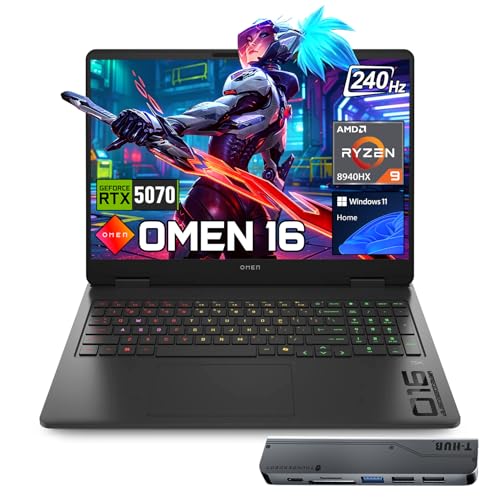
HP OMEN RTX 5070 240Hz Gaming Laptop
- High-end Ryzen 9 and RTX 5070 hardware
- Fast 240Hz display with WQXGA resolution
- Generous 64GB DDR5 memory and 2TB NVMe storage
- Strong port selection with an included USB-C hub
- RGB backlit keyboard includes a numeric keypad
- At 5.4 pounds, it is less convenient to carry than many thinner laptops
- Battery capacity and expected runtime are not specified in the listing
- The RTX 5070 has 8GB of VRAM, which may limit headroom in especially memory-intensive graphics workloads
Ryzen 9 Priorities
A Ryzen 9 processor makes the most sense when gaming shares the workload with streaming, video editing, compilation, or heavy multitasking. Games do not always use every available CPU core, so the processor badge alone cannot tell you whether a laptop is well balanced. GPU class, graphics power limits, memory capacity, display resolution, and cooling can matter more once the processor is already this capable. Buyers should judge the whole machine rather than treating Ryzen 9 as an automatic guarantee of better gaming.
For a gaming-first system, start with the GPU and display you actually need, then confirm that the Ryzen 9 processor, RAM, and cooling support that target. A higher-end CPU is useful for background applications and demanding creative work, but it will not compensate for an undersized GPU. Battery expectations should also stay realistic because powerful mobile components consume substantial energy under load. Our guide to gaming laptop battery life covers this.
Worth knowing: Match the laptop to the work you expect from Ryzen 9 instead of chasing the largest number on the specification sheet. A balanced GPU, display, memory setup, and cooling design usually matter more than a small CPU distinction.
Table Models Compared
The msi RTX 5070 uses the AMD Ryzen 9 8940HX with an NVIDIA GeForce RTX 5070, 32GB DDR5, and a 1TB SSD. Its 2560 by 1600 display runs at 240Hz, while Cooler Boost 5 uses dual fans and multidirectional airflow. This configuration is balanced for buyers who want a sharp, fast panel without paying for an RTX 5070 Ti. The Acer RTX 5070 pairs its different Ryzen 9 270 processor with an RTX 5070 and a 1920 by 1200, 180Hz screen. Acer also specifies dual-fan, dual-intake, and dual-exhaust cooling.
GPU-focused buyers should compare those models with the ASUS RTX 5070 TI and msi RTX 5070 TI. Both use the AMD Ryzen 9 8940HX and NVIDIA GeForce RTX 5070 Ti with 12GB GDDR7. ASUS specifies a 140W TGP, a 165Hz WUXGA display, 32GB DDR5, a 1TB SSD, vapor-chamber cooling, Tri-Fan technology, and liquid metal. The Vector offers a 2560 by 1600, 240Hz panel, 32GB DDR5, a 1TB SSD, Cooler Boost 5 with dual fans and up to seven heat pipes, plus a bundled 1TB portable drive.
The HP RTX 5070 favors memory and storage capacity. It combines the AMD Ryzen 9 8940HX and NVIDIA GeForce RTX 5070 Graphics with 64GB DDR5 and a 2TB PCIe NVMe M.2 SSD. Its 16-inch 2560 by 1600 IPS display has a 240Hz refresh rate, 500-nit rating, and 100% sRGB coverage. That makes it appealing for heavier multitasking, although the supplied information does not describe its cooling system. Our guide to laptop video editing explains where extra memory can help. For this category, the GPU difference matters most because every table model already has a powerful Ryzen 9 processor.
When Ryzen 9 Is Excessive
Skip this class if you mainly play lighter games, browse the web, or use basic office applications. A less expensive Ryzen 7 or comparable midrange processor can leave more of the budget for a suitable GPU, better screen, or larger SSD. That is often the smarter gaming purchase because many games become limited by graphics performance before they exhaust a modern high-core-count CPU. Buyers who rarely multitask will probably notice the display and GPU differences more than the jump to Ryzen 9.
These machines are also poor fits for anyone prioritizing low weight, quiet operation, or long unplugged sessions above performance. High-end CPUs and GPUs work best when the laptop has adequate cooling and access to wall power. A mainstream gaming laptop or general-purpose notebook may be more practical if portability matters more than rendering, streaming, or sustained gaming. Our overview of gaming laptop value provides useful context before paying for hardware that may sit underused.
Other Ryzen 9 Choices
- msi Ryzen 9 8940HX RTX 5070 TI pairs the AMD Ryzen 9 8940HX with an NVIDIA GeForce RTX 5070 Ti Laptop GPU rated at up to 140W. It suits buyers who want 32GB RAM, a 1TB SSD, a QHD+ 240Hz display, and Windows 11 Pro without the portable-drive bundle.
- HP Ryzen 9 8940HX RTX 5070 is a lower-capacity alternative to the table’s OMEN configuration. It retains the Ryzen 9 8940HX, RTX 5070 Graphics, 2560 by 1600 240Hz display, and bundled USB-C hub, but comes with 32GB DDR5 and a 1TB SSD.
- msi RTX 4070 uses a Ryzen 9-8945HS and RTX 4070 rather than the newer GPU options above. Its 32GB DDR5, 1TB SSD, QHD 165Hz panel, and Cooler Boost 5 design suit buyers satisfied with a previous graphics generation.
Ryzen 9 Listing Red Flags
Marketplace listings often lead with the processor because Ryzen 9 sounds impressive, but the quieter details determine whether the machine is a sensible gaming purchase. Check the complete configuration rather than assuming every variation under a shared product title has the same GPU, display, or memory. Long-term performance also depends on ventilation and maintenance. Our guide to performance over time explains the broader issue.
- A listing that says only “RTX graphics” without the exact GPU model hides the component most likely to define gaming capability, so confirm the full NVIDIA model and available graphics memory.
- A high refresh rate without a stated resolution, panel type, brightness, or color coverage leaves too much uncertainty about image quality, especially when the screen is a major part of the purchase.
- Large RAM and storage claims deserve a closer look because seller-upgraded configurations may differ from the manufacturer’s standard model, bundle, operating system, and support arrangement.
- Vague cooling language is a warning sign because a powerful Ryzen 9 and discrete GPU need effective heat removal to sustain demanding workloads rather than merely reaching brief peak speeds.
A Practical Selection Checklist
Use the listing’s detailed specifications, not its promotional headline, to work through the following checks. Chassis construction and cooling layout can also affect daily ownership. Our guide to laptop build quality covers what deserves attention.
- Match the GPU to Ryzen 9 by deciding whether you need mainstream high-resolution gaming or the extra headroom of an RTX 5070 Ti. A strong CPU paired with a much weaker GPU is difficult to justify for a gaming-first machine, while creators may place more value on CPU resources.
- Balance CPU and RAM by treating 32GB as a comfortable configuration for gaming, streaming, creative applications, and heavy multitasking rather than paying for processor prestige alongside cramped memory. More RAM can be useful for specialized workloads, but capacity should reflect software needs instead of marketing appeal.
- Compare display resolution, refresh rate, color coverage, and cooling together because sharper or faster panels place different demands on the GPU. Look for concrete thermal details such as fan count, airflow paths, heat pipes, a vapor chamber, or liquid metal rather than assuming every thick gaming chassis cools equally well.
- Verify condition, seller modifications, ports, storage layout, and upgrade access before ordering. Confirm that the exact configuration includes the connections you need, and distinguish internal storage from bundled external drives or hubs so accessories do not obscure the laptop’s native specification.
Matching Models to Buyers
msi RTX 5070 is the overall choice for balanced RTX 5070 graphics, 32GB DDR5, QHD+ resolution, and Cooler Boost 5.
ASUS RTX 5070 TI suits GPU-first buyers with its 140W RTX 5070 Ti, 32GB DDR5, vapor chamber, and Tri-Fan cooling.
Acer RTX 5070 is the value-minded option, combining RTX 5070 graphics with a 180Hz WUXGA display.
msi RTX 5070 TI offers an RTX 5070 Ti, QHD+ screen, Cooler Boost 5, and bundled portable storage.
HP RTX 5070 is the runner-up for buyers prioritizing 64GB DDR5, a 2TB SSD, and RTX 5070 graphics.
The Strongest Overall Choices
The msi RTX 5070 is the best-rounded choice because its Ryzen 9 8940HX, RTX 5070, 32GB DDR5, QHD+ 240Hz display, and specified cooling form a sensible package. Choose the ASUS RTX 5070 TI instead when the stronger RTX 5070 Ti and detailed cooling design matter more than having a higher-resolution panel.


