

The Best ASUS ROG gaming laptops combine high-end graphics, fast displays, and hardware aimed at demanding players. The ASUS ROG Strix Scar 18 is the strongest all-around choice, while the ASUS ROG Zephyrus G14 suits buyers wanting serious power in a smaller format.
Recommended by Us

ASUS ROG Strix Scar 18 RTX 5070 Ti
- High-end RTX 5070 Ti and Intel Core Ultra 9 275HX configuration
- Large 18-inch Mini LED display with 2.5K resolution and 240Hz refresh rate
- 32GB of fast DDR5-5600MHz memory
- Advanced vapor-chamber and tri-fan cooling design
- Tool-free RAM and SSD access
- The 6.28-pound weight and 18-inch chassis are less convenient for frequent travel
- A 1TB SSD may fill quickly when maintaining a large game library
- AniMe Vision and extensive RGB lighting may add little value for buyers who prefer a restrained design

ASUS ROG Strix G18 RTX 5070 Ti Gaming Laptop
- High-performance RTX 5070 Ti graphics with 12GB GDDR7
- Fast and spacious 18-inch 240Hz WQXGA display
- Generous 32GB DDR5 memory and 2TB NVMe storage
- Strong selection of modern wired and wireless connections
- Tri-Fan cooling is designed to help maintain performance during extended gaming sessions
- The 18-inch chassis and 6.61-pound weight make it less convenient for frequent travel
- Battery capacity and expected runtime are not specified
- The operating system is not listed in the provided product data

ASUS ROG Strix Scar 18 RTX 5080
- High-end RTX 5080 Laptop GPU and Core Ultra 9 processor configuration
- 4K 240Hz Mini LED panel with a 3ms response time
- Fast 32GB DDR5-6400MHz memory
- Tool-free access to RAM, SSD and fans
- Dual Thunderbolt 5, Wi-Fi 7 and 2.5G LAN connectivity
- The 8.16-pound weight makes it less convenient for frequent travel.
- A 1TB SSD may fill quickly with a large modern game library.
- Battery capacity and expected runtime are not specified in the listing.
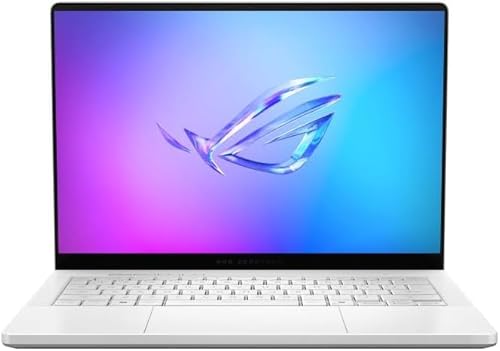
ASUS ROG Zephyrus G14 RTX 5080 OLED
- High-end RTX 5080 Laptop GPU with DLSS 4 and ray tracing support
- Sharp 3K OLED display with 120Hz, 0.2ms response time, and G-SYNC
- Powerful 12-core, 24-thread Ryzen AI processor with dedicated AI acceleration
- Generous 32GB LPDDR5X memory and 2TB PCIe 4.0 SSD
- Premium CNC aluminum chassis
- The 120Hz refresh rate is lower than the faster panels available on some competition-focused gaming laptops.
- The listing does not provide details about ports, wireless connectivity, battery capacity, or cooling hardware.
- The 14-inch display may feel compact for users who prefer a larger gaming workspace.

ASUS ROG Zephyrus G16 RTX 4090
- Premium RTX 4090 graphics with DLSS 3.0 and ray tracing support
- High-refresh 240Hz OLED display with G-SYNC
- Generous 32 GB RAM and 2 TB SSD configuration
- Strong selection of modern wired and wireless connections
- Premium aluminum chassis with customizable lighting
- The RTX 4090 is limited to a maximum 115W TGP, so it may trail higher-power RTX 4090 laptop implementations.
- Battery runtime is not specified in the listing.
- RAM and storage upgradeability are not stated.
Understanding ROG Laptop Tiers
ASUS ROG covers more than one kind of premium gaming laptop. Large Strix and Scar configurations emphasize expansive displays, powerful hardware, and sustained desk-based use, while slimmer Zephyrus models balance gaming capability with easier travel. The right family depends as much on where you play as the components you want.
At this level, GPU choice usually has the greatest effect on gaming capability, but display resolution and refresh rate determine how that power is presented. Memory and storage also matter when you keep a large library or run creative software. Our overview of laptop choices covers the broader decision.
Buyers should also consider cooling space, physical size, and upgrade access instead of ranking machines by graphics labels alone. An 18-inch system can suit a permanent gaming station, whereas a 14-inch model is easier to carry. Neither format is automatically better because each asks you to accept different practical compromises.
Fast ROG Selection Rules
- Choose a Strix or Scar model when maximum screen space matters more than easy daily portability.
- Consider a Zephyrus when you need premium gaming hardware in a slimmer, more travel-friendly format.
- Match the GPU to the display resolution instead of paying solely for the highest graphics tier.
- Prioritize additional SSD capacity if you keep many large games and dislike managing storage regularly.
- Check the exact configuration because similarly named ROG laptops may include substantially different screens and graphics hardware.
Match ROG to Your Setup
For a Desktop Replacement
If the laptop will spend most of its time on a desk, an 18-inch ROG configuration makes sense. The larger chassis and display create a more substantial gaming station, particularly when you do not plan to connect an external monitor. Give priority to the GPU, screen quality, cooling design, and the ports needed for your peripherals.
Size and weight become less troublesome in a fixed setup, but they still affect storage and occasional transport. Measure your desk, confirm that your bag can accommodate the computer, and leave room around the vents. Large gaming laptops can also use substantial power adapters, so plan the entire workspace rather than considering only the chassis footprint.
Worth knowing: Match the laptop to how you will use ASUS ROG hardware rather than chasing the highest specification-sheet number. A better-sized display, sufficient storage, and suitable connections can matter more than moving up one component tier.
For Frequent Travel
A portable buyer should look beyond raw graphics performance. Chassis size, power-adapter bulk, battery expectations, and the number of accessories you carry all affect whether a gaming laptop is pleasant to move. A compact Zephyrus can be a better fit than an 18-inch model even when the larger machine offers more room for cooling.
High-resolution OLED screens are especially appealing for mixed gaming and creative work, but display quality is only one part of the choice. Confirm that the available ports support your usual monitor, storage, headset, and charging arrangement. Our guide to laptop battery life explains why unplugged expectations require careful comparison.
For Competitive and Creative Work
Buyers splitting time between fast-paced gaming and content creation should seek a balanced configuration. A high-refresh display helps motion look clearer, while broad color coverage and high resolution support visual work. Plenty of memory is useful when several demanding applications remain open, and a larger SSD reduces the need to remove projects or games repeatedly.
Graphics memory and GPU class become more significant when workloads include demanding rendering, high-resolution assets, or local AI tasks. CPU capability still matters for compilation, encoding, and heavy multitasking, so avoid choosing a machine from the GPU badge alone. Connectivity can also determine whether docks, external displays, and fast storage fit naturally into the setup.
Cooling deserves equal attention because premium components generate considerable heat under sustained loads. Vapor chambers, multiple fans, and liquid-metal applications are examples of approaches listed for some ROG models, but the exact design varies. Fan noise and surface temperatures can also influence comfort, particularly when the laptop handles lengthy work sessions in a shared room.
The ROG Models to Choose
The ASUS ROG Strix Scar 18 is the leading choice for buyers who want the most complete high-end package among the laptops below. Its premium display and powerful core hardware suit a fixed gaming station. Choose the ASUS ROG Zephyrus G14 instead when portability, an OLED screen, and generous storage are higher priorities.
Listing Red Flags to Avoid
ROG model names can look nearly identical even when the internal hardware is different. Read the full configuration instead of relying on the main product image or a shortened title. Cooling also affects sustained performance and everyday comfort. Our guide to gaming laptop cooling provides additional context.
- A listing that omits the complete GPU name is risky because graphics tiers and laptop implementations can differ substantially.
- An unclear display specification deserves caution because resolution, panel type, brightness, color coverage, and refresh rate affect different uses.
- Missing memory or storage details make comparison difficult because capacity and upgrade access vary between otherwise similar ROG configurations.
- Vague port information is a warning sign because your monitors, docks, storage devices, and peripherals may require specific connections.
- A title mixing model generations without a precise configuration can cause confusion because similar chassis may contain very different hardware.
Other ROG Configurations Worth Considering
- ASUS ROG Strix G18 (2025) Gaming Laptop pairs an NVIDIA RTX 5080 16GB GDDR7 GPU with an Intel Ultra 9 275HX, 32 GB DDR5 RAM, and a 2 TB SSD. Its 18-inch 2.5K 240Hz ROG Nebula display suits buyers building a large-screen gaming and creative workstation.
- ASUS ROG Strix G18 Gaming Laptop stands out with an NVIDIA GeForce RTX 5080 GPU, 64GB of DDR5 RAM, and dual Thunderbolt 5 ports. It is aimed at heavy multitaskers and creators who need more memory than the standard configurations below provide.
- ASUS ROG Strix G18 Gaming Laptop 2026 RTX 5070 uses an NVIDIA GeForce RTX 5070 Laptop GPU with 8GB GDDR7 memory and an Intel Core Ultra 9 275HX. It suits buyers who want an 18-inch 2.5K 240Hz display but do not need an RTX 5080 configuration.
ASUS ROG Purchase Questions
1. Is an ASUS ROG laptop worth the extra cost?
It can be worthwhile when you will use the high-refresh display, dedicated graphics, advanced cooling, and premium connectivity regularly. The value is harder to justify for light gaming or basic office work. Compare the exact configuration rather than assuming every ROG badge represents the same level of hardware, display quality, or upgrade access.
2. Which GPU tier makes sense for an ASUS ROG laptop?
An NVIDIA GeForce RTX 5070 or RTX 5070 Ti configuration can suit high-resolution gaming without automatically moving to the highest tier. An NVIDIA GeForce RTX 5080 or NVIDIA GeForce RTX 4090 is more appropriate for buyers prioritizing demanding graphics workloads, higher settings, or additional graphics memory. The best choice depends on the display resolution and software you actually use.
3. Is 32GB of memory enough for a premium ROG?
For gaming, everyday multitasking, and many creative workloads, 32GB provides comfortable capacity. More memory becomes useful for unusually heavy multitasking, large creative projects, virtual machines, or local AI work. Check whether the memory is upgradeable because some thin laptops use soldered memory, while certain larger ROG listings specifically advertise tool-free internal access.
4. What costs should I check beyond the laptop itself?
Account for any dock, external monitor, storage drive, travel case, headset, or spare power solution your setup requires. Larger systems may also demand more desk space and be less convenient to transport. Our explanation of gaming laptop costs covers the hardware and design factors behind premium pricing.


