


The Best gaming laptops for 144 FPS pair powerful graphics with a high-refresh display and enough cooling to sustain performance. The msi RTX 5080 is our strongest all-around choice, while the Acer RTX 5070 TI offers a larger screen and capable hardware.
Recommended by Us

Acer Predator Helios Neo 18 RTX 5070 Ti
- High-end RTX 5070 Ti graphics with DLSS 4 and ray-tracing support
- Fast, color-rich 18-inch WQXGA 240Hz G-SYNC display
- Generous 32GB DDR5-6400 memory and 2TB PCIe Gen 4 storage
- Extensive ports including Thunderbolt 4 and HDMI 2.1
- Dual-fan cooling with an AeroBlade metal fan and liquid metal thermal compound
- The 7.28-pound chassis is cumbersome for frequent travel
- Both PCIe M.2 slots are occupied, so adding another internal SSD requires replacing an existing drive
- Battery capacity and expected runtime are not specified in the listing
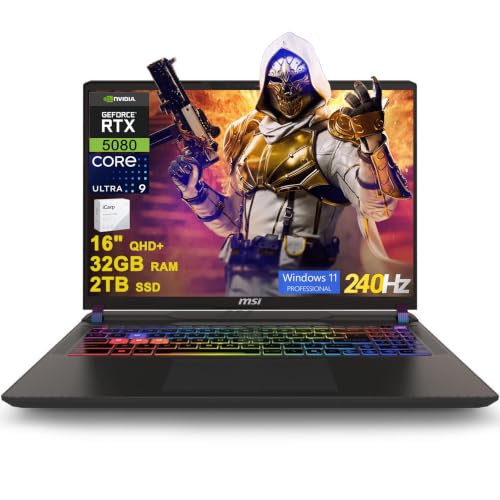
MSI Vector 16 HX AI RTX 5080 Gaming Laptop
- High-end RTX 5080 graphics with 16GB of dedicated graphics memory
- Sharp 16-inch QHD+ IPS display with a fast 240Hz refresh rate
- Generous 32GB DDR5 memory and 2TB SSD configuration
- Extensive port selection includes two Thunderbolt 5 connections
- Includes Windows 11 Professional and Wi-Fi 7
- The listed 49.82-pound weight appears unusually high for a laptop and should be verified before purchase.
- Battery capacity and expected runtime are not provided in the listing.
- The listing does not specify display brightness or color-gamut coverage.

MSI Vector 16 HX RTX 5080 Gaming Laptop
- RTX 5080 Laptop GPU includes 16GB of GDDR7 graphics memory
- Fast 240Hz QHD+ display with 100% DCI-P3 coverage
- High-capacity 64GB RAM and 4TB SSD configuration is listed
- Extensive port selection includes dual Thunderbolt 5, HDMI 2.1, Ethernet, and an SD card reader
- Thunderobot 7-in-1 USB-C hub is included
- The listing conflicts on capacity: the selected size says 64GB RAM and 4TB SSD, while the feature bullets state 32GB and 2TB
- The built-in camera is limited to 720p HD
- Wi-Fi 6 is listed rather than a newer Wi-Fi standard

Lenovo Legion 5 15IRX10 RTX 5070 OLED
- High-end Core i9-14900HX processor
- RTX 5070 graphics with 8GB GDDR7
- Sharp 15.1-inch WQXGA OLED display
- Generous 32GB DDR5-5600 memory
- Modern Wi-Fi 7 and Gigabit Ethernet connectivity
- Glossy display may show reflections in bright environments
- Display refresh rate is not specified in the listing
- Battery capacity and expected runtime are not provided

HP OMEN 17.3-inch RTX 4090 Gaming Laptop
- High-end GeForce RTX 4090 graphics
- Fast 17.3-inch QHD 240Hz IPS display
- Powerful 24-core Intel i9-13900HX processor
- Generous 32GB DDR5 RAM and 2TB NVMe SSD
- Extensive wired and wireless connectivity
- At 6.1 pounds, it is less convenient for frequent travel
- The listed 300-nit brightness is modest for a premium gaming display
- Battery capacity and expected runtime are not specified
Understanding the Performance Target
A high frame rate is not a fixed laptop feature. It changes with resolution, graphics settings, ray tracing, power limits, and the demands of each game. A fast GPU gives you room to adjust those variables, but a high-refresh screen is also necessary if you want the display to show the extra frames rather than cap the visible result.
Competitive settings are generally easier to run than maximum visual settings at a high resolution. That makes GPU tier, cooling capacity, and display resolution more useful than a broad performance promise. Thin systems may prioritize portability, while larger machines often have more physical space for thermal hardware. Our guide to gaming laptop cooling explains why sustained performance deserves attention.
A Practical Hardware Checklist
- Match the GPU tier to your settings and resolution. A higher-tier laptop GPU makes more sense for demanding visuals or QHD gaming, while a midrange option can be reasonable if you are willing to reduce settings and use supported upscaling features.
- Balance the processor, graphics, and memory instead of paying for one headline component. A strong GPU paired with limited memory or a weaker processor can create avoidable constraints, especially when gaming, streaming, and running background applications together.
- Check display resolution, refresh rate, and thermal design as a package. A fast panel is useful only when the hardware can feed it consistently, and adequate cooling helps the CPU and GPU maintain performance during longer sessions. Our explanation of laptop overheating covers the thermal side.
- Verify whether the listing is new, renewed, bundled, or sold in a modified configuration, then inspect ports and upgrade details. Confirm the included RAM and storage, available expansion slots, networking standard, operating system, and seller support rather than relying on the model family alone.
Worth knowing: Match the laptop to the performance target instead of chasing the highest specification on the page. A balanced GPU, display, and cooling setup is usually more useful than an expensive component that the rest of the machine cannot fully support.
Other Capable Gaming Options
| Product | What Is Different | Suits Whom |
|---|---|---|
| GIGABYTE RTX 5070 | This model combines an AMD Ryzen AI 7 350 processor with an NVIDIA GeForce RTX 5070 Laptop GPU. Its listed weight is 4.18 pounds, and its chassis measures 0.65 inches thick, making portability a larger part of its appeal. | It suits buyers who want capable gaming hardware in a thinner machine that is easier to carry between home, work, or school. |
| Acer RTX 5060 | The Nitro uses an AMD Ryzen 7 260 processor, NVIDIA GeForce RTX 5060 Laptop GPU, and a 16-inch WUXGA display with a 180Hz refresh rate. It also includes 32GB DDR5 memory and an open M.2 slot. | It fits buyers willing to adjust visual settings in exchange for a less extreme hardware tier, while retaining a fast display and practical storage expansion. |
| Alienware RTX 4080 | This large-screen alternative pairs an Intel Core i9-14900HX with NVIDIA GeForce RTX 4080 12 GB GDDR6 graphics. Its 18-inch QHD+ display has a 165Hz refresh rate, and supported configurations provide four M.2 SSD slots. | It is aimed at desktop-replacement shoppers who value a large display, substantial graphics hardware, and room for additional local storage. |
Rules for Choosing Wisely
Start with the games and settings you actually use. Maximum visual presets place a much heavier load on the GPU than reduced competitive settings, so a laptop that looks excessive on paper may be appropriate for QHD detail but unnecessary for lighter workloads.
Treat the display as part of the performance system. A high refresh rate improves motion clarity and responsiveness, but resolution also matters because higher pixel counts increase graphics demand. The sensible pairing depends on whether you value sharpness, visual effects, or consistently fast motion most.
Do not compare laptop GPUs by name alone. Power limits and thermal behavior can affect sustained results, even when two machines advertise graphics processors from the same family. Manufacturer specifications and detailed configuration information are more useful than assuming every similarly named GPU performs identically.
Allow enough memory for the game and everything running beside it. These laptops include 32GB configurations, which provide useful room for browsers, launchers, voice chat, and creative applications. Capacity is not a substitute for GPU power, but inadequate memory can make an otherwise strong machine feel less consistent.
Expect size and portability to involve trade-offs. Large gaming laptops provide expansive screens but take up more desk and bag space, while thinner models emphasize mobility. Our explanation of gaming laptop weight covers why powerful portable systems can become bulky.
Budget for the complete setup rather than the processor and GPU alone. Storage capacity, ports, networking, display quality, and upgrade access all affect everyday usefulness. Higher specifications also tend to raise cost quickly. Our overview of gaming laptop costs provides more context.
Checks Before Placing an Order
- Does the exact configuration include the advertised GPU, processor, memory, storage, display resolution, and refresh rate rather than specifications borrowed from another version?
- Does the screen support the resolution and refresh rate you want, and are you comfortable reducing graphics settings when a demanding workload exceeds the laptop’s comfortable range?
- Are the HDMI, USB-A, USB-C, Thunderbolt, Ethernet, audio, and card-reader connections suitable for your monitor and peripherals, since port selections vary substantially?
- Can the memory or storage be upgraded, and are any slots still available after the factory configuration, so later expansion does not require replacing existing parts?
- Is the manufacturer and seller combination one you trust for support and service? Our brand reliability overview can help frame that decision.
Matching Models to Buyers
- Best overall: msi RTX 5080 pairs RTX 5080 graphics with a QHD+ 240Hz display.
- Strongest-GPU pick: Acer RTX 5070 TI offers RTX 5070 Ti graphics and a large 18-inch display.
- Best value: Lenovo RTX 5070 combines RTX 5070 graphics with an OLED display.
- Alternative MSI configuration: msi core Ultra 9 RTX 5080 includes RTX 5080 graphics and Thunderbolt 5.
- Runner-up: HP RTX 4090 provides RTX 4090 graphics and a 240Hz QHD display.
The Strongest Shortlist
The msi RTX 5080 is the most balanced choice here for buyers who want powerful graphics, a fast QHD+ screen, and generous memory and storage. The Acer RTX 5070 TI is the stronger alternative for anyone who prefers a larger display and still wants a high-end GPU configuration.
Performance Questions Answered
1. Can a gaming laptop provide consistently high frame rates?
Yes, but consistency depends on the game, resolution, graphics settings, cooling, and laptop power limits. Competitive settings are much easier to drive than maximum visual settings with ray tracing. Look for a sensible pairing of GPU capability and display resolution rather than treating one advertised performance target as guaranteed across every workload.
2. What GPU class should I choose for fast QHD gaming?
A higher-tier laptop GPU is the safer choice when you want QHD resolution, demanding effects, and fewer compromises. Midrange graphics can still be suitable if you lower settings or use supported upscaling. Because laptop GPU power limits differ, compare the exact configuration instead of judging performance solely from the graphics processor name.
3. Is a high-refresh screen enough by itself?
No. The screen can display frames only as quickly as the CPU and GPU produce them. A high refresh rate remains useful for smooth motion, but demanding resolution and visual settings can prevent the hardware from fully using it. Display specifications should always be considered alongside graphics power and cooling.
4. How much memory should a high-performance gaming laptop have?
Enough memory should be available for the game, operating system, launchers, communication software, and background applications at the same time. The featured configurations include 32GB, which offers comfortable multitasking room for many buyers. Memory capacity cannot compensate for a weak GPU, however, so avoid overspending on RAM while neglecting graphics performance.
5. Will a powerful gaming laptop become noisy?
Fan noise is common when a laptop is drawing substantial power because compact cooling systems must move heat out quickly. Noise varies with performance mode, workload, chassis design, and room temperature. Our guide to gaming laptop noise explains why fans become more noticeable under load.
6. What listing details matter most before ordering?
Confirm the exact CPU, GPU, display resolution, refresh rate, RAM, storage, operating system, and port selection. Check whether upgrade slots remain available and whether the machine is sold new, renewed, or as a seller-modified configuration. Also review the seller, return policy, and support terms instead of assuming every listing for the same model is identical.


