

The Best gaming laptops for college balance demanding coursework with enjoyable gaming after class. The msi RTX 5080 is our strongest all-around choice, while the lighter GIGABYTE RTX 5070 makes more sense for students who regularly carry their computer across campus.
Recommended by Us

Acer Predator Helios Neo 18 RTX 5070 Ti
- High-end RTX 5070 Ti graphics with DLSS 4 and ray-tracing support
- Fast, color-rich 18-inch WQXGA 240Hz G-SYNC display
- Generous 32GB DDR5-6400 memory and 2TB PCIe Gen 4 storage
- Extensive ports including Thunderbolt 4 and HDMI 2.1
- Dual-fan cooling with an AeroBlade metal fan and liquid metal thermal compound
- The 7.28-pound chassis is cumbersome for frequent travel
- Both PCIe M.2 slots are occupied, so adding another internal SSD requires replacing an existing drive
- Battery capacity and expected runtime are not specified in the listing
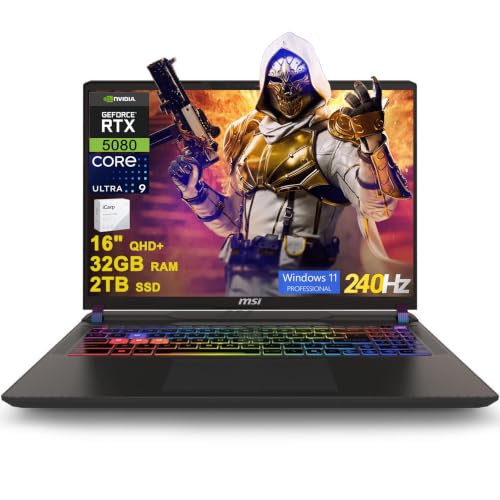
MSI Vector 16 HX AI RTX 5080 Gaming Laptop
- High-end RTX 5080 graphics with 16GB of dedicated graphics memory
- Sharp 16-inch QHD+ IPS display with a fast 240Hz refresh rate
- Generous 32GB DDR5 memory and 2TB SSD configuration
- Extensive port selection includes two Thunderbolt 5 connections
- Includes Windows 11 Professional and Wi-Fi 7
- The listed 49.82-pound weight appears unusually high for a laptop and should be verified before purchase.
- Battery capacity and expected runtime are not provided in the listing.
- The listing does not specify display brightness or color-gamut coverage.

MSI Vector 16 HX RTX 5080 Gaming Laptop
- RTX 5080 Laptop GPU includes 16GB of GDDR7 graphics memory
- Fast 240Hz QHD+ display with 100% DCI-P3 coverage
- High-capacity 64GB RAM and 4TB SSD configuration is listed
- Extensive port selection includes dual Thunderbolt 5, HDMI 2.1, Ethernet, and an SD card reader
- Thunderobot 7-in-1 USB-C hub is included
- The listing conflicts on capacity: the selected size says 64GB RAM and 4TB SSD, while the feature bullets state 32GB and 2TB
- The built-in camera is limited to 720p HD
- Wi-Fi 6 is listed rather than a newer Wi-Fi standard

Lenovo Legion 5 15IRX10 RTX 5070 OLED
- High-end Core i9-14900HX processor
- RTX 5070 graphics with 8GB GDDR7
- Sharp 15.1-inch WQXGA OLED display
- Generous 32GB DDR5-5600 memory
- Modern Wi-Fi 7 and Gigabit Ethernet connectivity
- Glossy display may show reflections in bright environments
- Display refresh rate is not specified in the listing
- Battery capacity and expected runtime are not provided

GIGABYTE AERO X16 RTX 5070 Laptop
- Upper-tier RTX 5070 Laptop GPU with DLSS 4 support
- Strong 32GB DDR5 and 1TB SSD configuration
- Ryzen AI 7 350 processor built for gaming and creative workloads
- Relatively light 4.18-pound weight for a 16-inch gaming laptop
- Windows 11 Home with Copilot+ PC features
- Display resolution and refresh rate are not specified in the listing
- Port selection, wireless standard, and keyboard lighting are not listed
- GPU power limit and SSD interface are not provided
Balancing Campus and Gaming
A college gaming laptop has to perform several jobs well. It should handle research, large numbers of browser tabs, video calls, presentations, and specialized course software before gaming even enters the picture. Portability matters if you move between lectures, libraries, and dorms, while a larger display may be preferable if the laptop usually stays on one desk.
Hardware should reflect your actual workload rather than the most impressive specification available. A capable mid-tier GPU is often enough for gaming and creative assignments, while higher tiers suit demanding visual workloads and students who prioritize maximum graphics quality. Consider whether a gaming notebook is the right format first. Our guide to gaming laptop value covers the broader tradeoffs.
Practical College Selection Rules
- Choose a size you can comfortably carry between classes without resenting its weight by midsemester.
- Prioritize enough memory for coursework, browsers, communication apps, and games to remain open together comfortably.
- Favor additional storage capacity when your course files and game library both consume substantial local space.
- Match display resolution to GPU capability so visual sharpness does not create unnecessary graphics demands.
- Check the available ports against your monitor, storage, headset, mouse, and classroom presentation accessories.
- Expect powerful hardware to need regular outlet access during sustained gaming or demanding academic workloads.
First-Day Setup and Checks
Once the laptop arrives, complete the operating system setup and run system updates before transferring important coursework. Install current graphics drivers through the appropriate vendor utility, then update any manufacturer control software that manages performance modes. Create a separate folder structure for each class and decide early which files will be stored locally, in cloud storage, or on an external drive.
Next, inspect the screen at several brightness levels, verify that the keyboard and touchpad respond normally, and connect every accessory you expect to use. Confirm that Wi-Fi, Bluetooth, audio, webcam, charging, and available ports work as expected. Let the machine complete large downloads before judging noise or responsiveness because background updates can temporarily increase processor activity and cooling demand.
Worth knowing: Match the laptop to college life rather than chasing the highest specification-sheet number. A system that fits your bag, desk, schedule, and course software can be more useful than a faster model you dislike carrying.
Finally, learn the laptop’s performance profiles. A quieter mode can be useful in lectures and libraries, while a higher-performance mode is better reserved for gaming or demanding project work near an outlet. Set up automatic backups before the semester becomes busy, and keep several days to check for early hardware problems. Our overview of long-term performance explains why cooling care and routine maintenance matter.
When Another Laptop Fits Better
Skip a gaming laptop if your daily work consists mainly of writing, web research, spreadsheets, and streamed media, especially when all-day mobility matters more than graphics performance. A thinner productivity notebook with integrated graphics will generally be easier to carry and may suit long stretches away from an outlet. Students who already own a capable desktop may also prefer a simple classroom laptop instead of duplicating expensive hardware.
A desktop is the better alternative when you want easier component upgrades, do nearly all your work in one room, and do not need gaming performance in class. Another option is a lightweight notebook for campus paired with a desktop in the dorm or at home. That arrangement involves two devices, but each serves a clearer purpose. Our laptop versus desktop comparison explores the practical differences between those setups.
Hardware Priorities for Students
Use these priorities to keep gaming capability in proportion with everyday college requirements and the software your program expects.
| Part | Priority | Why |
|---|---|---|
| CPU tier | Modern upper-midrange or high-end processor | Supports demanding coursework, multitasking, and gaming |
| GPU tier | Midrange for balance, high-end for visual workloads | Determines gaming detail and graphics-task capability |
| Display | Sharp panel with a fast refresh rate | Improves reading space and motion clarity |
| RAM and Storage | Generous memory with a roomy SSD | Accommodates multitasking, projects, and large game installs |
The GPU usually deserves the most attention when gaming is a major priority, but it should not consume the entire decision. CPU capability matters for compilation, simulation, media work, and heavy multitasking. Display quality affects every assignment, while memory and storage determine how comfortably the laptop handles mixed academic and entertainment use. Students working with video should also consider screen quality and application demands. Our guide to video editing laptops provides additional context.
Matching Models to Student Needs
| Reader | Pick | Why |
|---|---|---|
| Best overall | msi RTX 5080 | Combines an Intel Core Ultra 9 275HX, RTX 5080, 32GB memory, and a QHD+ 240Hz display. |
| Strongest-GPU editorial pick | Acer RTX 5070 TI | Offers RTX 5070 Ti graphics, an 18-inch WQXGA 240Hz display, 32GB memory, and 2TB storage. |
| Best value | GIGABYTE RTX 5070 | Pairs RTX 5070 graphics with a 4.18-pound body measuring 0.65 inches thick. |
| Best alternative configuration | msi core Ultra 9 RTX 5080 | Includes RTX 5080 graphics, 32GB memory, 2TB storage, Wi-Fi 7, and two Thunderbolt 5 ports. |
| Best runner-up | Lenovo RTX 5070 | Balances RTX 5070 graphics, 32GB memory, a WQXGA OLED display, and a 4.19-pound listed weight. |
Our College Gaming Verdict
The msi RTX 5080 is the most complete option for students who want high-end gaming and substantial hardware for demanding coursework. Choose the GIGABYTE RTX 5070 instead when carrying comfort and value matter more than owning the highest graphics tier. Either can serve as one computer for study and entertainment, but the better choice depends on how frequently it must leave your desk.
Other College-Ready Alternatives
| Product | What Is Different | Suits Whom |
|---|---|---|
| Acer RTX 5060 | This model uses an AMD Ryzen 7 260 processor and NVIDIA GeForce RTX 5060 Laptop GPU. Its 16-inch WUXGA display has a 180Hz refresh rate and 100% sRGB coverage. | It suits students who want 32GB of memory and a 1TB SSD without moving into the higher GPU tiers represented by the main table. |
| HP RTX 4090 | The HP combines an i9-13900HX processor with GeForce RTX 4090 graphics and a 17.3-inch QHD 240Hz anti-glare display. It also includes 32GB of DDR5 memory and a 2TB SSD. | This is better suited to a student who wants a large desktop-style screen and powerful graphics, and expects the laptop to remain at a primary workspace. |
| Alienware RTX 4080 | The Alienware provides an 18-inch QHD+ 165Hz display, Intel Core i9-14900HX processor, and NVIDIA GeForce RTX 4080 12 GB GDDR6 graphics. Its compatible configurations support four M.2 SSD slots. | It suits students prioritizing a spacious display, substantial graphics capability, and broad storage expansion over a compact campus-friendly form factor. |


