

The Best RTX 3080 gaming laptops combine high-end graphics with processors, displays, and cooling systems suited to demanding play. The Acer Predator Triton 500 SE stands out for its higher-resolution screen and RTX 3080Ti, while the ASUS ROG Strix Scar 15 offers a strong Full HD configuration.
Recommended by Us

Acer Predator Triton 500 SE RTX 3080 Ti
- High-end RTX 3080Ti GPU with 16GB of dedicated graphics memory
- Sharp 16-inch 2560 x 1600 IPS display with a 240Hz refresh rate
- Powerful 14-core Intel Core i7-12700H processor
- Generous 2TB PCIe SSD capacity
- RGB backlit keyboard and Wi-Fi 6 included
- 16GB of system RAM may feel modest for especially heavy editing or multitasking at this performance tier.
- Battery runtime, port selection and cooling details are not provided in the listing.
- The title says WAXGA while the feature list specifies WQXGA, so buyers should confirm the display configuration.
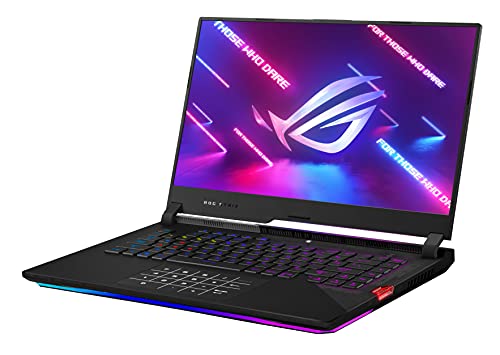
ASUS ROG Strix Scar 15 RTX 3080
- High-end RTX 3080 GPU with 8GB of GDDR6
- Very fast 300Hz IPS-type display
- Strong Ryzen 7 5800H processor
- Spacious 1TB PCIe SSD
- Per-key RGB opti-mechanical keyboard
- Full HD resolution favors refresh rate rather than sharper QHD or 4K detail
- At 5.07 pounds and 1.07 inches thick, it is not among the most portable 15-inch options
- The listing specifies Windows 10 Home rather than Windows 11 preinstalled
ASUS ROG Strix Scar 15 RTX 3080
- High-end NVIDIA GeForce RTX 3080 8GB graphics
- Very fast 300Hz IPS-type display with a 3ms response time
- Capable Ryzen 9 5900HX processor
- Useful 1TB PCIe NVMe M.2 SSD capacity
- Per-key RGB opti-mechanical keyboard
- Full HD resolution prioritizes refresh rate over sharper QHD or 4K detail
- 16GB of DDR4 RAM may be modest for some heavy creative or multitasking workloads
- At 5.07 pounds and 1.07 inches thick, it is not among the most portable 15-inch laptops
Understanding This Graphics Tier
An RTX 3080-class laptop is intended for demanding games, high visual settings, ray tracing, and GPU-accelerated creative work. It is more capable than a mainstream gaming GPU, but laptop performance still depends on power limits, cooling, resolution, and processor balance. Buyers should compare complete systems rather than assuming every machine carrying the same GPU label will perform identically.
At Full HD, this tier makes the most sense for players seeking smooth output on a high-refresh display or extra headroom for demanding settings. Higher-resolution screens place more work on the GPU but can provide a sharper desktop and gaming image. Readers deciding between portable and fixed systems can review our laptop desktop comparison for broader context.
Myths That Mislead Buyers
Every RTX 3080 Laptop Performs Alike
The GPU name does not tell the entire performance story. Laptop graphics processors can operate at different power levels, and their sustained performance depends on how effectively the chassis handles heat. The listed ASUS configurations specify an RTX 3080 operating at 115W, with up to 130W through Dynamic Boost 2.0. That level of detail is more useful than relying on the graphics name alone when comparing similar-looking models.
The Highest GPU Tier Is Always Necessary
A powerful GPU should match the display and the buyer’s actual workload. Someone using a Full HD screen for competitive gaming may prioritize refresh rate and consistent cooling, while a buyer choosing a higher-resolution panel may benefit more directly from additional graphics resources. The RTX 3080 tier is appropriate for demanding settings and high-refresh play, but chasing a higher model number can add little value if the rest of the laptop does not support the intended experience.
Worth knowing: Match the laptop to RTX 3080-class workloads instead of chasing the highest specification on the page. A balanced display, processor, memory configuration, and cooling design usually matters more than one headline number.
A Strong GPU Makes the CPU Irrelevant
The processor remains responsible for game logic, background applications, system responsiveness, and feeding work to the graphics processor. A weak CPU can limit a high-refresh gaming experience even when the GPU has ample capability. Memory matters too, particularly when games, launchers, voice software, and browser tabs run together. The laptops below pair their graphics hardware with Ryzen 7, Ryzen 9, or Intel Core i7 processors and include 16GB of memory.
Refresh Rate Matters More Than Everything Else
A fast panel can show motion more clearly when the system produces frames quickly, but refresh rate should not be considered alone. Resolution affects sharpness and GPU workload, while panel technology and response time influence how the display feels in motion. Cooling also matters because sustained heat can reduce consistency during longer sessions. Our overview of gaming laptop cooling explains why thermal design deserves close attention.
Every Listing Includes the Details You Need
Listings can omit information that affects everyday ownership. Confirm the exact GPU, processor, memory capacity, storage capacity, screen resolution, refresh rate, operating system, and condition before ordering. Buyers should also verify available ports, upgrade access, included accessories, and seller-specific warranty terms directly on the current listing when those details are not supplied. A familiar model name is not enough because configurations can differ within the same product family.
Practical RTX 3080 Rules
- Compare graphics power information when available because identical GPU names do not guarantee identical sustained laptop performance.
- Pair the GPU with a capable processor to support demanding games, multitasking, and high-refresh display output.
- Treat 16GB of memory as a practical baseline for gaming alongside launchers, browsers, and communication software.
- Choose Full HD for high-refresh priorities or higher resolution when image sharpness matters more to you.
- Review cooling details carefully because sustained heat can affect performance consistency, fan behavior, and long-session comfort.
- Confirm condition, ports, upgrade access, operating system, and seller terms before relying on the model name.
RTX 3080 Laptop Questions
1. Is an RTX 3080 laptop still a sensible gaming choice?
Yes, provided its performance level, condition, and features fit your needs. RTX 3080-class hardware remains aimed at demanding gaming, high visual settings, ray tracing, and high-refresh displays. It can also suit GPU-accelerated creative workloads. A newer model is not automatically the better purchase if it offers a weaker overall configuration or compromises the display, memory, storage, or cooling you value.
2. Do I need an RTX 3080 for Full HD gaming?
Not every Full HD player needs this graphics tier. It makes the most sense when you want demanding visual settings, ray tracing, high-refresh output, or enough graphics headroom to keep the laptop useful as software requirements increase. More casual players may be satisfied with a lower GPU tier, particularly if they are comfortable adjusting settings and do not prioritize a very fast panel.
3. Is 16GB of RAM enough for this GPU tier?
For many gaming systems, 16GB is a sensible starting point and matches every laptop in the table. It can support modern games alongside normal background applications, although heavier content creation and unusually demanding multitasking may benefit from more. Check whether the memory is replaceable or expandable before buying because upgrade options vary. Our laptop upgrade overview covers the main limitations.
4. Should I choose Full HD or a higher-resolution screen?
Choose according to how you use the machine. Full HD places a lighter workload on the GPU and pairs naturally with very high refresh rates, making it attractive for fast-paced play. A higher-resolution panel provides a sharper image and more desktop space but asks more of the graphics processor. Screen size also changes perceived sharpness, so resolution should be considered alongside dimensions and viewing distance.
5. What should I verify on a used or older listing?
Start with the exact CPU, GPU, GPU memory, system memory, storage, display resolution, and refresh rate. Then confirm condition, battery expectations, operating system, included charger and accessories, available ports, upgrade access, return policy, and warranty information with the seller. Product families often contain several configurations, so match the model code and specifications rather than trusting a shortened title or a photograph alone.
Hardware That Shapes Performance
GPU Power and Thermal Headroom
The RTX 3080 tier can handle demanding graphics settings, ray tracing, and high-resolution output, but sustained capability depends on power delivery and thermal headroom. Thin designs may prioritize portability, while larger cooling systems can have more room to manage heat. Buyers should look for an explicitly stated graphics power figure when possible and avoid comparing laptop GPUs solely by name. Cooling behavior also affects noise and comfort during extended sessions.
Processor and Memory Balance
A high-end graphics processor works best when the CPU can keep game logic and background tasks moving without becoming a persistent bottleneck. Enough system memory also reduces pressure when launchers, browsers, recording tools, and communication applications remain open. For this class, 16GB is a practical baseline, while users with heavier creative workloads may want expansion options. Our guide to gaming laptop selection provides additional context for balancing components.
Resolution and Refresh Rate
Display choice determines how the GPU’s resources are used. A Full HD high-refresh panel favors fluid motion and gives the graphics hardware more room to maintain demanding settings. A higher-resolution screen improves detail and workspace but raises rendering load. Neither option is universally superior. Buyers should decide whether they value maximum refresh, sharper output, or a compromise between both, then choose a GPU and cooling design capable of supporting that priority consistently.
Best Match by Buyer
- Best overall: acer Predator Triton 500 SE Gaming Laptop for its RTX 3080Ti, 16-inch 240Hz display, and 2TB SSD.
- Best value with Ryzen 9: ASUS ROG Strix Scar 15 (2021) Gaming Laptop with a 300Hz Full HD display and 1TB SSD.
- Best value with Ryzen 7: ASUS ROG Strix Scar 15 (2021) Gaming Laptop pairs a 300Hz display with 16GB RAM.
Choosing the Right Configuration
The Acer Predator Triton 500 SE is the strongest overall choice for buyers who want the RTX 3080Ti, a higher-resolution 240Hz display, and larger storage capacity. The ASUS ROG Strix Scar 15 is the better value-oriented alternative, combining its RTX 3080 with a Ryzen 9 processor, 300Hz Full HD display, 16GB of memory, and a 1TB SSD.


