

The Best gaming laptops with intel core i5 pair a capable mobile processor with a GPU that suits your actual games and display. The HP RTX 4050 offers the most balanced package here, while the msi RTX 4060 is the stronger graphics option.
Recommended by Us

MSI Thin 15 RTX 4060 Gaming Laptop
- RTX 4060 graphics with 8GB of listed VRAM
- 144Hz Full HD display
- 16GB RAM included
- Backlit keyboard and webcam
- Windows 11 Home and Office Professional Plus 2021 included
- A 512GB SSD can fill quickly with large game installations.
- Battery capacity and expected runtime are not provided in the listing.
- The Office 2021 redemption code requires contacting the seller.

MSI Thin 15 RTX 4060 Gaming Laptop
- Dedicated NVIDIA GeForce RTX 4060 8GB graphics
- Fast 144Hz FHD IPS display
- Useful mix of USB-C, USB-A, HDMI, and Ethernet ports
- Includes Windows 11 Professional and a backlit keyboard
- 512GB storage may feel limited for a large game library
- HDMI output is limited to 4K at 30Hz
- The listed webcam resolution is only 720p
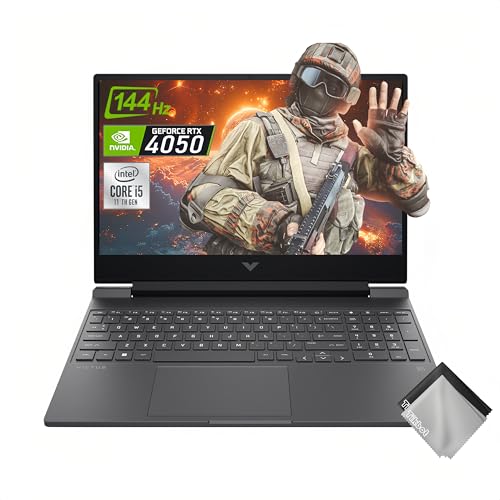
HP Victus 15 RTX 4050 Gaming Laptop
- RTX 4050 GPU includes 6GB of dedicated GDDR6 memory.
- 144Hz IPS anti-glare display is well matched to fast-paced gaming.
- 16GB of RAM and a 1TB NVMe SSD form a practical everyday configuration.
- Wi-Fi 6 and Bluetooth 5.3 provide current wireless connectivity.
- Wide Vision HD camera includes temporal noise reduction.
- DDR4 memory is an older generation than DDR5.
- At 5.06 pounds, it may be cumbersome for frequent travel.
- The stated battery figure is for up to 10 hours of video playback, not gaming use.

Acer Nitro V 15 RTX 4050 Gaming Laptop
- RTX 4050 graphics with DLSS 3.5 and ray-tracing support
- Fast 165Hz Full HD IPS display
- Two DDR5 slots with support for up to 32GB
- Strong connectivity selection including Thunderbolt 4, Wi-Fi 6, and Gigabit Ethernet
- The included 8GB of RAM is modest for demanding gaming and heavy multitasking.
- A 512GB SSD can fill quickly after installing several large applications.
- Battery runtime is not specified in the listing.

HP Victus 15 Gaming Laptop with RTX 3050
- Dedicated RTX 3050 graphics with 6GB GDDR6
- Smooth 144Hz FHD IPS display
- Useful 16GB DDR4 memory configuration
- Fast 512GB PCIe SSD storage
- Includes Wi-Fi 6, a backlit keyboard, and Windows 11 Pro
- RTX 3050 graphics belong to the entry-level gaming tier rather than the high-end class
- A 512GB SSD can fill quickly with a large game library
- At 7 pounds, it is relatively heavy for frequent travel
What Core i5 Really Means
An Intel Core i5 label alone does not tell you whether a laptop will be good for gaming. The processor generation, exact model, power class, cooling, and paired graphics chip all affect the experience. A modern H-series Core i5 is generally a sensible gaming choice because it can handle play, everyday work, and moderate multitasking without forcing you into a premium CPU tier. However, the GPU usually creates the larger difference in visual settings, so paying more for the processor while accepting weak graphics can be a poor trade.
- Check the complete processor name rather than stopping at Core i5, since different generations and laptop power classes can deliver noticeably different performance under sustained workloads.
- Prioritize the dedicated GPU when gaming is the main purpose, because an adequately fast Core i5 paired with stronger graphics is often more useful than a higher CPU tier paired with weaker graphics.
- Allow enough memory for gaming, browser tabs, voice chat, launchers, and background applications, since an otherwise capable processor can feel constrained when the system runs short of RAM.
Our laptop performance comparison explains where portable systems differ from desktops.
Worth knowing: Match the laptop to how you will use an Intel Core i5 rather than chasing the highest specification-sheet number. A balanced CPU, GPU, memory, and display combination is usually the smarter purchase.
Checks Before You Order
- What is the full Core i5 model number, and is it an H-series processor designed for higher-performance laptops rather than a lower-power chip intended mainly for light portable work?
- Which dedicated GPU is included, and does its tier fit the visual quality and resolution you expect rather than merely satisfying the minimum requirement for discrete graphics?
- Does the laptop include enough RAM for your normal mix of gaming and background applications, and can that memory be expanded if your workload becomes heavier later?
- Is the storage capacity practical after the operating system and applications are accounted for, and does the chassis provide a realistic path for adding or replacing storage?
- Does the display combine a suitable resolution, refresh rate, and panel type, rather than using a high refresh-rate figure to distract from an otherwise basic screen specification?
- Are the ports, wireless connections, Ethernet support, keyboard layout, and webcam suitable for your desk and travel setup without relying on several adapters?
Upgrade access varies widely between models, even when their headline specifications look similar. Our overview of laptop upgrade options covers the practical limits.
Hardware That Changes the Experience
Processor Generation and Power Class
A recent Intel Core i5 H-series processor is typically enough for a gaming laptop that also handles web browsing, office tasks, streaming tools, and moderate creative work. The exact model still matters because generations differ in core layout, clock behavior, and efficiency. Do not assume every Core i5 performs alike. Cooling and laptop power limits also affect how long a processor can maintain demanding workloads, so the CPU badge should be treated as a starting point rather than a verdict.
The GPU Matters More
Once the processor is capable enough, the dedicated GPU generally has the greatest influence on gaming detail settings and graphics features. An NVIDIA GeForce RTX 4060 Laptop GPU occupies a stronger tier than an NVIDIA GeForce RTX 4050 Laptop GPU, while an NVIDIA GeForce RTX 3050 targets more restrained settings. Laptop GPU behavior can also vary with power configuration and cooling, so the graphics name is useful but not the complete story. Avoid overpaying for CPU headroom that your graphics hardware cannot use.
Memory and Storage Balance
Memory capacity affects how comfortably a laptop can keep a game and several background applications open at once. Storage determines how quickly a small internal drive becomes inconvenient, although capacity alone does not indicate overall drive performance. Buyers who keep large libraries should check expansion details instead of assuming every chassis offers another slot. If long-term ownership matters, our guide to gaming laptop lifespan discusses the factors that shape useful service life.
A Sensible Hardware Priority
The most practical Core i5 configuration spends its hardware budget on balance rather than one impressive headline component.
| Part | Priority | Why |
|---|---|---|
| CPU tier | Modern Core i5 H-series | Enough headroom for gaming and everyday multitasking |
| GPU tier | Highest practical priority | Drives visual settings and graphics features |
| Display | Full HD high refresh rate | Fits the performance range of mainstream laptop graphics |
| RAM and Storage | Adequate capacity with expansion | Prevents early capacity limits and supports heavier multitasking |
This order is not absolute. A competitive player may value display responsiveness, while someone using the machine for work may place additional weight on memory and storage. The main point is to avoid paying for a component that the rest of the system cannot support. A powerful GPU attached to too little memory can feel needlessly restricted, just as a premium processor adds little when paired with entry-level graphics. Think about the whole laptop, including its cooling, screen, connections, and upgrade options.
Our laptop versus desktop overview can help if portability is not essential.
Matching Hardware to Your Routine
Gaming With Everyday Multitasking
For a laptop that will run games alongside browser tabs, chat, music, and office software, prioritize a recent H-series Intel Core i5, sufficient memory, and balanced graphics. The CPU does not need to be the most expensive part of the machine. It needs enough sustained capability to avoid becoming the obvious weak point while several applications are active. A sensible midrange GPU and a high-refresh Full HD display make a coherent pairing for this type of mixed use.
Battery life still deserves realistic expectations because demanding gaming places a much heavier load on a laptop than video playback or document work. Our discussion of gaming laptop value covers the broader tradeoffs.
Graphics Quality Comes First
If graphics quality is the priority, direct more attention toward the GPU than toward moving from a capable Core i5 to a more expensive processor family. The NVIDIA GeForce RTX 4060 Laptop GPU options listed here occupy the strongest graphics tier in this group, while the NVIDIA GeForce RTX 4050 Laptop GPU models offer a more moderate balance. Check memory and storage as well, because stronger graphics do not compensate for a cramped drive or restrictive multitasking capacity.
A high-refresh display is worthwhile when the graphics hardware can make good use of it, but refresh rate should not be viewed in isolation. Resolution, panel type, and the applications you use all matter. Marketing often emphasizes the largest number, even when another specification would make a more noticeable day-to-day difference.
Keeping the Purchase Modest
A value-focused buyer should accept that some settings may need adjustment instead of paying for unused graphics headroom. The NVIDIA GeForce RTX 3050 option remains the lower-tier choice among these laptops, but its pairing with an Intel Core i5-12450H, listed 16GB of RAM, and a Full HD 144Hz display is internally sensible. Confirm that its performance tier suits your expectations rather than assuming every RTX-branded laptop targets the same workload.
Lower initial cost can be reasonable when the laptop already meets your actual needs. Our explanation of budget laptop costs provides useful context without treating the cheapest listing as automatically better.
Other Core i5 Configurations
HP i5-13420H RTX 4050This alternative combines the Intel Core i5-13420H with NVIDIA GeForce RTX 4050 6GB GDDR6 graphics, 16GB DDR4 memory, and a 512GB SSD. It suits buyers who want the Victus design with a 144Hz Full HD IPS display and a listed range of wired connections.
msi i5-13420H RTX 4060This MSI configuration uses the Intel Core i5-13420H and NVIDIA GeForce RTX 4060 8GB Laptop GPU with 16GB DDR4 and a 512GB NVMe SSD. It is another option for shoppers who care more about the stronger GPU tier than having a larger internal drive.
msi i5-13420H RTX 4060This version keeps the Intel Core i5-13420H and NVIDIA GeForce RTX 4060 pairing but adds 16GB DDR5, a 1TB NVMe SSD, and Cooler Boost 5. It is better suited to buyers who want more listed storage and DDR5 memory from the outset.
The Most Balanced Choices
The HP RTX 4050 is the clearest all-around choice, combining an Intel Core i5-13420H, NVIDIA GeForce RTX 4050 Laptop GPU, 16GB of memory, and a 1TB SSD. It avoids leaning too heavily on one specification.
Choose the msi RTX 4060 instead if the NVIDIA GeForce RTX 4060 Laptop GPU matters more than the larger storage capacity offered by the HP.


