

The Best gaming laptops with OLED display pair striking contrast with hardware capable of making the most of a high-resolution panel. The Lenovo RTX 5070 is our best overall choice, while the msi RTX 5070 TI offers the strongest graphics processor among these laptops.
Recommended by Us

MSI Stealth A16 AI+ RTX 5070 Ti OLED
- High-performance RTX 5070 Ti laptop GPU
- Sharp 240Hz QHD+ OLED display
- Generous 32GB DDR5 RAM and 2TB NVMe storage
- Modern Ryzen AI processor and Wi-Fi 7 connectivity
- Battery capacity and expected runtime are not specified
- The listing does not provide the physical port selection
- QHD+ gaming at very high settings can be more demanding than playing at lower resolutions
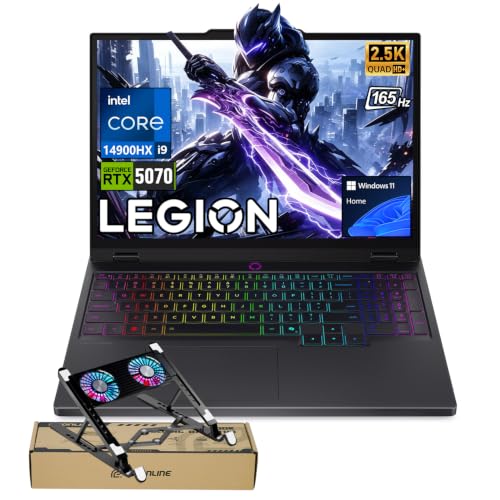
Lenovo Legion 5 RTX 5070 OLED
- High-performance RTX 5070 graphics with 8GB GDDR7
- Powerful 24-core Intel Core i9-14900HX processor
- Sharp 2560 × 1600 OLED display with a 165Hz refresh rate
- Broad port selection with USB-C, USB-A, HDMI and Ethernet
- Customizable 24-zone RGB keyboard
- The RTX 5070 is listed with 8GB of graphics memory, which may require texture-setting adjustments in especially memory-intensive workloads.
- The listing conflicts on system memory and storage: the title states 32GB RAM and a 2TB SSD, while the size field states 8GB RAM and a 128GB SSD.
- Battery capacity and expected runtime are not provided.

Lenovo Legion 5 OLED RTX 5070
- Upper-tier RTX 5070 graphics with 12GB GDDR7
- High-resolution 165Hz OLED display with G-SYNC
- Powerful 10-core, 20-thread Ryzen AI processor
- Generous 32GB LPDDR5-5600 memory capacity
- Extensive wired and wireless connectivity
- The 32GB LPDDR5-5600 memory is soldered, limiting future RAM upgrades.
- The OLED display does not support touch input.
- A 1TB SSD may require storage management for users with large game and media libraries.

Acer Predator Helios Neo 16S RTX 5060
- High-refresh OLED display combines WQXGA resolution, 240Hz motion, and wide DCI-P3 color coverage
- Core Ultra 9 275HX and RTX 5060 provide a capable configuration for demanding gaming and multitasking
- G-SYNC and the listed 0.2ms response time support smooth, responsive competitive play
- Extensive port selection includes Thunderbolt 4, HDMI 2.1, Ethernet, and four USB 3.2 connections
- Slim 0.79-inch chassis uses aluminum on the top and bottom
- The 512GB SSD may be restrictive for a large library of modern games
- 16GB of RAM is adequate for gaming but modest compared with higher-capacity configurations
- The listing specifies Wi-Fi 6E rather than the newer Wi-Fi 7 standard

Lenovo Legion 5 15.1-inch OLED RTX 5060
- Current-generation NVIDIA GeForce RTX 5060 graphics
- High-resolution OLED display with a 165Hz refresh rate
- Eight-core, 16-thread Ryzen 7 processor
- 16GB RAM and SSD storage included
- Distinctive Eclipse Black finish
- A 512GB SSD may fill quickly with large game installations.
- The listed weight of approximately 7.19 pounds is substantial for frequent travel.
- The listing does not specify the port selection, wireless standard, or keyboard lighting.
Why OLED Changes the Choice
OLED panels can switch individual pixels off, producing deeper blacks and stronger contrast than a typical backlit laptop display. Colors also tend to look rich and immediate, which benefits atmospheric games, movies, and creative work. That visual quality makes display resolution, refresh rate, GPU capability, and screen finish especially important when comparing gaming laptops.
A good OLED gaming laptop should be balanced rather than built around one headline specification. A powerful GPU helps with the panel’s native resolution, while a fast refresh rate improves motion clarity. Memory, storage, cooling, and ports still affect everyday ownership. Our laptop selection guide covers the broader decision process.
Match the Hardware Carefully
How should the GPU match an OLED display?
An RTX 5060 is a sensible starting tier for a high-resolution OLED laptop, while RTX 5070 and RTX 5070 Ti options provide more graphics headroom for demanding settings, ray tracing, and longer-term use.
How should CPU power and memory be balanced?
Look for enough memory to support gaming, background applications, and streaming without constant pressure. A powerful processor is useful, but pairing it with limited memory or storage can make an otherwise premium laptop feel constrained.
Which display and cooling details matter most?
Check resolution, refresh rate, response time, adaptive-sync support, and brightness certification when available. Faster components create more heat, so chassis thickness, cooling design, and realistic performance modes deserve attention as well.
What should be verified in the product listing?
Confirm whether the laptop is new, the exact GPU and memory configuration, storage capacity, operating system, included accessories, and available ports. Our laptop upgrade guide explains what may be changeable later.
First-Day OLED Setup
Once the laptop arrives, inspect the display at several brightness levels and use full-screen solid colors to check for obvious panel problems. Confirm that the listed resolution and maximum refresh rate are available in Windows. If adaptive sync is supported, verify that it is enabled through the appropriate graphics settings rather than assuming it works automatically.
Install Windows updates, current GPU drivers, and the manufacturer’s control software before judging performance. Select the proper performance mode when connected to power, then check whether games are using the dedicated GPU. OLED’s deep blacks and high contrast are easiest to appreciate with suitable HDR and color settings, but an overly aggressive preset can make colors look unnatural.
For everyday care, use sensible brightness, allow built-in panel maintenance features to run, and avoid leaving static interfaces on-screen at maximum brightness for long periods. Auto-hiding the taskbar and using a short screen timeout are simple precautions. OLED provides a more dramatic image than many standard panels, but thoughtful setup helps preserve that experience without making normal use inconvenient.
Three Details That Matter Most
Resolution and GPU Balance
A WQXGA or QHD+ OLED panel contains more pixels than a basic Full HD screen, so it asks more from the GPU at native resolution. An RTX 5060 can suit buyers willing to adjust demanding settings, while RTX 5070-class hardware provides additional headroom. Upscaling can also reduce the rendering burden. The right choice depends on whether you prioritize maximum visual settings, portability, or overall value.
Refresh Rate and Motion
OLED’s quick pixel response complements a high refresh rate because transitions can remain clear during rapid movement. A 165Hz panel is already well suited to general gaming, while a 240Hz option is more appealing to players who prioritize responsiveness. Refresh rate alone does not guarantee a better experience, however. The GPU must produce enough performance, and adaptive-sync support can help keep output looking smooth when rendering demand changes.
Heat, Noise, and Portability
Powerful processors and GPUs need effective cooling, especially inside a thin chassis. Higher performance modes may increase fan noise, while quieter modes can reduce sustained output. Consider where the laptop will be used and whether weight, thickness, or maximum power matters most. The best machine is one whose thermal behavior suits your routine. Our guide to gaming laptop cooling explores this trade-off.
Worth knowing: Match the laptop to how you want to use its OLED display instead of chasing the highest specification on the page. A balanced GPU, refresh rate, cooling system, and memory configuration usually matters more than one standout number.
OLED Hardware Tiers Explained
| Tier | What You Get | Best For |
|---|---|---|
| Value | An RTX 5060-class GPU, a high-resolution OLED screen, and enough processing power for modern gaming with sensible setting adjustments. | Buyers who want OLED color and contrast without automatically moving to a higher graphics tier. |
| Balanced | An RTX 5070-class GPU with greater graphics headroom, capable processors, and stronger memory or storage configurations. | Players seeking a versatile mix of image quality, demanding-game performance, streaming, and creative work. |
| Performance | An RTX 5070 Ti-class GPU, a fast OLED panel, and premium supporting hardware for heavier gaming and content workloads. | Enthusiasts who prioritize graphics capability and are comfortable with a higher-cost system. |
Higher tiers usually provide more headroom, but they can also bring greater power demands. Think about ownership beyond the specification sheet. Our laptop lifespan overview explains the factors that influence useful service life.
Choices for Different Players
- Best overall: Lenovo RTX 5070 pairs RTX 5070 graphics with a 165Hz WQXGA OLED display.
- Strongest GPU: msi RTX 5070 TI combines an RTX 5070Ti with a 240Hz OLED panel.
- Best value: Lenovo RTX 5060 offers RTX 5060 graphics and an eight-core AMD Ryzen 7 260.
- Alternative configuration: Lenovo i9-14900HX RTX 5070 includes an Intel Core i9 14900HX, RTX 5070, and 2TB SSD.
- Runner-up: Acer RTX 5060 has a 240Hz OLED panel and RTX 5060 graphics.
Practical OLED Laptop Questions
1. Is paying more for an OLED gaming laptop worthwhile?
It can be worthwhile if deep blacks, strong contrast, and rich color noticeably improve how you enjoy games and media. Buyers focused only on raw performance may get more GPU power from a conventional display at a similar cost, so decide whether panel quality is a central priority.
2. Is an RTX 5060 enough for a high-resolution OLED screen?
An RTX 5060 is a reasonable match for a high-resolution OLED laptop when you are comfortable adjusting demanding graphics settings or using supported upscaling features. An RTX 5070 or RTX 5070 Ti gives you more headroom if native-resolution image quality and heavier effects matter more.
3. How much memory should an OLED gaming laptop have?
For modern gaming and normal multitasking, 16GB is a practical baseline, while 32GB gives more breathing room for streaming, creative applications, and many background tasks. Check whether the memory is soldered or replaceable because that determines whether capacity can be expanded later.
4. Does a faster OLED refresh rate always look better?
A faster refresh rate can improve perceived smoothness and responsiveness, but the benefit depends on the workload and the GPU’s output. A balanced 165Hz OLED configuration may be more useful than a 240Hz model paired with hardware that rarely takes advantage of the additional refresh capacity.
5. What ownership costs should be considered beyond the laptop?
Consider whether you need additional storage, a larger charger for travel, external peripherals, or extended coverage. Battery behavior can also influence how often the machine remains connected to power. Our gaming laptop battery article explains what affects unplugged use.
The Strongest Overall Choices
The Lenovo RTX 5070 is the most balanced choice here, combining RTX 5070 graphics with a 165Hz WQXGA OLED screen, substantial memory, and broad connectivity. Choose the msi RTX 5070 TI instead if the stronger RTX 5070Ti and faster 240Hz OLED display are your main priorities.
Other OLED Configurations
- Lenovo RTX 5060 2 is another Ryzen 7 250 and RTX 5060 configuration with 32GB of memory, 1TB of storage, and a 165Hz WQXGA OLED display. It suits buyers who want that specific balance of memory and storage.
- Lenovo RTX 5070 3 combines an Intel Core i9 14th Gen 14900HX with RTX 5070 graphics in a 4.19-pound chassis. Consider it if processor power and relatively low listed weight are priorities.
- Lenovo RTX 5060 3 includes RTX 5060 graphics, 32GB DDR5 RAM, a 1TB SSD, and a portable 500GB drive. It is a practical option for buyers who want bundled external storage and broad connectivity.


