

The Best gaming laptops with OLED screen combine rich contrast with hardware capable of driving a sharp, high-refresh display. The Lenovo RTX 5070 is the strongest all-around choice, while the msi RTX 5070 TI suits buyers who prioritize the most powerful GPU listed here.
Recommended by Us

MSI Stealth A16 AI+ RTX 5070 Ti OLED
- High-performance RTX 5070 Ti laptop GPU
- Sharp 240Hz QHD+ OLED display
- Generous 32GB DDR5 RAM and 2TB NVMe storage
- Modern Ryzen AI processor and Wi-Fi 7 connectivity
- Battery capacity and expected runtime are not specified
- The listing does not provide the physical port selection
- QHD+ gaming at very high settings can be more demanding than playing at lower resolutions
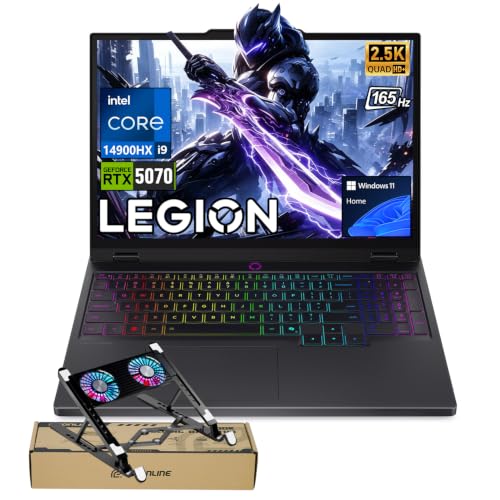
Lenovo Legion 5 RTX 5070 OLED
- High-performance RTX 5070 graphics with 8GB GDDR7
- Powerful 24-core Intel Core i9-14900HX processor
- Sharp 2560 × 1600 OLED display with a 165Hz refresh rate
- Broad port selection with USB-C, USB-A, HDMI and Ethernet
- Customizable 24-zone RGB keyboard
- The RTX 5070 is listed with 8GB of graphics memory, which may require texture-setting adjustments in especially memory-intensive workloads.
- The listing conflicts on system memory and storage: the title states 32GB RAM and a 2TB SSD, while the size field states 8GB RAM and a 128GB SSD.
- Battery capacity and expected runtime are not provided.

Lenovo Legion 5 OLED RTX 5070
- Upper-tier RTX 5070 graphics with 12GB GDDR7
- High-resolution 165Hz OLED display with G-SYNC
- Powerful 10-core, 20-thread Ryzen AI processor
- Generous 32GB LPDDR5-5600 memory capacity
- Extensive wired and wireless connectivity
- The 32GB LPDDR5-5600 memory is soldered, limiting future RAM upgrades.
- The OLED display does not support touch input.
- A 1TB SSD may require storage management for users with large game and media libraries.

Acer Predator Helios Neo 16S RTX 5060
- High-refresh OLED display combines WQXGA resolution, 240Hz motion, and wide DCI-P3 color coverage
- Core Ultra 9 275HX and RTX 5060 provide a capable configuration for demanding gaming and multitasking
- G-SYNC and the listed 0.2ms response time support smooth, responsive competitive play
- Extensive port selection includes Thunderbolt 4, HDMI 2.1, Ethernet, and four USB 3.2 connections
- Slim 0.79-inch chassis uses aluminum on the top and bottom
- The 512GB SSD may be restrictive for a large library of modern games
- 16GB of RAM is adequate for gaming but modest compared with higher-capacity configurations
- The listing specifies Wi-Fi 6E rather than the newer Wi-Fi 7 standard

Lenovo Legion 5 15.1-inch OLED RTX 5060
- Current-generation NVIDIA GeForce RTX 5060 graphics
- High-resolution OLED display with a 165Hz refresh rate
- Eight-core, 16-thread Ryzen 7 processor
- 16GB RAM and SSD storage included
- Distinctive Eclipse Black finish
- A 512GB SSD may fill quickly with large game installations.
- The listed weight of approximately 7.19 pounds is substantial for frequent travel.
- The listing does not specify the port selection, wireless standard, or keyboard lighting.
Why OLED Changes the Choice
OLED displays control each pixel individually, producing deeper blacks and stronger contrast than a typical backlit laptop panel. Colors can also look especially rich, which benefits visually detailed games, films, and creative work. Buyers should still consider resolution, refresh rate, and GPU strength because a premium panel cannot compensate for poorly matched gaming hardware. Our explanation of OLED display availability covers the wider trade-offs.
These laptops pair OLED panels with NVIDIA GeForce RTX 5060, RTX 5070, or RTX 5070Ti graphics. That range covers value-conscious gaming through more demanding high-resolution use. A faster GPU generally provides more flexibility with visual settings, but memory, cooling, storage, ports, and total system balance remain important. The right model is the one that supports your actual games and workloads without charging you for performance you will rarely use.
Matching Hardware to OLED
How do you match the GPU to an OLED screen?
A GeForce RTX 5060 is a sensible starting point for a high-resolution OLED laptop, while RTX 5070-class hardware offers more headroom for demanding settings. Choose according to your workload rather than treating OLED itself as a reason to buy the fastest GPU.
How should you balance the processor and memory?
Look for a capable modern processor paired with enough RAM for gaming, background apps, and streaming. A powerful GPU feels less useful when limited memory or an underpowered processor creates avoidable bottlenecks during demanding multitasking.
Which display and cooling details deserve attention?
Compare resolution and refresh rate, but also check how the laptop manages heat under sustained load. Faster panels reward strong graphics hardware, while effective cooling helps the processor and GPU maintain consistent performance. Our laptop cooling guide explains the basics.
What should you verify before ordering?
Confirm whether the listing is new, upgraded, or bundled by a reseller. Check the exact RAM, storage, operating system, ports, wireless standard, display specification, and upgrade options instead of relying only on the model family name.
OLED Laptop Questions Answered
1. Is OLED better than IPS for a gaming laptop?
OLED generally provides deeper blacks, excellent contrast, and vivid color because its pixels produce their own light. A good IPS panel can still be a practical choice when battery life, cost, or maximum brightness in a particular environment matters more. For buyers who value cinematic image quality and dark-scene detail, OLED is especially appealing.
2. Is an RTX 5060 enough for an OLED gaming display?
An NVIDIA GeForce RTX 5060 can be a sensible match for a WQXGA OLED laptop, particularly if you are willing to adjust demanding graphics settings. An RTX 5070 or RTX 5070Ti provides more graphics headroom, but it also tends to appear in more expensive configurations. The best choice depends on the games and applications you use.
3. How much memory should an OLED gaming laptop have?
Sixteen gigabytes is a practical baseline for gaming and everyday multitasking, while thirty-two gigabytes gives heavier users more room for streaming, creative software, and numerous background applications. Buyers planning long-term ownership should also determine whether the memory is replaceable or soldered. Capacity alone does not reveal upgrade flexibility.
4. Can an OLED gaming laptop replace a desktop PC?
It can replace a desktop for someone who values portability and accepts the thermal, acoustic, and upgrade limitations of a laptop. Desktop systems usually provide broader component replacement options, while gaming laptops place the display, keyboard, battery, and computer in one portable unit. Our overview of gaming laptop value can help frame that decision.
Three Practical Hardware Tiers
| Tier | What You Get | Best For |
|---|---|---|
| Value tier | An OLED panel with RTX 5060 graphics, a capable processor, and enough memory for mainstream gaming and daily use. | Players willing to adjust demanding settings while prioritizing OLED contrast and color. |
| Balanced tier | RTX 5070-class graphics, a strong processor, and generous memory and storage for gaming, streaming, and creative workloads. | Buyers who want high-resolution gaming headroom without selecting the strongest available GPU. |
| Performance tier | RTX 5070Ti graphics, a high-refresh OLED display, and larger memory and storage allocations. | Enthusiasts who prioritize graphics capability and demanding multitasking over value. |
Each tier can deliver an attractive OLED experience, but the balanced level makes sense for the widest range of buyers. Watch seasonal promotions if timing is flexible. Our guide to gaming laptop sales explains when discounts commonly deserve attention.
How the Main Models Compare
The msi RTX 5070 TI has the strongest listed GPU of the group, an NVIDIA GeForce RTX 5070Ti Laptop GPU. It pairs that graphics processor with an AMD Ryzen AI 9HX 370 processor, 32GB DDR5, and a 2TB NVMe SSD. Its 16-inch QHD+ OLED display runs at 240Hz, and Wi-Fi 7 is included. That combination targets buyers who want high-end graphics, substantial storage, and a fast panel in one system.
The two RTX 5070 Lenovo choices differ in several meaningful ways. The Lenovo RTX 5070 uses an AMD Ryzen AI 9 465, an NVIDIA GeForce RTX 5070 Laptop GPU with 12GB GDDR7, 32GB LPDDR5-5600, and a 1TB SSD. The Lenovo i9-14900HX RTX 5070 combines an Intel Core i9-14900HX, RTX 5070 with 8GB GDDR7, 32GB RAM, and 2TB SSD. Both list 165Hz WQXGA OLED displays, but their processor platforms, graphics memory, and storage allocations differ.
Among the RTX 5060 options, the Acer RTX 5060 combines an Intel Core Ultra 9 275HX with 16GB DDR5 and a 512GB SSD. Its cooling description specifically lists dual fans, a 5th Gen AeroBlade 3D metal fan, and liquid metal thermal compound. The Lenovo RTX 5060 uses an AMD Ryzen 7 260, 16GB RAM, and a 512GB SSD. The most important difference for this topic is GPU tier: it determines how much flexibility you have when driving a high-resolution OLED panel.
Worth knowing: Match the laptop to how you will use its OLED screen instead of chasing the largest specification number. A balanced GPU, memory capacity, cooling system, and storage configuration often matters more than one headline component.
When OLED Is the Wrong Fit
Skip an OLED gaming laptop if your priorities are the lowest possible cost, long unplugged sessions, or a screen that will display the same static interface for extended periods. OLED earns its place through deep blacks, strong contrast, and vivid color, but those qualities may not justify the premium for someone who mainly uses basic productivity applications. A well-specified IPS gaming laptop can provide a high refresh rate and capable hardware while leaving more of the budget for the GPU or storage.
An IPS model may also make more sense for a user who works in bright environments and values practical flexibility over cinematic contrast. Alternatively, a desktop PC paired with a separate OLED monitor offers greater component upgrade freedom if portability is not required. Gaming notebooks also perform best when connected to power during demanding use. Our guide to plugged-in gaming explains why portable operation and maximum performance are different priorities.
Picks for Different Players
| Reader | Pick | Why |
|---|---|---|
| Best overall | Lenovo RTX 5070 | RTX 5070 12GB graphics, 32GB memory, 1TB SSD, and a 165Hz WQXGA OLED create a balanced configuration. |
| Strongest GPU | msi RTX 5070 TI | The RTX 5070Ti, 240Hz OLED, 32GB DDR5, and 2TB SSD suit demanding users. |
| Best value | Lenovo RTX 5060 | RTX 5060 graphics and a 165Hz OLED cover the essential gaming and display requirements. |
| Intel alternative | Lenovo i9-14900HX RTX 5070 | Its Intel Core i9-14900HX, RTX 5070, 32GB RAM, and 2TB SSD form a powerful combination. |
| Runner-up | Acer RTX 5060 | A 240Hz OLED, RTX 5060, Thunderbolt 4, Ethernet, and detailed cooling hardware distinguish this Acer. |
Other OLED Configurations
- Lenovo RTX 5070 3 combines an Intel Core i9 14th Gen 14900HX with RTX 5070 8GB GDDR7 graphics, 32GB DDR5-5600, and a 1TB SSD. It suits buyers who want an Intel-based performance configuration with Wi-Fi 7 and Gigabit LAN.
- Lenovo RTX 5060 2 pairs RTX 5060 8GB GDDR7 graphics with a 165Hz 15.3-inch WQXGA OLED, 32GB DDR5, and a 1TB SSD. The included portable 500GB drive makes this configuration different from the main table options.
- Lenovo RTX 5060 3 lists RTX 5060 graphics, a Ryzen 7 250, 32GB memory, 1TB storage, and a 165Hz OLED WQXGA display. Consider it if that exact memory and storage combination matches your needs.
The Most Balanced Choice
The Lenovo RTX 5070 is the most balanced option for its RTX 5070 graphics, generous memory, useful connectivity, and high-resolution OLED display. Buyers who want the strongest listed graphics processor and a faster 240Hz panel should consider the msi RTX 5070 TI instead. Either choice keeps OLED image quality paired with hardware suited to demanding gaming and multitasking.


