


The Best gaming laptops with rgb keyboard pair customizable lighting with hardware that can handle demanding play. The msi RTX 5080 is the strongest all-around choice, while the Acer RTX 5070 TI stands out for buyers who want a larger display.
Recommended by Us

Acer Predator Helios Neo 18 RTX 5070 Ti
- High-end RTX 5070 Ti graphics with DLSS 4 and ray-tracing support
- Fast, color-rich 18-inch WQXGA 240Hz G-SYNC display
- Generous 32GB DDR5-6400 memory and 2TB PCIe Gen 4 storage
- Extensive ports including Thunderbolt 4 and HDMI 2.1
- Dual-fan cooling with an AeroBlade metal fan and liquid metal thermal compound
- The 7.28-pound chassis is cumbersome for frequent travel
- Both PCIe M.2 slots are occupied, so adding another internal SSD requires replacing an existing drive
- Battery capacity and expected runtime are not specified in the listing

ASUS ROG Strix Scar 16 RTX 5090
- Top-tier NVIDIA GeForce RTX 5090 Laptop GPU
- Fast 2.5K 240Hz display with 100% DCI-P3 color
- 32GB of fast DDR5-5600MHz memory
- Advanced vapor chamber and tri-fan cooling design
- Tool-free access to RAM, storage, and fans
- The 1TB SSD may fill quickly with a large modern game library.
- At 6.17 pounds, it is relatively substantial for frequent travel.
- Battery capacity and expected runtime are not listed.
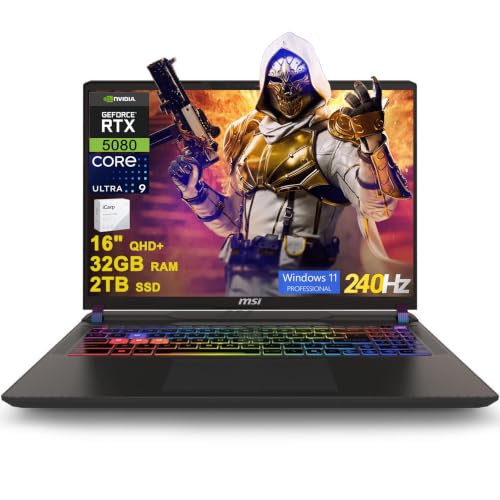
MSI Vector 16 HX AI RTX 5080 Gaming Laptop
- High-end RTX 5080 graphics with 16GB of dedicated graphics memory
- Sharp 16-inch QHD+ IPS display with a fast 240Hz refresh rate
- Generous 32GB DDR5 memory and 2TB SSD configuration
- Extensive port selection includes two Thunderbolt 5 connections
- Includes Windows 11 Professional and Wi-Fi 7
- The listed 49.82-pound weight appears unusually high for a laptop and should be verified before purchase.
- Battery capacity and expected runtime are not provided in the listing.
- The listing does not specify display brightness or color-gamut coverage.

MSI Vector 16 HX RTX 5080 Gaming Laptop
- RTX 5080 Laptop GPU includes 16GB of GDDR7 graphics memory
- Fast 240Hz QHD+ display with 100% DCI-P3 coverage
- High-capacity 64GB RAM and 4TB SSD configuration is listed
- Extensive port selection includes dual Thunderbolt 5, HDMI 2.1, Ethernet, and an SD card reader
- Thunderobot 7-in-1 USB-C hub is included
- The listing conflicts on capacity: the selected size says 64GB RAM and 4TB SSD, while the feature bullets state 32GB and 2TB
- The built-in camera is limited to 720p HD
- Wi-Fi 6 is listed rather than a newer Wi-Fi standard

HP OMEN 17.3-inch RTX 4090 Gaming Laptop
- High-end GeForce RTX 4090 graphics
- Fast 17.3-inch QHD 240Hz IPS display
- Powerful 24-core Intel i9-13900HX processor
- Generous 32GB DDR5 RAM and 2TB NVMe SSD
- Extensive wired and wireless connectivity
- At 6.1 pounds, it is less convenient for frequent travel
- The listed 300-nit brightness is modest for a premium gaming display
- Battery capacity and expected runtime are not specified
RGB Features That Matter
An RGB keyboard changes the look and usability of a gaming laptop, but the listing should clarify how much control you receive. Some keyboards divide lighting into zones, while others may offer broader customization through companion software. Brightness controls and the option to disable lighting are useful when working, traveling, or playing in a dark room. RGB should complement a good keyboard layout rather than distract from key travel, spacing, and access to frequently used controls.
Hardware still determines whether a laptop fits your gaming needs. These laptops range from GeForce RTX 5070 Ti graphics to GeForce RTX 5090 graphics, with high-refresh QHD-class displays and substantial DDR5 memory. Choose the GPU and screen first, then confirm that the RGB implementation provides the visual control you want. Our overview of gaming laptop choices provides more help with the broader decision.
Worth knowing: Match the laptop to how you plan to use its RGB keyboard rather than chasing the highest specification on the page. Lighting zones, screen quality, graphics performance, and physical size can matter more than decorative effects alone.
Hardware Differences Between Models
The msi Vector 16 HX AI Gaming Laptop 16" QHD+ IPS combines an Intel Core Ultra 9 275HX processor with an NVIDIA GeForce RTX 5080 16GB Graphic, 32GB of DDR5 memory, and a 2TB SSD. Its 16-inch QHD+ IPS display runs at 240Hz, while the keyboard uses 24-zone RGB lighting. The other msi Vector has the same Intel Core Ultra 9 275HX and NVIDIA GeForce RTX 5080 Laptop GPU combination, along with 32GB of DDR5 RAM and a 2TB PCIe NVMe M.2 SSD. Its listing describes an RGB backlit keyboard without specifying 24-zone control.
The ASUS ROG Strix Scar 16 uses an Intel Core Ultra 9 275HX processor and NVIDIA GeForce RTX 5090 Laptop GPU. It has 32GB of DDR5-5600MHz memory, a 1TB PCIe Gen 4 SSD, and a 16-inch 2.5K 240Hz ROG Nebula HDR display. Its cooling system includes an end-to-end vapor chamber, three fans, and Conductonaut extreme liquid metal. Lighting extends beyond the keyboard area through a full-surround RGB light bar, and Stealth Mode can turn the lighting off. Tool-free access also makes the RAM, SSD, and fans easier to reach.
The Acer Predator Helios Neo 18 pairs an Intel Core Ultra 9 275HX with an NVIDIA GeForce RTX 5070 Ti Laptop GPU, 32GB of DDR5 memory, and a 2TB PCIe Gen 4 SSD. Cooling includes dual fans, a 5th Gen AeroBlade 3D Metal Fan, and liquid metal thermal compound. The HP OMEN 17.3" QHD Intel i9 RTX 4090 Premium instead uses an i9-13900HX Processor and GeForce RTX 4090 with 32GB of DDR5 RAM and a 2TB SSD. For this topic, keyboard-lighting detail matters most after confirming that the GPU, display, and cooling suit your workload.
RGB Listing Terms Explained
Manufacturers and marketplace sellers use several similar phrases for keyboard lighting. Read them carefully because they do not always describe the same level of customization.
- RGB backlit keyboard: The keys have colored illumination, but this phrase alone does not confirm per-key control, zone count, effects, or software support.
- Multi-zone RGB: The keyboard is divided into groups that can display different colors, offering more control than a single lighting setting without necessarily supporting individual keys.
- Per-key RGB: Each key can generally be assigned its own color or effect, although the available controls still depend on the laptop’s lighting software.
- RGB light bar: Lighting appears around part of the chassis rather than only beneath the keys, as shown by the full-surround light bar listed for the ASUS ROG Strix Scar 16.
- Stealth Mode: This refers to a setting that disables decorative lighting, which can make a visually bold gaming laptop more suitable for shared or professional spaces.
Lighting can add cost without improving graphics performance. Our explanation of gaming laptop costs covers the other components and design choices that influence what buyers pay.
Choosing the Right Hardware Tier
| Tier | What You Get | Best For |
|---|---|---|
| Value | An RGB-equipped laptop with a capable dedicated GPU, high-refresh display, and enough memory for gaming and everyday multitasking. | Players who want visible customization and modern graphics features without prioritizing the highest available GPU class. |
| Balanced | A stronger GPU, QHD-class screen, generous DDR5 memory, and storage suitable for a larger game library. | Buyers who want an RGB keyboard alongside demanding gaming, streaming, or content creation. |
| Performance | A high-end GPU, premium high-refresh display, advanced cooling, and broader lighting or customization features. | Enthusiasts who prioritize maximum graphics capability and are comfortable with a larger or more expensive machine. |
Heat management becomes increasingly important as the CPU and GPU tier rises. Our guide to gaming laptop cooling explains what to consider when comparing thermal designs.
First-Day Setup and Checks
Begin by completing Windows setup and connecting the laptop to its supplied power adapter. Run Windows Update, then check the manufacturer’s support utility for graphics, chipset, firmware, and keyboard-control updates. Restart when prompted. Avoid installing several third-party lighting utilities immediately, since overlapping software can compete for control of the keyboard and create inconsistent effects.
Open the included lighting application and verify that every supported zone responds. Cycle through colors, brightness levels, and available patterns, then confirm that the lighting can be disabled. Check the function-key shortcuts as well. A listing that says only “RGB backlit keyboard” may offer fewer controls than one that specifies a zone count, so compare the actual software options with the product description.
Next, confirm the listed display resolution and refresh rate in Windows display settings. Check that the expected memory and storage appear in the system information pages, connect your main peripherals, and verify Wi-Fi, Ethernet, audio, camera, and external-display ports you intend to use. Keep the laptop on a hard, unobstructed surface during demanding use so its vents can move air properly.
Matching Models to Buyers
| Reader | Pick | Why |
|---|---|---|
| Best overall | msi RTX 5080 | RTX 5080 graphics, 32GB RAM, 2TB storage, a 240Hz QHD+ display, and 24-zone RGB lighting. |
| Strong-GPU focus | Acer RTX 5070 TI | Combines an RTX 5070 Ti with an expansive 18-inch 240Hz display and detailed thermal hardware. |
| Best value | HP RTX 4090 | Offers RTX 4090 graphics, 32GB RAM, 2TB storage, RGB lighting, and a 17.3-inch QHD 240Hz display. |
| Alternative brand | ASUS RTX 5090 | Features an RTX 5090, a Nebula HDR display, advanced cooling, and extensive chassis lighting. |
| Runner-up | msi RTX 5080 2 | Pairs RTX 5080 graphics with 32GB RAM, a 2TB SSD, and an RGB backlit keyboard. |
The Bottom Line
The msi RTX 5080 is the most balanced choice for this search because it combines powerful hardware, a 240Hz QHD+ display, and clearly specified 24-zone RGB lighting. Buyers who prefer a larger screen should consider the Acer RTX 5070 TI, which pairs an 18-inch 240Hz panel with capable graphics and a detailed cooling design.
RGB Laptop Ownership Questions
1. Does an RGB gaming laptop cost more to own long term?
RGB lighting itself usually has little effect on long-term ownership costs, but the premium hardware commonly paired with it can make repairs or replacement more expensive. Battery wear, fan condition, and cooling maintenance are more significant concerns. Our guide to gaming laptop lifespan explains the broader ownership factors.
2. Is a more expensive RGB keyboard always better?
No. A higher laptop price may reflect its GPU, display, processor, cooling system, storage, or chassis rather than more capable keyboard lighting. Check whether the listing specifies per-key control, multiple zones, adjustable brightness, or a dedicated lighting application. If it only says RGB backlit, do not assume advanced customization.
3. How much memory should an RGB gaming laptop have?
For modern gaming and general multitasking, a substantial amount of DDR5 memory provides useful headroom for background applications and demanding workloads. Every table model here includes 32GB, which is also helpful for content creation and heavier multitasking. Upgrade access still matters if you expect your needs to change over several years.
4. What should skeptical buyers verify before ordering?
Confirm the exact GPU, CPU, screen resolution, refresh rate, memory, storage, ports, operating system, and keyboard-lighting description. Similar model names can appear with different internal specifications. Also check whether the seller states a zone count or only uses the broad phrase “RGB backlit keyboard,” since those descriptions indicate different levels of detail.
Other RGB Gaming Alternatives
Lenovo RTX 5070 is a lighter alternative with an Intel Core i9 14th Gen 14900HX, NVIDIA GeForce RTX 5070 8GB GDDR7, 32GB of DDR5 RAM, and a WQXGA OLED display. It suits buyers who place display technology and portability high on their list, although the supplied data does not specify its keyboard lighting.
GIGABYTE RTX 5070 combines an AMD Ryzen AI 7 350 Processor with an NVIDIA GeForce RTX 5070 Laptop GPU in a chassis listed at 0.65 inches thick and 4.18 pounds. It is worth considering when mobility and creative work matter alongside gaming, but the supplied features do not confirm an RGB keyboard.
Acer RTX 5060 uses an AMD Ryzen 7 260 Processor, NVIDIA GeForce RTX 5060 Laptop GPU, 32GB of DDR5 memory, and a 1TB Gen 4 SSD. Its 16-inch WUXGA IPS display has a 180Hz refresh rate, making this a more moderate hardware option, though RGB keyboard details are not included in the provided listing data.


