

The Best gaming laptops with RTX 3070 pair capable graphics with balanced processors, memory, displays, and cooling. The Razer RTX 3070 TI stands out for its RTX 3070 Ti and QHD screen, while the Alienware RTX 3070 offers a fast Full HD display and generous memory.
Recommended by Us

Razer Blade 17 RTX 3070 Ti Gaming Laptop
- High-refresh QHD display with NVIDIA G-SYNC
- Capable RTX 3070 Ti graphics and 14-core Intel processor
- Fast DDR5 memory and spacious 1TB PCIe SSD
- Extensive wired connectivity and built-in SD card reader
- Chroma RGB lighting adds keyboard customization
- 16GB of RAM may be limiting for especially heavy creative workloads or extensive multitasking
- The listing does not provide battery capacity or estimated runtime
- A 17.3-inch design may be less convenient for frequent travel than a smaller gaming laptop
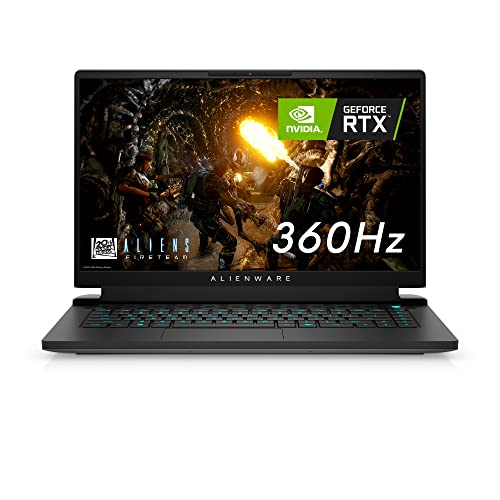
Alienware m15 R6 RTX 3070 Gaming Laptop
- Exceptionally fast 360Hz display with G-SYNC and a 1ms response time
- RTX 3070 graphics with 8GB of graphics memory
- Generous 32GB DDR4 memory and 1TB SSD configuration
- User-upgradeable memory through two SO-DIMM slots
- Advanced Optimus and dedicated Cryo-Tech cooling features
- At 5.93 pounds, it is relatively heavy for frequent travel
- The FHD panel prioritizes refresh rate rather than a higher display resolution
- Battery runtime, port selection, and wireless specifications are not provided in the listing
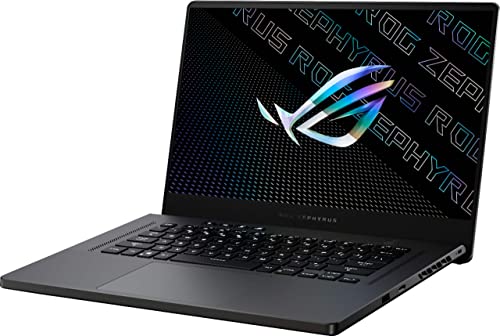
ASUS ROG Zephyrus 15.6-inch QHD RTX 3070
- Capable NVIDIA GeForce RTX 3070 graphics
- High-end AMD Ryzen 9 processor family
- Sharp 15.6-inch QHD display
- Useful 16GB RAM and 1TB SSD configuration
- Approximately 4.19-pound listed weight
- Display refresh rate is not provided in the listing
- Ports, wireless standards, and operating system are not specified
- Cooling and keyboard-lighting details are not listed
Understanding RTX 3070 Performance
An RTX 3070 laptop occupies a capable graphics tier for demanding PC gaming. It is particularly well suited to Full HD play at high settings, while QHD is practical when settings are chosen sensibly. Ray tracing increases the graphics workload, so using upscaling or reducing selected effects may produce a smoother experience.
Buyers should not judge these laptops by the GPU name alone. Laptop graphics performance can vary with cooling, power limits, processor pairing, and display resolution. A fast screen benefits competitive play, while a sharper QHD panel places more demand on the graphics hardware than a Full HD panel.
The worthwhile models are therefore the ones that balance graphics capability with the rest of the system. Memory capacity, processor performance, thermal design, storage, and screen specifications all affect everyday value. Our overview of gaming laptop pricing explains why similarly named machines can occupy different market positions.
Choosing Balanced Laptop Hardware
- Match the GPU to your actual workload rather than buying from the model number alone. An RTX 3070 is a strong fit for Full HD gaming and a practical QHD option, while the RTX 3070 Ti offers a higher graphics tier for buyers who want additional headroom.
- Balance the CPU and memory with the graphics hardware. A powerful GPU paired with inadequate memory or an unsuitable processor can create an uneven system, especially when gaming, streaming, communication software, and background applications are running together.
- Compare resolution, refresh rate, and thermal design as a group. A high-refresh Full HD screen prioritizes responsiveness, while QHD provides additional detail; either choice benefits from cooling designed to sustain performance. Our gaming laptop cooling article explains why thermal design deserves close attention.
- Verify the exact condition, ports, storage, operating system, and upgrade information in the current listing. Model families often include several configurations, so photographs or a familiar product name should never replace checking the specifications attached to the exact item.
Worth knowing: Match the laptop to what you need from an RTX 3070 rather than chasing the highest specification-sheet number. A suitable display, enough memory, and effective cooling can matter more than one isolated component advantage.
Comparing The Three Laptops
The Razer Blade 17 Gaming Laptop has the highest listed graphics tier here with an NVIDIA GeForce RTX 3070 Ti. Its 12th Gen Intel Core i7-12800H is a 14-core processor with up to 4.8GHz Turbo Boost, accompanied by 16GB DDR5 4800MHz memory and a 1TB PCIe SSD. Its 17.3-inch QHD display combines a 240Hz refresh rate with NVIDIA G-SYNC.
The Alienware M15 R6 Gaming Laptop uses an NVIDIA GeForce RTX 3070 with 8GB of graphics memory, an 11th Gen Intel Core i7-11800H, 32GB DDR4 memory, and a 1TB SSD. Its 15.6-inch Full HD screen has a 1ms response time, a 360Hz refresh rate, G-SYNC, and Advanced Optimus. Alienware also specifies Cryo-Tech cooling and two available SO-DIMM slots for memory upgrades.
The ASUS – ROG Zephyrus 15.6″ QHD Gaming Laptop combines an AMD Ryzen 9 processor with an NVIDIA GeForce RTX 3070, 16GB memory, and a 1TB SSD. Its defining listed display difference is the 15.6-inch QHD panel, although the supplied product data does not specify its cooling or upgrade options. For this topic, the most important distinction is whether you prefer the Razer’s RTX 3070 Ti and QHD combination, the Alienware’s Full HD 360Hz screen and 32GB memory, or the ASUS model’s QHD format with an RTX 3070.
RTX 3070 Strengths And Limits
Upsides
- The RTX 3070 tier remains capable for visually demanding Full HD gaming without requiring buyers to move immediately to the highest graphics category.
- QHD gaming is practical when settings are adjusted for the workload, making this GPU tier useful for buyers who value sharper visuals.
- Support for ray tracing and upscaling gives users flexibility when balancing image quality against smooth performance.
- The GPU pairs naturally with high-refresh displays, provided the processor, cooling system, and chosen graphics settings can support the intended experience.
Trade-offs
- Maximum settings are not automatically the best choice at QHD, particularly when demanding lighting effects are enabled.
- Two laptops carrying an RTX 3070 label may perform differently because cooling and manufacturer power settings can affect sustained graphics behavior.
- High refresh rates provide the greatest benefit when the workload is light enough for the hardware to deliver consistently responsive output.
Anyone researching the best gaming laptops with RTX 3070 should treat this graphics tier as a strong middle ground rather than an unlimited-performance option. It can handle demanding modern graphics workloads, especially at Full HD, and remains useful at QHD with sensible adjustments. The best machine is the one whose screen, processor, memory, and thermal design support the way you actually plan to play.
Questions Before You Commit
Is an RTX 3070 powerful enough for your intended resolution?
An RTX 3070 is well suited to Full HD and capable at QHD, but higher resolutions create heavier graphics demands. Consider whether you favor maximum visual detail, a high refresh rate, or a balance between them.
Does the processor make sense beside the GPU?
A capable mobile processor helps the laptop maintain balanced performance in processor-heavy workloads and multitasking. Compare the exact CPU model rather than assuming every configuration within the same laptop family uses identical hardware.
How much memory should the laptop include?
Sixteen gigabytes is a practical baseline for modern gaming and ordinary multitasking, while additional memory can help with heavier concurrent workloads. Also check whether the listed memory can be upgraded after purchase.
Are the display and cooling priorities aligned?
A fast Full HD display emphasizes responsiveness, while QHD prioritizes image detail. Cooling matters with either option because the processor and GPU must manage heat during sustained use rather than only short bursts.
Have you verified the listing and seller details?
Confirm condition, included accessories, ports, storage, operating system, and upgrade terms before ordering. Model names may cover different configurations. Our overview of reliable laptop brands adds useful ownership context.
Matching Laptops To Buyers
| Reader | Pick | Why |
|---|---|---|
| Best overall | Razer RTX 3070 TI | RTX 3070 Ti graphics, a 14-core Intel processor, QHD 240Hz display, and vapor chamber cooling. |
| Best value with more memory | Alienware RTX 3070 | RTX 3070 graphics, 32GB memory, a 1TB SSD, and a Full HD 360Hz G-SYNC display. |
| Best value for QHD | ASUS RTX 3070 | Combines an RTX 3070, AMD Ryzen 9 processor, 16GB memory, 1TB SSD, and QHD screen. |
Practical Cost And Spec FAQs
1. Is an RTX 3070 laptop still worth paying for?
It can be worthwhile when the total configuration and asking price make sense. The GPU remains capable for Full HD and practical QHD gaming, but compare the processor, memory, screen, storage, condition, and cooling rather than paying for the graphics name alone.
2. Should I pay more for an RTX 3070 Ti model?
The higher graphics tier can provide additional headroom, but it is not automatically the better purchase for every user. Consider whether its display, processor, memory, cooling, and connectivity also fit your needs before deciding that the GPU difference justifies a higher cost.
3. Is 16GB or 32GB of RAM the better choice?
Sixteen gigabytes is a sensible capacity for gaming and regular multitasking. Thirty-two gigabytes may be more useful for heavier concurrent workloads or buyers who want additional memory available immediately. Upgrade access can also be more valuable than paying for unused capacity.
4. What should I inspect before buying an older configuration?
Check the exact GPU, CPU, memory, storage, display resolution, refresh rate, ports, operating system, condition, and seller terms. Confirm that the listed configuration matches the product title. Our article on cheap gaming laptop costs can help put lower-priced listings into perspective.
The Best Fit
The Razer RTX 3070 TI is the strongest overall choice for buyers who want RTX 3070 Ti graphics, a QHD 240Hz display, and broad connectivity. The Alienware RTX 3070 is the more compelling alternative for a fast Full HD screen, 32GB memory, and specified memory upgrade access. Choose according to resolution and workload rather than the GPU badge alone.


