

The Best gaming laptops with RTX 3080 combine high-end mobile graphics with processors and displays that can keep pace. The Acer RTX 3080 TI is the strongest overall option here, while the ASUS RTX 3080 offers a compelling balance of hardware.
Recommended by Us

Acer Predator Triton 500 SE RTX 3080 Ti
- High-end RTX 3080Ti GPU with 16GB of dedicated graphics memory
- Sharp 16-inch 2560 x 1600 IPS display with a 240Hz refresh rate
- Powerful 14-core Intel Core i7-12700H processor
- Generous 2TB PCIe SSD capacity
- RGB backlit keyboard and Wi-Fi 6 included
- 16GB of system RAM may feel modest for especially heavy editing or multitasking at this performance tier.
- Battery runtime, port selection and cooling details are not provided in the listing.
- The title says WAXGA while the feature list specifies WQXGA, so buyers should confirm the display configuration.
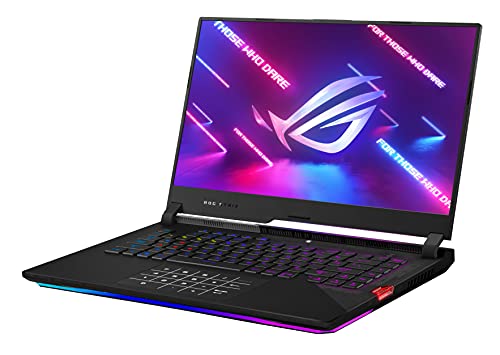
ASUS ROG Strix Scar 15 RTX 3080
- High-end RTX 3080 GPU with 8GB of GDDR6
- Very fast 300Hz IPS-type display
- Strong Ryzen 7 5800H processor
- Spacious 1TB PCIe SSD
- Per-key RGB opti-mechanical keyboard
- Full HD resolution favors refresh rate rather than sharper QHD or 4K detail
- At 5.07 pounds and 1.07 inches thick, it is not among the most portable 15-inch options
- The listing specifies Windows 10 Home rather than Windows 11 preinstalled
ASUS ROG Strix Scar 15 RTX 3080
- High-end NVIDIA GeForce RTX 3080 8GB graphics
- Very fast 300Hz IPS-type display with a 3ms response time
- Capable Ryzen 9 5900HX processor
- Useful 1TB PCIe NVMe M.2 SSD capacity
- Per-key RGB opti-mechanical keyboard
- Full HD resolution prioritizes refresh rate over sharper QHD or 4K detail
- 16GB of DDR4 RAM may be modest for some heavy creative or multitasking workloads
- At 5.07 pounds and 1.07 inches thick, it is not among the most portable 15-inch laptops
Understanding RTX 3080 Laptop Performance
An RTX 3080 laptop belongs to a high-performance gaming tier intended for demanding graphics, high-refresh displays, and visually rich settings. It can also suit content creation and other GPU-heavy work. Laptop performance still depends on power limits, cooling, processor capability, and display resolution, so the GPU name alone does not tell the entire story.
Buyers should first decide whether they prioritize a very fast Full HD panel or a sharper, higher-resolution display. These laptops serve both approaches. A balanced model is usually more worthwhile than one with an impressive GPU paired with limited memory, storage, or thermal capacity. Our guide to laptop value provides more context.
Worth knowing: Match the laptop to what you want from an RTX 3080-class system rather than chasing the highest specification on the page. Display resolution, cooling, memory, and GPU configuration all influence the experience.
Listing Red Flags to Avoid
- A listing that says only “RTX 3080” without stating graphics memory or operating power leaves out useful context, because mobile versions of the same GPU can perform differently depending on their configuration.
- A high-refresh display is less informative when the resolution and panel type are missing, since refresh rate describes only one part of image quality and does not confirm viewing characteristics or sharpness.
- Unclear product condition, seller information, or upgrade wording deserves caution, especially with older premium hardware; our guide to laptop retailers explains the broader purchasing considerations.
- A listing that highlights the GPU but barely mentions the processor, RAM, storage, or cooling may hide an uneven configuration that limits multitasking, local game storage, or sustained performance.
Hardware Priorities That Matter
Start with the complete hardware combination instead of ranking these laptops by graphics branding alone.
| Part | Priority | Why |
|---|---|---|
| CPU tier | High-performance mobile processor | Supports demanding games and background tasks |
| GPU tier | RTX 3080 or RTX 3080Ti | Targets high-end mobile graphics workloads |
| Display | Fast Full HD or sharper high-refresh panel | Determines the balance between speed and detail |
| RAM and storage | At least 16GB and solid-state storage | Supports multitasking and practical local capacity |
The best balance depends on how the laptop will be used. A fast Full HD screen is appealing for players who value responsiveness, while a higher-resolution panel provides more workspace and finer detail. Memory and storage also affect daily convenience even when they do not change the GPU itself. Display technology varies widely across gaming machines. Our explanation of gaming laptop displays covers why OLED is not standard in this category.
Three Models Compared Directly
The Acer RTX 3080 TI has the most distinctive graphics and display configuration of the group. It pairs an NVIDIA GeForce RTX 3080Ti with 16 GB of dedicated memory and an Intel Core i7-12700H. Its 16-inch WQXGA IPS display has a 2560 x 1600 resolution, a 16:10 aspect ratio, and a 240 Hz refresh rate. It also provides 16GB LPDDR5 memory and a 2TB PCIe SSD.
The ASUS RTX 3080 uses an NVIDIA GeForce RTX 3080 8GB GDDR6 rated at 115W, or 130W with Dynamic Boost 2.0. Its AMD Ryzen 9 5900HX reaches up to 4.6 GHz. The remaining hardware includes 16GB DDR4 3200MHz RAM, a 1TB PCIe NVMe M.2 SSD, and a 15.6-inch Full HD IPS-type display with a 300Hz refresh rate and 3ms response time.
The ASUS RTX 3080 JT6 has the same stated RTX 3080 graphics configuration, 16GB DDR4 3200MHz memory, 1TB PCIe SSD capacity, and 300Hz Full HD IPS-type display as the other ASUS model. Its main change is the AMD Ryzen 7 5800H, which reaches up to 4.4 GHz. Both ASUS listings specify ROG Intelligent Cooling with Thermal Grizzly Liquid Metal Thermal Compound. For this comparison, the biggest difference is whether you want the Acer model’s RTX 3080Ti and higher-resolution screen or an ASUS model’s 300Hz Full HD approach.
Practical Checks Before Checkout
How can you tell whether the GPU tier is sufficient?
Match it to the display and workload. RTX 3080-class graphics suit demanding gaming and GPU-heavy applications, but resolution, graphics settings, cooling, and power configuration determine how effectively that capability is delivered.
Should the processor influence the decision?
Yes. A strong GPU should be accompanied by a capable processor that can handle game logic, background software, and general system work. Compare the full CPU name rather than relying on broad branding.
Is 16GB of memory balanced for these models?
All three listed configurations include 16GB of memory, which is a practical baseline for modern gaming and multitasking. Verify whether the memory is upgradeable if your long-term workload may require more capacity.
How should display and cooling specifications be judged?
Consider resolution, refresh rate, panel type, and thermal information together. Higher refresh rates favor fluid motion, while higher resolution improves detail and workspace. Our guide to gaming laptop cooling explains the thermal side.
What listing details should be verified before ordering?
Confirm the exact processor, GPU, graphics memory, display resolution, RAM, storage, operating system, product condition, included accessories, ports, upgrade access, seller terms, and warranty information shown on the current product page.
Matching Models to Buyers
Each configuration emphasizes a different mix of graphics tier, processing hardware, display format, and storage capacity.
| Reader | Pick | Why |
|---|---|---|
| Best overall | Acer RTX 3080 TI | RTX 3080Ti graphics, a 240Hz WQXGA display, LPDDR5 memory, and a 2TB PCIe SSD. |
| Best value with Ryzen 9 | ASUS RTX 3080 | Combines Ryzen 9 5900HX processing with RTX 3080 graphics and a 300Hz Full HD panel. |
| Best value with Ryzen 7 | ASUS Ryzen 7 5800H RTX 3080 | Keeps the 300Hz display and stated RTX 3080 configuration while using an AMD Ryzen 7 5800H. |
The Strongest Choices Here
The Acer RTX 3080 TI is the strongest overall choice for buyers who want RTX 3080Ti graphics, a higher-resolution display, and more included storage. Choose the ASUS RTX 3080 if a 300Hz Full HD screen, AMD Ryzen 9 5900HX, and the stated ROG cooling system better match your priorities.
Long-Term RTX 3080 Questions
1. Is an RTX 3080 laptop still practical for demanding gaming?
Yes, RTX 3080-class laptop graphics remain suited to demanding gaming, especially when expectations are matched to the display resolution and graphics settings. Long-term satisfaction depends on the complete configuration, including cooling, processor performance, memory capacity, and storage.
2. Is the RTX 3080Ti automatically better than every RTX 3080 laptop?
It is the higher GPU tier, but the laptop as a whole still matters. Power configuration, cooling, processor choice, display resolution, and memory can affect the experience, so compare complete specifications rather than treating the GPU badge as the only deciding factor.
3. Will 16GB of RAM become a limitation?
It is a sensible capacity for gaming and normal multitasking, and every laptop listed here includes 16GB. Buyers who run memory-heavy creative applications or many demanding programs simultaneously should check whether the specific configuration supports later memory upgrades.
4. Should battery life affect an RTX 3080 laptop purchase?
Yes, if the machine will regularly be used away from an outlet. High-performance gaming hardware can draw substantial power under load, and gaming performance on battery may differ from plugged-in use. Our overview of gaming laptop battery life explains the practical trade-offs.
5. What should be checked for long-term ownership?
Verify the exact hardware configuration, product condition, seller terms, warranty details, ports, upgrade options, and included accessories on the current listing. Cooling information also deserves attention because sustained high-performance use places ongoing demands on a laptop’s thermal system.


