

Reviving an aging desktop often starts with replacing weak integrated graphics to support modern displays. Finding the best 4gb graphics cards gives compact workstations and older towers the dedicated memory needed for smooth video playback and multi-monitor setups without demanding heavy power supplies or expensive system upgrades along the way.
Recommended by Us

- Versatile 4-display connectivity with dual HDMI, DisplayPort, and VGA
- Tiny 30W power consumption operates easily on standard 300W power supplies
- Compact low-profile build suitable for slim office and ITX computer cases
- No external PCIe power connectors required
- DDR3 memory and Kepler architecture provide entry-level performance unsuitable for modern gaming
- Boost clock frequency is not specified in the official product details

ASUS Cerberus GTX 1050 Ti 4GB OC
- Runs directly off the motherboard slot without extra PCIe power cables
- Sturdy backplate prevents PCB sagging and physical damage
- Compact 8-inch dual-slot design fits easily into tight PC cases
- GPU Tweak II provides user-friendly performance adjustments
- Exact boost clock and TDP specifications are not provided in the listing
- 4GB GDDR5 memory pool is limited for modern graphically demanding titles
- Older generation GPU architecture compared to current market offerings

- Ultra-compact dimensions of 5.91 x 0.75 x 2.72 inches fit slim chassis
- Dual digital display outputs with DisplayPort 1.4a and HDMI 2.0b
- Generous 4GB dedicated memory pool for a basic display card
- Lightweight 0.6-pound design requires minimal chassis structural support
- Equipped with DDR4 memory instead of faster GDDR5 variants
- Narrow 64-bit memory bus restricts intensive 3D gaming performance
- TDP and PCIe bus details are omitted from the official product data
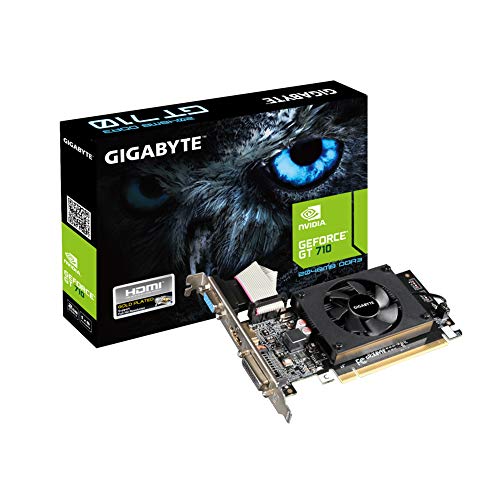
Gigabyte GV-N710D3-2GL REV2.0 2GB
- Compact low-profile design ideal for slim desktop cases
- Diverse video output options including HDMI, DVI-D, and D-Sub
- Dedicated 2GB DDR3 memory frees up system RAM
- Straightforward drop-in solution for multi-monitor workstation setups
- DDR3 memory and 954 MHz core clock are not suitable for modern 3D gaming
- TDP and specific PCIe interface generation are not specified in the listing

QTHREE NVIDIA GeForce GT 730 4GB
- Extremely low 30W power requirement runs off motherboard PCIe slot power
- Low-profile bracket kit included for easy fitting in slim desktop cases
- Flexible triple-output configuration accommodating modern and legacy displays
- 4GB memory buffer assists with everyday desktop multitasking
- Not compatible with Windows 11 systems
- Uses older DDR3 memory rather than modern GDDR standards
- Limited to basic multimedia and legacy tasks rather than modern 3D gaming

Maxsun AMD Radeon RX 550 4GB ITX
- Compact form factor ideal for small-form-factor and ITX computer builds
- Multiple video outputs (DisplayPort, HDMI, DVI-D) accommodate older and newer monitors
- Dedicated 4GB VRAM handles light editing, CAD/CAM work, and general media playback
- Solid capacitor and silver-plated PCB design helps sustain hardware durability
- Official TDP and power consumption figures are not specified in the listing
- Entry-level performance intended for light gaming rather than demanding modern titles

- Comprehensive display connectivity with HDMI, DVI, and legacy VGA support
- Low-profile layout accommodates tight and space-constrained chassis designs
- Equipped with 4GB of dedicated onboard memory to free up system RAM
- Active cooling fan aids in heat dissipation during routine desktop tasks
- Exact clock speeds, TDP wattage, and PCIe revision are omitted from specifications
- Older GDDR3 memory architecture is not built for demanding modern 3D games
Selecting the Right Card for Your Desktop Build
When matching a video card to an existing chassis, physical space and power limits dictate your options. If you want entry-level gaming capability without extra PCIe power cables, the Asus GTX 1050 Ti 4GB OC is the one I would go for. Its GDDR5 memory and plug-and-play design let it run directly off slot power, while software support through ASUS GPU Tweak II makes management simple.
For compact home office setups requiring broad display versatility, I would point budget builders toward the QTHREE GT 730 4GB. Its low-profile design draws a modest 30W, fits into small form factor enclosures, and drives up to four monitors through its dual HDMI, VGA, and DisplayPort outputs. Meanwhile, if you prefer an AMD architecture for light 1080p gaming and photo work, the Maxsun RX 550 4GB ITX delivers a 1183 MHz boost clock with 512 stream processors. Many builders also wonder does a GPU need to be compatible with your motherboard before installing one of these compact units.
FAQs
1. Can these 4GB video cards handle modern gaming?
These video cards handle esports titles and older releases at modest settings. For newer titles, system balance matters, and builders frequently ask does GPU or CPU affect FPS more during fast gameplay sessions. High texture packs quickly fill four gigabytes of memory.
2. Do low-profile 4GB graphics cards need dedicated power connectors?
Most entry-level cards like the GT 730 draw around 30W directly from the motherboard PCIe slot. They do not require six-pin or eight-pin power cables from the power supply, making them ideal drop-in options for standard prebuilt office towers.
3. Will an older 4GB graphics card degrade after years of use?
Silicon does not inherently slow down, though cooling hardware can wear out. Readers curious if does GPU performance degrade over time should note that dried thermal paste and dust buildup on fans usually explain thermal throttling rather than chip degradation.
4. What display connections do entry-level 4GB cards provide?
Display configurations vary across models. Some cards provide modern HDMI and DisplayPort outputs, while others retain legacy DVI-D and VGA ports. Checking output specifications on AMD or manufacturer specification sheets ensures your monitors connect without extra adapters.
Editor’s Verdict
For builders seeking the best 4gb graphics cards to revitalize an everyday system, the Asus GTX 1050 Ti 4GB OC offers the strongest balance of GDDR5 speed and easy plug-and-play installation without needing supplementary power cables.



