

Old office desktop towers and compact home-theater PCs often run on integrated graphics that struggle with modern video output or multi-monitor setups. Adding one of the best entry level graphics cards provides dedicated video memory and clean display outputs without requiring a massive power supply upgrade or a roomy chassis.
Recommended by Us
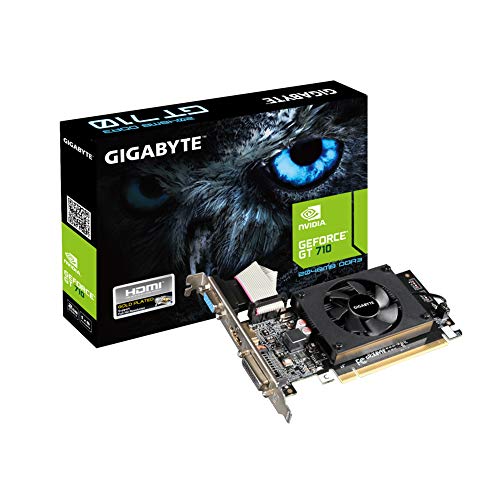
Gigabyte GV-N710D3-2GL REV2.0 2GB
- Compact low-profile design ideal for slim desktop cases
- Diverse video output options including HDMI, DVI-D, and D-Sub
- Dedicated 2GB DDR3 memory frees up system RAM
- Straightforward drop-in solution for multi-monitor workstation setups
- DDR3 memory and 954 MHz core clock are not suitable for modern 3D gaming
- TDP and specific PCIe interface generation are not specified in the listing

Glorto GeForce GT 210 1GB Low Profile
- Low-profile half-height design easily fits tight desktop and HTPC chassis
- Dual-display functionality across HDMI and VGA enables convenient dual-screen setups
- Practical and cost-effective video output card for systems lacking integrated graphics
- Wide compatibility across older desktop systems supporting PCI Express 1.0 x16
- Legacy architecture and DDR3 memory are not built for modern 3D gaming workloads
- TDP power draw rating is not specified in the manufacturer listing
- Incompatible with ultra-compact micro form factor systems

QTHREE Radeon RX 550 4GB
- Requires no external 6-pin or 8-pin power cables
- Compact profile ideal for ITX and space-limited PC cases
- Offers three distinct display connection options
- Generous 4GB VRAM buffer for entry-level computing needs
- Restricted to entry-level graphical processing power
- Operates via a PCIe x8 lane width rather than full x16
- Recommended 450W power supply requirement is conservative given the 50W card draw

Glorto GeForce GT 610 2GB Low Profile
- Low profile design fits comfortably into compact desktop and HTPC enclosures
- Works with Windows 11 right away without requiring manual driver installation
- Includes both modern HDMI and legacy VGA video outputs
- Affordable option to add display capabilities to PCs without integrated graphics
- Relies on older DDR3 memory and a PCIe 1.1 x16 interface
- 523MHz core clock and entry-level architecture are not suitable for modern gaming
- Specific power draw figures are not provided in the listing

- Ultra-compact dimensions of 5.91 x 0.75 x 2.72 inches fit slim chassis
- Dual digital display outputs with DisplayPort 1.4a and HDMI 2.0b
- Generous 4GB dedicated memory pool for a basic display card
- Lightweight 0.6-pound design requires minimal chassis structural support
- Equipped with DDR4 memory instead of faster GDDR5 variants
- Narrow 64-bit memory bus restricts intensive 3D gaming performance
- TDP and PCIe bus details are omitted from the official product data

- Low-profile bracket included for compact SFF and HTPC chassis compatibility
- Versatile display outputs featuring dual HDMI alongside legacy VGA
- 4096MB video memory capacity exceeds typical entry-level buffers
- Supports hardware acceleration through CUDA and OpenCL
- Relies on older DDR3 memory rather than faster GDDR standards
- Modest 600MHz core frequency is not suitable for modern 3D gaming
- Specific TDP wattage and boost clock figures are not specified by the manufacturer

- Low-profile bracket configuration fits easily into compact HTPC and SFF systems
- Versatile display outputs provide native legacy VGA alongside HDMI and DVI
- Generous 4GB frame buffer for general office multitasking and multi-screen setups
- Modern API support including DirectX 12, Vulkan, and OpenCL
- Uses slower DDR3 memory rather than faster GDDR5 variants
- TDP and power draw ratings are not specified in the product details
- Not designed to fit ultra-compact micro form factor chassis
Matching Video Cards to Compact PC Setups
When outfitting an older system or an office workstation, your motherboard slot and power headroom dictate what works. For general multimedia and light desktop duties, I would point budget builders toward the MSI GeForce GT 1030 4GB. Its 1430 MHz boost clock, 4GB of video memory, and HDMI 2.0b port handle clean high-resolution desktop tasks while sipping minimal power.
If you need a bit more graphical muscle for basic gaming titles or video streaming, the QTHREE Radeon RX 550 4GB is the card I would go with. It features 640 stream processors, GDDR5 memory running at 6000 MHz, and a 50W board power rating that runs without auxiliary cables. While checking whether a card fits your system, remember that understanding if a GPU needs to be compatible with your motherboard saves plenty of installation headaches. For ultra-slim small form factor cases that only require legacy VGA and HDMI connections, the low-profile Glorto GeForce GT 740 4GB brings a 993 MHz core clock and DirectX 12 support. You can read driver setup guides directly on AMD or board partner sites before dropping the hardware into your PCIe slot.
FAQs
1. Do basic graphics cards need extra power cables?
Most compact low-profile cards pull all necessary electricity directly through the PCIe slot, which supplies up to 75 watts. Hardware like the RX 550 operates at roughly 50 watts, meaning standard OEM power supplies can run them smoothly without extra six-pin or eight-pin PCIe power leads.
2. Does adding a dedicated GPU improve gaming frame rates?
Adding dedicated hardware takes processing weight off system RAM and onboard graphics silicon. If you wonder how components split the workload in interactive software, reading about does GPU or CPU affect FPS more explains how dedicated memory and compute cores prevent major performance chokepoints.
3. Can low-profile video cards fit into slim office desktops?
Yes, many compact models include half-height mounting brackets specifically tailored for small form factor desktop enclosures. Make sure your chassis has an available PCIe slot width and sufficient clearance around the expansion bracket before installing the board, as some proprietary cases limit bracket orientation.
4. Does hardware age reduce a graphics processor’s speed?
Silicon does not slow down purely from chronological age, though thermal paste dry-out or dust buildup can trigger thermal throttling over time. Checking does GPU performance degrade over time clarifies how regular system maintenance keeps older discrete boards operating at factory frequencies.
Editor’s Verdict
For reviving an aging desktop or building an affordable media center, the best entry level graphics cards offer low power draw and flexible display options. I recommend the QTHREE Radeon RX 550 4GB for balanced multimedia performance, while the low-profile MSI GeForce GT 1030 4GB serves as a silent, efficient companion for slim desktop cases.



