

Adding extra storage to your setup does not require spending high sums on fast flash media. Everyday backups, archival folders, and bulky media libraries run smoothly on mechanical spinning disks without straining your wallet. Finding the best affordable hard drives comes down to matching your device compatibility with the capacity you actually need.
Recommended by Us

Kosbees 1TB Ultra Slim Portable Hard Drive
- Pocket-friendly, lightweight form factor under 0.55 inches thick
- Immediate plug-and-play operation for Windows devices
- Capable USB 3.0 transfer speeds up to 133MB/s read and 103MB/s write
- Versatile cross-platform support across PC, Mac, Linux, and gaming consoles
- Requires manual formatting to ExFAT for macOS use
- Cannot run current-generation PS5 and Xbox Series X|S games directly

Kosbees 1TB Ultra Slim External HDD
- Lightweight, pocketable build weighing under 0.5 lbs
- Simple plug-and-play setup out of the box for Windows
- Convenient storage expansion for PS4 and Xbox One titles
- Comes with a USB 3.0 connection cable included
- Requires manual formatting to ExFAT before using on macOS
- Cannot run current-generation PS5 or Xbox Series X|S games directly

Seagate Enterprise 10TB HDD (Renewed)
- Massive 10TB storage capacity in a standard 3.5-inch form factor
- Enterprise-grade 24/7 design backed by a 2.5 million hour MTBF rating
- High-performance 7200 RPM rotation speed with 256MB buffer
- Versatile application across desktop PCs, NAS racks, and surveillance systems
- Ships as a bare drive without SATA data cables or mounting screws
- Requires manual drive initialization and formatting before the system detects it
- Supplied in basic brown box packaging rather than retail boxing

Seagate SkyHawk 6TB Surveillance HDD
- Built specifically for continuous 24x7 surveillance video workloads
- Workload endurance rating is triple that of typical desktop hard drives
- Rotational vibration sensors protect multi-bay RAID installations
- Substantial 256MB onboard cache buffers heavy write streams
- Internal 3.5-inch form factor requires proper bay mounting and power connections
- Listing does not provide specific sequential read or write transfer rates
Kosbees 500GB Portable External HDD
- Lightweight design weighing just 0.35 pounds makes it easy to take anywhere
- Instant plug-and-play functionality on Windows systems
- Respectable USB 3.0 transfer rates up to 133MB/s read speed
- Convenient storage expansion for PS4 and Xbox One consoles
- Requires reformatting to ExFAT before it works with Mac computers
- Cannot run current-gen PS5 or Xbox Series X|S games directly from external storage
- Modest 500GB capacity limits how many modern games can be archived at once
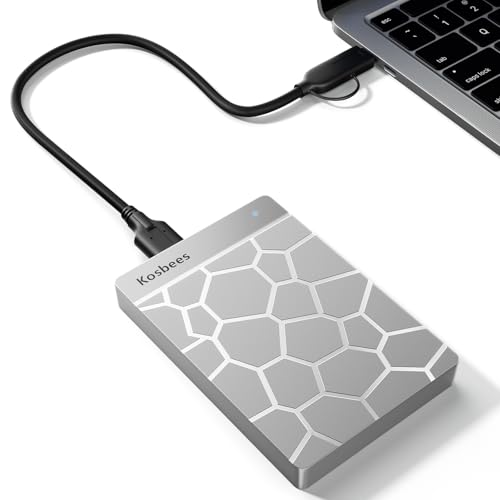
Kosbees 500GB Portable External HDD
- Plug-and-play readiness on Windows PCs with no setup required
- Compact, lightweight build fits easily into bags and pockets
- Supports direct game playback for PS4 and Xbox One consoles
- Competent USB 3.0 transfer rates for standard file backups
- Requires reformatting to ExFAT before working with macOS
- Current-gen PS5 and Xbox Series X/S games must be transferred to internal storage to play
- Modest 500GB capacity may fill quickly with large modern media collections

- 7200 RPM class performance provides dependable everyday mechanical responsiveness
- SATA 6Gb/s connection ensures easy integration with common desktop towers
- Useful as a dedicated secondary storage drive when paired with an SSD
- Standard 3.5-inch form factor fits common PC chassis brackets
- 500GB capacity is relatively modest for extensive game installations or large video archives
- Specific sustained transfer speed rates are not detailed in the manufacturer listing
Selecting the Right Drive for Your Setup
For a basic desktop rebuild or dedicated secondary storage drive, I would go with the WD Blue 500GB. It spins at 7200 RPM with a 32MB cache, making it a reliable choice to pair beside a primary boot SSD in an everyday tower. If you are uncertain about pairing these technologies, understanding what is the difference between HDD and SSD helps clarify why mechanical drives excel at secondary mass storage while flash handles your operating system.
If you manage extensive media archives or network storage, I would point you toward the Seagate Enterprise 10TB. This unit provides massive hyperscale room with a 256MB cache and 7200 RPM spindle speeds, supported by high mean-time-between-failures ratings. Seagate designs these enterprise disks for continuous twenty-four-seven workloads across servers and desktop arrays. Meanwhile, for console gamers wanting plug-and-play room for older titles, the Kosbees 1TB handles external transfers over USB 3.0 up to 133 megabytes per second.
FAQs
1. Can you run current generation console games from an external hard drive?
Modern consoles require their fast internal storage to launch current-generation releases. You can store your game files on an external disk to free up console space, but you must copy them back before playing. Older titles from previous console generations can run directly from an external drive.
2. Why does a hard drive show less capacity in Windows than on the box?
Manufacturers calculate storage using decimal math where one gigabyte equals one billion bytes. Operating systems like Windows calculate storage in binary notation. Because of this conversion difference, a drive marketed at 500GB reports roughly 465GB of usable storage inside your file manager.
3. How does drive rotational speed impact daily performance?
Drives running at 7200 RPM read and locate stored files faster than standard 5400 RPM models. This extra rotation speed benefits file access when copying large files or opening installed programs. Knowing where is the SSD located in a computer allows you to keep your system boot drive on flash while leaving bulky items to high-speed spinning disks.
4. Are traditional mechanical drives still useful alongside modern solid state drives?
Mechanical drives remain useful because they deliver vast storage capacity at a fraction of the cost per gigabyte compared to flash. Many builders reserve high-speed flash drives for active system files while keeping games and documents on cost-effective disks. Reading about when did SSDs come out highlights how storage roles shifted over time.
Editor’s Verdict
Finding the best affordable hard drives depends on whether your setup needs internal bulk storage or convenient external backups. For dependable internal desktop duties, the WD Blue 500GB provides dependable 7200 RPM performance. If your primary goal is backing up console libraries or laptops on the move, the Kosbees 1TB delivers great value in a pocket-friendly shell.







